
ASUS TUF Gaming GT502
4.6Editor score
Dual-chamber internal design
Independent cooling zones available
Tool-free side panel removal
Explore our expert guide comparing the top Dual System PC Cases for 2026. We analyze airflow, compatibility, and design to help you choose the perfect chassis.
Dual system PC cases offer a unique solution for enthusiasts who need to run two separate computers in one chassis. These specialized enclosures provide the flexibility to house multiple motherboards, power supplies, and graphics cards while maintaining efficient cooling and clean cable management.
We evaluated ten top-rated models based on thermal performance, build quality, and expansion capabilities. Our analysis focuses on how well each case supports independent system configurations, airflow optimization, and ease of assembly for complex builds requiring multiple computing units.
Each pick highlights specific strengths like dual-chamber designs, modular components, and advanced cooling support. Prices and availability can change frequently, so always verify current listings before purchasing to ensure you get the best value for your specific dual system requirements.
4.6Editor score
4.8Editor score

4.3Editor score
This side-by-side comparison highlights the key specifications and features of the ten leading dual system PC cases available today. Evaluate dimensions, fan support, and unique design elements to find the chassis that best fits your multi-compute configuration needs.


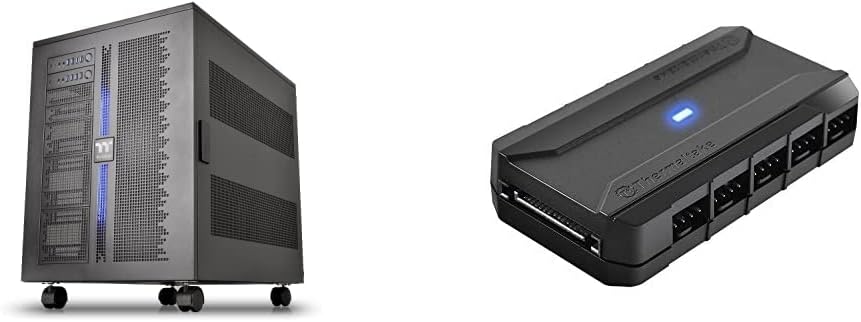
The Thermaltake Core W200 stands out as a unique chassis designed specifically for housing two independent systems in a back-to-back configuration. This bundle includes the Commander FP hub, making it easy to manage cooling for both systems simultaneously. It ranks first for users needing true parallel computing power in one footprint.
We may earn a commission when you buy through this link, at no additional cost to you.
Its fully modular and dismantle design allows for incredible flexibility during assembly and maintenance. You can break down the construction completely to access any component on either side. The support for up to two 600mm radiators ensures that even extreme custom liquid cooling builds can thrive without thermal throttling.
While the system supports two PSUs and VGA cards, the complexity of routing power and data for two separate computers requires patience. Cables can become extensive, but the included Commander hub includes reusable ties and velcro tabs to keep things neat. This trade-off is acceptable for the unique dual capability provided.
Enthusiasts building home servers or render nodes will find this case ideal for their specific needs. It maximizes desk space by combining two towers into one. For anyone needing independent systems in one chassis, this is the definitive choice despite the setup effort required.
The core benefit is running two distinct systems with their own motherboards and power supplies without buying two separate cases.
With support for massive 600mm radiators and ten PWM fans, thermal management is never a bottleneck for high-load tasks.
We may earn a commission when you buy through this link, at no additional cost to you.
The Cooler Master HAF II 500 delivers exceptional airflow performance with its oversized Mighty40 cooling system. Featuring two 220mm front intake fans and a 180mm rear exhaust, it ensures components stay cool during intensive workloads. It earns the budget spot for offering high-end cooling features at an accessible price point.
We may earn a commission when you buy through this link, at no additional cost to you.
Low airflow resistance design uses large ventilation openings to maximize air movement through the case. The split-level cable management optimizes routing space and creates room for oversized rear exhaust cooling. This structure helps maintain clear paths for air to flow from front to back efficiently.
While it lacks the dual dual chassis of the Core W200, its internal layout supports heavy components well with a Dual-Mode GPU Holder. This clamp supports two GPUs up to 3.6 slots thick each, making it suitable for multi-GPU builds. The flexible storage cage adapts to PSU length variations nicely.
Gamers and creators looking for a powerful, affordable case with outstanding thermal performance will love this model. It balances cost and function effectively. If you prioritize cooling efficiency over complex dual motherboard setups, this case offers a reliable and budget-friendly solution.
The inclusion of large 220mm and 180mm fans provides immediate high-volume cooling right out of the box.
Robust mounting options allow for multiple heavy graphics cards, which is crucial for rendering or AI workloads.
We may earn a commission when you buy through this link, at no additional cost to you.
The ASUS ROG Strix Helios II is crafted for showcase builds with a premium aluminum front panel featuring a diamond-grille design. Its dual tempered glass side panels provide a panoramic view of the components. This case sits at the top for those seeking high-end aesthetics alongside serious performance capabilities.
We may earn a commission when you buy through this link, at no additional cost to you.
Optimal thermal performance is achieved through pre-installed four 140mm performance fans that deliver ultimate airflow. Support for EATX motherboards and graphics cards up to 450mm ensures it fits the largest components. Tidy PC building is enabled by multifunction covers and rear cable clips for clean management.
The Advanced I/O panel features two USB 20Gbps Type-C ports and ARGB controls, adding convenience for modern peripherals. However, the high cost reflects the premium materials and build quality. While heavy, the stability and design quality justify the investment for serious enthusiasts wanting a centerpiece build.
If you want a case that looks as impressive as it performs, this is the ideal choice. It combines rugged protection with sophisticated styling. Users prioritizing aesthetics and EATX compatibility will find this case offers the best premium experience available today.
The aluminum and glass combination creates a luxury feel that elevates any gaming or workstation setup significantly.
Support for large EATX boards and ultra-long GPUs ensures you are never limited by internal space constraints.
We may earn a commission when you buy through this link, at no additional cost to you.
The NZXT H9 Flow RGB+ features a dual-chamber design that separates main components from the PSU and drives for improved thermal performance. This layout enhances cable management and creates a cleaner build environment. It includes pre-installed RGB fans and an NZXT Control Hub for a streamlined setup experience.
We may earn a commission when you buy through this link, at no additional cost to you.
Perforated steel panels and angled front-right fans ensure efficient cooling for high-performance builds. With ten-fan capacity across top, front-right, and bottom, you have ample flexibility. The panoramic view wraparound tempered glass paneling showcases every detail of your internal hardware beautifully.
While the included fans are high quality, customization might be limited if you prefer different brands. However, the back-connect ready feature compatibility with boards like ASUS BTF and MSI Project Zero allows for a cable-free look. This is a strong option for users wanting a clean aesthetic.
For builders prioritizing a tidy chassis with good thermal separation, this case is highly recommended. The design balances style and function well. Users needing a robust ATX case with advanced cable hiding features will appreciate the thoughtful engineering here.
Isolating the PSU from components reduces heat soak and simplifies routing cables away from the main view.
Back-connect motherboard compatibility means cables can route through the board for a virtually clean front panel.
We may earn a commission when you buy through this link, at no additional cost to you.
The Antec Flux Pro distinguishes itself with a CPU/GPU dual temperature display that offers real-time monitoring at a glance. Crafted with a combination of metal, glass, and wood, it creates a high-quality texture. It includes six PWM fans out of the box, ready for immediate thermal management.
We may earn a commission when you buy through this link, at no additional cost to you.
Multi-directional vent design supports up to twelve fans simultaneously for expanded airflow options. The removable cooling brackets allow flexible radiator placement on the top, front, and PSU shroud. This supports simultaneous installation of 420mm and 360mm radiators for heavy cooling demands.
While the temperature display is a standout feature, it is limited to basic CPU and GPU readings. However, having six fans included significantly reduces setup costs. The use of different materials gives the case a distinct look compared to standard all-metal chassis.
Users who want detailed temperature visibility and robust cooling stock will find this case valuable. It is a practical full-tower choice for complex builds. If monitoring temps without software is a priority, this case offers a unique benefit in a solid package.
The integrated display gives instant feedback on system temperatures without needing to open monitoring software.
Support for up to twelve fans ensures you can optimize airflow for specific cooling setups easily.
We may earn a commission when you buy through this link, at no additional cost to you.
The ASUS TUF Gaming GT502 divides its internals into two chambers allowing independent cooling zones for the CPU and GPU. This dual-chamber design helps manage heat better by isolating components. It features front USB 3.2 Gen 2 Type-C connectivity, which is essential for modern high-speed devices.
We may earn a commission when you buy through this link, at no additional cost to you.
Side panels can be removed simply by pressing a button hidden on the rear of the chassis for tool-free access. Panoramic view tempered glass panels at the front and side provide a tactfully tinted view of the main chamber. A bundled support bracket helps banish GPU sag effectively.
The tinted glass may reduce visibility of internal components compared to clear glass options. However, it adds a stealthy aesthetic that appeals to many gamers. With strong cooling zones and robust connectivity, it remains a top contender in the mid-tower category.
Gamers looking for a durable case with practical features like USB-C and tool-free access will appreciate this model. It balances utility and style. The dual-chamber layout ensures better cooling performance, making it a solid choice for gaming rigs.
Separating the rear and main chambers prevents heat from the PSU affecting the CPU and GPU directly.
The inclusion of USB 3.2 Gen 2 Type-C on the front panel ensures compatibility with latest peripherals.
We may earn a commission when you buy through this link, at no additional cost to you.
The HAVN HS 420 uses a hybrid structure with a dual-chamber design balanced for optimal GPU cooling. It directs cool air from the bottom intake onto the centrally positioned GPU. This design combines traditional case ratios with modern airflow techniques for efficient thermal management.
We may earn a commission when you buy through this link, at no additional cost to you.
It fits a total of eleven 140mm fans, offering exceptional cooling potential. The heat-formed uni-sheet glass panel provides a panoramic view with minimal distortion due to its small curve radius. The SimpliCable routing system uses grooved guides to cleanly route cables for a pristine appearance.
While the fan support is impressive, the internal layout might require more planning to route everything correctly. The unique 3-way adjustable GPU support bracket handles a wide range of card shapes. Vibration isolation pads help avoid resonance buildup from high-speed fans.
Enthusiasts wanting a unique hybrid design with massive cooling capacity will enjoy this case. The attention to detail on glass distortion and cable management is impressive. It offers a compelling alternative for those wanting a fresh take on the standard ATX chassis.
The hybrid structure ensures the GPU receives direct airflow, which is critical for maintaining performance.
The SimpliCable system uses built-in guides to keep wires organized and out of sight effortlessly.
We may earn a commission when you buy through this link, at no additional cost to you.
The NZXT H6 RGB+ features a compact dual-chamber design that isolates power and cables from your main build. It uses seamless curved glass to provide a panoramic view without seams. This case is perfect for those wanting high airflow without taking up too much desk space.
We may earn a commission when you buy through this link, at no additional cost to you.
High-airflow mesh across top, front-right, and right panels improves intake. It supports up to ten 120mm fans across various positions for flexible cooling. An integrated adjustable anti-sag bracket keeps large GPUs firmly supported. However, the case ships without fans allowing full customization.
The lack of included fans is a trade-off for customization and cost savings but requires buying separately. The compact size means limited space for extra drives compared to full towers. However, the clean aesthetic and effective cooling make it a strong choice for focused gaming builds.
Builders wanting a sleek small form-factor case with dual-chamber benefits will love this model. It prioritizes style and airflow. If you need a clean look and don't mind adding your own fans, it delivers a great visual experience.
Despite its compact size, it retains the benefits of a dual-chamber layout for better internal organization.
The single-piece bent glass minimizes distortion and enhances the visual impact of your components.
We may earn a commission when you buy through this link, at no additional cost to you.
The Thermaltake Capo X delivers parallel operation from a single chassis housing two independent mATX systems simultaneously. Each system features its own I/O ports including power and reset. This design opens extra desk space by combining two functional units into one chassis.
We may earn a commission when you buy through this link, at no additional cost to you.
Configurable cooling supports up to thirteen 120mm fans and high air coolers. Hidden connector support allows for cable-less looks on compatible motherboards like ASUS BTF. Two detachable clamp GPU braces provide top and bottom support for each card ensuring stability.
While it supports two systems, they are limited to mATX motherboards which reduces upgrade potential. However, the individual I/O is a massive convenience for daily use. This case is perfect for users needing two compact systems in one footprint without buying two separate towers.
Users needing a dual mATX setup with independent access will find this solution efficient. It balances space saving with functionality. If you need two machines but limited desk space, this chassis offers a robust solution for parallel operation.
Independent I/O panels mean you can manage both systems independently without switching cables constantly.
Combining two mATX systems into one case frees up desk space for other peripherals or tools.
We may earn a commission when you buy through this link, at no additional cost to you.
The Thermaltake View 380 TG offers a dual chamber case with pillarless front and side tempered glass panels. This unique design provides an unobstructed view of your components. It supports hidden-connector motherboards, which helps maintain the clean aesthetic by hiding cable connections.
We may earn a commission when you buy through this link, at no additional cost to you.
Four Hydraulic Bearing 120mm ARGB Lite Fans are pre-installed to get you started quickly. The I/O ports include Gen.2 USB 3.2 Type-C and USB 3.0. The dual tempered glass setup allows you to view your build from multiple angles effectively.
While it lacks extreme cooling features found in high-end towers, it excels at visual presentation. The support for hidden connectors adds value for cable management. The included ARGB fans help reduce initial build costs for those on a budget.
Budget builders prioritizing a clean look and hidden-connector compatibility will find this case excellent value. It provides a premium look without a premium price. If you want a clear view of your hardware and a modern build style, this is a top recommendation.
The pillarless glass design removes visual interruptions, letting your components take center stage.
Compatibility with hidden-connector motherboards helps achieve a cable-free look that enhances visual appeal.
We may earn a commission when you buy through this link, at no additional cost to you.
Selecting the right dual system PC case involves evaluating compatibility, cooling, and layout. We explain the essential factors to consider for a successful multi-compute build.
Decide whether you need true parallel operation like the Core W200 or a dual-chamber layout like the H9 Flow. Parallel systems require separate power and motherboard support while dual-chamber focuses on cooling separation.
Choose the layout that matches your workload needs. Parallel is for servers while dual-chamber is for single high-end workstations.
Check if the case supports EATX, ATX, or mATX motherboards. Some cases like the HAF II 500 focus on ATX while others like Helios II support larger boards.
Always verify dimensions before purchasing to ensure your hardware fits properly without modification.
Look for cases with high fan counts like the Capo X or Antec Flux Pro. Ensure you can fit the radiator sizes required for your liquid cooling loop.
High airflow is critical for dual components to prevent overheating under load.
Dual systems may need separate I/O ports for access. Cases like the Capo X offer individual panels for each system.
Ensure you have enough USB-C and standard USB ports for all peripherals.
Dual systems create complex cabling. Features like the HAVN HS 420 SimpliCable system or modular designs help keep cables neat.
Clean cable management improves airflow and reduces maintenance time.
Premium cases like Helios II use aluminum and glass for durability. Budget cases may use thinner steel but remain functional.
Invest in sturdy materials if you plan to move the chassis frequently.
Modern cases like the H9 Flow support back-connect motherboards. This feature eliminates front-panel cable clutter for a cleaner look.
Ensure your motherboard supports hidden connectors to utilize this feature.
Dual systems often use multiple GPUs. Check for vertical mounting options and anti-sag brackets like the GT502.
Support for long graphics cards ensures compatibility with high-end models.
Install your motherboards and PSUs according to the chassis manual. Separate cable bundles for each system to avoid confusion during troubleshooting.
Regularly clean dust filters especially in high-airflow cases. Dust buildup can restrict airflow and cause thermal issues in dual setups.
Monitor temperatures using software or built-in displays. Adjust fan curves based on system load to maintain optimal performance.
Yes, cases like the Thermaltake Core W200 or Capo X are designed to host two independent motherboards. This allows you to run two separate OS instances. Ensure you have enough power supply capacity and distinct cabling for both units.
Dual-chamber cases separate components like the PSU from the main build for better airflow. Dual-system cases support two complete motherboards. Dual-chamber is for a single PC while dual-system is for two separate computers.
Some models like the Antec Flux Pro and Helios II support EATX. Check specific compatibility tables for your motherboard size. ATX is common but EATX requires more internal space.
Cases like the HAF II 500 and Capo X support multiple GPUs. Verify dimensions and clearance for your specific graphics card. Anti-sag brackets help stabilize heavy cards during operation.
Many cases include fans out of the box. For example, the Flux Pro includes six fans while NZXT cases vary. Always check the product specs before purchasing.
Yes, most cases offer flexible fan slots for upgrades. Cases like the Core W200 support massive radiators. Check radiator dimensions before purchasing new cooling components.
The Thermaltake Core W200 and ASUS ROG Strix Helios II offer top-tier solutions for parallel computing and premium styling. The HAF II 500 stands out as a budget-friendly choice for high airflow.
Prioritize compatibility with your motherboard size and cooling needs. Dual-chamber designs offer cleaner layouts while true dual-system cases enable parallel workloads.
Prices and stock fluctuate frequently. Verify current listings and reviews to ensure you select the right chassis for your needs.