
Razer Basilisk V3
4.6Editor score
Optical Switches Gen 2
11 Programmable Buttons
HyperScroll Tilt Wheel
This guide compares the top mice for drag clicking, evaluating switches, sensors, and ergonomics to help you find the perfect device for high-speed gameplay.
Finding the right mouse for drag clicking is essential for players who need rapid-fire shots in games like Minecraft. The right device ensures smooth, fast clicks without double-clicking issues or fatigue during long sessions.
We have evaluated ten top-rated gaming mice based on their switch types, sensor performance, and ergonomic design. Each product was analyzed for its ability to handle high-frequency clicking demands reliably.
Each pick in this guide highlights specific strengths like optical switches or lightweight frames. Please note that prices and availability may change, so check current listings before making your final decision.
4.6Editor score

4.6Editor score

4.6Editor score
This side-by-side comparison highlights the key specifications of each mouse to help you identify the best option for your specific drag clicking needs.
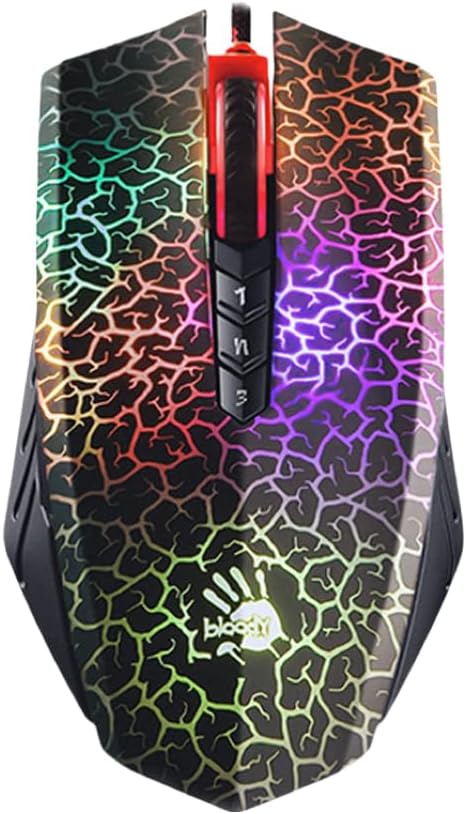


The Bloody A70 II is a strong contender for those seeking optical switch technology at an accessible price point. With a rating of 4.5 stars, it is praised for its ability to deliver rapid clicks without the noise of traditional mechanical switches.
We may earn a commission when you buy through this link, at no additional cost to you.
Its Light Strike switch technology ensures a response time of less than 0.2 milliseconds, which is critical for drag clicking in fast-paced games. The fully programmable nature allows users to assign complex macros for enhanced gameplay efficiency.
While it offers exceptional performance, some users may find the proprietary software slightly less intuitive than mainstream alternatives. Additionally, the lack of wireless connectivity might be a drawback for those preferring a clutter-free desk setup.
This mouse is ideal for budget-conscious gamers who prioritize speed and customization. If you need a reliable tool for high-frequency clicking without breaking the bank, the A70 II is a solid recommendation.
The optical engine delivers 8000 DPI adjustable settings ensuring pixel perfect accuracy during intense gaming sessions.
Users can map advanced macros to any button allowing for streamlined execution of complex game commands.
We may earn a commission when you buy through this link, at no additional cost to you.
The Razer Basilisk V3 stands out as a versatile choice with its iconic ergonomic design and powerful optical switches. Rated at 4.6 stars, it is widely favored by millions for its comfortable form factor that supports the hand during extended use.
We may earn a commission when you buy through this link, at no additional cost to you.
Equipped with Optical Mouse Switches Gen 2, this device offers crisp execution at a blistering 0.2ms actuation speed. The HyperScroll Tilt Wheel provides unique control for both quick content browsing and precise in-game weapon cycling.
Despite its many strengths, the wired connection limits mobility compared to wireless options. Some users might also find the overall weight slightly higher than ultra-light competitive mice, which could affect rapid movements.
This mouse is perfect for gamers who need a reliable, ergonomic tool with advanced features. If you value comfort and precise control alongside fast switching, the Basilisk V3 is an excellent pick.
The thumb rest is optimally positioned to reduce strain during long gaming sessions and support quick access to buttons.
The Focus Plus 26K Optical Sensor tracks movement with zero smoothing for pixel precise accuracy on any surface.
We may earn a commission when you buy through this link, at no additional cost to you.
Designed with esports pros, the Logitech G PRO X2 SUPERSTRIKE delivers unmatched speed and customization for competitive players. With a 4.6 rating, it features the fastest fully customizable click available on the market today.
We may earn a commission when you buy through this link, at no additional cost to you.
The Haptic Inductive Trigger System provides real-time feedback that enhances immersion and control. Its HERO 2 sensor ensures pinpoint accuracy with tracking capabilities that exceed standard requirements for professional play.
While the performance is top-tier, the high price might be a barrier for casual users. Additionally, the POWERPLAY charging feature is sold separately, which could add to the total cost of ownership.
This mouse is tailored for serious competitors who demand the absolute best speed and wireless freedom. If you are looking to dominate your matches with lag-free precision, this is the premier choice.
The HITS system offers real-time tactile feedback during gameplay to improve reaction times and awareness.
Enjoy 60 to 90 hours of battery life ensuring uninterrupted focus during long tournament matches.
We may earn a commission when you buy through this link, at no additional cost to you.
The Razer Basilisk V3 X brings wireless freedom to the beloved ergonomic form of the Basilisk series. Rated at 4.4 stars, it balances performance and longevity with a battery life that can last up to 285 hours.
We may earn a commission when you buy through this link, at no additional cost to you.
Equipped with Razer Hyperspeed Wireless, this mouse offers seamless low-latency performance ideal for competitive play. The 11 customizable controls allow for a wide range of commands and macros to be mapped efficiently.
While the battery life is impressive, the use of mechanical switches instead of optical may lead to faster wear over time compared to other options in this guide. Users should also note that battery life can vary based on settings.
This mouse is great for users who need a reliable wireless tool with proven ergonomics. If you value long battery life and versatile connectivity for gaming and work, the V3 X is a strong candidate.
Supports multi-device setups with HyperSpeed Wireless or Bluetooth for a streamlined workflow across different systems.
The 18K optical sensor tracks movement with zero spinouts for pixel precise aim on various surfaces.
We may earn a commission when you buy through this link, at no additional cost to you.
The Razer Viper V3 is designed for players who prioritize speed and precision with a centralized mass design. With a 4.4 rating, it ensures seamless swipes that are crucial for competitive play without battery imbalance issues.
We may earn a commission when you buy through this link, at no additional cost to you.
Its Focus Pro 30K Optical Sensor ensures a finer degree of accuracy and flawless tracking even on glass surfaces. The Hyperspeed wireless connection remains stable and smooth even in noisy environments or tournaments.
While it offers excellent performance, the reliance on a single AA battery might be less convenient for some users compared to rechargeable options. The absence of a thumb rest may also be less ideal for those needing extra support.
This mouse is perfect for gamers who need a lightweight, high-performance wireless solution. If you want a balanced tool for intense gaming sessions, the Viper V3 delivers consistent results.
Power through intense schedules with up to 280 hours of high-performance gaming on just a single AA battery.
The intelligent sensor functions maintain flawless tracking across a wide variety of surfaces including glass.
We may earn a commission when you buy through this link, at no additional cost to you.
The Razer Pro Click V2 Vertical offers a unique shape designed to promote the most comfortable hand position for extended use. With a 4.1 rating, it features a vertical ergonomic design that elevates the wrist to minimize friction.
We may earn a commission when you buy through this link, at no additional cost to you.
Its 6-button layout is optimized for productivity and workflow efficiency. The high-performance sensor ensures seamless tracking even on glass surfaces allowing for smooth operation across different desk environments.
While it is excellent for reducing strain, it may not be tailored for high-speed gaming clicks. Users will also need time to adjust to the vertical orientation if coming from a traditional mouse.
This mouse is ideal for professionals who spend long hours at the computer and experience wrist pain. If comfort and ergonomics are your top priorities, this is a worthy investment.
Shaped for a natural handshake grip this design supports the wrist to reduce strain during daily tasks.
Powered by a long-lasting battery it allows for game and create use up to 6 months without interruption.
We may earn a commission when you buy through this link, at no additional cost to you.
The Razer Viper V3 Pro SE is engineered for esports pros with a perfectly balanced ultra lightweight design. Rated at 4.6 stars, it features Optical Switches Gen 3 with a 90 million click lifecycle and zero double-clicking issues.
We may earn a commission when you buy through this link, at no additional cost to you.
Its Focus Pro 35K Optical Sensor Gen 2 supports intelligent functions and 1-DPI step adjustments for granular aim. The 54g weight allows gamers to make swift precise flicks that match every intention.
The high price point makes this a significant investment. However, the durability and performance are unmatched for those seeking top-tier equipment. The smooth-touch finish provides grip without skin friction for long sessions.
This mouse is a premium choice for serious competitors who need the lightest and most reliable tool. If you want to enhance your gameplay with professional-grade technology this is the ultimate pick.
Gen 3 optical switches provide a blistering 0.2 ms actuation speed without debounce delay for instant response.
The smooth-touch finish offers a balanced feel ensuring long-lasting comfort without sacrificing control.
We may earn a commission when you buy through this link, at no additional cost to you.
The Razer Pro Click V2 is sculpted to perfectly fit the right hand with a wider thumb rest to promote better wrist posture. With a 3.9 rating, it is designed for strain-free experiences during work and play.
We may earn a commission when you buy through this link, at no additional cost to you.
It features HyperScroll Technology allowing you to switch between high-speed scrolling and precise tactile modes easily. The 5-way multi-device connectivity maximizes efficiency by controlling a full setup with a single mouse.
While highly ergonomic, it is primarily a productivity tool and may not appeal to gamers seeking aggressive features. The slightly lower rating suggests some users may find the features less compelling for pure gaming.
This mouse is best for professionals who prioritize comfort and efficiency. If you need a reliable mouse for daily tasks with ergonomic benefits the Pro Click V2 is a strong option.
Summarize text and draft emails instantly with one click using the AI Prompt Master feature via Synapse 4.
Connect up to 5 devices and toggle between them instantly with a dedicated button for streamlined workflow.
We may earn a commission when you buy through this link, at no additional cost to you.
The Razer Naga V2 is equipped with 19 programmable buttons providing an arsenal of commands at your fingertips. With a 4.0 rating, it is favored by MMO gamers for its advanced macro mapping capabilities and long battery life.
We may earn a commission when you buy through this link, at no additional cost to you.
Its Focus Pro 30K Optical Sensor ensures flawless tracking on various surfaces. The mechanical switches are gold-plated to resist degradation ensuring consistent execution across hundreds of hours of gameplay.
The high button count may make it heavier than standard gaming mice. Users may also need to manage power for the many features to maximize the battery life effectively.
This mouse is perfect for MMO players who need extensive command access. If you want an arsenal of commands for rapid commands the Naga V2 is a specialized tool.
The ergonomically positioned buttons provide easy access for mapping out essentials or going all out with advanced macros.
With up to 400 hours on Bluetooth last longer in the heat of battle without needing battery replacement.
We may earn a commission when you buy through this link, at no additional cost to you.
The Razer Cobra Pro offers a compact design with 10 customizable controls for a greater degree of control and remapping. With a 4.6 rating, it features Gen 3 Optical Switches with a 90 million click lifecycle and zero double-click issues.
We may earn a commission when you buy through this link, at no additional cost to you.
It supports versatile connectivity with up to 170 hours on Bluetooth or 100 hours on HyperSpeed. The Focus Pro 30K Optical Sensor provides flawless tracking performance on a wider variety of surfaces.
The compact size might not suit everyone especially those with larger hands. Charging via USB Type C means you need a cable handy when the battery runs low.
This mouse is great for gamers seeking a lightweight wireless tool with robust features. If you want reliable speed and battery life in a compact form the Cobra Pro is a solid choice.
Gen 3 optical switches boast a blistering 0.2 ms actuation time without debounce delay for unrivalled speed.
Save up to 5 preset game profiles via Razer Synapse and easily swap between them instantly.
We may earn a commission when you buy through this link, at no additional cost to you.
Selecting the right mouse requires understanding how different technologies and designs affect your gaming experience and comfort.
Optical switches use light to register clicks which eliminates mechanical bounce and double-click issues common in mechanical switches. This makes them highly reliable for drag clicking where rapid consistent inputs are required.
Opt for optical switches to ensure maximum speed and durability in your clicking performance.
Lighter mice allow for faster movements and less fatigue during extended gaming sessions. Weights under 70 grams are often preferred for competitive play where quick flicks and precise adjustments are key.
Consider a lightweight design to enhance agility and reduce hand strain over time.
High DPI sensors provide precise tracking and ensure your cursor moves exactly as intended. This is vital for accuracy games where missing a pixel can cost a match.
Look for sensors with high DPI and low latency to guarantee precise control.
The shape of the mouse should fit comfortably in your hand to prevent pain during long sessions. Ergonomic designs reduce strain and improve your ability to maintain consistent click quality over time.
Choose a shape that supports your natural hand position to avoid discomfort.
Wireless mice offer freedom from cables but may have latency issues if not optimized. Wired mice offer guaranteed low latency but limit your desk setup flexibility.
Decide between wireless freedom and wired reliability based on your specific setup needs.
Drag clicking puts extra wear on switches so high click lifespans are critical. A mouse rated for 60 million clicks or more will last longer under heavy use.
Prioritize durable switches to ensure your mouse lasts through intense gaming periods.
To maximize the performance of your mouse keep it clean and free of dust. Use a soft cloth to wipe down the surface regularly to maintain smooth movement.
Adjust your DPI settings to match your play style. Lower DPI can help with control while higher DPI allows for rapid movement across the screen.
Avoid excessive force when clicking as this can damage the switches over time. Let the switch mechanism do the work to extend the lifespan of your device.
Drag clicking involves flicking your finger across a surface to generate multiple clicks rapidly. A special mouse with durable and fast switches ensures these clicks register correctly without errors.
Yes optical switches are better because they do not suffer from mechanical bounce. This results in cleaner more consistent clicks with lower latency for better performance.
Yes lighter mice allow for faster finger movements and reduced fatigue. Heavier mice can slow down your reaction time during rapid input sequences.
While you can use any mouse optimized models with high-speed switches provide a clear advantage in PvP. They ensure that every rapid click counts and registers accurately.
Keep the mouse clean and avoid dropping it. Also do not apply excessive force to the buttons to prevent premature wear on the switches.
Modern wireless technology has largely eliminated latency issues. Look for mice with high polling rates to ensure response times match those of wired options.
We have reviewed ten top mice offering a range of options from budget-friendly to premium models. Each device brings unique features to enhance your gaming precision and speed.
Prioritize switches that offer durability and speed along with a comfortable ergonomic design. These factors will determine your long-term satisfaction and performance in games.
Remember to check current prices and availability before purchasing as deals may vary over time. Investing in the right mouse can significantly elevate your gaming experience.