
OMTech 50W Fiber Laser Marking Machine with Lightburn and Rotary Axis
4.2Editor score
All-in-One Metal Body Design
5.9×5.9 Inch Engraving Area
Dual Red Dot Locator System
Selecting a 50W Fiber Laser Engraver is a critical decision for professionals and hobbyists seeking precision metal marking capabilities. These machines offer exceptional speed and durability for industrial applications.
We evaluated ten leading models based on engraving speed, accuracy, software compatibility, and build quality. Our analysis ensures you find a machine that meets your specific project requirements.
Each pick highlights unique features like autofocus, rotary axes, and laser sources. Note that specifications and availability may change over time as manufacturers update their product lines.
4.2Editor score

5.0Editor score

5.0Editor score
As an Amazon Associate we earn from qualifying purchases.
The following table provides a side-by-side comparison of the ten featured 50W Fiber Laser Engraver models to help you quickly identify the best fit for your needs.


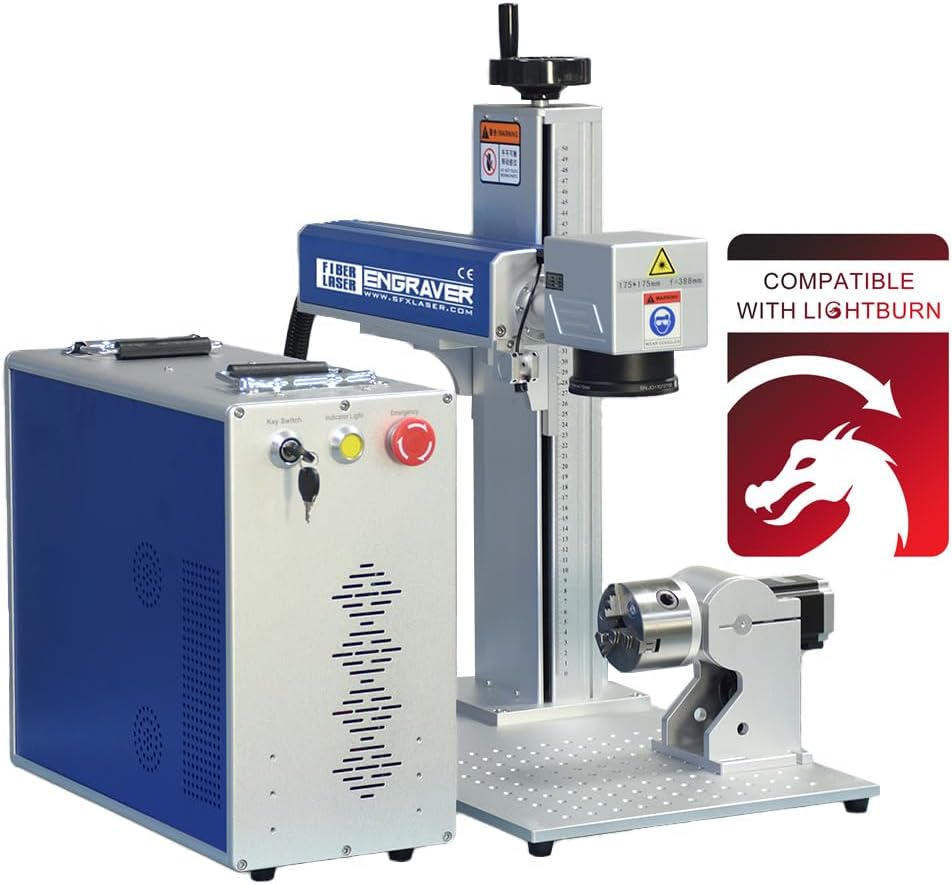
This model stands out for its expansive 7.9×7.9 inch marking area and high 5-star rating. It combines industrial power with user-friendly software compatibility for diverse applications.
We may earn a commission when you buy through this link, at no additional cost to you.
The inclusion of a rotary axis makes it ideal for jewelry and cylindrical engraving. Its 50W laser ensures deep and crisp marks on metals like gold and steel with ease.
While the price is higher, the value added by the rotary axis and software flexibility justifies the cost. Users benefit from reduced setup time due to the precise red dot pointer.
Ideal for professionals needing a versatile machine for detailed metal work. This choice offers the best balance of performance and functionality for serious engravers.
The 200x200mm workbed allows for larger designs without repositioning material frequently during the engraving process.
Support for both LightBurn and EzCad2 ensures you can use preferred design tools without needing additional conversion software.
We may earn a commission when you buy through this link, at no additional cost to you.
This all-in-one fiber laser engraver offers a compelling entry point into professional 50W engraving. Its 4.2 rating reflects strong performance for its price category.
We may earn a commission when you buy through this link, at no additional cost to you.
The compact 5.9×5.9 inch area is perfect for smaller batches and detailed jewelry work. The dual red dot locator simplifies alignment for quick setup and operation.
With a lifespan exceeding 100,000 hours, the investment remains stable over years of use. The lightweight design aids portability for mobile engraving services.
Best suited for small businesses or hobbyists prioritizing cost-efficiency. It delivers reliable precision without the complexity of high-end industrial features.
The all-metal body ensures stability during operation while maintaining a cool appearance even after extended use sessions.
Up to 10000 mm/s speed allows quick turnover for high-volume orders while maintaining tight tolerance accuracy.
We may earn a commission when you buy through this link, at no additional cost to you.
Equipped with a JPT laser source, this machine delivers superior performance for demanding industrial applications. Its 5-star rating highlights consistent reliability and speed.
We may earn a commission when you buy through this link, at no additional cost to you.
The 7m/s marking speed significantly boosts productivity in commercial environments. High electrical-optical conversion ensures efficient power usage and stable operation.
The BJ JCZ control board offers robust stability and long-term reliability. While the price is higher, the reduced downtime and precision make it a smart long-term investment.
Recommended for high-volume production shops requiring top-tier accuracy. The US-based support team provides peace of mind for professional users.
The JPT source delivers consistent beam quality essential for intricate designs on varied metal surfaces.
With speeds up to 7m/s, this unit reduces job times compared to standard 50W alternatives significantly.
We may earn a commission when you buy through this link, at no additional cost to you.
The GWEIKE G2 Max stands out with its ability to engrave 90+ colors on metals like titanium. This feature opens creative possibilities for custom jewelry and branding.
We may earn a commission when you buy through this link, at no additional cost to you.
Its electric lift column simplifies focus adjustments compared to manual knobs. The 150x150mm working area provides ample space for most standard metal components.
While powerful, the deep engraving feature requires careful calibration to maintain detail. The detachable design adds versatility for field work or custom setups.
Ideal for creative professionals looking for color options on metal. Its advanced features justify the higher price for specialized artistic needs.
This capability uses laser parameters to create vibrant color layers on stainless steel without dyes.
High power allows for deep engraving on metals, suitable for serial numbers and permanent identification.
We may earn a commission when you buy through this link, at no additional cost to you.
Designed for portability, this unit weighs only 43 lbs and fits easily into transport cases. It excels at small-scale jewelry making and field marking tasks.
We may earn a commission when you buy through this link, at no additional cost to you.
The included 360-degree rotary axis allows engraving on cylindrical objects like rings without extra purchases. This adds significant value for jewelry-focused businesses.
With two field lenses included, users can choose between speed or precision depending on the project. The manual lift column requires attention but ensures precise adjustments.
Best for mobile professionals needing a compact solution. It balances power with portability better than larger industrial alternatives.
Lightweight design and compact dimensions make it easy to move between workbenches or job sites.
Cylindrical engraving is supported out of the box, saving time and money on accessories.
We may earn a commission when you buy through this link, at no additional cost to you.
This model offers a rare 2-in-1 design allowing both desktop and handheld operation. It appeals to users needing flexibility for on-site marking tasks.
We may earn a commission when you buy through this link, at no additional cost to you.
The speed of up to 15000 mm/s ensures quick processing for simple marks. It is one of the few options that natively supports Mac users through LightBurn.
The handheld mode offers unmatched mobility but requires steady hands and practice for best results. Its lower rating suggests potential learning curve challenges.
Recommended for users needing mobile marking flexibility. It provides a unique niche in the market for portable 50W solutions.
LightBurn support allows Mac users to access professional laser engraving tools without switching operating systems.
Handheld capability makes it ideal for marking large or fixed objects that cannot be moved to a workbench.
We may earn a commission when you buy through this link, at no additional cost to you.
The standout feature of this model is its automatic focusing system, which eliminates manual adjustments. This simplifies the workflow for daily engraving tasks.
We may earn a commission when you buy through this link, at no additional cost to you.
Its compact design fits well in small workshops while running quietly. The included safety goggles provide essential protection for user safety.
With LightBurn compatibility, users gain access to modern design tools. The 5-star rating reflects user satisfaction with its ease of use.
Best for beginners or those valuing simplicity. The autofocus feature reduces setup time significantly compared to manual alternatives.
Automatic focus adjustment ensures consistent marking quality regardless of material thickness variations.
Small footprint allows fitting into standard desks or workspaces without needing large industrial tables.
We may earn a commission when you buy through this link, at no additional cost to you.
This machine brings professional 3D relief engraving to the desktop with a JPT laser source. It offers high precision and modern features like one-touch autofocus.
We may earn a commission when you buy through this link, at no additional cost to you.
The 3D relief capability allows for intricate artistic engraving on metal. It provides a professional result often reserved for much more expensive systems.
The compact working area limits large-scale production but is sufficient for detailed jewelry. Its speed and accuracy ensure high-quality results with minimal waste.
Ideal for artists and professionals requiring deep engraving. It balances advanced tech with usability for intricate design work.
Advanced control allows layering marks to create depth and texture on metal surfaces effectively.
0.01mm accuracy ensures fine details are reproduced faithfully in every engraving pass.
We may earn a commission when you buy through this link, at no additional cost to you.
Dereklaser offers a robust solution with a large 7.8×7.8 inch workbed suitable for industrial components. It uses a durable Raycus source with a long lifespan.
We may earn a commission when you buy through this link, at no additional cost to you.
Ready to use out of the box, it requires minimal setup for immediate operation. The Raycus source ensures reliable performance for continuous use in production.
Manual focus is the main trade-off for its affordability and large size. However, the included software and protective eyewear make it a complete package.
Recommended for users prioritizing workspace size. It is a strong option for industrial marking where setup speed is critical.
The 200x200mm bed accommodates larger parts that would require multiple repositionings on smaller machines.
The Raycus fiber source offers high stability and a 100k hour lifespan for consistent long-term performance.
We may earn a commission when you buy through this link, at no additional cost to you.
This model features Class 1 laser output, offering enhanced safety by containing the beam within the enclosure. It uses a JPT source for reliable industrial marking.
We may earn a commission when you buy through this link, at no additional cost to you.
The Class 1 rating makes it safer for office environments where laser safety regulations are strict. The included D80 rotary axis adds versatility for cylindrical work.
The lower rating suggests some users may find the interface complex. However, the safety features and speed justify it for regulated professional settings.
Best for environments requiring high safety compliance. It provides a secure solution for professional industrial applications.
Full enclosure safety ensures laser beams are contained, protecting users during operation without extra barriers.
The included D80 rotary axis enables seamless engraving on rings and cylindrical parts without extra purchases.
We may earn a commission when you buy through this link, at no additional cost to you.
Choosing the right 50W Fiber Laser Engraver involves understanding laser sources, software compatibility, and working area requirements.
The laser source determines the machine's reliability and lifespan. Top brands like JPT and Raycus offer over 100,000 hours of operation with consistent beam quality.
Prioritize machines with proven sources to ensure long-term durability and minimal downtime during critical projects.
Working areas range from 5.9×5.9 inches to 7.9×7.9 inches. Larger beds accommodate bigger metal parts without needing to reposition items frequently.
Select a size that fits your common projects to avoid limiting your engraving capabilities in the future.
Most machines support EzCad2, while modern ones offer LightBurn compatibility for better design tools. Ensure the software runs on your operating system before buying.
Software choice impacts workflow efficiency and design flexibility, so pick one you are comfortable using daily.
A rotary axis allows engraving on cylindrical objects like rings or pipes. Some machines include this out of the box while others require separate purchases.
If you frequently work on jewelry, ensure the machine supports or includes a rotary attachment to save time and money.
Autofocus systems simplify setup by using a button press for calibration. Manual focus requires precise adjustments but often costs less than automated versions.
Consider your tolerance for setup time; beginners usually benefit from one-touch autofocus features for quicker results.
Look for emergency stop buttons, safety goggles, and proper laser classes. Class 1 machines contain the beam while Class 4 require external protective measures.
Safety certifications ensure compliance with regulations and protect you from accidental exposure during engraving tasks.
Engraving speeds vary from 7,000 mm/s to 15,000 mm/s. Higher speeds increase throughput but may require precise calibration to maintain accuracy on delicate designs.
Choose a balance between speed and 0.01mm precision based on whether you prioritize quick production or intricate detail.
Reliable support is crucial for laser equipment. Check for warranty terms and US-based service teams that can assist with technical issues quickly.
Strong support ensures you can resolve any machine faults without prolonged downtime affecting your business operations.
Start by preparing your workspace and ensuring proper ventilation. Calibrate the laser focus using the provided red dot pointers or autofocus buttons for precise depth.
Select appropriate material settings in your software. For metals, use lower speed with higher power settings to ensure deep engraving without damaging the optics.
After each use, clean the lens and mirrors to prevent dust accumulation. Cover the machine when not in use to avoid debris entering the optical path and causing damage.
Generally, a 50W fiber laser is designed for marking and deep engraving rather than cutting. It can engrave details on metals like steel and aluminum effectively but may not cut thick sheets without multiple passes.
EzCad2 is the industry standard for most machines, but LightBurn is preferred for its intuitive interface. Check if your model supports LightBurn for better design control and workflow.
A quality 50W fiber laser source typically lasts over 100,000 hours. Regular maintenance such as cleaning optics ensures the source performs optimally throughout its lifespan.
Basic computer skills are required to operate the software. Most machines come with tutorials to help you learn focus adjustment and design import safely.
Safety depends on the laser class. Class 1 machines are safer for enclosed use, while others require safety glasses and ventilation. Always follow manufacturer safety guidelines.
Fiber lasers target metals primarily due to their 1064nm wavelength. They generally do not work well on wood or plastic which are better suited for CO2 lasers.
The OMTech 50W Fiber Laser Engraver with LightBurn and Rotary Axis offers the best overall balance for professionals needing versatility.
For budget-conscious buyers, the OMTech 50W Fiber Laser Marking Machine provides excellent precision at a lower cost.
Always check current prices and specifications before purchasing to ensure you select the model that best fits your specific project needs.