
LeapFrog 2-in-1 LeapTop Touch
4.7Editor score
Converts to tablet mode
Role play activities
Simple ABCs and numbers
This guide compares the top laptops for 5 year olds focusing on educational content, durability, and features to help parents choose the right learning device.
Finding the right laptop for a five year old can be challenging for many parents today. You want a device that is safe educational and fun without breaking the bank. This guide helps you navigate the options available in the market right now.
We have analyzed ten top rated products based on features, user feedback, and educational value. Our goal is to provide a clear comparison so you can make an informed decision. Each product was evaluated on learning modes design and age appropriateness.
Every pick in this list shows what makes it stand out for young learners. You will find details on activities, screens, and durability to guide your choice. Please note that prices and availability can change at any time online.
4.7Editor score

4.5Editor score

4.2Editor score
The following table provides a side-by-side comparison of all ten products evaluated in this guide. You can quickly see key specifications and features to understand how each device stacks up against the others for your child needs learning needs.




The VTech Genio Bilingual JuniorBook Learning Laptop for Kids stands out as a top choice for young learners aged five and up. With a high rating of 4.5 stars, it offers a realistic computer experience designed specifically for children. The device features a full size QWERTY keyboard and cursor controller to help build basic computer skills early on.
We may earn a commission when you buy through this link, at no additional cost to you.
One of the key strengths of this laptop is its extensive library of over eighty activities that are pre loaded and ready to play offline. These activities cover subjects like math, science, language arts, music, and Spanish making it a versatile tool for early education. The bilingual feature allows kids to switch between English and Spanish immersion which is a significant benefit for language development.
While the device does require four AA batteries which are not included for regular use, the offline capability means there are no hidden costs or subscriptions needed to access the content. Parents appreciate that no internet connection is needed, which keeps the learning focused and safe. The build quality is sturdy enough to withstand typical toddler handling.
This laptop is ideal for parents looking for a dedicated learning toy that mimics a real computer without the complexity of a full PC. It is a strong recommendation for families wanting to introduce computer literacy in a fun safe and educational way. The mix of games and structured learning makes it a well rounded choice.
The bilingual learning modes are particularly beneficial for households where Spanish is spoken or where parents want to expose their child to a second language early. By integrating vocabulary and comprehension into games, it reinforces language skills naturally without feeling like a chore for the child.
The ability to play activities without an internet connection ensures that learning can happen anywhere from road trips to areas with spotty Wi-Fi.
Using a full size QWERTY keyboard helps children develop finger dexterity and typing familiarity that will serve them well in later school years.
We may earn a commission when you buy through this link, at no additional cost to you.
The Lexibook Unicorn Educational Laptop for Kids brings a touch of magic to learning with its appealing design and robust educational features. Rated at 4.3 stars, it is tailored for children who enjoy themed play while absorbing academic concepts. The laptop includes activities in English and Spanish covering mathematics, logic, and general knowledge to support a well rounded curriculum.
We may earn a commission when you buy through this link, at no additional cost to you.
Children can enjoy fun games that test logic, memory, and speed after completing learning tasks which helps reinforce what they have learned in an entertaining way. The device also features musical activities that introduce notes learning composing and playing melodies offering a creative outlet alongside academic study. The realistic mouse and keyboard add to the immersive experience.
While the screen is compact and the device relies on battery power which may require frequent replacements the slim and elegant design makes it easy for small hands to grip and carry around. It is a convenient size for travel or keeping at home for daily play sessions. The build quality reflects the brand's reputation for safe toy design.
This laptop is a great option for parents who want a device that balances fun themes with serious educational content. It works well for children who need motivation through character themes to engage with learning. The mix of subjects ensures that boredom is less likely to set in during play time.
The inclusion of clock reading and general knowledge activities helps children understand time and the world around them which are essential life skills for this age group. By making these topics interactive the laptop turns abstract concepts into concrete learning moments that are easier to grasp.
Musical activities allow children to experiment with sounds and rhythms which can enhance cognitive development and creativity alongside math and language skills.
The slim and convenient size ensures that the laptop is comfortable for young children to hold and use for extended periods without fatigue.
We may earn a commission when you buy through this link, at no additional cost to you.
The Kids Laptop Educational Color Screen with 48 Learning Modes offers a vivid and engaging experience for children aged five and up. With a solid 4.2 rating it features a 4.3 inch color screen that provides lifelike visuals to make watching and interacting with content more enjoyable. The device is designed to mimic a real laptop with a realistic mouse and keyboard for authentic play.
We may earn a commission when you buy through this link, at no additional cost to you.
The variety of forty eight learning modes covers alphabet, mathematics, colors, animals, and logic to ensure that children are exposed to a broad spectrum of educational topics. Fun games are also included to test logic, memory, and speed after learning which helps keep the child motivated and eager to return to the device. The design is sleek and slim for easy handling.
While it does not have Wi-Fi capabilities and runs on batteries which are not included for regular use the device offers great value for the price point. The protective film on the screen ensures durability and clarity during use. It is a practical choice for parents looking for a standalone learning tool without needing an internet connection.
This laptop is ideal for households that want a robust toy laptop that can grow with the child as it offers multiple modes and levels of difficulty. It serves as a good introduction to computer interaction without the risks associated with online connectivity. The color screen adds a layer of visual appeal that keeps kids interested.
The inclusion of calendar and clock reading activities helps children develop a sense of time and organization which are critical skills for starting school or managing daily routines. By practicing these skills in a game format the child learns to associate time with fun activities rather than stressful tasks.
The TFT color screen provides clear and vibrant visuals that capture a child's attention more effectively than monochrome displays on older toy laptops.
Educational activities like calendar and clock reading help children apply learned concepts to daily life making the learning process more meaningful.
We may earn a commission when you buy through this link, at no additional cost to you.
The LeapFrog 2-in-1 LeapTop Touch is a highly rated toy laptop designed for preschoolers and children up to age five. Boasting an impressive 4.7 star rating it features a screen that flips to convert from a keyboard to a tablet mode which offers unique play flexibility. This versatility makes it a standout choice for younger children who are just starting to explore technology.
We may earn a commission when you buy through this link, at no additional cost to you.
Children can pretend to be like mom and dad with role play activities such as e-mailing Scout which encourages imaginative play and social interaction. The laptop includes a keyboard with letters A-Z and numbers 1-10 or parents can customize the device to help their child spell their own name for a personal touch. Five learning modes cover ABCs, numbers, games, music, and messages.
While it may not have the extensive features of larger laptops it excels in simplicity and ease of use for very young children. The device requires three AA batteries and is built to withstand the rough handling typical of preschoolers. The tablet mode is particularly useful for children who prefer touch interactions over typing.
This product is perfect for parents looking for an affordable and engaging introduction to computers for toddlers and preschoolers. It bridges the gap between traditional toys and digital learning effectively making it a strong contender in the budget category. The high rating reflects its popularity and reliability among families.
The ability to transform into a tablet mode supports different learning styles and keeps the play experience fresh for children. This adaptability ensures that the toy remains relevant even as the child grows or their interests change from keyboard typing to touch screen exploration.
Role play activities like e-mailing encourage children to think about communication and social scenarios in a safe and controlled environment.
The flip screen design allows the device to adapt to how the child wants to play making it more versatile than standard toy laptops.
We may earn a commission when you buy through this link, at no additional cost to you.
The VTech Play Smart Preschool Laptop in Pink is a sleek and functional toy that offers thirty activities with leveled learning to grow with your child. Rated at 4.6 stars it allows parents to personalize the device with a child's name age avatar and more which creates a sense of ownership and engagement. The laptop is designed to look like a grown-up's device making it a desirable toy for young children.
We may earn a commission when you buy through this link, at no additional cost to you.
Activities on this laptop introduce children to beginning Spanish words letters and numbers to support early language and numeracy skills. Kids can play logic games discover animal sounds and footprints and listen to instrument sounds with a music game to explore different aspects of the world. The device is intended for ages three to six and requires two AA batteries for operation.
While the feature set is simpler compared to more advanced models it focuses on core educational needs for preschoolers effectively. The leveled learning system ensures that the content remains challenging and appropriate as the child improves their skills. The pink design may appeal specifically to children who prefer colorful and stylish toys.
This laptop is a great choice for parents who want a reliable and educational toy that feels premium and engaging without a high price tag. It is well suited for home use or travel and the simple design means there are fewer parts to break. The personalized features add a touch of fun and intimacy to the learning process.
The ability to categorize foods into fruits or vegetables helps children learn about healthy eating habits which is an important life lesson. Combined with letter and number exploration the device covers a broad range of foundational skills necessary for school readiness in an interactive format.
The activities are designed with different levels so the child can continue to learn and grow as their skills improve without outgrowing the toy quickly.
The sleek black and pink design makes the toy look more like a real laptop which increases the child's interest in using it for play.
We may earn a commission when you buy through this link, at no additional cost to you.
The LEXiBOOK LAPTAB 10 inch Version 11 Touchscreen Laptop is a premium device that offers a real laptop experience for kids with a 10.1 inch HD touchscreen. Rated at 4.2 stars it is powered by a lightning-fast octa-core processor and 128GB storage which allows for a wide range of entertainment and education options. This device is designed for children who are ready for a more advanced learning environment.
We may earn a commission when you buy through this link, at no additional cost to you.
It comes with a Power Academy app 300 Ebooks with ReadEra and a 15-language translator to empower learning in a structured way. Kids can also access thousands of games and apps on Google Play for unbeatable entertainment. The laptop includes customizable profiles and robust parental controls to ensure a safe and tailored experience for everyone in the family.
While it is more expensive than standard toy laptops the advanced features justify the cost for parents seeking a device that bridges the gap between a toy and a real computer. The rechargeable battery provides hours of use and the device includes USB-A and USB-C ports for versatility. It is a great choice for older kids or tech-savvy families.
This laptop is ideal for households that want a durable and feature-rich device that can be used for both learning and entertainment over a longer period. The parental controls allow parents to manage time and apps effortlessly which provides peace of mind when children are using the device. The HD screen offers a crisp viewing experience for videos and books.
The family-friendly design with customizable profiles means that multiple children can use the device while keeping their data and learning progress separate. This feature is particularly useful for families with more than one child ensuring that each child gets a personalized experience without interfering with others.
Using a real operating system allows children to become familiar with apps and interfaces they will use in school and adult life preparing them for the future.
Robust parental controls and profiles give parents full visibility and control over what the child accesses ensuring a safe digital environment.
We may earn a commission when you buy through this link, at no additional cost to you.
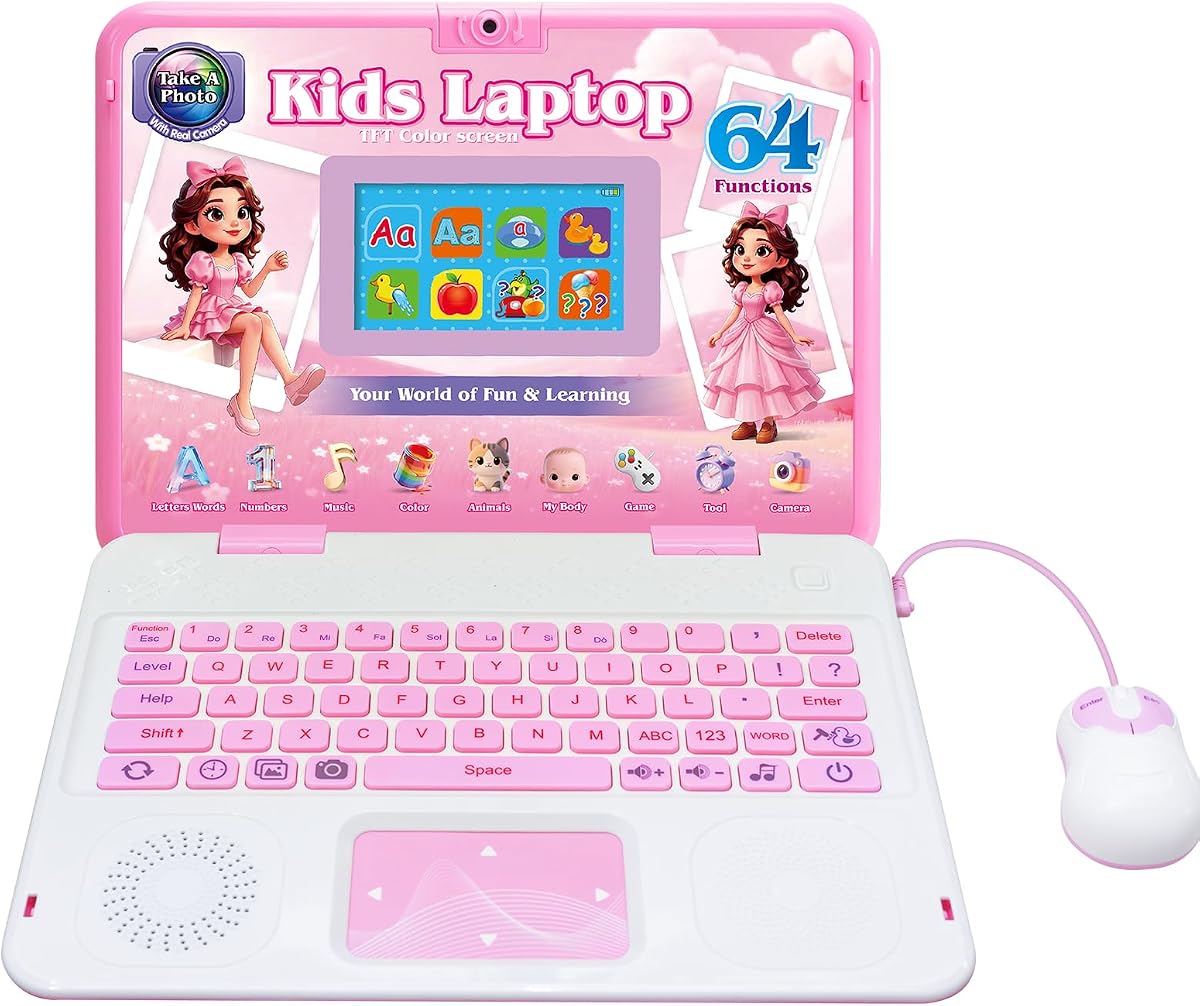
The Kids Laptop with Camera offers a unique blend of educational content and creative features that stand out in the toy laptop market. Rated at 4.6 stars it includes sixty four learning modes covering camera alphabet mathematics colors animals music and games to provide a comprehensive learning experience. The built-in camera with clear lenses allows kids to take funny pictures and express their creativity.
We may earn a commission when you buy through this link, at no additional cost to you.
Kids can enjoy a range of exciting games after mastering educational activities and use photo modes with cute frames and filter effects to record beautiful memories for themselves and friends. The 4.3 inch TFT color display provides vibrant true-to-life colors that fit perfectly between portability and handling comfort. The design is compact enough for a natural easy handgrip.
While the camera features are fun and engaging they do not replace the safety and features of a real digital camera. This device is best viewed as a creative tool within a toy laptop context. The battery power requirement means you will need to keep spares on hand for uninterrupted play sessions.
This laptop is perfect for children who love taking pictures and editing them while also learning core academic skills. It encourages artistic expression alongside learning which helps children develop a well-rounded set of interests. The high rating suggests that both parents and kids appreciate the added creativity.
The inclusion of photo frames and filters introduces basic digital editing concepts which are increasingly relevant in the modern world. By experimenting with these tools children learn about visual composition and creativity in a safe offline environment that fosters imagination.
The built-in camera with fun effects lets children explore photography safely and develop an eye for composition and visual storytelling early on.
With sixty four modes the laptop offers a wide variety of activities that keep the child engaged and prevent boredom from setting in during play.
We may earn a commission when you buy through this link, at no additional cost to you.
The LeapFrog LeapPad Academy Kids' Learning Tablet is designed to develop math reading writing coding problem-solving and creativity skills with more than twenty educator-approved learning apps that grow with kids. Rated at 4.3 stars it includes a three-month trial of LeapFrog Academy which provides access to thousands of engaging games activities eBooks videos songs and more. The device features a tough bumper with kickstand and a 7 inch shatter-safe screen.
We may earn a commission when you buy through this link, at no additional cost to you.
Parents can set time limits manage apps and explore kid-friendly web content with parent controls to ensure a safe and age-appropriate digital experience. The learning tablet includes a stylus for drawing and writing which adds another dimension to the creative learning process. The device is intended for ages three to eight and includes a rechargeable lithium-ion battery.
While it is technically a tablet rather than a laptop the robust build and parental controls make it a strong contender for learning on the go. The requirement for a subscription to access all content may be a consideration for some families but the initial trial offers a good taste of the ecosystem. The rechargeable battery is more convenient than disposable options.
This product is ideal for parents who want a device that evolves with their child's learning needs over several years. The shatter-safe screen and tough bumper provide durability for active children which reduces the risk of breakage during play. It serves as a versatile learning tool that covers a wide range of subjects.
The inclusion of coding and problem-solving skills aligns with modern educational trends that emphasize logic and technical literacy from a young age. By introducing these concepts early the tablet helps children build confidence in technology and analytical thinking which are valuable skills for the future.
The learning apps are approved by educators ensuring that the content is pedagogically sound and supports real academic development goals.
The tough bumper and shatter-safe screen mean the device can withstand drops and bumps making it suitable for active play environments.
We may earn a commission when you buy through this link, at no additional cost to you.
The Lexibook Barbie Educational Laptop for Kids engages young minds with one hundred and twenty four activities in English and Spanish covering math clock logic and music. Rated at 4.3 stars it features a realistic mouse and keyboard and a slim and stylish design that mimics authentic laptops. The device creates an immersive learning environment that kids will adore while encouraging ergonomic usage.
We may earn a commission when you buy through this link, at no additional cost to you.
Children can enjoy a range of exciting games like Snake Memory and Puzzle after mastering educational activities which ensures hours of joyful playtime. Each activity offers multiple levels allowing kids to learn test and improve their skills at their own pace. The compact size makes it ideal for on-the-go learning at home in the car or during family trips.
While the theme may appeal more to specific interests the educational content is broad enough to benefit any child who enjoys the branding. The laptop is powered by batteries which need to be replaced periodically for regular use. The elegant design makes it a toy that looks more like a real device than a typical toy.
This laptop is a great option for parents who want a device that combines a popular theme with rigorous educational content to motivate learning. The bilingual features are a standout benefit that can support language learning goals effectively. The portability ensures that learning can happen anywhere without interruption.
The multi-level activities allow for differentiated learning so that children of varying skill levels can enjoy the device without feeling overwhelmed or bored. This adaptability ensures that the laptop remains useful as the child grows and their learning needs change over time.
The realistic design and ergonomic usage encourage children to engage with the device seriously which leads to longer and more productive learning sessions.
Activities in both English and Spanish provide a comprehensive educational experience that promotes growth and knowledge acquisition in two languages.
We may earn a commission when you buy through this link, at no additional cost to you.
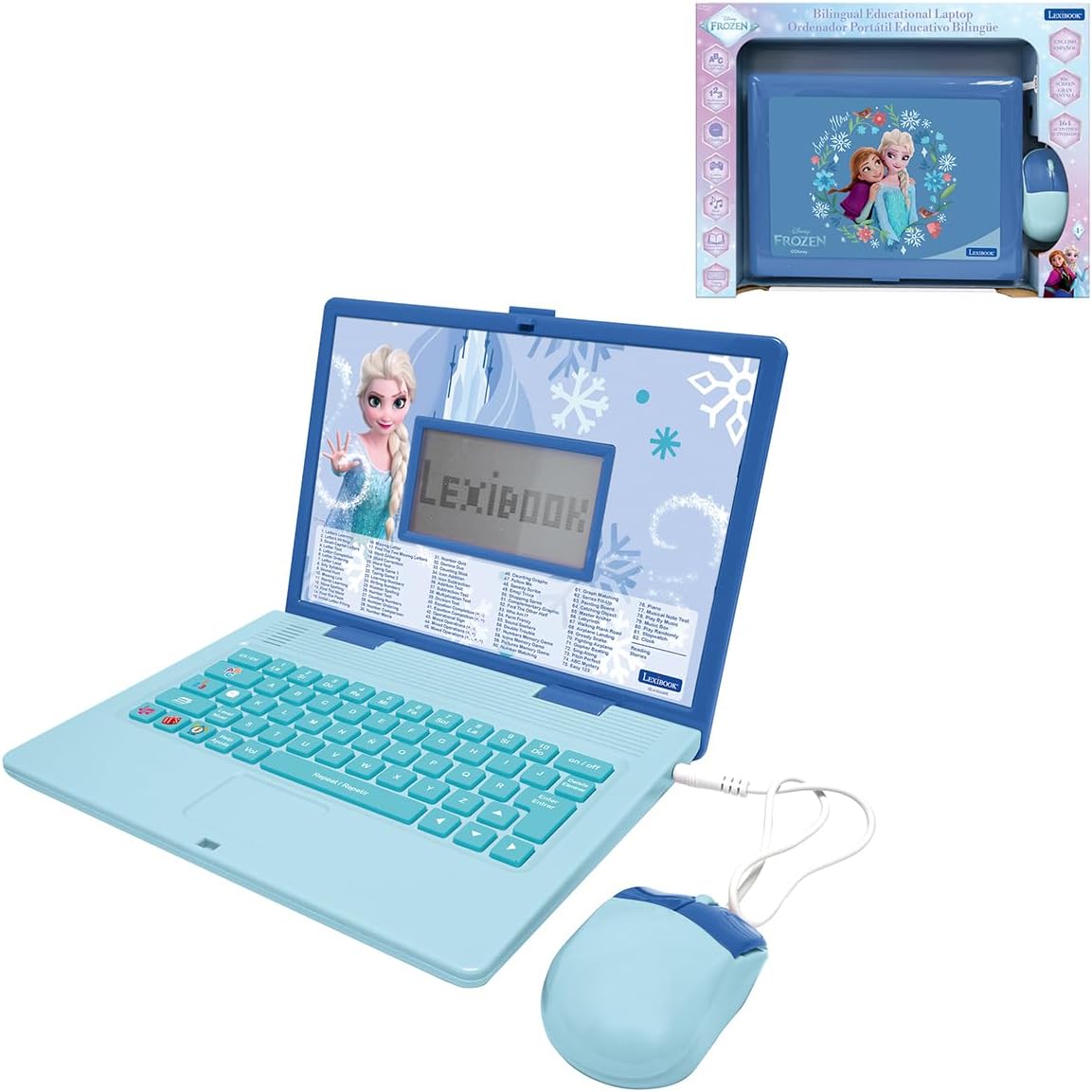
The LEXiBOOK Frozen Educational Laptop is a complete learning laptop packed with one hundred and sixty four activities in English and Spanish covering vocabulary spelling maths logic games and music. Although specific reviews are not available it is rated by the brand as a smart quality and safe product approved by parents. The device features a comfortable keyboard helpful voice guidance and a clear LCD screen for easy navigation.
We may earn a commission when you buy through this link, at no additional cost to you.
Children can switch easily between English and Spanish to build strong language skills while practising letters words and comprehension through fun and motivating activities. Quiz challenges logic games and musical functions make every learning session enjoyable and keep children engaged from the first activity. The device is lightweight and ideal for learning at home or taking on the go.
While the lack of public reviews makes it harder to judge performance the Lexibook brand is known for reliable toy design. The device relies on batteries for power which is typical for toy laptops. The LCD screen provides a clear display for viewing activities without the need for complex lighting systems.
This laptop is perfect for children who are fans of the Frozen theme and want to combine their favorite characters with educational activities. The extensive activity count ensures that there is plenty of content to explore without running out of options quickly. The bilingual support is a valuable feature for language development.
The voice guidance helps children navigate the laptop independently which is an important skill for developing confidence in using technology. By providing audio cues and instructions the device supports children who are still learning to read or prefer auditory learning styles to text-based interaction.
Using a popular character theme like Frozen helps motivate children to engage with learning activities that they might otherwise find boring or difficult.
Helpful voice guidance allows children to navigate and learn without needing to read every word which supports early literacy and independent play.
We may earn a commission when you buy through this link, at no additional cost to you.
Selecting the right laptop for a five year old involves considering several key factors that impact learning and enjoyment. This guide outlines the most important aspects to look for when making your purchase.
The most critical factor is the quality and breadth of the educational content provided. Look for laptops that offer a variety of activities covering math, reading, logic, and creativity. Pre-loaded offline content ensures that learning can continue without needing an internet connection which is safer and more convenient.
Prioritize devices that have a high count of activities and clear learning objectives so your child can progress and stay engaged over time.
Ensure the laptop is designed specifically for the age range of your child. Products designed for toddlers may be too simple while those for older kids might be frustrating. Check the manufacturer's age recommendations to guarantee the interface and activities match your child's developmental stage.
Choose a device that grows with your child offering levels or modes that adjust difficulty as skills improve to maintain interest.
Children in this age group can be rough with their toys so durability is essential. Look for laptops made from sturdy plastic with reinforced corners and screens. A device that can withstand drops and bumps will last longer and provide better value for your investment.
Opt for models with robust construction and screen protection to avoid frequent replacements due to accidental damage.
Most toy laptops run on disposable AA batteries so consider how often these will need replacing. Some higher-end models offer rechargeable batteries which can save money and reduce waste in the long run. Check the number of batteries required and if they are included for testing purposes.
Select a battery option that fits your lifestyle preference whether it is convenience with rechargeables or simplicity with standard disposables.
For children learning to use a computer a realistic keyboard and mouse can be very helpful. Full-size QWERTY keyboards help develop finger dexterity while touchscreens offer an alternative for those who prefer touch. Consider what type of input will best suit your child's learning style.
Choose input methods that mimic real computers to build familiarity and skills that will transfer to future learning environments.
If you are interested in language development look for laptops that offer bilingual support such as English and Spanish. This feature can introduce vocabulary and comprehension in a natural way through games and activities. Bilingual options add significant value to the educational experience.
Prioritize devices with clear language switching features to ensure the child can engage with content in both languages effectively.
A clear and bright screen makes the learning experience more enjoyable and easier on the eyes. Look for color screens if possible as they are more engaging than black and white displays. The size should be large enough to see easily but small enough to be portable for travel.
Choose a screen that balances visibility and portability to ensure the device is used frequently and comfortably.
If the device has any connectivity features ensure it has robust parental controls. These allow you to manage time limits and approved content. Even for offline devices features that allow personalization and progress tracking can help parents monitor learning.
Look for laptops that provide safety features and controls to ensure a secure and tailored experience for your child.
Insert the required batteries correctly and ensure the device is powered on before handing it to your child. Follow the initial setup instructions to personalize settings such as the name or avatar if available.
Encourage your child to explore the different modes and activities in a structured way. Spend time together initially to explain how the keyboard and mouse work to build confidence and familiarity with the interface.
Store the laptop in a cool dry place when not in use to protect the electronics and screen. Clean the surface with a soft dry cloth to remove dust and fingerprints without damaging the screen.
Yes many of the laptops listed offer activities designed to support school readiness skills like ABCs numbers logic and basic computer literacy. They provide a playful way to introduce foundational concepts that will help in early education.
Most of the toy laptops featured in this guide are designed to work offline with pre-loaded activities. However some advanced models may offer optional connectivity so always check the specifications before purchase.
The majority of these toy laptops require standard AA batteries for operation. Some higher-end models may have rechargeable lithium-ion batteries which can be charged via a cable for more eco-friendly use.
Some models allow parents to personalize settings like the child's name or avatar. Advanced tablets may offer parental controls to manage apps or content but toy laptops usually have fixed activity libraries.
Yes these laptops are designed specifically for children with rounded edges and durable materials. They are built to be safe for young hands and typically avoid harmful chemicals or small parts that could pose a choking hazard.
Battery life varies by model and usage frequency but most toy laptops offer several hours of play on a single set of batteries. Rechargeable models may provide more consistent usage times without needing replacements.
Many brands offer limited warranties on their toys but terms can vary. It is a to check the manufacturer's policy or the retailer's return policy to ensure you are protected against defects.
While some devices start at age two to three most laptops in this guide are designed for ages five and up. At this age children have the motor skills and attention span to fully engage with the activities.
Choosing the right laptop for a five year old depends on balancing educational content with fun and ease of use. The VTech Genio Bilingual JuniorBook and LeapFrog 2-in-1 LeapTop Touch stand out as top choices for different needs.
Prioritize features that match your child's interests whether that is a realistic keyboard or a themed interface. A device that keeps them engaged will provide the most value for their development and learning journey.
Always check the current prices and availability as these can change frequently. Investing in a quality toy laptop can provide hours of educational fun and help build essential skills for the future.