
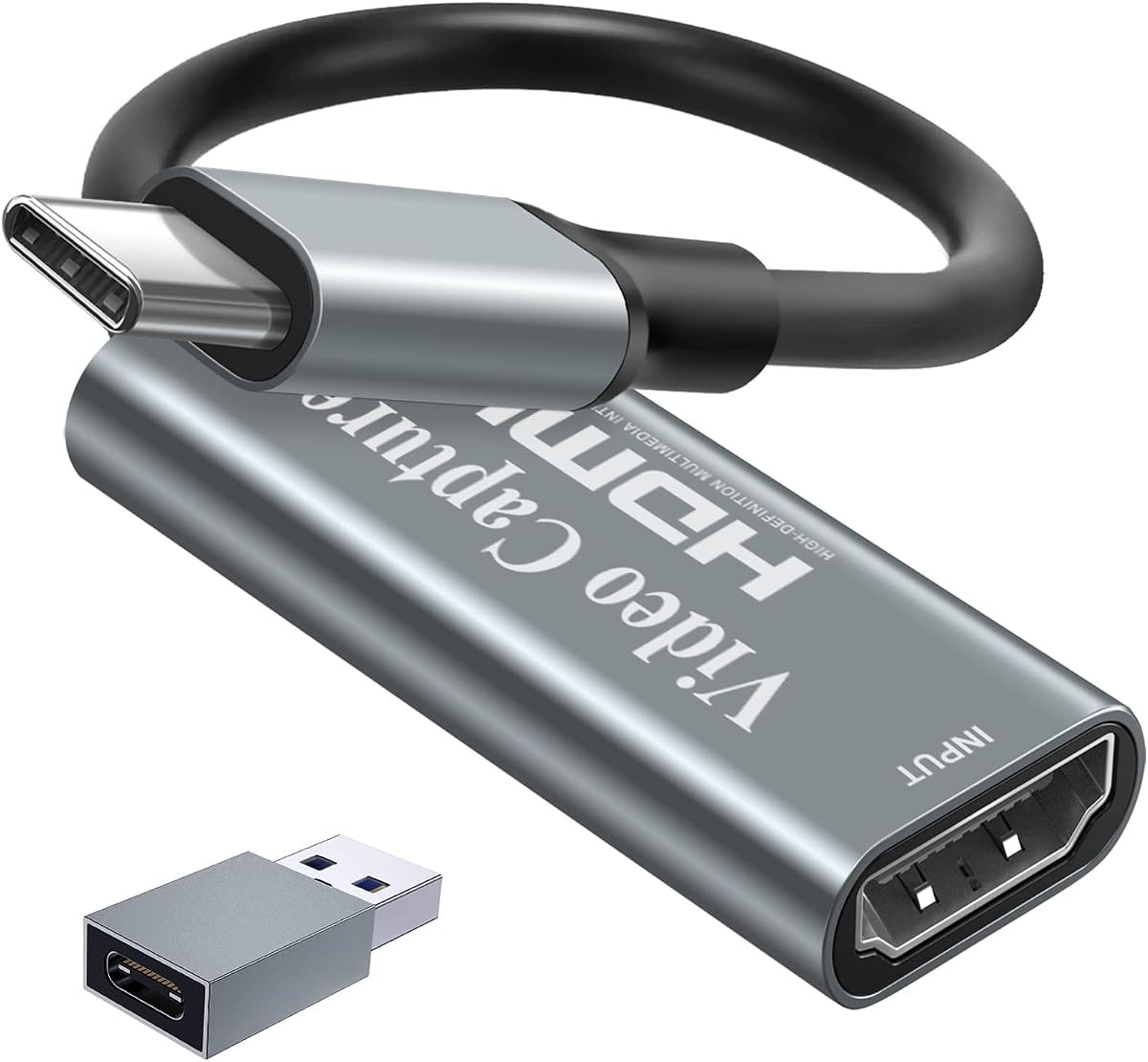
UGREEN 2K@30Hz 1080P 60FPS Video Capture Card
4.5Editor score
Supports Linux systems natively
Low latency 5 Gbps transfer
Dual USB A and C ports
This guide compares the top ten capture cards for Linux systems focusing on compatibility performance latency and software support for streaming and recording
Finding a reliable capture card for Linux can be challenging due to driver support and software integration. This guide highlights devices that work seamlessly with open-source tools like OBS Studio ensuring smooth streaming and recording experiences without unnecessary setup hurdles.
We evaluated ten top-rated capture cards based on their Linux compatibility video quality support and ease of use. Each product was assessed for its ability to handle high resolutions and frame rates while maintaining low latency for real-time broadcasting and content creation workflows.
Each pick showcases specific strengths such as plug-and-play functionality audio input options or hardware durability. Prices and availability change frequently so please check the latest listings before purchasing to ensure you get the best value for your specific Linux setup requirements.
4.5Editor score

4.4Editor score

4.2Editor score
This side-by-side comparison lists all ten featured capture cards with their key specifications to help you quickly identify which device meets your Linux streaming or recording requirements without extensive research.






This acer capture card offers a straightforward solution for Linux users needing basic HD capture capabilities. With a solid 4.4 rating it is designed for smooth streaming and recording without requiring complex driver installations.
We may earn a commission when you buy through this link, at no additional cost to you.
The device supports 4K input while outputting 1080P at 60Hz ensuring clear visuals for your audience. It includes a mic-in port for easy commentary which is useful for live streaming on platforms like OBS or VLC.
While it lacks premium features like HDR support or advanced audio routing the card delivers consistent performance for its class. The lack of driver requirements makes it particularly appealing for Linux environments where compatibility can be tricky.
This card is ideal for casual streamers or educators needing a simple setup. If you require advanced controls or higher resolution output you may want to consider more feature-rich options available in this guide.
The card recognizes instantly on Linux systems without extra software saving time on configuration.
Built-in mic-in ensures voice stays synchronized with video reducing post-production editing work.
We may earn a commission when you buy through this link, at no additional cost to you.
The UGREEN capture card stands out for its versatility offering both USB-A and USB-C connections. It supports Linux seamlessly and includes features like HDMI loop-out for real-time monitoring without latency.
We may earn a commission when you buy through this link, at no additional cost to you.
Its aluminum casing helps manage heat during long streaming sessions ensuring stable performance. The advanced chip manages high-bandwidth signals allowing for 4K input and smooth 1080P output at 60FPS.
While it requires driver installation on older Windows systems Linux users benefit from plug and play functionality. The lack of Fire TV compatibility is a minor drawback for some but does not impact general Linux usage.
This card suits content creators who need reliable connectivity and monitoring options. Its balanced feature set makes it a strong contender for both casual and professional streaming setups on Linux.
Both USB-A and USB-C ports ensure compatibility with various laptops and desktops without extra adapters.
HDMI loop-out allows you to preview gameplay on a monitor while streaming to your Linux system.
We may earn a commission when you buy through this link, at no additional cost to you.
The Guermok capture card is designed for portability making it easy to transport for on-the-go streaming. It supports Linux and offers ultra-low latency for smooth live gaming or video conferencing.
We may earn a commission when you buy through this link, at no additional cost to you.
Its aluminum alloy housing ensures effective heat dissipation during extended use. The card supports 4K input and outputs 1080P at 60FPS providing clear visuals for your recordings or streams.
Be aware that it only supports one-way transmission from HDMI to USB-C which limits flexibility for some users. Using the included adapter may result in USB 2.0 speeds if not connected properly to a USB 3.0 port.
This card is perfect for travelers or streamers needing a lightweight solution. Despite minor limitations it delivers reliable performance for most Linux-based content creation scenarios.
Small and lightweight design fits easily in bags for outdoor live streams or travel.
Built-in heat dissipation prevents overheating ensuring consistent output during long sessions.
We may earn a commission when you buy through this link, at no additional cost to you.
This Newhope capture card provides a straightforward method for capturing 1080P 60FPS video on Linux. It features a 4K pass-through and HDMI loop-out allowing you to play without delay while capturing.
We may earn a commission when you buy through this link, at no additional cost to you.
The mic-in port supports external commentary making it suitable for live gaming or teaching. It works with third-party software like OBS without needing additional drivers or power sources.
While it has a slightly lower rating compared to other options it remains a functional choice for basic needs. The lack of advanced features means it may not satisfy professional-grade requirements.
Ideal for users seeking simplicity this card handles everyday streaming tasks well. Check compatibility with your specific Linux distribution before purchasing to ensure smooth operation.
No driver installation required allows instant use with Linux systems and popular streaming apps.
Dedicated mic-in port lets you add voice commentary without needing extra audio interfaces.
We may earn a commission when you buy through this link, at no additional cost to you.
This compact capture card is engineered for creators on the go offering 1080P 60FPS capture with minimal latency. It supports Linux and integrates well with OBS and other streaming tools without setup hassles.
We may earn a commission when you buy through this link, at no additional cost to you.
The device features seamless passthrough allowing uninterrupted gameplay while you record. Its lightweight build makes it easy to carry to LAN parties or travel events.
Although it lacks advanced controls it delivers reliable performance for standard streaming needs. The lack of detailed documentation may require some trial and error during initial setup on Linux.
Best for mobile streamers this card balances portability with performance. It is a solid choice if you prioritize ease of use and transportability over high-end features.
Passthrough technology ensures you play without lag while your content is captured in the background.
Small form factor fits in any bag making it ideal for content creators who move often.
We may earn a commission when you buy through this link, at no additional cost to you.
This UGREEN card offers the best value for Linux users seeking high performance at a budget-friendly price. It supports 2K output and 1080P 60FPS ensuring quality video for streams or recordings.
We may earn a commission when you buy through this link, at no additional cost to you.
With 5 Gbps data transfer speeds it minimizes latency for smooth gaming. The aluminum alloy casing and tinned copper conductors ensure durability and signal integrity during use.
Note that you must disable HDCP on consoles like PS5 to use this card properly. It is unidirectional so USB inputs are not supported but this rarely affects standard capture workflows.
As the best budget pick it balances cost and functionality well. Linux users will appreciate the plug and play nature and wide software compatibility without breaking the bank.
Delivers high-speed transfer and stable signal quality at an affordable price point.
Aluminum casing and tinned copper wires protect against corrosion and heat during long sessions.
We may earn a commission when you buy through this link, at no additional cost to you.
This capture card delivers smooth 1080P 60FPS recording with support for high-resolution inputs up to 4K. It stands out for its built-in audio monitoring which enhances live streaming quality on Linux.
We may earn a commission when you buy through this link, at no additional cost to you.
The headphone output and mic input allow real-time audio adjustments reducing sync issues. It is recognized instantly on Linux without drivers and comes with a generous 18-month warranty for peace of mind.
While the output maxes at 2K the input capabilities ensure you capture high-quality source material. The package includes necessary cables simplifying setup for immediate use.
This card is great for users prioritizing audio quality and reliability. Its strong warranty and Linux support make it a dependable choice for regular content creators.
Built-in audio jacks let you monitor voice and game sounds instantly for better streams.
An 18-month warranty provides added security against defects during the initial usage period.
We may earn a commission when you buy through this link, at no additional cost to you.
The AVerMedia StreamLine MINI+ offers impressive 4K60 HDR passthrough making it suitable for high-end gaming on Linux. It maintains ultra-low latency ensuring near-instant response times during capture.
We may earn a commission when you buy through this link, at no additional cost to you.
You can choose from multiple video formats like NV12 or YUY2 to match your workflow. The included Streaming Center simplifies streaming to platforms like Twitch and YouTube without complex configurations.
Linux users may find documentation less extensive compared to Windows but the core functionality remains solid. The compact design is ideal for setups where space is at a premium.
This card is for users wanting advanced passthrough features. While Linux support is available checking community forums for specific distro tips can enhance your experience.
Supports HDR signals for accurate color reproduction on compatible displays during gameplay.
Software tools make broadcasting simple even for beginners with minimal technical knowledge.
We may earn a commission when you buy through this link, at no additional cost to you.
This Papeaso card focuses on simplicity offering plug-and-play operation with USB-C compatibility for modern devices. It supports Linux and avoids driver installations making setup quick and easy.
We may earn a commission when you buy through this link, at no additional cost to you.
The HDMI video capture card delivers fluid 1080P 60FPS video without freezing or noticeable delays. It works well for recording meetings or streaming casual gameplay on Linux platforms.
It uses USB 2.0 technology which might limit bandwidth for higher resolutions though 1080P remains stable. The package includes an adapter to connect to USB-A ports if needed.
Best for straightforward capture tasks this card is affordable and functional. Users with high-end 4K requirements might want to explore higher-speed USB 3.0 alternatives.
Native USB-C support connects directly to modern laptops without needing additional adapters.
Video transmission remains fluid without freezing ensuring smooth playback for viewers.
We may earn a commission when you buy through this link, at no additional cost to you.
The AVerMedia Live Gamer Ultra S is the premium choice for Linux users needing top-tier capture performance. It supports 4K60 HDR and VRR passthrough ensuring smooth gameplay on high-refresh displays.
We may earn a commission when you buy through this link, at no additional cost to you.
Capture 5.1-channel audio directly and enjoy ultrawide input support for expansive gaming setups. It integrates well with OBS and Streaming Center workflows providing professional-grade output.
This card commands a higher price but justifies it with advanced features and reliable Linux compatibility. Ensure your system has sufficient power to handle 4K processing effectively.
For serious streamers and professional content creators this device offers unmatched capabilities. It delivers the highest quality in this lineup for those who demand the best.
Supports 5.1-channel audio recording enabling immersive soundscapes for high-fidelity streams.
Handles ultrawide inputs and VRR for seamless capture on modern high-performance gaming rigs.
We may earn a commission when you buy through this link, at no additional cost to you.
Selecting the right capture card for Linux requires understanding hardware compatibility resolution requirements and software support. This guide outlines the key factors to consider for an optimal streaming experience.
Ensure the capture card explicitly supports Linux through UVC or generic drivers. Most modern cards work out of the box but checking community forums or manufacturer documentation can prevent surprises.
Verify that your Linux distribution recognizes the device without needing complex kernel modules.
Decide whether you need 1080P at 60FPS or higher resolutions like 4K. Most budget cards max out at 1080P while premium ones offer 4K60 HDR passthrough for professional quality.
Consider your internet bandwidth and PC capabilities before choosing higher resolutions to avoid lag.
Choose between USB-A and USB-C based on your laptop or desktop ports. USB 3.0 is essential for high-resolution capture to ensure sufficient bandwidth.
Look for dual interface options if you switch between devices frequently for better flexibility.
Low latency is critical for live streaming and competitive gaming. Cards with advanced chips often deliver near-zero latency for real-time monitoring without delays.
Check user reviews for reports of lag or sync issues on Linux systems specifically.
Mic-in ports allow direct voice commentary without extra interfaces. Some cards support headphone monitoring for real-time audio adjustments during streams.
5.1 audio capture is available on premium models for immersive sound recording.
Ensure the card works with OBS Studio VLC or your preferred streaming software on Linux. Most cards support open-source tools but some include proprietary streaming centers.
Check for compatibility with popular platforms like Twitch YouTube and Facebook for seamless broadcasting.
Aluminum alloy casings help dissipate heat during long sessions ensuring stable performance. Look for durable cable connectors and tinned copper conductors for better signal integrity.
A solid build reduces the risk of hardware failure during critical streaming events.
A longer warranty period like 18 months indicates manufacturer confidence. Responsive customer support can be valuable if you face driver or compatibility issues on Linux.
Check if the brand provides documentation specific to Linux distributions or community forums for help.
Connect the capture card to your computer using a USB 3.0 port and plug the HDMI cable from your console or camera into the input. Wait for your Linux system to recognize the device automatically without extra drivers.
Open your streaming software like OBS Studio and select the capture card as your video source. Adjust resolution and frame rate settings to match the card's capabilities for optimal quality.
Keep the card in a well-ventilated area to prevent overheating during long sessions. Regularly check cable connections and store the device in a protective case when not in use.
Most modern capture cards work on Linux without extra drivers thanks to UVC support. Always verify compatibility with your specific distribution before purchasing to ensure plug and play functionality.
Yes but you must disable HDCP on the PS5 console to allow the capture card to receive the signal. This setting is found in the console's video output options.
USB 3.0 is required for 1080P at 60FPS to ensure sufficient bandwidth. Using USB 2.0 may result in reduced resolution or frame rates due to bandwidth limitations.
Yes OBS Studio is fully compatible with most Linux-compatible capture cards. Simply select the device in the video source settings to start streaming or recording.
Many cards support audio passthrough allowing you to capture game sound directly. Some also have mic-in ports for commentary so you do not need extra audio interfaces.
Loop-out allows you to monitor gameplay on a second screen without latency. It is useful for competitive gaming but not essential if you only stream the final output.
This guide covered ten capture cards that deliver reliable performance on Linux systems. From budget-friendly options like the UGREEN 2K model to premium choices like the AVerMedia Live Gamer Ultra S there is something for every user.
Prioritize compatibility resolution and latency based on your specific streaming needs. Ensure your Linux setup supports the card's features to avoid unexpected compatibility hurdles.
Always verify current availability and check community feedback before purchasing. Prices and stock change frequently so staying updated ensures you get the best value for your setup.