
AULA S75 PRO
4.6Editor score
Built-in LCD Screen
Tri-mode Connectivity
Gasket Mount Design
Discover the top 75 percent mechanical keyboards for gaming and productivity. This guide compares features, switches, and build quality to help you choose.
Finding the right mechanical keyboard can transform your daily computing experience. A 75 percent layout offers a perfect balance between compact design and functionality. It keeps essential keys like arrows and function rows while saving valuable desk space for your mouse.
We evaluated ten top models based on build quality, switch feel, connectivity options, and customization features. Our comparison looks at gasket mounts, hot-swappable PCBs, and battery life to ensure you get the best value for your money today.
Each pick highlights specific strengths like wireless versatility or premium sound dampening. Prices and availability can change frequently, so check the latest details before purchasing. This guide helps you navigate the complex market of custom and pre-built mechanical keyboards.
4.6Editor score

4.4Editor score

4.4Editor score
This side-by-side comparison highlights the key specifications of all ten models. Use this table to quickly identify which keyboard matches your needs for connectivity, switches, and extra features like screens or knobs.

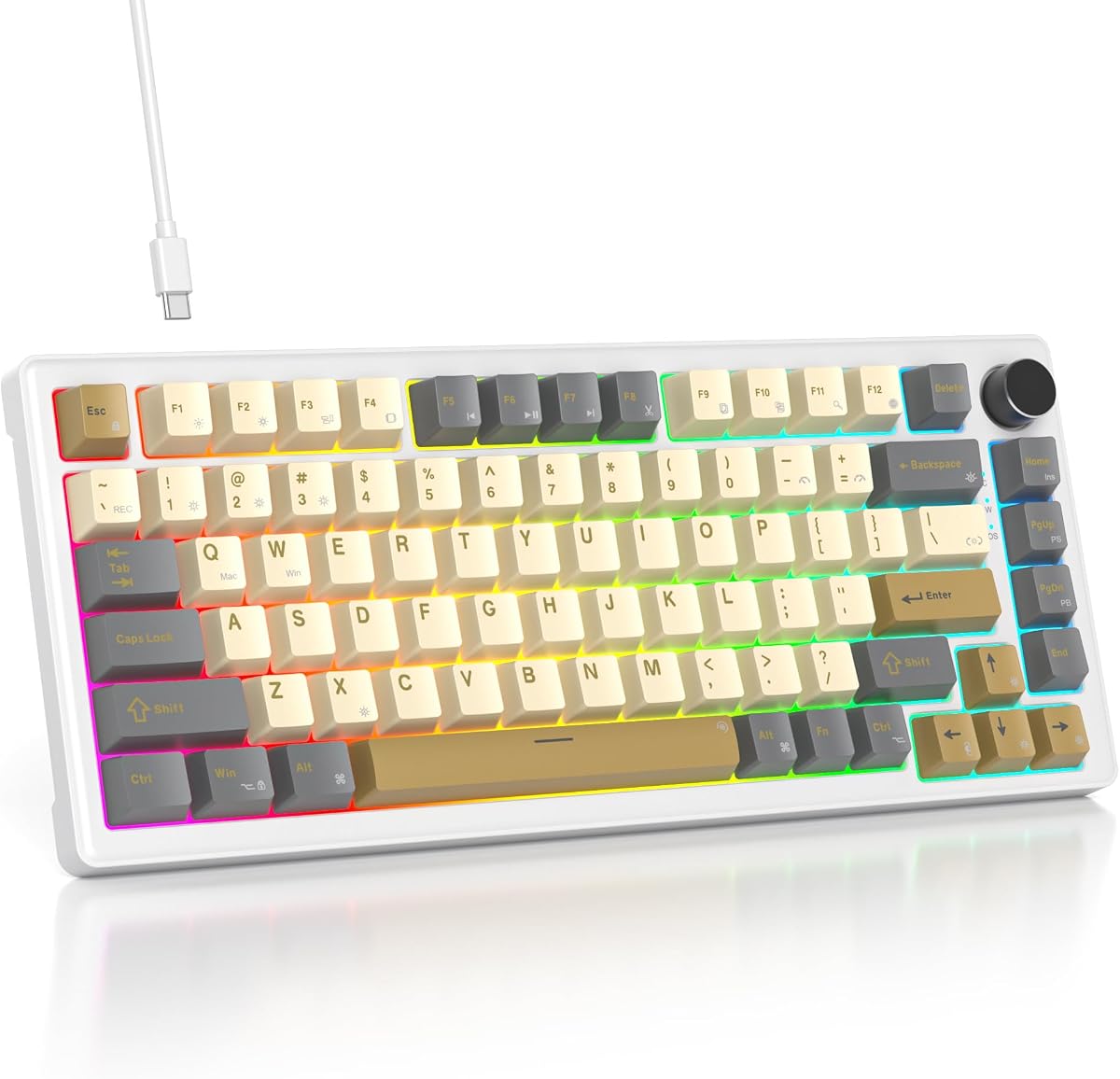


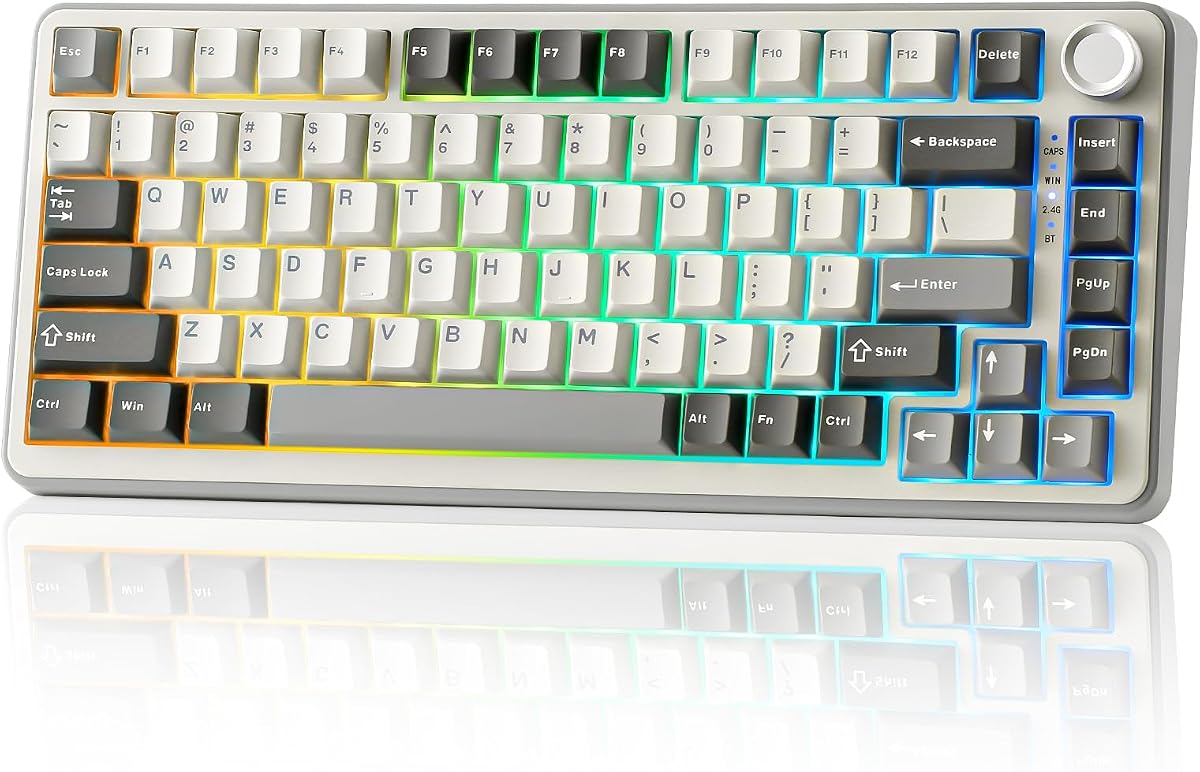

The RK ROYAL KLUDGE R75 stands out as the editor's choice for its balanced performance. With a 4.4 rating from users, it delivers a premium feel without the premium price tag. The gasket mount and pre-lubed switches create a satisfying typing experience immediately.
We may earn a commission when you buy through this link, at no additional cost to you.
Its creamy linear switches provide a smooth glide that reduces finger fatigue over long sessions. The five-layer sound dampening ensures that every keystroke feels isolated and quiet. You also get a robust PCB that supports 3-pin and 5-pin switches for future upgrades.
While the RGB lighting is vibrant, it can be intense in dark rooms, though you can adjust this. The software allows deep customization but might take a few minutes to understand fully. These are minor trade-offs for such a versatile mechanical keyboard.
This keyboard is perfect for typists and gamers who want a high-end feel. If you prioritize sound quality and customization, the R75 is the top recommendation on this list.
The five-layer padding and poron cotton effectively isolate noise and vibration.
Switch seamlessly between three devices using Bluetooth or 2.4GHz wireless modes.
We may earn a commission when you buy through this link, at no additional cost to you.
The AULA S75 PRO earns its place as the best premium pick with its unique LCD screen. A 4.6 rating highlights how much users appreciate the ability to see battery status and GIFs directly on the keyboard. It adds a futuristic touch to any setup.
We may earn a commission when you buy through this link, at no additional cost to you.
Beyond the screen, the tri-mode connection ensures you can link five different devices. The hot-swappable base supports 3-pin and 5-pin switches for DIY enthusiasts. Pre-lubed stabilizers provide a consistent and smooth typing experience across all keys.
The driver software is powerful but works best in wired mode on Windows, which limits Mac users. The price is higher than entry-level options, but the screen and build quality justify the cost for enthusiasts looking for unique features.
Choose this keyboard if you want a high-tech desktop experience with rich customization. It is ideal for streamers or power users who want visual feedback from their peripherals.
The built-in screen displays battery, time, and custom animations for added flair.
Integrated silicone pads and a solid PCB ensure a consistent typing feel.
We may earn a commission when you buy through this link, at no additional cost to you.
The Newmen GM326 is the clear winner for budget-conscious buyers seeking a 75 percent layout. With a 4.4 rating, it proves that you do not need to spend a fortune to get essential features like a volume knob and hot-swap support.
We may earn a commission when you buy through this link, at no additional cost to you.
Its compact wired design makes it perfect for travel or small desks. The linear red switches offer fast and smooth keystrokes for gaming. You can easily swap switches if you want to change the sound or feel later.
Being a wired keyboard limits mobility compared to wireless models. ABS keycaps can develop shine over time compared to PBT alternatives. However, at this price point, these trade-offs are acceptable for most casual users.
This is the ideal entry-level mechanical keyboard for students or those trying mechanical keys for the first time. It provides a solid foundation for learning about keyboards without a big investment.
The small size and detachable cable make it easy to carry anywhere.
A dedicated knob allows quick adjustment without using software or shortcuts.
We may earn a commission when you buy through this link, at no additional cost to you.
The AULA F75 Pro is a gaming-focused beast that balances performance with style. It holds a 4.6 rating thanks to its pre-lubed switches and reliable wireless connection. The side-printed keycaps give it a unique look that stands out on any desk.
We may earn a commission when you buy through this link, at no additional cost to you.
Gaming enthusiasts will appreciate the 2.4GHz mode which offers low latency similar to wired. The keyboard supports five devices and has a large battery for extended play. N-key rollover ensures your inputs are registered accurately even during intense fights.
The side-printed legends are stylish but might wear down faster than traditional prints. Some users find the lighting customization options slightly overwhelming at first. Despite these minor points, it is a strong choice for gamers.
If you want a keyboard that looks cool and performs well in matches, this is a great pick. It combines style and function perfectly for those who game regularly on multiple devices.
The 2.4GHz mode ensures fast response times for competitive gaming sessions.
Side-engraved PBT keycaps allow light to shine through for a modern look.
We may earn a commission when you buy through this link, at no additional cost to you.
The YUNZII B75 PRO is renowned for its acoustic performance and tactile comfort. A 4.6 rating confirms that users love the deep thocky sound produced by the gasket mount and five-layer padding. It feels like a custom build right out of the box.
We may earn a commission when you buy through this link, at no additional cost to you.
The Cocoa Cream V2 switches offer a smooth linear travel that is quiet yet satisfying. The wireless mode is reliable for both work and play. You get plenty of space on the 82 key layout for your mouse movements.
Mac users might find the customization software lacking compared to Windows users. The weight makes it less portable for daily commuters who move around often. These are small issues for a board that sounds this good though.
This keyboard is perfect for typists who enjoy a rich sound signature. If sound quality is your top priority, the B75 PRO delivers an immersive typing experience.
The floating mount design allows for natural movement and a softer typing feel.
Sound dampening layers reduce hollow echoes for a professional audio profile.
We may earn a commission when you buy through this link, at no additional cost to you.
The Keychron K2 V2 is the gold standard for Mac users needing a mechanical keyboard. Its layout is tailored for Apple devices with all the right function keys included. The Super Red switches provide a crisp and fast typing experience.
We may earn a commission when you buy through this link, at no additional cost to you.
Battery life is exceptional, lasting up to 72 hours on a single charge. The Bluetooth connection is stable and allows easy switching between three devices. It feels robust and well-built for daily heavy usage.
The lack of RGB lighting might be a downside for those who want colorful effects. The price is higher than some competitors, but the reliability and Mac compatibility are worth it. It is a solid investment for professionals.
If you are in the Apple ecosystem and need a reliable mechanical keyboard this is the top choice. It balances functionality and style perfectly for office and home use.
Includes all necessary Mac keys without needing to remap shortcuts.
The large battery ensures weeks of use between charges for heavy users.
We may earn a commission when you buy through this link, at no additional cost to you.
The Womier SK80 brings a unique color display to the affordable mechanical market. It holds a 4.7 rating for its vibrant visuals and satisfying typing feel. The display shows connection status and custom GIFs which adds a fun element.
We may earn a commission when you buy through this link, at no additional cost to you.
Its gasket mount design with EVA padding provides a cushioned feel that is rare at this price. The south-facing LEDs ensure your light goes through the keycaps effectively. You can enjoy music sync effects to match your mood or game.
The software options are somewhat limited compared to premium brands. The screen angle is fixed which might not suit every viewing preference. Still, it offers great value for those who want visual flair without breaking the bank.
This keyboard is great for gamers who want extra visual feedback on their setup. If you love customization and color, the SK80 offers a unique experience.
Display images and stats on the built-in color screen for instant feedback.
Music sync mode creates dynamic lighting effects that react to your audio.
We may earn a commission when you buy through this link, at no additional cost to you.
This wired model focuses on delivering a solid and quiet typing experience. The 4.6 rating shows that users appreciate the gasket mount and sound absorbing pads. It is a reliable tool for office work where noise is a concern.
We may earn a commission when you buy through this link, at no additional cost to you.
The PBT keycaps resist shine and wear better than standard ABS caps. You can swap switches easily thanks to the hot-swap sockets. The anti-ghosting feature ensures every keystroke is registered accurately during use.
Lacking wireless connectivity limits flexibility compared to other models. The software is functional but not as advanced as premium brands. Despite this, it offers great performance for those who prefer a simple wired setup.
Pick this keyboard if you prioritize build quality and quiet operation. It is a robust choice for daily work without extra distractions.
Sound absorbing pads ensure minimal noise for shared or quiet environments.
PBT keycaps provide a textured feel that lasts through years of typing.
We may earn a commission when you buy through this link, at no additional cost to you.
The V500 Retro blends modern mechanical tech with a nostalgic aesthetic. A 4.6 rating reflects user satisfaction with its smooth linear switches and sturdy gasket mount. It looks distinct on any desk while performing reliably.
We may earn a commission when you buy through this link, at no additional cost to you.
The white jade switches are pre-lubed for a smooth and quiet glide. Full-key programmability lets you create macros for productivity tasks. RGB lighting helps add a modern touch to the retro design.
It lacks wireless connectivity which might limit its use for some. The switch types are limited to the specific white jade option provided. However, for style seekers, it is a strong contender in the market.
This keyboard is best for users who value a unique look and smooth typing. If you want a vintage vibe with modern performance, the V500 is worth considering.
The retro design stands out while offering modern mechanical features.
Pre-lubed linear switches reduce effort and noise for comfortable typing.
We may earn a commission when you buy through this link, at no additional cost to you.
The MageGee MK-STAR offers a straightforward entry into mechanical keyboards. With a 4.1 rating it provides basic functionality without complex software. The red switches are perfect for gamers who need fast and linear actuations.
We may earn a commission when you buy through this link, at no additional cost to you.
It is a simple plug and play device that works well with Windows and Linux. The metal panel adds a touch of sturdiness to the build. Blue backlighting provides a classic gaming look for your desk.
The lack of software means you cannot remap keys or change complex effects. ABS keycaps may develop shine faster than other materials. Despite this, it is a great starter board for basic needs.
Choose this keyboard if you want a simple and cheap mechanical option. It is ideal for casual gamers who just want to get started without extra features.
Ready to use out of the box without installing drivers or software.
A metal panel ensures the keyboard stays stable during intense use.
We may earn a commission when you buy through this link, at no additional cost to you.
Selecting the right keyboard involves balancing features like connectivity, switches, and build quality. Here are key factors to consider before making your decision.
Wireless options like Bluetooth and 2.4GHz offer flexibility but add cost and battery management. Wired keyboards are simpler and cheaper but restrict mobility. Consider your workspace needs when choosing.
Prioritize wireless if you use multiple devices or want a clean desk. Choose wired for maximum reliability and lower price.
Linear switches are smooth and fast which suits gamers. Tactile switches give a bump for typists who want feedback. Clicky switches are loud but satisfying for some users.
Test switches if possible. Linear is best for gaming. Tactile or clicky is better for typing.
Hot-swappable PCBs let you change switches without soldering. This extends the keyboard life and lets you tweak sound or feel. Non-hot-swappable boards are cheaper but less flexible.
Always choose hot-swappable for future proofing. It is a small price increase for huge flexibility.
PBT keycaps are more durable and resist shine over time. ABS caps are cheaper and smoother but wear faster. Side printed or engraved legends last longer than dye sub.
Look for PBT keycaps for longevity. If budget allows, avoid ABS for heavy use.
Gasket mounts and foam padding reduce hollow sounds and vibrations. Boards with more layers often sound quieter and feel better. Consider if you work in a shared space.
Prioritize gasket mounts and foam for a premium feel. It improves comfort and sound quality.
Multimedia knobs and screens add convenience for volume and settings. RGB lighting enhances style. Drivers offer deeper customization but add complexity.
Decide if you need a knob or screen. Basic setups do not require extra features.
Wireless keyboards need sufficient battery capacity for daily use. 4000mAh is a good standard. Turn off RGB to extend usage if needed.
Check battery specs before buying. Ensure it lasts long enough for your workflow.
Ensure the keyboard works with your OS like Mac or Windows. Extra keycaps or driver support can make a big difference. Check connectivity requirements.
Verify OS support and switch options. Mac users should check layout differences first.
Use the provided software or hotkeys to customize lighting and macros. This enhances productivity and gaming performance. Adjust RGB brightness for your environment.
Clean the keyboard regularly by dusting or wiping with a damp cloth. Use compressed air for debris between keys to keep it functioning well.
For wireless models, charge the battery when needed to avoid sudden disconnects. Keep firmware updated for better stability and features over time.
Yes, they save space for mouse movement while keeping essential keys. The layout is compact but functional for most games. They also offer fast response and customizable lighting.
No, most modern 75 percent boards are hot-swappable. You can simply pull out old switches and press in new ones. Check if it supports 3 or 5 pin switches.
Most work with Mac but you may need to remap keys. Some brands like Keychron include Mac layouts. Always check product details for full compatibility.
It is a mounting style that uses foam for isolation. This reduces vibration and gives a softer typing feel. It is common in higher end custom boards.
Most rated for 50 million keystrokes. This ensures years of daily use without failure. Quality switches like Reds or Creams maintain feel over time.
Not with 2.4GHz models which perform like wired. Bluetooth may have slight delay. Check reviews for specific connection speed notes.
Yes, drivers or onboard controls allow quick changes. Most models have many preset modes. You can also create custom colors if supported.
Prices vary from budget options around $30 to premium models near $80. You get better build and features as price increases. Value options are available mid range.
We reviewed ten top models including the RK ROYAL KLUDGE R75 and AULA S75 PRO. Each offers unique strengths for different user needs. Find the best fit for your workflow.
Prioritize sound quality and hot-swappable features if you want a custom feel. Wireless is great for clean setups while wired offers reliability. Check your budget and OS needs carefully.
Prices may change so verify current deals before buying. We hope this guide helps you find a durable and comfortable mechanical keyboard for daily use.