
8Bitdo M30 Wired Controller
4.2Editor score
Officially licensed for Xbox
USB-C wired connection
3 customizable profiles
Discover the top fightpads for Xbox in 2026. This guide compares wired and wireless controllers, arcade sticks, and leverless pads for competitive gaming
Finding the right fightpad for Xbox can transform your competitive gaming experience. Whether you prefer a compact layout or a full arcade stick, the right controller offers precision and speed needed for fast-paced matches.
We evaluated ten top-rated controllers based on build quality, responsiveness, and compatibility. Each product was assessed for its suitability across popular fighting titles and its overall value for serious players seeking an edge.
This guide details key features, pros, and cons for each option. Remember that prices and availability may change over time. Check current listings to ensure you get the best deal on your chosen controller.
4.2Editor score
3.5Editor score

4.6Editor score
Below you will find a side-by-side comparison of all ten fightpads and arcade controllers featured in this guide. Use this table to quickly assess specifications and compatibility across the full range of options.


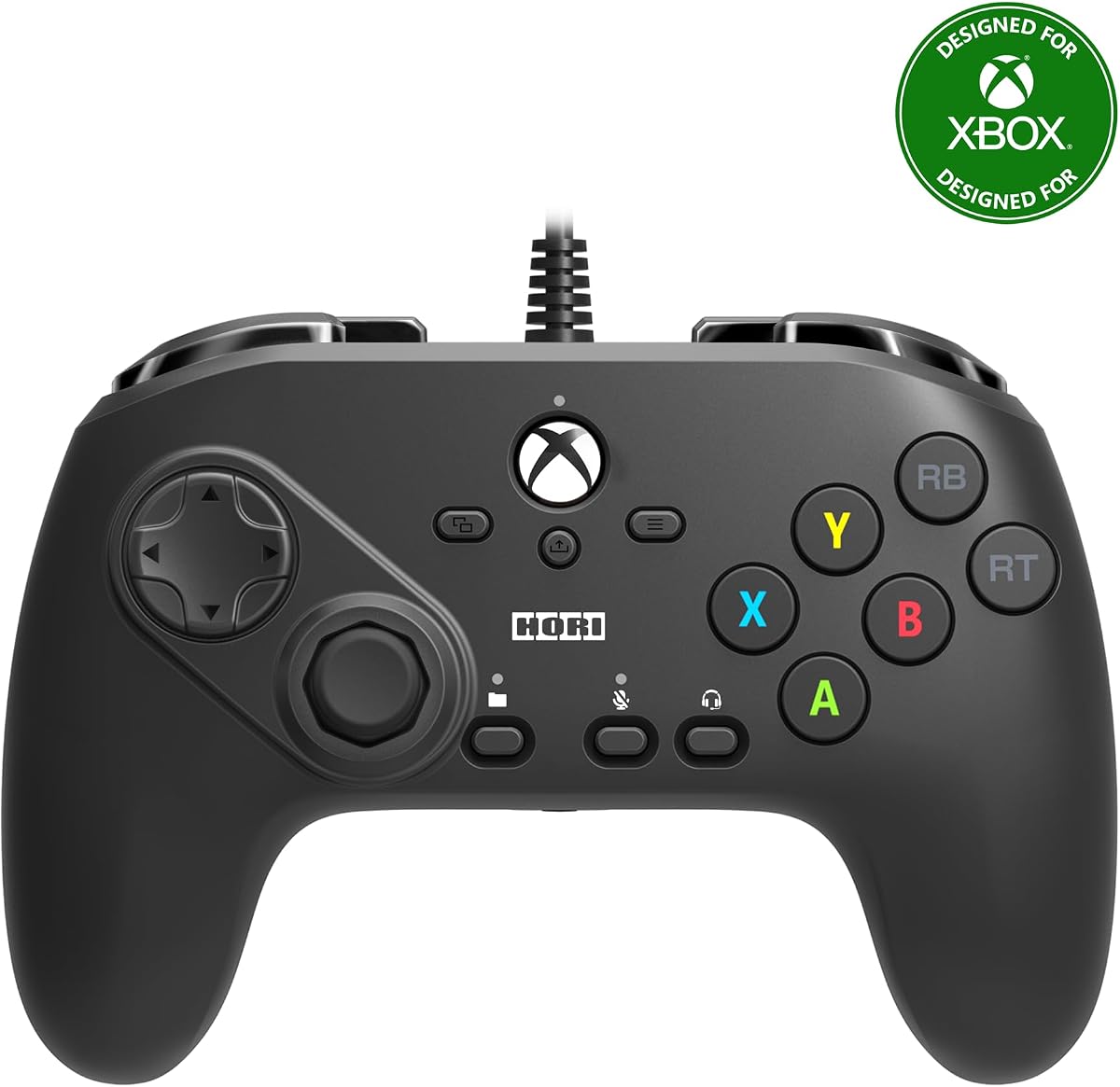
The HORI Fighting Commander Octa is designed specifically for fighting games on Xbox Series X and S. With a rating of 3.5, it offers a unique layout that prioritizes execution speed over traditional control schemes.
We may earn a commission when you buy through this link, at no additional cost to you.
Its six-button layout and micro-switch buttons provide immediate tactile feedback. The adjustable d-pad allows players to fine-tune their inputs, which is crucial for precise combo execution in competitive titles.
While the short throw analog stick aids speed, some users may prefer a standard stick for non-fighting games. The wired connection ensures zero latency but limits mobility compared to wireless options.
This controller is ideal for competitive players who need reliability and specific fighting game optimizations. The ability to save and switch between four profiles adds significant versatility for multi-game setups.
Micro-switch buttons reduce actuation force, allowing faster repeated inputs without finger fatigue during long sessions.
The companion app enables easy saving and switching of four distinct control profiles to match different game requirements.
We may earn a commission when you buy through this link, at no additional cost to you.
This Blanka-themed FightPad offers a nostalgic option for older Xbox 360 systems. With a rating of 3.9, it delivers a traditional arcade experience through a unique d-pad design.
We may earn a commission when you buy through this link, at no additional cost to you.
The enlarged circular floating D-Pad enhances directional accuracy significantly. Its 3-way switch allows it to function as an analog stick, bridging the gap between arcade and console controls.
However, its primary limitation is compatibility with legacy systems rather than modern Xbox Series consoles. The turbo feature adds depth but requires manual activation which might disrupt rhythm.
Buyers seeking a vintage controller for classic fighting games will find this pad appealing. It remains a collector's item for enthusiasts of the Street Fighter IV era on Xbox.
The 3-way switch enables the d-pad to mimic analog stick movements, offering versatility for games needing both inputs.
Built-in headset port allows direct audio connection for chat without needing additional adapters on the console.
We may earn a commission when you buy through this link, at no additional cost to you.
The 8Bitdo M30 offers excellent value with a solid 4.2 rating. It is officially licensed for Xbox and features a 6-button layout optimized for classic and fighting games.
We may earn a commission when you buy through this link, at no additional cost to you.
Its USB-C wired connection ensures zero latency, which is vital for competitive play. The support for 8BitDo Ultimate Software allows deep customization of button mapping and profiles.
While it lacks wireless functionality on Xbox, the reliable connection offsets this for stationary setups. The audio jack provides convenient headset access without compromising performance.
This controller is perfect for gamers seeking budget-friendly performance without sacrificing build quality. Its compatibility with Windows also expands its utility for PC fighting games.
Software support allows you to remap buttons to suit your preferred fighting game control scheme efficiently.
A dedicated custom profile button lets you switch between three saved setups instantly during gameplay.
We may earn a commission when you buy through this link, at no additional cost to you.
Rated 4.6, this wireless controller stands out with its leverless design and 2.4G connectivity for Xbox and PC. It is officially licensed for full compatibility.
We may earn a commission when you buy through this link, at no additional cost to you.
The quad-movement design delivers unmatched accuracy and speed for combos. Being hot-swappable means you can change switches to match your tactile preference without soldering.
Its ultra-thin compact form makes it ideal for travel, though the price reflects these premium features. The programmable buttons add extra utility for complex inputs.
Competitive players who value precision and portability will appreciate this controller. The ability to customize hardware components sets it apart from standard pads.
A unique all-button arcade layout ensures rapid inputs and reduces accidental presses during intense matches.
Kailh Wizard low-profile mechanical switches can be swapped to alter the feel and responsiveness of the controller.
We may earn a commission when you buy through this link, at no additional cost to you.
The HORI PAD Pro offers a standard layout with enhanced customization options. With a 4.2 rating, it appeals to players who want flexibility within a traditional controller format.
We may earn a commission when you buy through this link, at no additional cost to you.
Fine-tuning sensitivity and dead zones allows for precise control. The adjustable vibration feedback lets you tailor immersion levels per game or personal preference.
While it lacks a dedicated fighting layout, the profile switching helps adapt to different genres. It remains a solid choice for general Xbox gaming.
Buyers wanting customization within a standard form factor should consider this option. It bridges the gap between casual and competitive needs effectively.
Adjusting stick sensitivity helps correct drift or improve aiming precision across various game types.
Instantly switch between four saved profiles using a dedicated button, avoiding menu navigation.
We may earn a commission when you buy through this link, at no additional cost to you.
Developed with pro gamers, this stick is ideal for top fighting titles. Its 4.4 rating reflects high build quality and durability standards.
We may earn a commission when you buy through this link, at no additional cost to you.
The SANWA joystick and action buttons guarantee precision. Full button mapping via software allows extensive customization for specific game needs.
The textured palm rest ensures comfort during long sessions. Multiple joystick heads allow you to choose between lever and ball styles.
This stick is best for serious competitors investing in a durable, high-performance setup. The included tools and cables make it ready for immediate use.
SANWA parts are industry-standard for reliability, ensuring smooth movement and consistent button presses over years.
Three faceplate options and a template allow you to personalize the look of your stick to match your style.
We may earn a commission when you buy through this link, at no additional cost to you.
This is the first Xbox-licensed wireless arcade stick globally, rated 4.6. It bridges the gap between arcade feel and console convenience.
We may earn a commission when you buy through this link, at no additional cost to you.
Wireless 2.4G or wired USB provides flexibility. The fast-mapping and profile buttons simplify setup for different games or players.
Battery life supports up to 30 hours of play, reducing charge frequency. The audio jack ensures you never lose sound access.
Gamers who want the feel of a stick without cable clutter will love this. It maintains official licensing standards for full compatibility.
Eliminate cable drag with reliable 2.4G wireless tech, keeping your setup clean and flexible during matches.
Full support for 8BitDo Ultimate Software ensures easy remapping and profile management via PC or Xbox.
We may earn a commission when you buy through this link, at no additional cost to you.
Designed for Xbox Series X and S, this stick is rated 4.3 for its easy maintenance. The chassis opens to let you customize components quickly.
We may earn a commission when you buy through this link, at no additional cost to you.
Assignable buttons and a Key Lock Mode prevent accidental inputs. You can also swap top housing artwork to personalize your stick's look.
It includes Share and Profile buttons for modern functionality. Compatibility extends to Xbox One and Windows 10 for broad utility.
This stick is perfect for players who like to tinker with hardware. It offers professional features with user-friendly accessibility.
The chassis design allows quick access to internals for maintenance or part swaps without special tools.
Key Lock Mode disables unnecessary buttons during matches to prevent accidental pauses or menu interruptions.
We may earn a commission when you buy through this link, at no additional cost to you.
Using Kailh Star Mini Hall Effect switches, this controller is rated 4.2. It eliminates physical friction for long-term durability and rapid inputs.
We may earn a commission when you buy through this link, at no additional cost to you.
The rapid trigger is adjustable from 0.1mm to 2.8mm, giving precise control over actuation depth. The full-color LCD acts as a functional control hub.
Tournament Lock mode ensures compliance with competition rules by restricting simultaneous opposing inputs. It supports multiple platforms including PS5 with an adapter.
This controller is for tech-savvy players wanting next-gen responsiveness. Its SOCD management and customizable animations provide a unique competitive edge.
Contactless magnetic switches prevent wear and debris buildup, ensuring consistent performance over many years.
Adjust SOCD settings and upload animations via browser driver, turning the screen into an interactive interface.
We may earn a commission when you buy through this link, at no additional cost to you.
This controller is rated 4.3 for its competitive features and durability. It is fully compatible with Xbox Series X, S, and One.
We may earn a commission when you buy through this link, at no additional cost to you.
Dual trigger locks let you set shorter pulls for faster actions. Programmable rear buttons provide access to secondary functions without taking fingers off the sticks.
Textured grips keep your hands secure during intense gameplay. A detachable USB-C cable ensures portability and prevents snagging.
Ideal for shooters and fighting games needing speed. The dual rumble motors add depth to the feedback without affecting precision.
Adjustable trigger locks reduce pull distance for quicker shots or attacks during fast-paced matches.
Program rear buttons to mimic stick clicks or other functions, giving you an extra edge in competition.
We may earn a commission when you buy through this link, at no additional cost to you.
Choosing the right controller depends on your playstyle, budget, and preferred game titles. This section breaks down key factors to consider.
Fightpads typically offer a 6-button layout optimized for arcade inputs. Ensure the layout matches the game you play most to reduce hand strain.
Look for ergonomic designs that fit your hand size comfortably for long sessions.
Wired controllers provide zero latency, which is critical for competitive play. Wireless options offer convenience but check for potential interference or battery concerns.
Prioritize wired connections if you compete in tournaments where latency must be minimal.
High-quality switches and buttons ensure longevity. Materials like aluminum or reinforced plastic help withstand intense usage.
Check reviews for long-term durability claims to avoid premature wear.
Software support for button mapping and profiles allows you to adapt the controller to different games. Look for hot-swappable parts if you want to change tactile feedback.
A dedicated profile switch adds convenience during gaming sessions.
Ensure the controller is officially licensed for your console model. Some older pads may not work with Series X or S without adapters.
Check compatibility with PC if you plan to use it on multiple platforms.
A 3.5mm audio jack is useful for direct headset connections without using console ports. Extra features like vibration adjustments can enhance immersion.
Consider whether these features align with your gaming habits before purchasing.
Prices vary widely from budget pads to premium sticks. Assess whether advanced features justify the cost for your specific needs.
Invest in a controller that balances cost with the features you will actually use.
If you plan to compete, ensure the controller meets official rules. Some pads offer specific lock modes to prevent accidental button presses during matches.
Verify that the device has necessary certifications for competitive play environments.
To use your fightpad, connect it via USB or wireless receiver to your console. Navigate to the Xbox settings to confirm the controller is recognized.
If your controller supports software customization, download the companion app to map buttons and create profiles. Adjust sensitivity settings to match your comfort level.
Keep your controller clean by wiping it with a soft cloth. Avoid exposing it to moisture and store it in a dry place when not in use.
Fightpads are designed with layouts optimized for fighting games, offering faster inputs and better ergonomic positioning. They reduce finger fatigue during intense matches. However, standard controllers with adjustable features can also perform well if you are accustomed to their layout.
No, wired controllers are often preferred for competitive gaming due to zero latency. Wireless options are convenient for casual setups but may introduce slight delay. Choose based on your need for mobility versus precision.
Many modern fightpads are compatible with PC via USB or wireless adapter. Check the product specifications to confirm support for Windows 10 or higher. This allows for consistent performance across platforms.
Most fightpads come with companion software or hardware profile buttons. Download the app to remap buttons and save configurations directly to the controller. This allows quick switching between setups.
A precise d-pad is crucial for executing directional combos accurately. High-quality d-pads with clear tactile feedback help prevent accidental inputs. Some models offer adjustable or interchangeable d-pads for personal preference.
Most officially licensed controllers come with a standard manufacturer warranty. Always check the product listing or contact the seller for specific terms. Proper maintenance helps maximize the lifespan covered by these warranties.
We reviewed ten top fightpads and controllers ranging from budget-friendly pads to premium arcade sticks. Each option brings unique strengths tailored to competitive performance.
Prioritize build quality and input latency to ensure a smooth gaming experience. Customization features like profile switching add significant value for multi-game players.
Remember to check current prices and availability as details may change. Select the controller that best aligns with your specific gaming requirements and budget.