
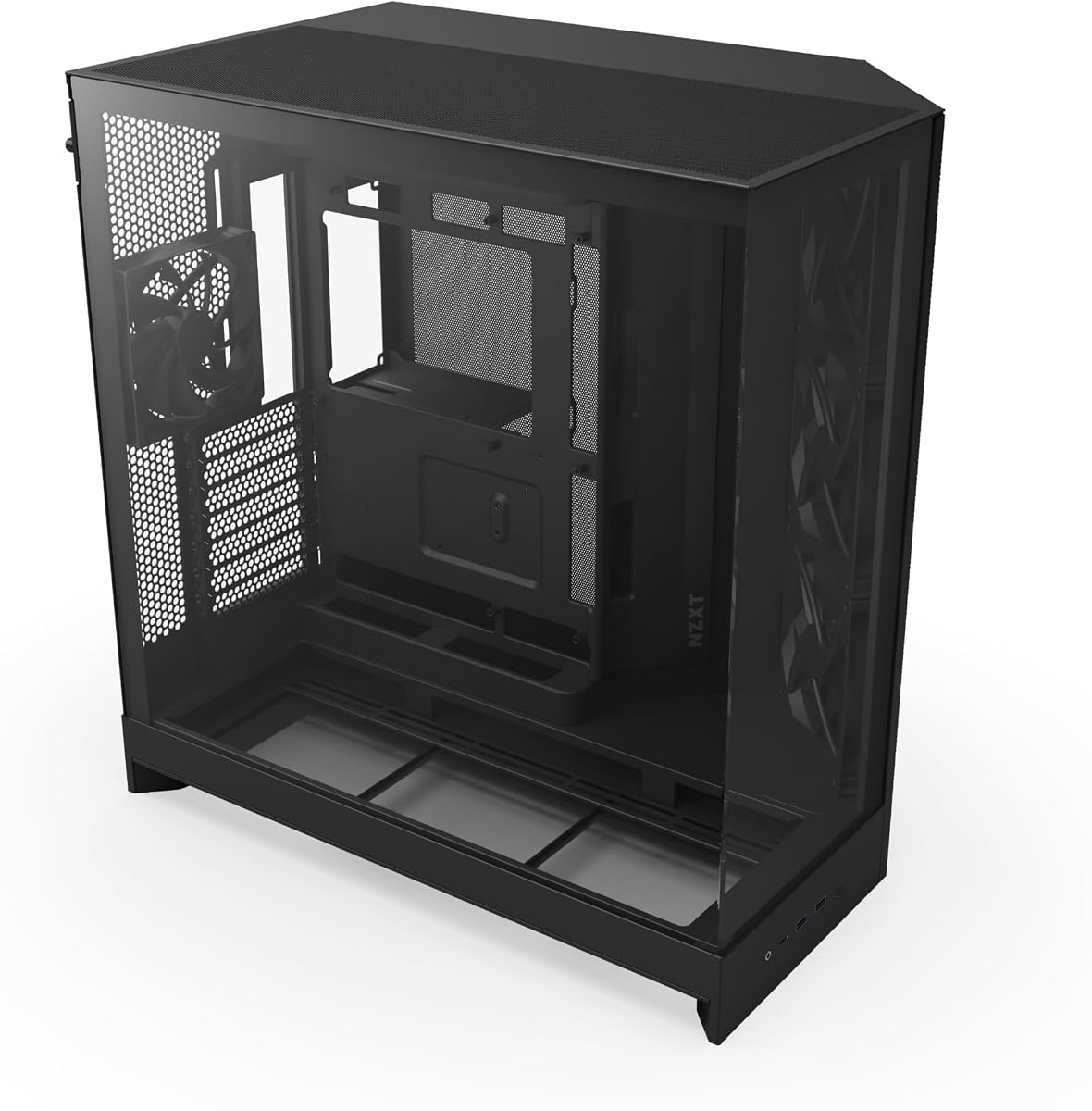
H1 HYXN ATX
4.4Editor score
Pre-installed RGB fans
Vertical airflow design
Spacious interior layout
This expert guide compares the top ten dual chamber PC cases for cooling and aesthetics to help you find the perfect build solution for your next gaming or
Dual chamber PC cases separate critical components like the power supply from your main hardware layout. This design improves airflow and cable management for cleaner builds.
We evaluated ten top models based on airflow efficiency, glass panel quality, and component support. Each pick balances performance with modern aesthetic standards.
Every review highlights real strengths and trade-offs for builders at any level. Please note that pricing and availability may change frequently online.
4.4Editor score
4.7Editor score

4.6Editor score
The following table breaks down key specifications for each model to help you compare cooling options, dimensions, and unique features side by side.


The NZXT H9 Flow stands out as a top choice for builders wanting a clean aesthetic and strong thermal performance. Its dual-chamber design effectively isolates the power supply from your main components, which helps reduce heat buildup in the CPU and GPU zones. This approach results in a tidy interior that looks professional and remains cool under load.
We may earn a commission when you buy through this link, at no additional cost to you.
Airflow is optimized through perforated steel panels and angled front-right fans that direct air efficiently. The case supports up to ten fans across multiple locations, giving you flexibility for custom cooling setups. It also fits large radiators up to 420mm on the top or front-right panels. Additionally, it is ready for back-connect motherboards to hide cables behind the board for an ultra-clean look.
While the pre-installed fans lack RGB lighting, they provide solid static performance for most builds. The top panel does not include a dust filter, so you may need to clean it regularly in dusty environments. However, the overall design prioritizes clean visibility and efficient heat removal, which suits enthusiasts who value performance and aesthetics equally.
If you want a case that balances cooling and looks without compromising on space, the H9 Flow is a strong recommendation. It works well for high-end gaming rigs and workstations that need room for large GPUs and advanced liquid cooling. This model delivers reliability and style in one package.
The dual-chamber layout separates the PSU from sensitive hardware, ensuring cooler operation and cleaner cable routing for a polished build.
Support for rear-connecting motherboards allows you to hide all cables behind the board, creating a truly seamless and professional aesthetic.
We may earn a commission when you buy through this link, at no additional cost to you.
The H1 HYXN ATX offers an impressive feature set for builders on a budget. It comes with seven pre-installed PWM ARGB fans that provide colorful lighting and decent airflow out of the box. The dual-chamber design separates hardware from the power supply to improve thermal efficiency and keep your build looking organized.
We may earn a commission when you buy through this link, at no additional cost to you.
This case uses a vertical airflow design with bottom and side intakes and top and rear exhausts. It supports up to two 360mm radiators at once and accommodates GPUs up to 400mm in length. The spacious interior makes it easy to install components and route cables without tight constraints. A dust filter on top and bottom helps reduce dust buildup over time.
Build quality may vary compared to premium models, and the fans can generate noticeable noise at high speeds. However, the daisy-chain wiring simplifies cable management significantly. You can control fan speeds through software, which adds flexibility for balancing noise and cooling performance.
For those seeking a visually striking and affordable solution, the H1 HYXN ATX delivers strong value. It is ideal for gamers who want ARGB lighting and liquid cooling support without a large price tag. This case provides all the essentials for a solid mid-tower build.
Seven pre-installed ARGB fans provide immediate style and cooling performance without needing extra purchases for a budget build.
Support for multiple 360mm radiators and large GPUs ensures you can upgrade hardware without needing a case swap later on.
We may earn a commission when you buy through this link, at no additional cost to you.
The HAVN HS 420 is designed for builders who prioritize top-tier cooling and a flawless visual experience. Its hybrid structure directs cool air from the bottom intake directly onto the GPU, which helps maintain stable temperatures during demanding tasks. The case supports up to eleven 140mm fans and multiple 420mm radiators for maximum airflow potential.
We may earn a commission when you buy through this link, at no additional cost to you.
A standout feature is the heat-formed UniSheet glass panel that curves tightly to minimize visual distortion. This design offers a panoramic view of your hardware without visible seams. The SimpliCable routing system with grooved guides keeps cables hidden and tidy, which enhances the overall look. An included VESA mount lets you attach a small display to show system stats.
While the price is higher than many competitors, the build quality and innovation justify the cost. Assembly may require more time due to the detailed cable guides and panel design. However, the vibration isolation pads on fan brackets reduce noise, and the adjustable GPU support bracket accommodates heavy cards securely.
For enthusiasts seeking the best combination of performance, aesthetics, and unique features, the HAVN HS 420 is a top pick. It is perfect for high-end gaming rigs that need exceptional cooling and a stunning display. This case sets a new standard for dual-chamber designs.
The hybrid airflow design and seamless glass panel ensure your components stay cool while showcasing every detail of your build.
SimpliCable guides and a 3-way GPU support bracket keep your interior organized and protect your hardware from sag or damage.
We may earn a commission when you buy through this link, at no additional cost to you.
The NZXT H6 RGB+ brings dual-chamber benefits to a smaller footprint without sacrificing performance. It features a single-piece curved glass panel that wraps around to a tight radius, minimizing distortion for a seamless view. The angled front-right fans deliver targeted airflow to your hottest components for effective cooling in a compact space.
We may earn a commission when you buy through this link, at no additional cost to you.
This case includes high-airflow mesh across the top, front-right, and right panels to maximize intake. A removable nylon filter at the bottom keeps dust out without restricting airflow. An adjustable GPU anti-sag bracket supports heavy modern graphics cards securely. You can customize fan layout with mounts for ten 120mm fans across multiple positions.
The main trade-off is that fans are not included, requiring additional purchase for optimal cooling. The price reflects the premium design and glass quality. However, the compact size makes it ideal for setups where desk space is limited. It supports ATX boards while maintaining a sleek aesthetic.
If you want a stylish, compact case with premium glass and smart cooling, the H6 RGB+ fits the bill. It suits small office setups or secondary builds that still need to look sharp. This model balances size and function effectively.
The seamless curved glass and compact footprint save space while delivering a premium look suitable for smaller desks.
Targeted airflow from angled fans and integrated GPU support bracket ensure stable performance even in tight conditions.
We may earn a commission when you buy through this link, at no additional cost to you.
The Thermaltake View 380 TG offers a clean visual style with pillarless front and side glass panels. It includes four ARGB Lite fans and supports hidden-connector motherboards for neat cable routing. This case provides a balanced solution for builders who want strong visibility and basic lighting without extra costs.
We may earn a commission when you buy through this link, at no additional cost to you.
Airflow is adequate with included hydraulic bearing fans. It supports radiators up to 360mm and GPUs up to 415mm. The I/O panel includes USB 3.2 Type-C and audio jacks. The solid construction and three-year warranty add reliability to its value proposition.
Fan capacity is limited compared to larger models, which may restrict extensive liquid cooling setups. However, the included fans and connector support make it a great starting point. It fits standard ATX boards and keeps your build organized and bright.
For those seeking a reliable and visually pleasing case without overspending, this model works well. It suits mid-range gaming builds or content creation setups. This case offers good quality for the price.
Pillarless glass panels provide a clear view of your components without visible barriers or supports.
Support for hidden-connector motherboards simplifies cable routing for a cleaner interior layout.
We may earn a commission when you buy through this link, at no additional cost to you.
The H2 HYXN ATX is a spacious case designed for high-end builds needing significant internal room. It comes with eight pre-installed ARGB PWM fans to deliver strong cooling out of the box. The dual-chamber layout separates the PSU from other components, improving airflow and cable management for a tidy build.
We may earn a commission when you buy through this link, at no additional cost to you.
This model supports GPUs up to 455mm and accommodates up to 420mm radiators or multiple 360mm units simultaneously. It is compatible with back-connected motherboards for hidden cable routing. An extra-large rear compartment with Velcro straps helps organize wiring efficiently. It fits various motherboard sizes from ITX to E-ATX.
The large dimensions require substantial desk space, which may not suit smaller setups. Fan quality is decent but may lack premium features like advanced speed control. However, the capacity for massive hardware and included lighting provides excellent value for serious enthusiasts.
If you need a case that fits cutting-edge hardware and supports advanced liquid cooling, this model is ideal. It works well for workstations or enthusiast gaming rigs. This case offers maximum flexibility for demanding builds.
Support for 455mm GPUs and 420mm radiators ensures your system can handle the largest components available.
Eight included ARGB fans and Velcro cable straps simplify setup while maintaining a colorful and organized interior.
We may earn a commission when you buy through this link, at no additional cost to you.
The Antec C8 Full-Tower offers an unobstructed view with seamless edge front and side panels. Its dual-chamber design separates components effectively, and it supports thick 360mm radiators on top, bottom, and side simultaneously. This case is ideal for enthusiasts who want complete control over fan placement and airflow.
We may earn a commission when you buy through this link, at no additional cost to you.
It provides space for three 140mm fans on the top or bottom and includes interchangeable brackets for 120mm or 140mm fans. The bottom panel features a full cut-out for easy fan access. The design prioritizes ventilation, allowing you to build a system optimized for maximum airflow or liquid cooling.
Because fans are not included, you will need to source them separately. This adds cost but ensures you pick fans matching your exact performance and noise preferences. The build is sturdy and offers ample space for E-ATX boards.
For custom cooling enthusiasts who value maximum airflow and visual openness, the Antec C8 is a standout choice. It suits large water cooling loops and complex builds. This case delivers freedom and flexibility for serious builders.
Full ventilation options allow you to place fans wherever you need to optimize cooling for your specific components.
Seamless edge panels and E-ATX support provide a clean look and space for large motherboards and components.
We may earn a commission when you buy through this link, at no additional cost to you.
The FOIFKIN F1 combines dual-chamber design with six pre-installed ARGB PWM fans to create a stylish and functional case. It separates hardware from the PSU to improve airflow and cable management. The full glass panels showcase your components clearly, while the design includes support for 360mm radiators.
We may earn a commission when you buy through this link, at no additional cost to you.
This case accommodates GPUs up to 400mm and supports ATX, M-ATX, and ITX boards. The I/O panel includes USB-C, multiple USB ports, and audio jacks. A dust filter helps keep components clean over time. The included fans offer immediate lighting and cooling without extra purchase.
Fan control may lack advanced software integration found in premium cases, and cable space is modest compared to larger models. However, the overall design balances style, function, and cost effectively. It is a solid option for budget-focused builders who want RGB.
For those seeking a clean look with immediate lighting and good thermal separation, this model works well. It suits mid-range gaming PCs. This case offers practical features at an accessible price.
Six included ARGB fans provide immediate style and cooling without requiring additional purchases for a budget setup.
Support for 360mm radiators and large GPUs ensures you can upgrade hardware without needing a case swap.
We may earn a commission when you buy through this link, at no additional cost to you.
The ASUS TUF Gaming GT502 features a dual-chamber design with distinct main and rear cooling zones for CPU and GPU. It includes a vertical GPU mount and a bundled support bracket to eliminate sag. Tool-free side panels allow easy access, while the panoramic tinted glass showcases hardware neatly.
We may earn a commission when you buy through this link, at no additional cost to you.
Front connectivity includes USB 3.2 Gen 2 Type-C and audio ports. The case is built for durability with robust materials and a design that supports independent cooling configurations. This approach helps maintain stable temperatures during demanding tasks. It fits ATX boards and offers ample space for large components.
The case is heavier than many others due to its solid construction, which may affect portability. Pricing is higher, reflecting its rugged build and specialized features. However, the convenience and strength make it a great choice for long-term use.
If you need a durable case with versatile mounting options and easy access, the GT502 is a strong pick. It suits gamers who value reliability and style. This case delivers strength and performance for demanding setups.
Included vertical GPU mount and support bracket let you display your graphics card proudly while avoiding sag.
Tool-free side panels and sturdy materials ensure quick maintenance and long-lasting durability for your system.
We may earn a commission when you buy through this link, at no additional cost to you.
The darkFlash DY470 stands out with a unique top-angled glass design that enhances aesthetic appeal and visibility. It features a dual-chamber layout supporting vertical GPU mounting for modern hardware. The case includes four PWM ARGB fans to provide immediate lighting and airflow.
We may earn a commission when you buy through this link, at no additional cost to you.
This full-tower case accommodates GPUs up to 410mm and supports dual 360mm radiators. Dust filters and velcro straps help maintain cleanliness and tidiness. The snap-on design simplifies installation and offers ample space for complex builds. It fits ATX boards and ensures good airflow for performance.
An RGB hub is not included, so you may need to add one to control lighting centrally. Assembly requires care to align the angled glass properly. However, the unique look and generous space make it a memorable choice.
For builders wanting a distinctive case with strong cooling and visual appeal, this model is worth considering. It suits enthusiasts who value design uniqueness. This case balances style and function well.
The top-angled glass design creates a unique look that makes your build stand out in any room.
Vertical GPU mounting and support for large radiators ensure you can use modern hardware without limits.
We may earn a commission when you buy through this link, at no additional cost to you.
Selecting the right dual chamber PC case requires balancing airflow, aesthetics, and component compatibility for your specific build needs.
A dual chamber design separates the power supply and drives from your main components like the CPU and GPU. This isolation improves thermal performance by reducing heat transfer and helps keep cables organized for a cleaner look. When choosing, verify that the chambers offer enough room for your PSU size and desired cable routing style.
Prioritize cases with clear separation to improve airflow and aesthetics.
Look for perforated panels, large intake areas, and support for multiple fans or radiators to ensure stable temperatures. Dual chamber cases often position intakes at the bottom or front to direct cool air onto hardware without blockage. Check fan mounting points and radiator support sizes like 360mm or 420mm to match your cooling solution.
Ensure the case supports your preferred cooling method with adequate fan and radiator options.
Tempered glass panels provide a window into your build, and designs vary from flat to curved to panoramic. Consider how the panels attach and whether they offer seamless views without visible seams or pillars. Some cases use tinted glass or angled designs for unique aesthetics and better visibility from different angles.
Choose panel styles that match your visual preferences and attachment preferences.
Verify that the case supports your motherboard form factor, GPU length, and CPU cooler height. Dual chamber cases often have generous clearance but can have restrictions on certain components like large PSUs or thick radiators. Check the maximum GPU and PSU dimensions to avoid fit issues with your planned parts.
Match the case dimensions to your specific hardware list to ensure proper fit.
Effective cable management systems include channels, Velcro straps, and tie-down points that hide wires behind the motherboard tray. Dual chamber designs often feature extra space in the rear or bottom to route cables neatly without obstructing airflow. Look for back-connect motherboard compatibility if you want a completely cable-free look.
Select cases with ample routing space and tools to keep your build tidy.
Some models include pre-installed fans with ARGB or PWM control to simplify setup, while others require you to purchase them separately. Consider whether you want immediate lighting and airflow or prefer customizing fan types and brands. Check if the included fans offer decent airflow and noise levels for your needs.
Decide if included fans or customizable options best suit your preferences.
Modern cases provide USB 3.2 Type-C ports along with standard USB 3.0 and 2.0 options plus audio jacks. Verify the port locations and speeds to ensure convenient access for peripherals like drives and headsets. Additional features like reset buttons or RGB controls on the I/O panel can enhance usability.
Ensure the I/O panel offers the ports and features you need for daily use.
Sturdy materials and solid construction contribute to longevity and ease of installation. Check for features like dust filters, tool-free panels, and secure mounting brackets for hardware like GPUs. A reliable warranty and responsive customer support can provide peace of mind during and after your build.
Look for durable construction and reliable warranty terms for long-term satisfaction.
Install your motherboard and components into the main chamber while routing cables into the dedicated rear or bottom channels to keep the interior tidy. Use Velcro straps or cable ties to bundle wires and ensure they do not block airflow paths within the case.
Regularly check dust filters on intakes and exhausts and clean them every few months to prevent airflow restrictions. Open panels using tool-free latches where available to avoid damaging glass or frames during maintenance.
Monitor temperatures using system software to confirm cooling performance and adjust fan speeds if needed. If you notice noise, consider replacing stock fans with quieter options or adjusting fan curves to balance cooling and acoustic output.
A dual chamber case separates the power supply and drives from the CPU and GPU zones to improve thermal performance and cable management. This layout reduces heat transfer to sensitive components and keeps cables organized for a cleaner look. It also allows for more efficient airflow by directing cool air to where it is needed most.
They can be better if designed with proper airflow paths such as bottom intakes and top exhausts. The separation allows for targeted cooling of hot components and reduces heat buildup in the main chamber. However, you still need to ensure the case supports enough fans or radiators for your cooling needs.
Most dual chamber cases support large GPUs up to 350mm or more, but you should check the specific clearance before buying. Some models include anti-sag brackets to support heavy graphics cards properly. If you plan to use a vertical GPU mount, verify that the case supports this feature explicitly.
Some models include pre-installed fans to simplify setup, while others do not. If fans are not included, you will need to purchase them separately to ensure proper airflow. Check the product details to see if PWM or ARGB fans are included and if they support software control.
Yes, they are often designed with ample room for components and cable routing. The separation of chambers makes it easier to route wires without crossing the main build area. Look for tool-free side panels and clear motherboard trays to simplify installation.
Most dual chamber cases come with removable dust filters on intakes and exhausts to keep components clean. These filters help reduce dust buildup and maintain consistent airflow over time. Cleaning them periodically is recommended to prevent clogging and ensure optimal cooling.
Our top picks include the NZXT H9 Flow for overall performance, the H1 HYXN ATX for budget value, and the HAVN HS 420 for premium features. Each model offers distinct advantages depending on your priorities such as cooling, aesthetics, or component capacity. Choosing the right case will impact your build quality and thermal efficiency significantly.
When selecting a case, prioritize airflow and component compatibility over style alone. Ensure the dimensions match your hardware and that the cable management tools help keep your interior organized. Investing time in choosing the right case will lead to a more stable and professional-looking build.
Please check current pricing and availability before purchasing since deals may change frequently. This guide aims to provide a comprehensive overview of the top options available this month. Thank you for reading and we hope this helps you make an informed decision.