
Behringer X AIR XR18
4.6Editor score
Tablet control
18 inputs
WiFi module
This guide compares the top digital mixing consoles for live sound and studio production, evaluating features like channel count, DSP power, and connectivity
Digital mixing consoles have revolutionized audio production by offering powerful processing and flexible routing in compact designs. Whether you manage a live event or record in a studio, the right console ensures clarity and control over your sound.
We evaluated ten leading models based on input capacity, built-in effects, connectivity options, and user interface design. Our analysis focuses on performance reliability, sound quality, and ease of use for professionals and enthusiasts alike.
Each pick highlights specific strengths like motorized faders, touchscreen controls, or remote operation capabilities. Note that availability and pricing may vary over time, so verify current stock before making your final selection.
4.6Editor score

4.7Editor score

4.2Editor score
The following table provides a side-by-side overview of key specifications for all ten consoles evaluated in this guide to help you compare features quickly.




The Behringer X32 stands out as a powerful digital mixing solution for live and studio environments. With a 4.7 rating, it delivers exceptional audio fidelity thanks to its MIDAS-designed preamps and robust DSP engine.
We may earn a commission when you buy through this link, at no additional cost to you.
Its 40 input channels and 25 buses provide ample flexibility for complex setups. The motorized faders allow for precise recall and scene management, while the LCD Scribble Strips simplify channel identification during performances.
While the learning curve may be steep for newcomers, the depth of control justifies the investment. The console supports DAW integration and remote editing, making it suitable for touring and fixed installations alike.
For professionals needing reliability and sonic excellence, the X32 remains a top recommendation. Its feature set ensures you can handle demanding audio tasks with confidence and precision.
The MIDAS-designed preamps deliver clean gain and low noise, ensuring professional sound across all inputs.
Motorized faders and recall scenes streamline operation for fast changes between songs or events.
We may earn a commission when you buy through this link, at no additional cost to you.
The Yamaha DM3 Standard offers a streamlined digital mixing experience in an ultracompact design. Rated 4.4, it combines renowned Yamaha sound quality with a versatile 22-channel configuration for smaller venues.
We may earn a commission when you buy through this link, at no additional cost to you.
A standout feature is the 9-inch touch screen which simplifies access to routing and EQ settings. The 96kHz sample rate ensures high-resolution audio, while the built-in USB interface supports direct recording to a laptop.
While it lacks the channel count of larger units, its size and ease of use make it ideal for mobile setups. The console balances performance and portability effectively for mid-sized applications.
Buyers seeking a user-friendly interface without sacrificing audio fidelity will appreciate this model. It is well-suited for podcast studios, small stages, and fixed installations needing a clean footprint.
The large touch screen provides easy navigation through mixing parameters without deep menu diving.
Built-in USB audio interface allows for multitrack recording without extra hardware.
We may earn a commission when you buy through this link, at no additional cost to you.
The Behringer WING is a powerhouse designed for extensive audio requirements with 48 channels and 28 buses. It boasts a 4.2 rating, reflecting its robust build and advanced connectivity options like AES50 for low-latency remote I/O.
We may earn a commission when you buy through this link, at no additional cost to you.
With 24 motorized faders and a large capacitive touch screen, the WING offers precision control over complex mixes. The touch-sensitive channel editing section allows for quick adjustments, enhancing workflow efficiency during live shows.
The cost and size may limit its appeal for smaller applications, but for major events, its scalability is unmatched. The ability to handle up to 144 input signals over three ports ensures future-proofing for growing productions.
This console is the ideal choice for large venues and touring bands needing maximum flexibility. Its premium features justify the investment for professionals demanding top-tier performance and control.
Three AES50 ports allow for ultra-low latency connection to remote stage boxes for expanded inputs.
Motorized faders provide instant visual feedback and recall for scene changes during performance.
We may earn a commission when you buy through this link, at no additional cost to you.
The Yamaha MGX12 earns a perfect 5.0 rating for its seamless blend of audio and video mixing capabilities. It is designed for presentations and content creators requiring integrated USB-HDMI interfaces for capturing visual feeds.
We may earn a commission when you buy through this link, at no additional cost to you.
Featuring a 4.3-inch touchscreen and tactile faders, this console simplifies workflow with assistive features like Auto Gain and Clip Safe. The powerful DSP processor ensures high-quality sound without external effects units.
While the routing is fixed compared to larger models, the ease of use is a major advantage. The included software bundle provides additional value for users starting out in recording or streaming environments.
For those hosting events with visual elements, the MGX12 is a top pick. Its design prioritizes speed and reliability, making it easy to manage complex setups without extensive training.
USB HDMI interface supports 4K video capture and pass-through for hybrid presentations.
Simple and Standard modes guide users through mixing tasks with minimal technical knowledge.
We may earn a commission when you buy through this link, at no additional cost to you.
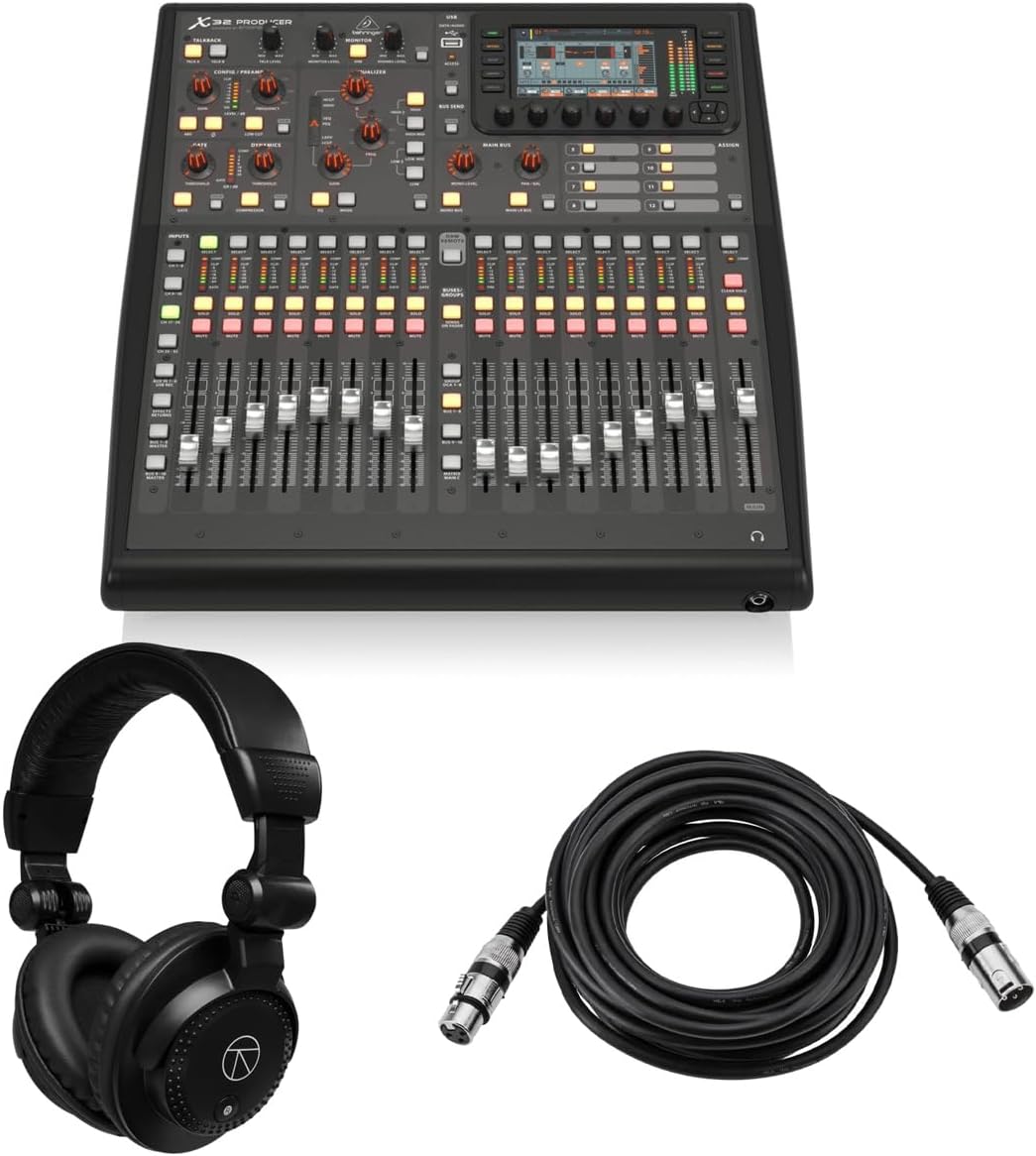
The Behringer X32 Producer is a rack-mountable version of the popular X32 series, rated 5.0 for its complete bundle and performance. It delivers high-quality audio with MIDAS preamps and includes headphones and cables for immediate setup.
We may earn a commission when you buy through this link, at no additional cost to you.
Its 40 input channels and 25 buses provide extensive mixing power within a compact chassis. The built-in effects engine and 5-inch display offer professional tools while maintaining a simple workflow for live applications.
While it requires rack mounting which may add installation time, the value proposition is strong for those needing a portable studio. The bundle saves additional costs on accessories often required to start mixing.
This model is ideal for touring sound engineers or fixed installations where space is limited. It combines the features of a full console with the convenience of included essentials for quick deployment.
Includes professional headphones and XLR cables reducing initial setup costs significantly.
Designed to fit standard racks saving floor space while maintaining full console power.
We may earn a commission when you buy through this link, at no additional cost to you.
The Behringer X32 Compact retains the powerful engine of the original in a smaller frame. With a 4.7 rating, it offers 40 input channels and MIDAS-designed preamps, making it a robust option for studios with limited space.
We may earn a commission when you buy through this link, at no additional cost to you.
Motorized faders ensure scene management is efficient, while LCD Scribble Strips maintain intuitive channel distinction. The reduced physical size makes it easier to transport without sacrificing the core mixing capabilities users expect.
While it has fewer outputs than the full version, it remains highly versatile for most applications. The trade-off in physical size allows for greater flexibility in mobile setups or smaller rooms.
Buyers needing a balance of power and portability will find this model attractive. It proves that high-end audio processing does not require a massive console footprint.
Smaller physical design fits easily into mobile racks and small mixing booths.
Maintains key X32 features like MIDAS preamps and motorized faders for consistent quality.
We may earn a commission when you buy through this link, at no additional cost to you.
The PreSonus StudioLive Classic 16.0.2 is a well-established mixer with solid integration options for software like Studio One. Rated 3.9, it offers straightforward control and powerful Fat Channel processing for clean sound shaping.
We may earn a commission when you buy through this link, at no additional cost to you.
It features Class A XMAX preamps that deliver warm and clear signal capture. The USB interface allows direct recording of all channels while the mixer supports MIDI I/O for controlling external devices and effects recall.
Although the design is dated compared to newer touchscreen models, it remains reliable for users who prefer physical buttons. The included software adds value for those building a complete recording environment at home.
This console is suitable for home studios needing basic live mixing and recording. It provides a stable platform for learning digital mixing concepts without overwhelming complexity.
Includes DAW software to start recording sessions immediately after unboxing.
Built-in EQ and compressor on every channel for rapid sound shaping.
We may earn a commission when you buy through this link, at no additional cost to you.
The Behringer X AIR XR18 offers a cost-effective entry into digital mixing with robust tablet control features. Rated 4.6, it is designed for iPad and Android users, allowing complete mixing access via a dedicated app.
We may earn a commission when you buy through this link, at no additional cost to you.
Its integrated Wi-Fi router enables direct connection without needing external hardware. The 16 MIDAS-designed preamps provide audiophile quality sound, ensuring your mix remains professional despite the compact size.
The lack of physical faders means you rely on the screen which may take adjustment for some. However, the flexibility and savings make it a top pick for mobile DJs and house of worship setups.
For budget-conscious buyers needing wireless flexibility, this model is highly recommended. It delivers premium audio components in a user-friendly package that simplifies remote control tasks.
Built-in Wi-Fi allows mixing from anywhere in the venue using a tablet.
Uses high-quality preamps to ensure clear vocal and instrument capture.
We may earn a commission when you buy through this link, at no additional cost to you.
The Allen & Heath Qu-5 delivers exceptional audio quality with 96kHz FPGA processing. This model supports up to 38 inputs and offers a flexible mixing architecture suitable for demanding live environments and recording tasks.
We may earn a commission when you buy through this link, at no additional cost to you.
With a 7-inch capacitive touchscreen and 17 motorized faders, the interface provides precise control. The USB-C multitrack recording capability supports professional workflows ensuring every detail is captured accurately.
While some users note a learning curve, the performance quality justifies the time investment. The mix of connectivity options including AES3 and SLink expansion port future-proofs the console for evolving needs.
Professionals requiring high-fidelity sound and robust expansion will find this console ideal. It balances power and usability for those who prioritize audio purity and workflow efficiency.
XCVI FPGA Processing ensures ultra-low latency and exceptional audio quality at high sample rates.
Multiple expansion options allow for extensive I/O without physical limitations.
We may earn a commission when you buy through this link, at no additional cost to you.
The QSC TouchMix-16 combines portability with professional features in a compact design. Rated 4.4, it comes with a carrying bag making it ready for mobile work without needing extra accessories.
We may earn a commission when you buy through this link, at no additional cost to you.
Its 20 full-function inputs and flexible EQ settings allow for quick sound optimization. The TRS Aux outs can drive wired in-ear monitors directly supporting modern monitoring standards for performers.
While advanced users might find the routing limits compared to open systems, the simplicity speeds up setup. The mix includes robust compression and gating on all channels for reliable performance.
For mobile DJs and small band leaders, this mixer is a dependable choice. Its design ensures you can get great sound anywhere without carrying heavy equipment or complex gear.
Comes with a dedicated bag to protect the mixer during transport to gigs.
Aux outputs support in-ear monitors giving performers better stage sound.
We may earn a commission when you buy through this link, at no additional cost to you.
Selecting the right digital mixing console requires understanding your specific audio needs and operational environment. This guide covers key factors to consider before purchasing.
The number of input channels determines how many microphones and instruments you can connect simultaneously. Ensure the console supports your maximum expected input count plus extra capacity for future needs.
Choose a model with enough channels to handle your busiest scenarios without requiring external mixers.
Digital signal processing (DSP) power affects how many effects and EQ bands you can use simultaneously. High-end models offer more flexibility for complex mixes and live sound reinforcement.
Look for consoles with robust processors to support your desired sound quality and effect density.
Interfaces range from physical faders and knobs to touch screens and remote tablet apps. Consider your preference for tactile control versus digital navigation when selecting a unit.
Ensure the layout matches your workflow style to minimize setup time and errors during events.
Check for essential connections like USB audio interfaces, Ethernet for remote control, and digital expansion ports. Compatibility with your existing gear is crucial for a smooth integration.
Verify that the available outputs meet your speaker and monitor requirements to avoid extra hardware costs.
Size and weight matter significantly if you transport gear regularly. Compact models are easier to move but may sacrifice inputs or outputs compared to larger units.
Choose a size that fits your transport vehicle and storage space while maintaining necessary functionality.
Pricing varies widely based on features and build quality. Determine how much you can spend while ensuring the console meets professional standards.
Compare feature sets against costs to find the best value for your specific use case.
Many modern consoles include software bundles for recording or scene management. These tools enhance workflow by simplifying file transfer and mixing tasks.
Look for models with strong software support to maximize productivity outside the physical mixer.
Live applications demand rugged construction that can withstand frequent transport and environmental changes. Check for reinforced chassis and reliable connectors.
Invest in a durable unit to ensure long-term performance and reduce replacement costs over time.
Begin by connecting all input and output cables securely before powering on the console. Verify signal paths to ensure sources are routed correctly to your main outputs.
Utilize scenes and presets to save settings for different events reducing the need for manual adjustments between gigs.
Regularly update firmware to access new features and security patches that improve overall system performance.
Digital consoles offer higher flexibility and recallability for settings. They provide built-in processing and effects that eliminate the need for external hardware. This leads to lighter setups and faster scene changes.
Yes most models feature USB audio interfaces for direct recording. You can send multiple channels to a DAW for multitrack capture. This simplifies the recording workflow significantly.
No most consoles operate independently as standalone units. However a computer or tablet is often used for deeper editing or remote control. It depends on the workflow you prefer.
MIDAS preamps are designed to provide high gain and low noise. They ensure clean audio capture from microphones especially in live environments. This results in better overall sound quality for your mix.
Motorized faders automatically move to match stored scenes. This allows you to recall specific settings quickly without manual adjustment. It streamlines the process between songs or events.
Yes wireless interfaces are generally robust when using dedicated networks. Ensure your Wi-Fi or Ethernet connection is stable to prevent dropouts. Testing before the event is highly recommended.
We reviewed ten top digital mixing consoles ranging from budget-friendly units to professional-grade systems. Each offers distinct strengths in channel count, interface design, and processing power.
Prioritize features like preamp quality and connectivity options that match your specific production needs. Consider whether you require remote control or high channel count based on your typical events.
Always check current availability and specs before purchasing to ensure the model meets your expectations. The right console will elevate your audio quality and simplify your workflow.