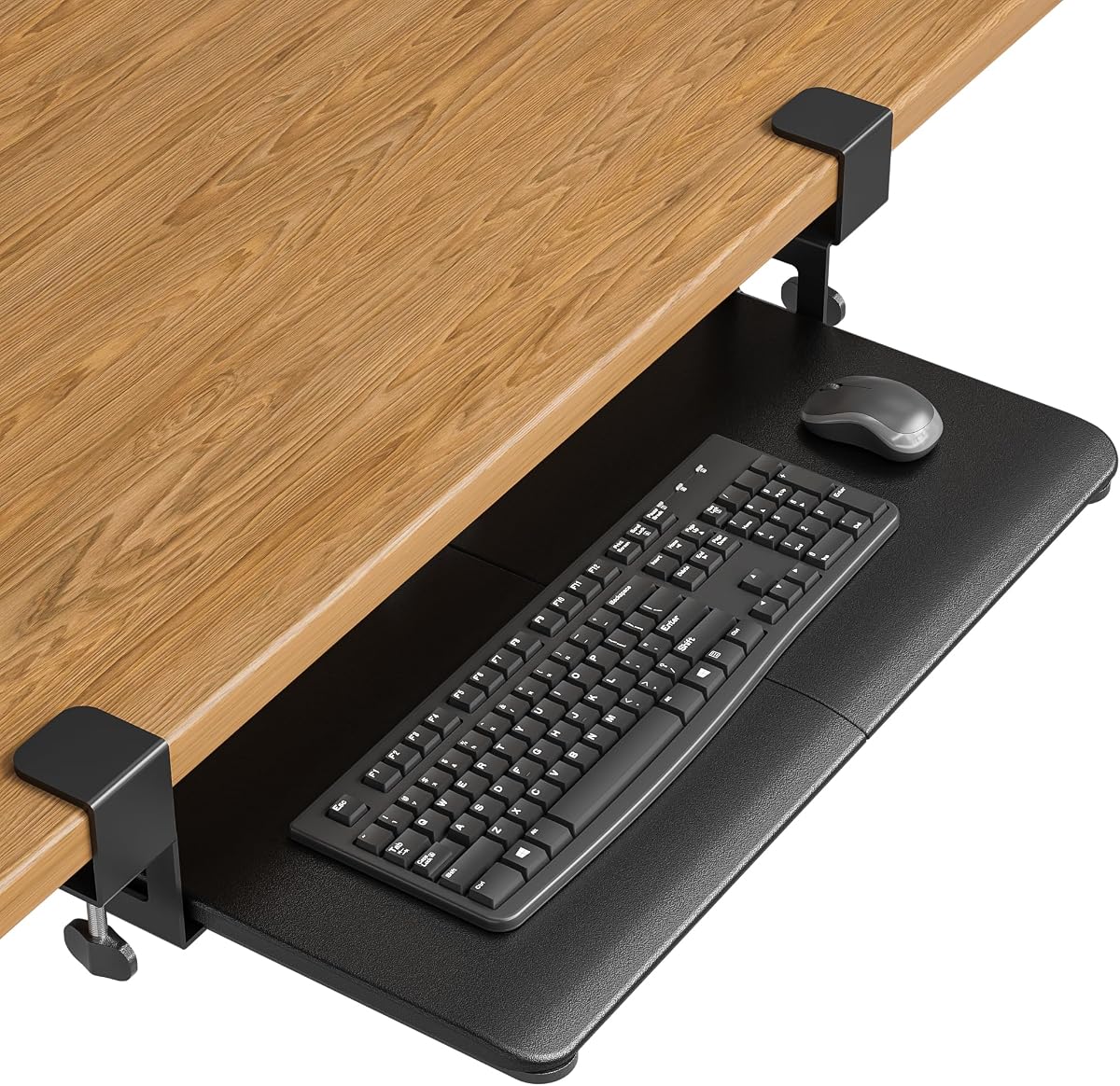
BONTEC Under Desk Keyboard Tray
4.4Editor score
No-drill installation
Fits desks up to 1.97 inches thick
Spacious 25.6 by 11.8 inch platform
Finding the right clamp on keyboard tray can transform your workspace by freeing up valuable desk surface for monitors and documents. A good tray supports ergonomic typing angles and reduces strain on your wrists and shoulders during long work sessions.
We compared ten leading models based on build quality, adjustability, and compatibility with different desk types. Our analysis focuses on features like tilt options, clamp strength, and ease of installation to help you make an informed decision.
Each pick highlights key strengths and potential limitations so you can choose the best fit for your setup. Please note that product availability and pricing may change over time so verify details before purchasing.
4.4Editor score

4.4Editor score

4.3Editor score
As an Amazon Associate we earn from qualifying purchases.
The following table provides a side-by-side comparison of all ten models including their dimensions, weight capacity, and key features to help you quickly identify the best option for your needs.


The VIVO MOUNT-KB05E stands out as a reliable choice for those seeking a straightforward clamp on keyboard tray. With a solid 4.4 rating, it delivers essential ergonomic benefits without unnecessary complexity.
We may earn a commission when you buy through this link, at no additional cost to you.
This model features sturdy C-clamps that attach securely to desks up to 1.25 inches thick. The tray extends 8.5 inches from the desk edge providing ample room for keyboard and mouse movements while freeing up desktop space.
While it offers adjustable angles to reduce strain, it lacks tilt functionality found in higher-end models. Additionally ensure your desk has enough clearance since the total length from clamp to clamp is 32.5 inches.
Ideal for home offices and standard workstations this tray balances affordability with functionality. It is a strong recommendation for users prioritizing space savings and basic ergonomic support.
Hiding your keyboard below the desktop creates a cleaner look and more room for other work essentials.
Adjustable angles help maintain a neutral wrist position reducing discomfort during extended typing sessions.
We may earn a commission when you buy through this link, at no additional cost to you.
The VIVO MOUNT-KBST1 offers enhanced customization with both height and width adjustments. This flexibility makes it suitable for various desk setups and user preferences.
We may earn a commission when you buy through this link, at no additional cost to you.
It features 2.4 inches of total height adjustment with five set points allowing you to find the ideal typing position. The tray also includes wrist and mouse pads adding comfort right out of the box.
While the adjustability is a major plus, the tray may not fit beveled edges which limits compatibility for some users. Ensure your desk thickness is within the 3.4 inch limit for secure clamping.
This model is excellent for users who need precise ergonomic tuning or have thicker desks. It provides a comprehensive solution for comfort and workspace organization.
Adjusting the width allows you to optimize space based on your keyboard and mouse setup.
Wrist and mouse pads reduce strain and enhance the typing experience without extra purchases.
We may earn a commission when you buy through this link, at no additional cost to you.
The VIVO MOUNT-KB04CB introduces rotation capabilities that allow you to pivot the tray as needed. This feature is particularly useful for users who share desks or need to access the surface from different angles.
We may earn a commission when you buy through this link, at no additional cost to you.
A single desk clamp secures the tray while permitting full 360 degree rotation. When not in use, you can rotate it under the desktop to discreetly store it and reclaim desk space.
Keep in mind that rotation requires sufficient clearance around the clamp. Additionally, this model does not work with lipped or beveled edges which may limit its use in some offices.
This tray is ideal for collaborative workspaces or those who value versatility. It combines functionality with a compact design that adapts to different needs.
Rotation allows multiple users to access the keyboard and mouse without reconfiguring the setup.
Rotating the tray under the desk keeps your workspace tidy when the keyboard is not in use.
We may earn a commission when you buy through this link, at no additional cost to you.
The BONTEC Under Desk Keyboard Tray offers excellent value for those seeking a cost-effective solution. It provides all the essential features needed for ergonomic typing without a high price tag.
We may earn a commission when you buy through this link, at no additional cost to you.
Installation is straightforward with no-drill C-clamps that secure to desks up to 1.97 inches thick. The spacious 25.6 by 11.8 inch platform accommodates most standard keyboards and mice comfortably.
Before purchasing ensure your desk meets the width and depth requirements for smooth operation. Also verify that your desk edges are flat as beveled or rounded edges may prevent proper installation.
This tray is a smart choice for budget-conscious users who do not want to compromise on basic functionality. It delivers reliable performance and space-saving benefits at an accessible price.
You gain ergonomic benefits without spending excessively on premium features you may not need.
The no-drill clamps allow for quick installation without damaging your desk surface.
We may earn a commission when you buy through this link, at no additional cost to you.
The VIVO MOUNT-KB05HT elevates ergonomics with nine distinct tilt settings ranging from positive to negative angles. This level of control helps users find the most comfortable typing position for long sessions.
We may earn a commission when you buy through this link, at no additional cost to you.
In addition to tilt, the tray features height adjustable side brackets and swivel clamps that rotate 90 degrees. These features provide extensive customization for corner or standard desk setups.
The premium price reflects the advanced adjustability and robust construction. However users with beveled edges should note this model is not compatible with those surfaces.
This is the ideal choice for professionals who prioritize ergonomic precision and have the budget for premium features. It offers unparalleled flexibility for optimizing your workspace.
Nine tilt positions allow you to fine-tune the angle to match your natural posture.
Rotating clamps and adjustable brackets make it easy to fit various desk types.
We may earn a commission when you buy through this link, at no additional cost to you.
The VIVO MOUNT-KB10C is tailored for L-shaped workstations with swiveling C-clamps that secure to corner desks. This specialized design ensures stability and proper alignment on non-standard surfaces.
We may earn a commission when you buy through this link, at no additional cost to you.
The swivel clamps rotate 90 degrees independently allowing for custom placement on either side of the corner. This adaptability makes it a versatile solution for office or home setups.
Ensure your desk thickness does not exceed 1.25 inches to maintain a secure hold. The tray holds up to 11 pounds and offers ergonomic typing angles to reduce wrist strain.
If you have a corner desk this model provides a dedicated solution that standard trays may not accommodate. It combines functionality with design tailored to unique workspaces.
The swivel clamps adapt to the angle of your L-shaped desk for a secure fit.
Adjustable angles help maintain a neutral posture even when typing from a corner position.
We may earn a commission when you buy through this link, at no additional cost to you.
The VIVO MOUNT-KB05-4D adds a 17 inch pencil drawer to the standard tray design. This extra storage is perfect for holding small accessories like pens and cables keeping your workspace organized.
We may earn a commission when you buy through this link, at no additional cost to you.
The tray extends up to 8.5 inches while the drawer adds an additional 10 inches for a combined extension of 18.5 inches. This provides ample room for both typing and storage needs.
Be mindful of the total depth requirement as the drawer extension may impact your legroom. Ensure your desk is flat and within the thickness limit for proper installation.
This model is ideal for users who want to maximize desk space without adding separate storage units. It combines functionality with convenience in a single under-desk unit.
The pencil drawer keeps frequently used items within reach without cluttering the desktop.
Storing accessories under the desk frees up valuable surface area for other tasks.
We may earn a commission when you buy through this link, at no additional cost to you.
The Ergonomic Mouse and Keyboard Tray offers heavy-duty clamps that accommodate desks up to 2.76 inches thick. This broad compatibility makes it suitable for a wide range of desk styles.
We may earn a commission when you buy through this link, at no additional cost to you.
A built-in back baffle prevents your keyboard from sliding while typing ensuring a stable platform. The upgraded slide mechanism guarantees smooth extension and retraction for daily use.
Verify your desk length as the clamp-to-clamp distance is 25.9 inches. The ergonomic design promotes healthier posture and reduces discomfort during prolonged work sessions.
This tray is a strong choice for those with thicker desks seeking reliable performance. It balances durability with ergonomic features to enhance your typing experience.
The adjustable clamps work with a wider variety of desk thicknesses than many competitors.
The back baffle keeps your keyboard secure reducing accidental movement during typing.
We may earn a commission when you buy through this link, at no additional cost to you.
The VIVO DESK-EXT24 serves as a versatile desk extender that can function as a keyboard tray or storage surface. Its foldable design allows you to save space when the extension is not needed.
We may earn a commission when you buy through this link, at no additional cost to you.
Reinforced K-shaped brackets support up to 44 pounds making it suitable for printers or speakers in addition to keyboards. A 90-degree release lever makes folding simple and intuitive.
While not exclusively a keyboard tray it offers flexible utility for various office needs. Ensure your desk thickness is between 0.5 and 3.5 inches for proper clamp fit.
This product is ideal for users who want a multi-purpose solution. It adds workspace versatility without permanently altering your desk setup.
Folding the extender out of the way clears desk space for other tasks.
The robust brackets can hold heavy devices like printers beyond just keyboards.
We may earn a commission when you buy through this link, at no additional cost to you.
The Mount-It! Keyboard Tray provides peace of mind with a lifetime warranty and US-based support. This commitment to quality ensures long-term reliability for your workspace setup.
We may earn a commission when you buy through this link, at no additional cost to you.
Installation is simple with no-drill clamps that fit desks up to 2.2 inches thick. The 27 by 11 inch tray offers ample room for full-size keyboards and mouse movement.
The push-pull slide-out design keeps your workspace flexible and tidy when the tray is retracted. However it is not compatible with glass desks which may limit some installations.
This model is recommended for users who prioritize long-term support and durability. It combines robust construction with practical ergonomic features for daily use.
A lifetime warranty reflects the manufacturer's confidence in the product's durability.
US-based product specialists are available to assist with installation or setup questions.
We may earn a commission when you buy through this link, at no additional cost to you.
Selecting the right keyboard tray involves considering several key factors to ensure compatibility and comfort.
Measure your desk thickness before purchasing. Most trays accommodate specific ranges typically between 0.5 and 3.5 inches. Exceeding this limit may prevent the clamps from securing properly.
Check if your desk has beveled, lipped, or rounded edges. Many trays require flat unobstructed surfaces for clamp installation. Avoid models incompatible with your edge type to ensure secure mounting.
Ensure the tray fits your keyboard and mouse comfortably. Standard sizes range from 20 to 27 inches wide. Also verify the space under your desk for smooth slide-in and out motion.
Look for a tray that supports at least 11 pounds to handle your equipment securely. Some models offer higher limits for heavier accessories. This prevents sagging and ensures stability during use.
Consider if you need height tilt or rotation adjustments. Basic models offer slide functionality while premium ones include multiple tilt settings. Adjustability helps achieve optimal ergonomic positioning for your posture.
Most trays use no-drill C-clamps for easy setup. Ensure you have access to the underside of your desk. Check if tools are needed or if hand tightening is sufficient for installation.
Some trays include drawers wrist pads or mouse platforms. These extras add convenience but may increase cost or reduce space. Decide if you need these features based on your workspace organization.
Review the warranty terms before buying. Lifetime warranties offer long-term protection while limited ones cover specific issues. Access to customer support can be crucial if you encounter installation or quality problems.
Begin by measuring your desk thickness and edge type to confirm compatibility. Attach the clamps to the tray first then position it under the desk. Tighten the clamps securely without over-torquing to avoid damaging the surface.
Adjust the tray height and tilt to find a comfortable typing position. Your wrists should remain neutral and your elbows close to your body. Slide the tray in and out smoothly to test the mechanism.
Regularly clean the tray with a soft cloth to remove dust and debris. Check the clamps and slide mechanism periodically for tightness. Avoid placing excessive weight on the tray to maintain its longevity and stability.
Most modern trays use protective pads to prevent scratches. As long as you tighten the clamps properly and avoid overtightening your desk should remain undamaged. Ensure the clamps fit your desk thickness to avoid slipping.
Glass desks are generally not compatible because clamps need solid surfaces to secure. Some models may have specialized options but most require wood or metal. Check the product specifications for glass desk compatibility.
Most trays are not compatible with beveled edges as clamps need flat surfaces. Some premium models may have flexible clamps but this is rare. Verify edge compatibility before purchasing to avoid return issues.
Typically you need the tray width plus a few inches for clamp clearance. Most trays require around 30 to 32 inches of desk space. Measure your desk length to ensure it accommodates the tray and clamps.
Yes many standing desks work with clamp on trays provided the edges are flat. Ensure the clamp fits the standing desk thickness at the lowest height setting. Adjustable trays offer better flexibility for varying desk heights.
Corner desks require specific trays with swivel clamps for proper fit. Standard trays may not align correctly on L-shaped surfaces. Look for models designed for corner desks to ensure stability.
Most trays support around 11 pounds which is sufficient for standard keyboards and mice. Some heavy-duty models support up to 44 pounds. Check the weight capacity if you use larger equipment.
Most come with all necessary hardware and require only hand tightening. Some models may need a screwdriver for assembly. Instructions are usually included to guide you through the process easily.
Choosing the right clamp on keyboard tray can significantly improve your workspace ergonomics and organization. The top picks offer various features from budget-friendly options to premium adjustable models.
Consider your desk compatibility and personal comfort needs when making a decision. Ensure you measure thickness and edge types before purchasing to avoid fit issues.
Prices and availability may change so verify the latest details on product pages. Investing in a quality tray today can enhance your productivity and comfort for years to come.