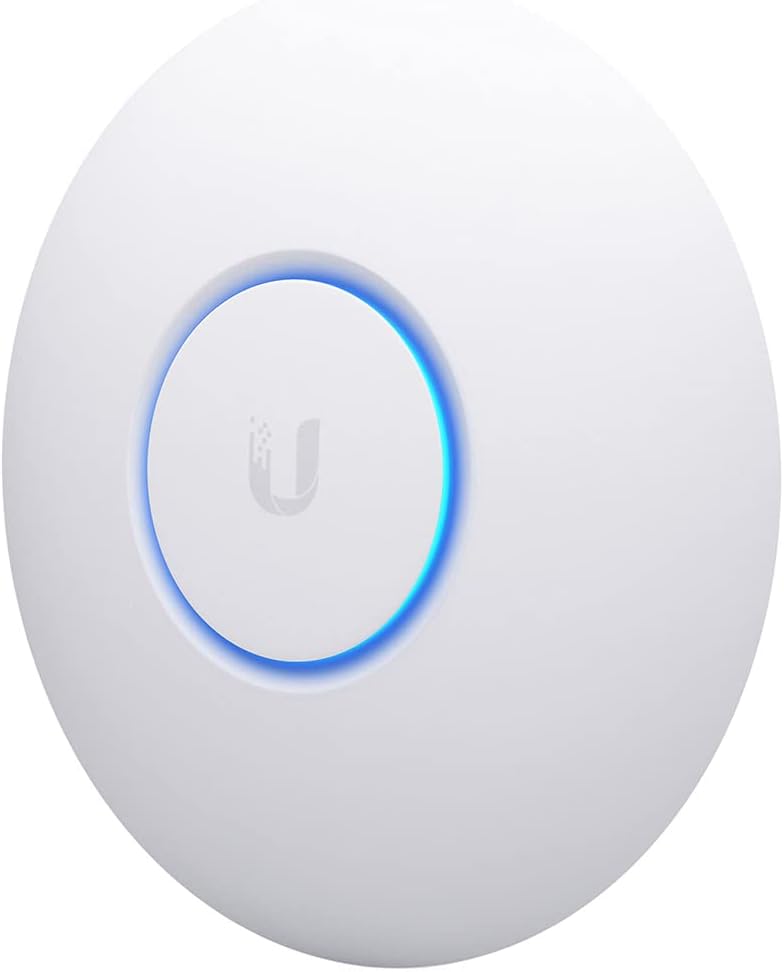
Ubiquiti UniFi nanoHD
4.7Editor score
4-stream 802.11ac Wave2
Supports 200+ users
802.3af PoE compatible
This guide compares the top ten POE access point models for performance, coverage, and manageability across indoor outdoor office home and enterprise use cases.
Selecting the right POE access point is essential for building a reliable network that delivers consistent speed and coverage throughout your space without cumbersome power cables.
We evaluated ten leading models based on wireless standards, throughput capacity, management features, and durability to help you find the perfect fit for your specific deployment needs.
Each pick highlights key strengths and trade-offs to guide your decision while noting that prices and availability may change over time so verify current details before purchasing.
4.7Editor score

4.5Editor score

4.7Editor score
The following side-by-side comparison outlines the core specifications and capabilities of each model to help you quickly identify which POE access point aligns with your performance and budget requirements.


The Omada EAP650 ranks first for its balance of Wi-Fi 6 performance, flexible power options, and the included free cloud management platform that simplifies deployment across multiple sites.
We may earn a commission when you buy through this link, at no additional cost to you.
It delivers up to 2976 Mbps using 1024-QAM and beamforming while supporting seamless roaming and load balancing when paired with an Omada controller for professional environments.
The sleek compact design blends into modern offices and the 5-year warranty plus technical support offers peace of mind for long-term reliability without recurring fees.
Choose this access point if you need fast dual-band coverage and scalable management for a small business or enterprise setup with minimal infrastructure overhead.
With speeds reaching nearly 3Gbps and support for multiple spatial streams it handles concurrent devices efficiently without throttling performance during peak usage times.
Whether using hardware software or cloud controllers the Omada SDN ecosystem provides centralized control over your entire network from a single intuitive interface.
We may earn a commission when you buy through this link, at no additional cost to you.
This top-tier access point leads in raw throughput and future readiness with Wi-Fi 7 technology delivering up to 5Gbps and a 2.5G Ethernet port for multi-gigabit internet plans.
We may earn a commission when you buy through this link, at no additional cost to you.
It supports over 250 concurrent clients and uses 4K-QAM to increase data capacity by 120 percent making it ideal for high-density environments like lecture halls or conference centers.
Although it requires compatible devices to fully utilize Wi-Fi 7 benefits the investment ensures longevity and peak performance for bandwidth-heavy applications like 4K streaming and large file transfers.
Invest in this model if you demand cutting-edge speed and plan for network scalability without needing hardware upgrades in the near future.
Multi-link operation and increased bandwidth reduce latency and interference ensuring smoother performance for real-time video conferencing and cloud-based workloads.
The 2.5G port eliminates bottlenecks for fast internet connections so your wireless speeds can match wired capabilities without replacing hardware later.
We may earn a commission when you buy through this link, at no additional cost to you.
The Ubiquiti UniFi nanoHD provides exceptional value for budget-conscious buyers needing reliable business-grade performance with support for over 200 concurrent users on a single access point.
We may earn a commission when you buy through this link, at no additional cost to you.
Its 4-stream Wave2 MU-MIMO technology enables simultaneous data transmission to multiple devices reducing congestion and maintaining steady speeds even in crowded network environments.
While it does not support the latest Wi-Fi 6 it remains highly effective for general office use and blends discreetly into settings with optional covers sold separately for installation.
Pick this access point if you want proven reliability and broad user support without paying premium prices for the newest wireless standards.
Designed to handle 200 plus concurrent connections it ensures stable connectivity for staff and guests without slowdowns during busy hours.
Works with the powerful UniFi controller for deep network insights and advanced security features without requiring costly dedicated hardware.
We may earn a commission when you buy through this link, at no additional cost to you.
The EAP610 offers an accessible entry into Wi-Fi 6 with speeds up to 1800 Mbps and four spatial streams that boost multi-user throughput for smooth operation across many devices.
We may earn a commission when you buy through this link, at no additional cost to you.
It integrates seamlessly into the Omada SDN platform allowing you to manage multiple sites from the cloud or use a local controller for more control over your network settings.
The ultra-slim design saves wall space and maintains a professional look while the included five-year warranty provides strong long-term protection against hardware failures.
Opt for this model when you need modern Wi-Fi 6 benefits for small offices or cafes without the cost of top-tier enterprise gear.
Four spatial streams increase concurrent data capacity so more clients connect reliably without dropping packets or slowing down the network.
Free cloud management means no extra fees for controlling multiple access points remotely which simplifies oversight for distributed networks.
We may earn a commission when you buy through this link, at no additional cost to you.
This outdoor access point delivers reliable coverage for patios or courtyards with an IP65-rated enclosure that withstands rain dust and extreme temperatures from negative thirty to seventy degrees.
We may earn a commission when you buy through this link, at no additional cost to you.
It provides wireless ranges exceeding 200 meters at 2.4 GHz and 300 meters at 5 GHz while supporting MU-MIMO for simultaneous data transmission to multiple outdoor devices.
The included PoE injector simplifies installation by reducing the need for additional wiring and the unit fits discreetly indoors as well when weather resistance is not required.
Choose this model for outdoor connectivity needs that demand durability and extended range without compromising on centralized network management features.
Rated IP65 it resists dust and water ingress ensuring continuous operation even during heavy rain or dusty environments.
Comes with a PoE injector so you can power and connect the unit with a single cable saving time and cost during setup.
We may earn a commission when you buy through this link, at no additional cost to you.
The EAP225 provides solid business-grade performance with AC1350 speeds and gigabit Ethernet ports that eliminate wired bottlenecks for efficient data transmission across your network.
We may earn a commission when you buy through this link, at no additional cost to you.
It supports seamless roaming protocols 802.11K and 802.11V so users move between access points without disconnecting which is essential for offices with multiple units.
With built-in mesh capability you can extend wireless coverage flexibly without additional wiring while the five-year warranty ensures reliable service over time.
Select this access point when you need cost-effective indoor coverage with robust roaming and management tools for growing small businesses.
Seamless roaming support keeps sessions active as users walk between rooms improving productivity and reducing frustration from dropped connections.
Mesh networking allows adding more units easily to cover dead zones without running new cables throughout the building.
We may earn a commission when you buy through this link, at no additional cost to you.
Ubiquiti U6+ delivers reliable high-speed wireless with data transfer rates up to 3 Gbit/s ensuring efficient communication for businesses that need consistent performance under heavy load.
We may earn a commission when you buy through this link, at no additional cost to you.
It features a PoE+ port that can draw up to 25.5 watts of power through a single cable simplifying installation where power outlets are scarce or inaccessible.
Data encryption safeguards sensitive information from unauthorized access and the wall-mountable design ensures flexibility to place the unit optimally for coverage.
This unit suits medium businesses seeking robust connectivity and security without requiring complex enterprise setups beyond a standard UniFi controller.
Integrated data encryption protects your network traffic and user data keeping it safe from potential intruders on your local Wi-Fi.
PoE+ support means you can rely on your PoE switch to power the unit eliminating extra outlets and cable clutter.
We may earn a commission when you buy through this link, at no additional cost to you.
This version of the U6+ AP offers a compact network expansion solution with 2×2 dual-band technology delivering reliable Wi-Fi 6 coverage in smaller spaces.
We may earn a commission when you buy through this link, at no additional cost to you.
It includes a 1GbE PoE connection so installation remains straightforward and the unit blends discreetly into ceilings or walls without drawing attention.
Ideal for adding capacity to existing networks it supports dual displays and integrates smoothly with other UniFi products for unified management and monitoring.
Choose this model if you need to extend coverage in tight areas without sacrificing performance or management consistency across your setup.
Its compact footprint makes it easy to hide in ceilings or walls without compromising coverage or aesthetic appeal.
Integrates with the UniFi controller for a single pane of glass visibility over all connected devices and network settings.
We may earn a commission when you buy through this link, at no additional cost to you.
This variant of the BE5000 provides cutting-edge Wi-Fi 7 performance with 240 MHz bandwidth and Multi-RU support to maximize simultaneous transmissions and throughput efficiency.
We may earn a commission when you buy through this link, at no additional cost to you.
It features a 2.5G port that unlocks full potential for fast broadband plans ensuring wired connections keep pace with advanced wireless capabilities.
While it omits the DC adapter to reduce cost it still includes all key features for mesh and seamless roaming when used with an Omada SDN controller.
Buy this model if you want top-tier wireless speeds and a cost-effective Wi-Fi 7 solution for high-density or professional network deployments.
With 240 MHz bandwidth the AP handles more data at once reducing congestion and lag during peak usage times.
The 2.5G Ethernet port guarantees your wired network doesn't bottleneck the incredible speed of Wi-Fi 7.
We may earn a commission when you buy through this link, at no additional cost to you.
The EAP650-Outdoor combines blazing Wi-Fi 6 speeds up to 2976 Mbps with IP67 weatherproofing and dedicated high-gain antennas to deliver strong coverage in exposed outdoor areas.
We may earn a commission when you buy through this link, at no additional cost to you.
It resists harsh conditions including rain dust and extreme temperatures while the included PoE injector makes installation efficient and hassle-free.
Advanced wireless features like mesh seamless roaming and load balancing are supported via Omada SDN controllers ensuring a stable professional-grade network experience.
Invest in this unit for patios parking lots or large outdoor venues where high-speed connectivity must remain reliable despite challenging weather conditions.
IP67 rating ensures the unit stays protected against water immersion and dust making it ideal for year-round outdoor use.
Dedicated high-gain antennas boost signal strength for better reach across large outdoor spaces without signal dropouts.
We may earn a commission when you buy through this link, at no additional cost to you.
Choosing the right POE access point involves weighing wireless performance, environment, scalability, and management features to ensure reliable network coverage.
Modern POE access points support Wi-Fi 6 or Wi-Fi 7 standards which offer higher speeds lower latency and better performance with multiple connected devices simultaneously.
Prioritize models matching your broadband speed and device density to avoid bottlenecks and ensure smooth operation for streaming video conferencing and cloud apps.
Coverage depends on antenna design transmit power and environmental obstacles so calculate the square footage and wall materials to select an AP with adequate range.
Look for beamforming and multi-user MIMO features which direct signals toward clients and improve efficiency in congested areas.
Outdoor access points require weatherproof ratings like IP65 or IP67 to resist rain dust and temperature extremes whereas indoor units prioritize sleek aesthetics and compact size.
Choose weatherproof models for external spaces to ensure longevity and consistent performance despite environmental exposure.
Confirm the PoE standard your switch supports such as 802.3af or 802.3at and ensure the access point can accept that voltage and wattage.
Some units accept passive PoE or DC power adapters for flexibility so check compatibility before purchasing to avoid extra adapters or power issues.
Cloud-based SDN controllers enable remote management and centralized control for multi-site networks whereas standalone APs may lack advanced features like roaming and analytics.
Opt for systems with intuitive apps or software controllers that fit your technical expertise and maintenance preferences.
High-density environments like offices and schools need access points capable of supporting hundreds of devices without performance degradation or dropped connections.
Check manufacturer specs for maximum concurrent client limits and select models rated for your expected user count to maintain network stability.
Look for support of WPA3 encryption and advanced security features such as guest networks and bandwidth throttling to protect data and isolate user traffic.
Security protocols help prevent unauthorized access and keep your network resilient against evolving cyber threats.
A solid warranty and responsive technical support are vital for long-term reliability especially for critical business networks that cannot afford prolonged downtime.
Choose manufacturers offering multi-year warranties and accessible support channels to address any hardware or software issues quickly.
Install the access point in a central elevated location with clear line-of-sight to maximize wireless coverage and avoid physical obstructions like metal cabinets or thick concrete walls.
Connect the device to your switch using a Cat5e or Cat6 Ethernet cable and verify that the PoE port supplies the correct voltage and wattage specified for the unit.
Regularly update firmware to benefit from security patches and performance improvements while monitoring signal strength and client connections via the controller dashboard.
A POE access point receives both data and electrical power over a single Ethernet cable which simplifies installation and reduces cabling costs. This setup allows placement in ceilings or hard-to-reach areas without nearby power outlets while maintaining reliable network connectivity.
Yes you need a PoE-enabled network switch or injector that matches the power requirements of your access point. Verify the switch supports the correct standard such as 802.3af or 802.3at to ensure reliable power delivery without extra wiring.
Outdoor POE access points are built with weatherproof enclosures rated IP65 or higher to resist rain dust and temperature changes. Ensure the model you select is designed for outdoor use to maintain performance and longevity in exposed environments.
The number of supported devices varies by model but modern access points can handle over two hundred concurrent connections. Check the manufacturer's specifications for maximum client limits to match your network's expected user density.
Many enterprise POE access points support mesh networking features when used with compatible controllers. This allows you to extend coverage wirelessly by linking multiple access points together for seamless roaming across your network.
Wi-Fi 7 builds on Wi-Fi 6 with wider channel bandwidths higher modulation rates and multi-link operations for faster speeds and lower latency. It offers improved performance for high-density environments and future bandwidth demands.
We reviewed ten top POE access points highlighting models from Omada and Ubiquiti that balance speed reliability and scalability for diverse networking needs.
Prioritize wireless standards and coverage requirements that match your space and device density to ensure consistent performance without unnecessary expense or complexity.
Always verify current pricing availability and warranty terms before purchasing since product specs and costs may change over time as networks evolve.