
reMarkable Paper Pro
4.2Editor score
11.8 inch Canvas Color
Unmatched writing feel
Includes Marker Plus pen
Color E Ink Tablets offer a unique blend of portability and eye comfort designed for readers and note takers who want a paper like experience. These devices use electronic ink technology to display text and images that reflect ambient light rather than emitting it directly. This approach significantly reduces eye strain compared to traditional LCD or OLED screens making them ideal for long sessions.
To compile this list we examined ten real products available on the market focusing on display technology performance and usability features. We looked at screen size resolution color capabilities and stylus compatibility to ensure a thorough comparison of what each device offers. Our analysis prioritizes devices that deliver a genuine paper like feel while supporting modern connectivity and file formats.
Each pick in this guide highlights specific strengths and trade offs to help you find the right tool for your workflow. We provide detailed specifications pros and cons along with practical advice on how to choose the best model for your needs. Please note that prices and availability change frequently so verify current details before making a purchase decision.
4.2Editor score

4.3Editor score

4.0Editor score
As an Amazon Associate we earn from qualifying purchases.
The following table provides a side by side overview of all ten Color E Ink Tablet models evaluated in this guide highlighting their key specifications and unique selling points.


The Amazon Kindle Scribe Colorsoft stands out as a top choice for users seeking a dedicated reading and writing device. With a 4.3 rating it offers a custom built display that delivers high contrast color without distracting flashes when writing. The included pen requires no charging and features a built-in eraser for intuitive note-taking.
We may earn a commission when you buy through this link, at no additional cost to you.
Its textured surface creates a smooth paper-like experience that feels natural under the pen. The device supports cloud services like Google Drive and OneDrive allowing seamless document review and markup. Users can convert handwriting to text and use AI tools to summarize content or answer questions about their notes.
While the price point is higher than some competitors the build quality and specialized features justify the cost for heavy users. The device is purpose-built for focus meaning fewer notifications and distractions compared to general tablets. Battery life supports weeks of reading and writing on a single charge ensuring long-lasting utility.
This device is ideal for professionals students and avid readers who prioritize a distraction-free environment. It excels at document review and creative note-taking with robust organization tools. For those wanting the best balance of screen size and productivity features this model is a strong recommendation.
The built-in notebook supports handwriting recognition and conversion to typed text for easier editing. Users can expand or collapse margins to make room for notes while reading directly on the page.
Files can be imported from cloud services and exported as PDFs for sharing. Notebooks sync to OneNote allowing editing on other devices without losing annotations.
We may earn a commission when you buy through this link, at no additional cost to you.
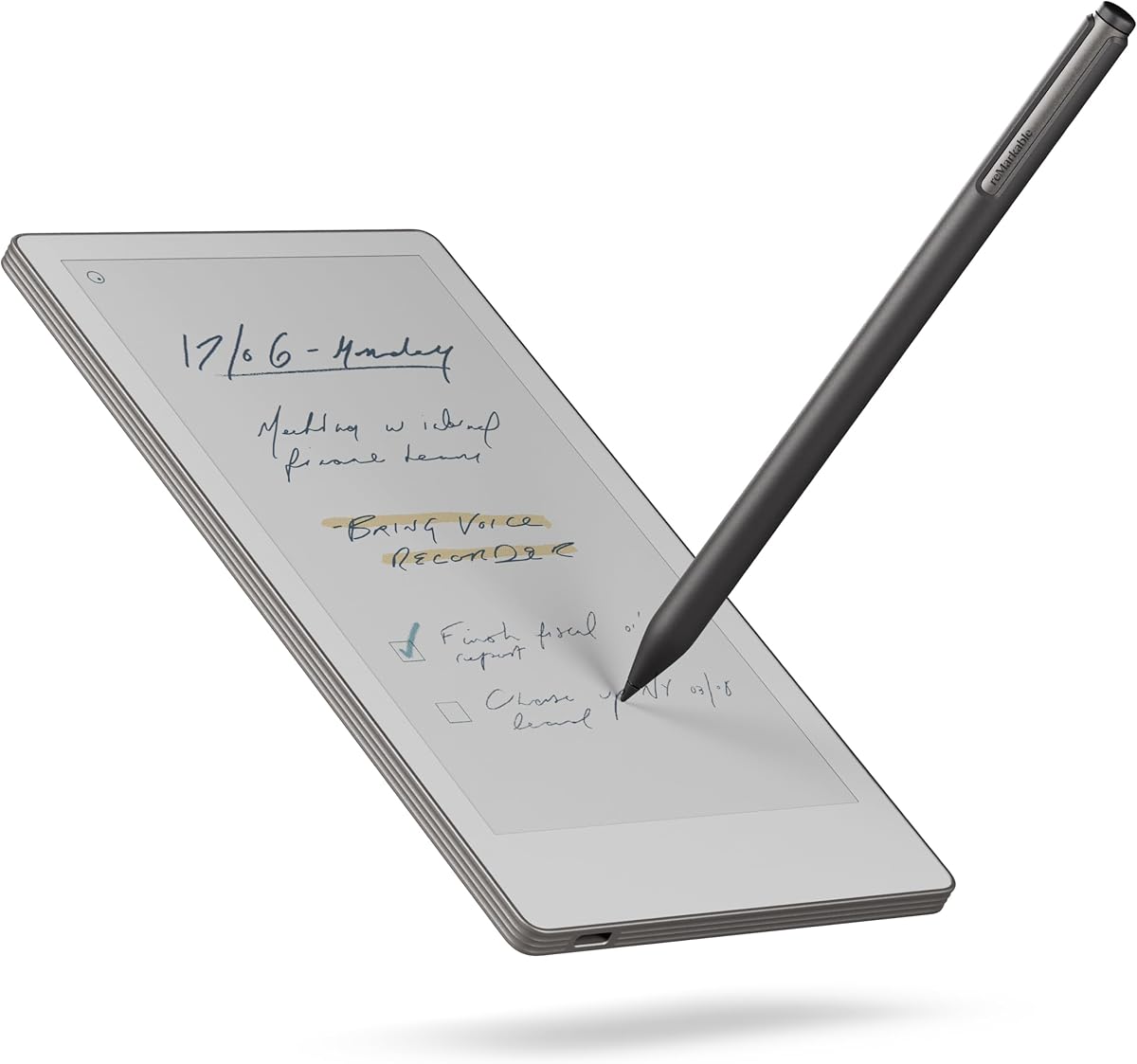
The reMarkable Paper Pro redefines digital note-taking with its full-size 11.8 inch Canvas Color display. Rated 4.2 it combines a low-glare screen that reflects natural light with a writing experience that rivals physical paper. The included Marker Plus pen offers precise control and all-day comfort for extended writing sessions.
We may earn a commission when you buy through this link, at no additional cost to you.
This device is designed to deliver realistic friction and responsiveness ensuring that every stroke feels authentic. Users can organize notes with folders and tags making retrieval simple and efficient. The ability to write directly on PDFs and convert handwriting to typed text adds significant value for professional workflows.
While the interface focuses on simplicity it may lack the versatility of open Android systems. However for those who prioritize writing quality and organization this trade-off is acceptable. The adjustable reading light allows comfort during day or night ensuring consistent usability across environments.
Ideal for creative professionals and note takers who value focus and tactile feedback this model excels. Its ultra-slim portability makes it easy to carry anywhere. For a premium paper-like experience that supports color sketching and reading this tablet is a top contender.
For the first time the reMarkable supports color for writing and sketching alongside reading. This allows for visual organization and highlighting without compromising the classic paper feel.
Despite the large screen the device remains slim and lightweight making it easy to transport. It fits into bags or cases designed for notebooks and books.
We may earn a commission when you buy through this link, at no additional cost to you.
The BOOX Tablet Go Color 7 offers an accessible entry into color E Ink technology with a 4.0 rating. Its 7 inch Kaleido 3 display provides 4096 colors and a flat cover lens for durability. Running Android 13 it supports third-party apps and diverse document formats for flexible usage.
We may earn a commission when you buy through this link, at no additional cost to you.
Users can adjust the front light between warm and cold tones to suit reading conditions. The device includes multiple refresh modes to reduce ghosting and improve performance for browsing or video. It supports over 35 file formats including PDF EPUB and images ensuring compatibility with existing libraries.
While the stylus is sold separately this model remains cost-effective for casual readers and note takers. The compact size makes it perfect for commuting or travel where space is limited. Battery life is efficient given the small screen size allowing long periods between charges.
For users seeking a lightweight affordable option with strong app support this tablet fits well. It balances performance and price effectively without sacrificing core E Ink benefits. If portability and versatility are priorities this model provides excellent value in the market.
Different refresh modes like HD Balanced and Fast optimize the display for specific tasks. This reduces ghosting and improves fluidity when navigating apps or scrolling.
The device includes Wi-Fi and Bluetooth 5.1 for connecting accessories. A USB-C port supports OTG or audio jack functionality for added versatility.
We may earn a commission when you buy through this link, at no additional cost to you.
The Ocean C combines performance and comfort with a 7 inch color E Ink display and Android support. Rated 4.5 it offers an octa-core processor and 4GB RAM for seamless multitasking. The device is designed for readers and note takers seeking a balance of speed and eye comfort.
We may earn a commission when you buy through this link, at no additional cost to you.
Its flexible screen mimics paper texture for natural control during writing sessions. The device supports a wide range of formats including images books and office documents. Adjustable brightness and color temperature settings ensure readability in any lighting condition.
While the stylus must be purchased separately the pen syncs perfectly for precision tracking. Battery life supports extended usage without frequent charging. Users appreciate the responsiveness and ergonomic design that minimizes fatigue during long tasks.
Ideal for those wanting a capable device at a competitive price this model performs well. It supports 3rd party apps allowing customization and utility. For a reliable mid-range choice with strong performance this tablet is a smart purchase.
The screen design mimics paper texture to provide a natural writing feel. This engineering choice enhances control and reduces fatigue during prolonged use.
A wide variety of file formats are supported including office docs and images. This ensures compatibility with diverse content types without conversion needs.
We may earn a commission when you buy through this link, at no additional cost to you.
This bundle includes the reMarkable Paper Pro with a stylish Book Folio cover for protection. Rated 4.2 it combines the 11.8 inch Canvas Color display with the Marker Plus pen for a complete experience. The Mosaic weave cover adds durability and a professional look to the device.
We may earn a commission when you buy through this link, at no additional cost to you.
Users benefit from all the features of the standard model with added convenience of included accessories. The Folio allows for easy carrying and protects the screen from scratches and impacts. Note organization remains robust with folders and tags for efficient management.
The inclusion of the cover makes this a ready-to-use solution out of the box. It suits users who value aesthetics and protection alongside performance. While expensive the value of the bundle offsets the cost compared to buying separately.
Ideal for professionals needing a reliable portable note-taking system this set excels. The color capabilities allow for creative sketching and highlighting. For those wanting a premium experience with full accessories this bundle is a top choice.
The Basalt Book Folio is crafted from premium Mosaic weave material for durability. It provides a stylish protective cover that enhances the device's usability.
Everything needed including pen tips cable and cover is provided. This ensures immediate usability without needing additional purchases.
We may earn a commission when you buy through this link, at no additional cost to you.
The BOOX Note Air 5 C offers a 10.3 inch display with Kaleido 3 color technology for detailed viewing. Rated 3.8 it features 6GB RAM and Android 15 for smooth operation. The device supports fingerprint recognition for secure and quick access to content.
We may earn a commission when you buy through this link, at no additional cost to you.
Users can enjoy a large canvas for note-taking and reading without losing portability. The front light with warm and cold options ensures comfort in various conditions. Document support includes over 30 formats covering almost every file type.
While some users may find the screen slightly darker than LCDs the trade-off is eye comfort. The device is heavier than smaller tablets but still manageable for daily use. Battery capacity supports extended usage sessions before recharging is needed.
Ideal for users requiring more screen real estate for documents or comics this model is strong. It supports 3rd party apps allowing flexible workflows. For a large screen experience with strong performance specs this tablet is recommended.
The 10.3 inch display provides ample space for reading PDFs and taking notes. Resolution supports 300 ppi for black and white content.
Built-in fingerprint recognition on the power button ensures secure access. This adds convenience and protection for sensitive notes.
We may earn a commission when you buy through this link, at no additional cost to you.
The Penstar eNote Pro C includes a high-precision stylus and offers advanced AI tools for note organization. Rated 4.0 it features a 10.3 inch Kaleido 3 screen with 8192 pressure levels for precise writing. The bundle includes extra nibs a magnetic folio cover and a quick start guide.
We may earn a commission when you buy through this link, at no additional cost to you.
AI features include real-time voice-to-text handwriting recognition and note summarization. This helps streamline workflows and makes it easier to find information later. The device supports split-screen multitasking for reading and writing simultaneously.
Battery life is robust supporting up to three weeks on a single charge. Storage capacity of 128GB allows for extensive content without external expansion. The device is designed for focused reading and writing without distractions like video playback.
Ideal for users needing high storage and AI assistance this model excels. The included pen ensures immediate usability out of the box. For productivity focused workflows with powerful organization tools this tablet is a strong choice.
Real-time voice-to-text and handwriting recognition convert notes to searchable text. Summarization tools help condense large documents efficiently.
The stylus offers 8192 levels of pressure for detailed strokes and shading. This creates a natural writing experience with zero lag.
We may earn a commission when you buy through this link, at no additional cost to you.
This model supports 4G connectivity for reading and accessing content on the go. Rated 3.7 it features the same 7 inch Kaleido 3 display and Android 13 OS as other variants. The device is lightweight at 195 grams making it ideal for travel and commuting.
We may earn a commission when you buy through this link, at no additional cost to you.
Users can adjust refresh modes to reduce ghosting and improve browsing performance. The front light with warm and cold options ensures readability in dark environments. Document support includes almost every common file format for flexible reading.
While the stylus is sold separately the device supports InkSense for active input. The compact size and 4G readiness make it a versatile tool for mobile professionals. Battery capacity supports long usage sessions between charges.
Ideal for users who need connectivity and portability this model is effective. It supports 3rd party apps for flexible workflows. For a lightweight choice with strong mobility features this tablet fits well.
The device supports 4G connectivity for accessing content anywhere. This ensures you stay productive without relying on Wi-Fi.
At 195 grams the device is light enough for pocket carry. It fits easily into bags and cases without adding bulk.
We may earn a commission when you buy through this link, at no additional cost to you.
The reMarkable Paper Pro Move offers the smallest size in the line with a 7.3 inch Canvas Color display. Rated 3.9 it is designed to be distraction-free by removing notifications and interruptions. The device includes the Marker Plus pen and six spare tips for immediate use.
We may earn a commission when you buy through this link, at no additional cost to you.
Users can search handwritten notes and convert them to typed text easily. Notes sync to the cloud allowing access on mobile and desktop apps. Tags and folders keep documents organized for efficient retrieval.
The smaller size makes it slip into pockets or bags easily for travel. This suits users who want the premium reMarkable feel in a compact form. Battery life supports extended reading and writing sessions.
Ideal for travelers and note takers who prioritize portability this model excels. The Canvas Color display provides vivid color for organizing notes. For a focused portable experience with strong organization this tablet is a top pick.
Notes sync to the cloud for access on multiple devices. This allows for seamless work continuity between tablet and desktop.
Smaller than a paperback the device fits in bags and pockets. This ensures you can capture inspiration whenever it strikes.
We may earn a commission when you buy through this link, at no additional cost to you.
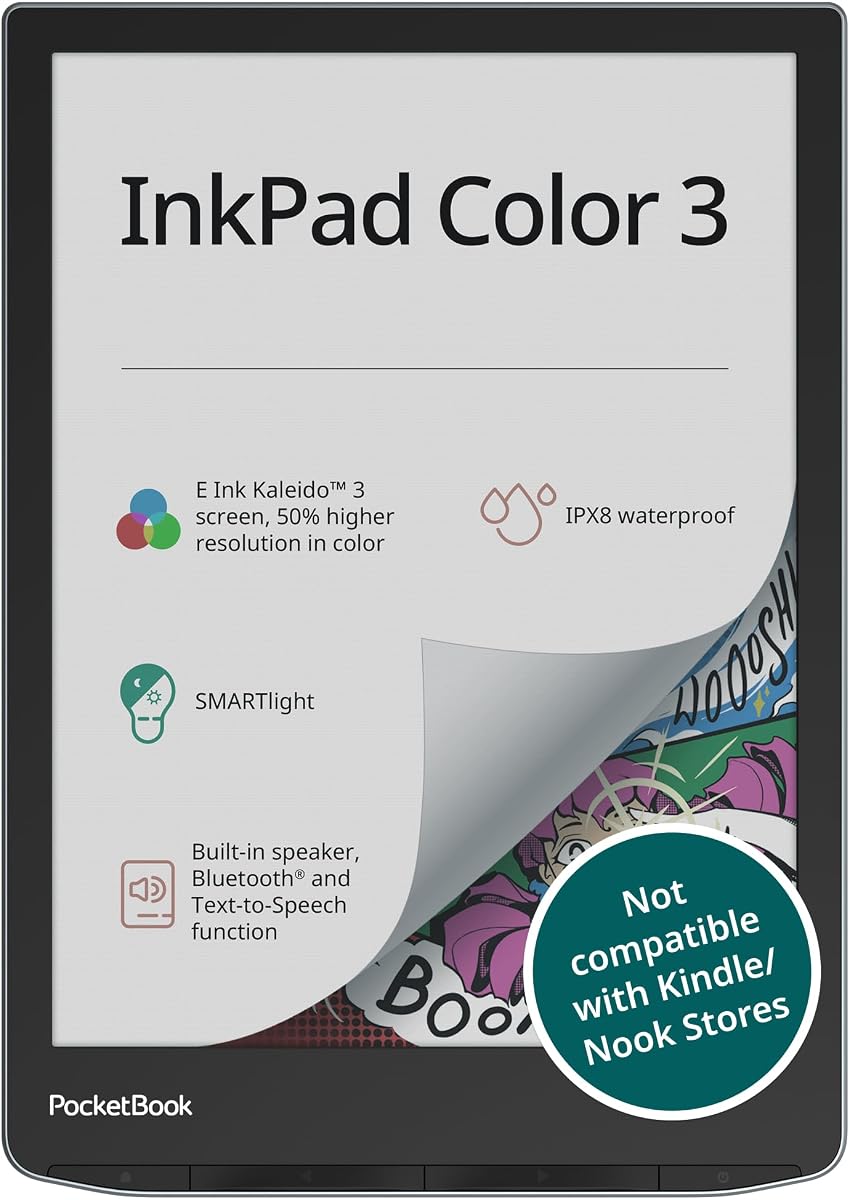
The PocketBook InkPad Color 3 supports audiobooks and text-to-speech for listening. Rated 4.0 it features a 7.8 inch enhanced color E-Paper display for vivid reading. The device is waterproof with IPX8 protection making it ideal for travel or outdoor use.
We may earn a commission when you buy through this link, at no additional cost to you.
Users can save thousands of ebooks and audiobooks with internal storage and external memory options. The built-in speaker allows direct audio playback or use with wireless headphones. Bluetooth supports seamless syncing with other devices for content transfer.
The SMARTlight adjusts frontlight for comfortable viewing in any environment. Battery life lasts up to one month on a single charge ensuring long utility. Support for multiple languages ensures accessibility for diverse users.
Ideal for users who want audio options alongside reading this model stands out. The waterproof design adds durability for active lifestyles. For a versatile reading companion with audio features this tablet is recommended.
The device supports built-in speaker or headphones for audiobooks. Text-to-speech functionality enhances accessibility for reading.
IPX8 waterproof protection allows reading near water without worry. This ensures durability for travel and outdoor environments.
We may earn a commission when you buy through this link, at no additional cost to you.
Choosing a Color E Ink Tablet requires considering display technology size and workflow needs. This guide outlines key factors to help you select the right model for your usage.
Color E Ink tablets use Kaleido 3 or similar technology that offers 4096 colors with lower resolution than B/W screens. The display is anti-glare and reflects ambient light for eye comfort. While colors appear less vivid than LCDs the paper-like feel makes reading more pleasant over time.
Look for devices with high pixel density for text clarity. Consider if the color quality matches your needs for diagrams or comics.
Screen size ranges from 7 inches to 11.8 inches affecting portability and workspace. Smaller devices fit in pockets while larger ones support more detailed note-taking. Think about where you will use the device most and how often you carry it.
Choose 7 inch for mobility and 10 inch+ for professional document work. Balance size against weight for daily comfort.
The pen experience is critical for note takers. Some devices include the pen while others sell it separately. Check for pressure sensitivity and friction that mimics paper for natural control.
Ensure the stylus supports the features you need like erasers or shortcut buttons. A good writing experience improves productivity significantly.
Android based devices support third-party apps while closed systems focus on reading and writing. Decide if you need access to apps like Evernote or Google Drive or if a focused environment suits you better.
Open systems offer flexibility but may add complexity. Closed systems provide simplicity and better battery life.
E Ink tablets typically offer weeks of battery life due to low power consumption. Larger devices with more RAM may consume more power but still last long. Check real-world usage reports for battery duration.
Prioritize models with efficient power management if you travel often. A long battery ensures you don't miss capturing notes.
Compatibility with your existing files is essential. Most tablets support PDF EPUB and common image formats. Check for support of office docs or specialized formats like DJVU if needed.
Ensure the device can import from cloud storage services. This makes organizing and retrieving notes easier.
Wi-Fi and Bluetooth are standard but some devices offer 4G. Check for USB-C support and audio jack options for accessories. Connectivity impacts how you sync content with other devices.
Choose devices that match your ecosystem. Seamless syncing improves workflow efficiency.
Prices vary widely from affordable options to premium models. Determine your budget early to narrow choices. Higher cost often includes better build quality or included accessories.
Balance cost with essential features. A cheaper model without necessary specs may not meet your needs.
Start by familiarizing yourself with refresh modes to reduce ghosting during page turns. Use HD mode for reading and fast mode for browsing to optimize performance.
Protect the screen from scratches using the included folio or a soft sleeve. Avoid applying pressure to the display as E Ink screens are sensitive to impacts.
Regularly update the software to access new features and improvements. Keep the device charged and store it in a cool dry place when not in use to maintain battery health.
Yes Color E Ink Tablets are excellent for sunlight reading since they reflect ambient light rather than emitting it. The anti-glare screen reduces eye strain and improves visibility compared to LCD screens.
Most E Ink styluses do not require charging as they use passive EMR technology. Check product details to confirm if the pen is active and needs charging or not.
Android based tablets allow installation of third-party apps while closed systems do not. Check the operating system before purchasing if app flexibility is a priority for you.
Battery life typically ranges from weeks to months depending on usage frequency. Heavy note-taking may reduce duration but most devices last weeks on a single charge.
Some models like the PocketBook InkPad offer waterproofing but many are not. Check specific specs before purchasing if water resistance is required for your use case.
Yes these tablets are designed for reading ebooks and PDFs. They support multiple formats including EPUB and Kindle compatible files for flexible reading.
We have reviewed ten Color E Ink Tablets highlighting their strengths from budget options to premium choices. The Amazon Kindle Scribe Colorsoft stands out for productivity while the reMarkable Paper Pro leads in writing experience.
Prioritize display size and OS features based on your workflow needs. If portability is key consider 7 inch options but choose 10 inch for detailed document work.
Check current prices and availability before purchasing as they change frequently. We hope this guide helps you find the perfect device for your reading and note-taking needs.