
Crucial P310 1TB SSD
4.7Editor score
Up to 7100 MB/s read
Compatible with laptops and desktops
Includes Acronis data recovery
This guide compares the top Crucial Internal NVME SSD options for laptops, desktops, and consoles, evaluating speed, capacity, compatibility, and reliability
Finding the right storage solution is critical for modern computing. Crucial Internal NVME SSDs offer exceptional speed and reliability for gaming, creativity, and daily tasks. They ensure your system runs smoothly with fast load times and responsive performance.
We evaluated ten top models based on performance metrics, compatibility, and user feedback. Each product brings unique strengths whether you need budget efficiency or maximum throughput for demanding workloads. Our analysis focuses on real-world utility and long-term value for all users.
Every pick highlights specific benefits and trade-offs to help you decide. Look at key specs like read speeds and NAND type to match your needs. Remember that availability and pricing fluctuate, so check current details before purchasing to secure the best deal today.
4.7Editor score
4.8Editor score

4.6Editor score
This side-by-side comparison highlights the distinct capabilities of each Crucial Internal NVME SSD model. We examine interface speeds, storage capacity, and specific use cases to help you identify the perfect drive for your setup without confusion.


The Crucial P310 1TB SSD stands out as a top contender for general users seeking high performance without breaking the bank. With a stellar 4.7 rating from verified buyers, it delivers consistent Gen4 NVMe performance that accelerates boot times and application launches significantly. This drive is engineered to handle AAA games and heavy media files with ease, making it a versatile choice for modern workstations and gaming rigs alike.
We may earn a commission when you buy through this link, at no additional cost to you.
Performance-wise, the drive boasts read speeds up to 7100MB/s and write speeds reaching 6000MB/s. This throughput ensures that large file transfers happen quickly and that multitasking remains smooth even under heavy loads. The inclusion of Acronis Data Recovery Software adds significant value, allowing users to protect their data with robust cloning and recovery tools right out of the box. Furthermore, its compatibility extends beyond standard desktops to include handheld gaming consoles like the ROG Ally X, offering broad utility.
While the P310 excels in most areas, it does rely on thermal management for sustained loads which might require an external heatsink in compact enclosures. Additionally, specific batches may utilize QLC NAND which can show slower sustained write speeds compared to TLC drives under extreme stress. However, for typical consumer workloads like gaming and content consumption, these trade-offs are negligible and do not impact the overall user experience negatively.
This drive is ideally suited for anyone upgrading from a SATA SSD or HDD who wants a substantial performance jump without overspending. Whether you are a casual gamer, a student, or a home office user, the P310 offers a reliable balance of speed and capacity. We recommend this model for users who prioritize quick load times and system responsiveness in their daily computing routine.
Up to 2x faster than Gen3 generations improve real-world tasks like booting Windows and launching Adobe apps quickly.
Works seamlessly with laptops, desktops, and select gaming consoles ensuring flexible upgrade paths for any user.
We may earn a commission when you buy through this link, at no additional cost to you.
The Crucial P310 1TB Heatsink version is specifically designed for users who need robust thermal management alongside high performance. Boasting a 4.7 rating, this drive comes ready for installation in devices like the PlayStation 5 where thermal constraints are strict. The integrated heatsink ensures that the drive operates within safe temperature ranges during long gaming sessions preventing thermal throttling and maintaining consistent speeds.
We may earn a commission when you buy through this link, at no additional cost to you.
Key strengths include its ability to deliver up to 7100MB/s read speeds which matches the requirements for next-generation console storage. This allows games to load faster and system hibernation to function smoothly without interruptions. The backward compatibility with Gen3 systems means you can also use this drive in laptops and desktops where cooling might be limited. The physical design fits standard M.2 2280 slots while providing necessary protection against heat buildup.
One trade-off is the price premium over the standard P310 model which might not be necessary for users with active cooling in their desktop cases. Additionally, the fixed nature of the heatsink limits flexibility if you need to adjust dimensions for very tight spaces. However, for console users who need a guaranteed fit and thermal solution this added cost is justified by the convenience and reliability it offers.
We recommend this model primarily for PlayStation 5 owners looking to expand their storage library with a verified compatible drive. It is also excellent for compact desktop mini-PCs where airflow is restricted. If you want peace of mind regarding heat without buying a separate cooler this drive provides an all-in-one solution that simplifies your upgrade process.
Built-in heatsink ensures silent stable operation under heavy gaming sessions and demanding workloads without overheating.
Meets PlayStation 5 specs and installs easily in desktops laptops and consoles with M.2 slots for universal use.
We may earn a commission when you buy through this link, at no additional cost to you.
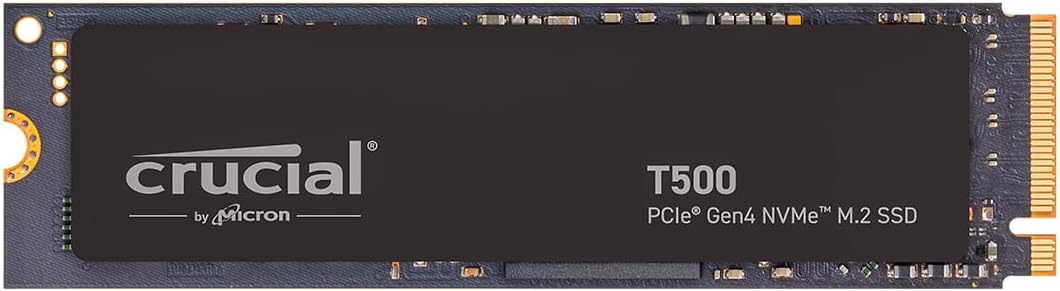
The Crucial T500 1TB SSD earns our Editor's Choice award for its superior blend of speed and reliability tailored to professionals and gamers. With an impressive 4.8 rating, it utilizes TLC NAND technology which offers better endurance and consistent performance compared to QLC alternatives. This drive is engineered to maximize workflow efficiency with read speeds reaching up to 7300MB/s making it one of the fastest Gen4 options on the market.
We may earn a commission when you buy through this link, at no additional cost to you.
Its standout feature is the support for Microsoft DirectStorage which can load games up to 16% faster while boosting creative apps by up to 42% for rendering and multitasking. The inclusion of a one-month Adobe Creative Cloud subscription adds immediate value for designers and video editors looking to start projects quickly. Acronis True Image is also included for seamless data recovery and transfers ensuring your files are safe during the transition.
While the TLC NAND drives cost more than QLC options the longevity and write performance justify the investment for power users who save files daily. The software bundle is limited to one month so long-term reliance on these tools is not guaranteed. However, for those needing a drive that can handle 8K video editing or intensive CAD work the T500 delivers the necessary throughput without bottlenecks.
This drive is perfect for creative professionals, video editors, and hardcore gamers who demand top-tier performance from their storage. If you work with large assets and need a drive that won't slow you down the T500 is an excellent choice. We highly recommend it for anyone building a high-performance workstation or gaming PC in 2026.
Up to 7300MB/s read and 6800MB/s write with high IOPS for faster loads and seamless multitasking performance.
Comes with a one-month Adobe Creative Cloud subscription for photo video and 3D projects upon activation.
We may earn a commission when you buy through this link, at no additional cost to you.
For users requiring massive storage without sacrificing speed the Crucial P310 2TB delivers an ideal solution. Maintaining the same 4.7 rating as its smaller sibling, this drive provides double the capacity while adhering to the same robust Gen4 NVMe standards. It is perfect for those who accumulate vast libraries of games, videos, and documents needing a single drive to store them all.
We may earn a commission when you buy through this link, at no additional cost to you.
The performance metrics match the 1TB version with up to 7100MB/s read speeds ensuring that accessing files deep in your storage is still instant. The 3D NAND technology ensures data integrity over time which is crucial when storing valuable large files. Its compact M.2 2280 form factor means it fits easily into most modern motherboards without requiring extra adapters or extension cables.
The main trade-off is the price since doubling the capacity increases the total cost significantly compared to buying two smaller drives. Additionally, higher capacity drives can generate more heat under sustained load so a heatsink might be advisable for high-density storage applications. Despite this the cost per gigabyte remains competitive making it a smart financial move for long-term storage needs.
This model is best suited for users building media servers, professional workstations, or gamers with extensive game libraries. If you find yourself running out of space on your current drive the 2TB P310 offers a reliable upgrade path. We recommend it for anyone who values having plenty of room for future projects and large files without constant management.
Spacious 2TB capacity stores AAA games, apps, and media files with standard Gen4 NVMe performance for power users.
Uses standard M.2 2280 dimensions so it installs easily in most laptops, desktops, and gaming consoles.
We may earn a commission when you buy through this link, at no additional cost to you.
The Crucial P510 1TB SSD brings next-generation PCIe Gen5 performance to users ready to upgrade their hardware. With a solid 4.7 rating, it delivers read speeds up to 11000MB/s which is nearly double the speed of standard Gen4 drives. This makes it a future-proof option for those looking to maximize the potential of the latest motherboards and processors available in the market.
We may earn a commission when you buy through this link, at no additional cost to you.
Performance-wise, the drive uses TLC NAND to ensure consistent high speeds even during large file transfers. It is backward compatible with Gen4 systems allowing users to upgrade their storage without immediately changing their entire computer setup. The included Adobe Creative Cloud subscription adds value for creative users who can utilize the speed for faster rendering and asset loading times.
A significant consideration is that you need a motherboard with a Gen5 slot to utilize the full speed of this drive. Without it, you are limited to Gen4 speeds which still make it a fast drive but not fully utilized. Additionally, Gen5 drives can generate more heat so adequate cooling is essential to maintain peak performance over time.
This drive is perfect for enthusiasts and early adopters who want the fastest consumer storage available now. If you are building a new PC with high-end components the P510 ensures your storage will not be a bottleneck. We recommend it for those who want to stay ahead of the curve with top-tier throughput and reliability.
Delivers up to 11000MB/s read and 8500MB/s write speeds for quicker load times and smooth multitasking.
Backward compatibility with Gen4 systems making upgrades simple for both new and existing systems.
We may earn a commission when you buy through this link, at no additional cost to you.
The Crucial T710 1TB SSD represents the pinnacle of consumer storage performance available today. With a 4.6 rating, it offers blazing-fast read speeds up to 14900MB/s making it ideal for extreme gaming and professional workflows. This drive is engineered for tech enthusiasts who need the absolute fastest data access possible for their most demanding applications and projects.
We may earn a commission when you buy through this link, at no additional cost to you.
Its standout feature is the built-in AES-256-bit hardware encryption which protects sensitive data without impacting performance. Using Micron G9 TLC NAND ensures high endurance and reliability even under constant heavy use. The drive is optimized for Intel 13th/14th Gen and AMD Ryzen 7000 processors ensuring it works perfectly with the latest platform architectures for maximum efficiency.
The price is the highest in this lineup which may be a barrier for budget-conscious users. Additionally, the high performance generates significant heat requiring a compatible heatsink for optimal stability during sustained workloads. However, for users handling 8K video editing or large database tasks these costs are justified by the massive speed gains and security features provided.
This drive is best suited for hardcore gamers and professionals who cannot tolerate any storage bottlenecks. If you are running intensive simulations or editing 8K video the T710 provides the throughput required to keep your workflow smooth. We recommend it for those seeking premium performance and data security in a single package.
Features AES-256-bit hardware encryption with TCG Opal 2.01+ to help protect sensitive data securely.
Designed for Intel 13th/14th Gen and AMD Ryzen 7000 in M.2 2280 Gen5 slots for optimal performance.
We may earn a commission when you buy through this link, at no additional cost to you.
The Crucial E100 480GB offers a cost-effective entry point into NVMe storage for budget-conscious users. With a 4.5 rating, it provides a significant upgrade over traditional hard drives while maintaining a low price tag. This drive is ideal for older systems or budget builds where space is not the primary concern but speed still matters.
We may earn a commission when you buy through this link, at no additional cost to you.
Performance-wise, it delivers read speeds up to 4700MB/s which is still much faster than SATA SSDs or mechanical drives. This makes boot times noticeably quicker and general system navigation smoother. The drive includes easy installation instructions and is backed by a 3-year warranty ensuring reliability even at this lower price point.
The main trade-offs are the lower capacity of 480GB and slower speeds compared to the P310 or T500 models. This might limit how many large applications or games you can store on it alone. However, for a secondary drive or a boot drive on a budget laptop it offers immense value.
This model is perfect for students or users upgrading an older laptop that still supports M.2 slots. If you need a cheap drive to make a slow computer snappy again the E100 is an excellent choice. We recommend it for anyone seeking basic NVMe performance without a significant financial investment.
Gen4 performance is 8x faster than SATA and 33x faster than hard disk drives for noticeable speed gains.
More durable and dependable than hard drives while generating less noise and heat for quiet operation.
We may earn a commission when you buy through this link, at no additional cost to you.
The Crucial P310 1TB QLC version is designed for users prioritizing capacity and price over extreme write endurance. With a 4.6 rating, it offers solid Gen4 performance for everyday tasks and general storage needs. This drive is a practical choice for those who need a 1TB solution at a lower price point than TLC-based models.
We may earn a commission when you buy through this link, at no additional cost to you.
Its key strength is the efficient use of QLC NAND which allows for more storage density at a lower cost. Read speeds remain high for fast access to files while write speeds are sufficient for typical consumer workloads like document editing and web browsing. The drive maintains the compact M.2 2280 form factor for universal compatibility.
One trade-off is that QLC NAND has lower endurance and slower sustained write speeds compared to TLC. This might be noticeable if you frequently transfer large files regularly to the drive. However, for most users who rarely write massive amounts of data this does not impact the daily experience.
This model is best suited for general storage or as a secondary drive in a dual-drive setup. If you need a budget option to store photos and documents the P310 QLC offers good value. We recommend it for budget builds where capacity is more important than raw write speed.
High density storage provides ample space for files at a lower price compared to standard TLC drives.
Rigorous testing and quality control means you receive a high-quality product backed by warranty.
We may earn a commission when you buy through this link, at no additional cost to you.
The Crucial T500 1TB Heatsink version is engineered to meet the strict performance requirements of the PlayStation 5 console. With a top 4.8 rating, it offers reliable TLC NAND storage paired with an integrated heatsink to manage thermal output during intense gaming. This ensures that the drive maintains high speeds without throttling over long play sessions.
We may earn a commission when you buy through this link, at no additional cost to you.
Performance is a highlight with read speeds up to 7300MB/s which maximizes the potential of Gen4 systems. The built-in heatsink simplifies the installation process by removing the need for third-party cooling solutions. This makes it an ideal choice for users who want a premium storage upgrade for their console without the hassle of custom fitting.
The main trade-off is the premium price over standard drives which might not be necessary for less demanding storage use cases. Additionally, the fixed size might limit use in extremely tight desktop spaces. However, for console gaming the thermal stability and performance guarantee provided by this drive justify the added cost.
This drive is perfect for PlayStation 5 owners who want the fastest possible storage upgrade available. If you plan to play graphically demanding games and want to ensure smooth load times this drive is the best choice. We recommend it for gamers who prioritize performance and reliability for their console library.
Meets PlayStation 5 specs and installs easily in desktops, laptops, and consoles with M.2 slots for seamless play.
Built-in heatsink ensures silent stable operation under heavy gaming sessions and creative workloads without overheating.
We may earn a commission when you buy through this link, at no additional cost to you.
The Crucial T700 1TB SSD is a robust Gen5 option for users needing high throughput and solid reliability. With a 4.6 rating, it delivers read speeds up to 11700MB/s which is ideal for professional workflows and high-end gaming. This drive is built to last with a 5-year warranty ensuring long-term peace of mind for your investment.
We may earn a commission when you buy through this link, at no additional cost to you.
Its performance matches the latest hardware standards providing seamless data access for demanding applications. The inclusion of Micron TLC NAND guarantees consistent speeds and endurance compared to cheaper QLC alternatives. Compatible with Intel 13th/14th Gen and AMD Ryzen 7000 series it offers broad platform support for new builds.
One trade-off is that you need a compatible Gen5 motherboard to utilize the full speed capabilities. Without it, the drive is limited to Gen4 performance which is still good but not its full potential. The cost is also higher than Gen4 drives which may not be necessary for casual users.
This drive is best suited for enthusiasts building next-generation systems who need proven reliability and performance. If you require high endurance and warranty support the T700 is a strong choice. We recommend it for users who want a balance of cutting-edge speed and established quality.
Engineered for tech enthusiasts and hardcore gamers with Micron TLC NAND and a 5-year warranty.
Comes with Acronis cloning software for easy data recovery and transfers and a one-month Adobe Creative Cloud subscription.
We may earn a commission when you buy through this link, at no additional cost to you.
Choosing the right Crucial Internal NVME SSD involves understanding performance, capacity, and compatibility to match your specific computing needs.
Interface type dictates the maximum speed your drive can offer. Gen4 drives provide speeds up to 7300MB/s while Gen5 drives can reach 14900MB/s. Ensure your motherboard supports the chosen interface to take full advantage of the performance.
Select Gen4 for broad compatibility and Gen5 for future-proofing high-end systems.
Capacity determines how much data you can store including games, videos, and applications. Smaller capacities like 480GB are suitable for basic tasks while larger 2TB options handle extensive libraries. Consider your current storage usage to avoid running out of space quickly.
Opt for 1TB or 2TB drives if you store large media files or run many applications simultaneously.
NAND technology affects drive speed and endurance. TLC NAND offers better longevity and consistent write speeds compared to QLC NAND which is cheaper but slower under sustained loads. High-performance users should prefer TLC for reliability.
Choose TLC NAND for professional workloads and general reliability over long periods.
High-speed SSDs generate heat which can affect performance during long sessions. Models with built-in heatsinks help maintain stable speeds without thermal throttling. Desktops with good airflow may not need this but laptops and consoles should prioritize it.
Select drives with integrated heatsinks if your system has limited airflow or is used for gaming.
Endurance is the total amount of data you can write before the drive wears out. Most Crucial drives offer a 5-year warranty which covers manufacturing defects. High-endurance drives are essential for workloads involving frequent large file transfers.
Verify the warranty period and endurance ratings to ensure long-term durability for your specific use case.
Compatibility ensures the drive fits your laptop, desktop, or console. Check if your device uses M.2 2280 slots and supports the specific interface version. Some consoles like PS5 have specific requirements that must be met for seamless operation.
Confirm system requirements before buying to avoid installation issues and ensure full functionality.
Price varies based on speed, capacity, and NAND type. Budget options offer good speeds for basic tasks while premium options provide maximum throughput. Consider what performance you actually need rather than overspending on unnecessary features.
Balance cost against your specific performance needs to get the best value for your money.
Many Crucial drives include software like Acronis True Image and Adobe Creative Cloud. These tools help with data recovery and creative workflows providing added value. Check what bundles are included to maximize your purchase utility.
Look for included software bundles that offer free trials or licenses to enhance your productivity immediately.
Install the SSD carefully into an M.2 slot on your motherboard ensuring it is firmly seated. Use a screw to secure it if required to prevent movement and ensure a good electrical connection during operation.
Format the drive to NTFS or APFS depending on your operating system using the system disk utility. This prepares the storage for files and ensures the file system is optimized for your specific use case and OS.
Keep your system drivers updated to ensure optimal performance and thermal management. Periodically check storage usage to avoid filling the drive completely which can slow down performance over time.
Gen4 NVMe SSDs offer read speeds up to 7300MB/s while Gen5 models can reach 14900MB/s. Gen5 requires a compatible motherboard and cooler while Gen4 works on a wider range of systems.
Yes, specific Crucial models like the P310 and T500 with heatsinks are compatible with the PlayStation 5. Ensure you select a model that meets the console's thermal requirements for stable operation.
Check your laptop specifications or user manual to see if it has an M.2 slot supporting PCIe NVMe. Most modern laptops support this standard but older models may only support SATA or standard SSDs.
Many Crucial drives include Acronis True Image software for cloning and data recovery. This allows you to transfer your existing OS and files to the new drive easily.
Most Crucial NVMe SSDs come with a limited 5-year warranty depending on the model. This covers manufacturing defects and performance issues over the product's lifespan.
Yes, desktops with M.2 slots on the motherboard can install NVMe SSDs directly. If your board lacks a slot, you may use an adapter to fit the drive into a PCIe slot.
In summary, the Crucial Internal NVME SSD lineup offers excellent options for every user from budget upgrades to high-end professional storage. The T500 and P310 models stand out as versatile choices for most gamers and creatives.
Prioritize your specific needs such as capacity and interface speed before making a decision. If you need raw speed for work the T710 is unmatched while the P310 offers great balance for general use.
Remember to check current availability and warranty terms as details may change over time. Invest in a drive that fits your system and usage patterns to enjoy a smoother and faster computing experience.