
CENMATE Aluminum 4 Bay Hard Drive Enclosure
4.3Editor score
Aluminum alloy build with cooling fan
Supports 2.5 and 3.5 inch drives
USB 3.0 with up to 5Gbps speed
Direct Attached Storage provides a reliable way to expand your computer capacity without network complexity. These devices connect directly via USB or Thunderbolt for fast access to large files. Choosing the right enclosure ensures your data remains safe and easily accessible whenever needed.
We evaluated ten leading models based on speed, capacity, build quality, and compatibility. Each product offers unique features like hardware RAID, hot swapping, or hybrid support. Our analysis highlights the strengths and weaknesses to help you make an informed decision quickly.
Each pick shows detailed specs and real-world performance insights for your reference. Prices change frequently so always verify current deals before purchasing. These options cover everything from budget friendly enclosures to professional grade storage solutions.
4.3Editor score

4.2Editor score

3.5Editor score
As an Amazon Associate we earn from qualifying purchases.
This side-by-side comparison highlights the key specifications of all ten models to help you find the exact match for your workflow requirements and budget constraints.


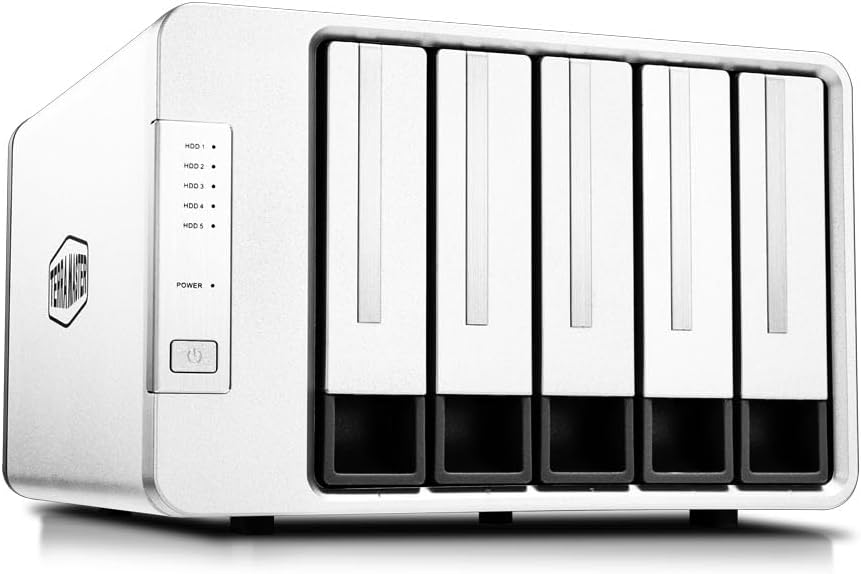


The TERRAMASTER D4-320 stands out as a top choice for users needing fast access to large files. It earns a solid 4.2 star rating and offers high-speed data transmission through USB 3.2 Gen2.
We may earn a commission when you buy through this link, at no additional cost to you.
Its standout qualities include the ability to reach up to 1,016 MB/s read/write speeds with four drives. The tool-free tray design and hot-swappable feature make managing your storage incredibly convenient.
One trade-off is the lack of hardware RAID which means you need software for data redundancy. However the Push-lock design ensures drives stay secure during transport reducing risk of disconnection.
This unit is perfect for creative professionals and home users needing fast external storage. We recommend it for anyone prioritizing speed and ease of use over complex data mirroring.
The enclosure uses USB 3.2 Gen2 to achieve speeds up to 10Gbps. When four SATA III HDDs are installed the combined read/write speed can reach 1,016 MB/s.
An intelligent temperature-controlled fan manages heat while sound-absorbing panels reduce noise by up to 50%. In standby mode noise drops below 21 dB(A).
We may earn a commission when you buy through this link, at no additional cost to you.
The QNAP TR-004 is ideal if you need hardware RAID support for data redundancy. It rates 4.2 stars and works via USB Type-C for Windows macOS and Linux.
We may earn a commission when you buy through this link, at no additional cost to you.
Its key strength lies in the hardware RAID supporting modes like 0 1 and 5. You can also expand your QNAP NAS capacity by using it as external storage for backup.
Limitations include compatibility restrictions with older QNAP NAS models. Also you cannot install NAS apps on this device as it acts purely as external storage volume.
This drive is best for existing QNAP users needing extra safe storage. It suits those who value data integrity and want a reliable extension of their network setup.
The device supports hardware RAID modes including 0 1 5 JBOD and individual disks. This offers superior data safety compared to software-based solutions.
You can use the TR-004 as external storage for NAS backup to expand capacity. However storage pools cannot be combined into the connected NAS.
We may earn a commission when you buy through this link, at no additional cost to you.
The TERRAMASTER D8 Hybrid offers a unique combination of HDD and NVMe slots. It holds 4 SATA drives and 4 M.2 NVMe SSDs for up to 152TB total.
We may earn a commission when you buy through this link, at no additional cost to you.
Its standout feature is the ability to tailor storage for hot and cold data. You can keep frequent files on fast NVMe SSDs while storing archives on large HDDs.
The rating is slightly lower which may reflect setup complexity. Additionally the power on recovery ensures the device reboots automatically after abnormal power loss.
This enclosure fits professionals needing tiered storage performance. If you manage large datasets this unit provides the speed and capacity for demanding workflows.
The enclosure holds 4 SATA HDDs and 4 M.2 NVMe SSDs. This combines HDD capacity with SSD speed for optimized storage efficiency.
The device features power on recovery which automatically reboots after abnormal power loss. This helps maintain uptime during unexpected power interruptions.
We may earn a commission when you buy through this link, at no additional cost to you.
The CENMATE Aluminum 4 Bay is a top pick for budget-conscious buyers. It rates 4.3 stars and features an aluminum-alloy build with a built-in cooling fan.
We may earn a commission when you buy through this link, at no additional cost to you.
It offers great value supporting up to 80TB total capacity. The USB 3.0 interface delivers speeds up to 5Gbps which is fast enough for most daily tasks.
One trade-off is the noise level which can reach 40-50 decibels. It may not suit quiet offices but is fine for general desktop use or backup stations.
This enclosure is perfect for students or families needing extra space. It suits anyone wanting a reliable and affordable DAS without fancy RAID features.
The enclosure supports 2.5 and 3.5 inch drives up to 80TB. It saves space on desktop or laptop while keeping data accessible.
A DC 12V power adapter provides stability for high-speed transmission. This ensures consistent performance during file transfers.
We may earn a commission when you buy through this link, at no additional cost to you.
The SABRENT 5-Bay provides reliable access to five drives with independent controllers. It rates 4.1 stars and connects via a 10Gbps USB-C port for speed.
We may earn a commission when you buy through this link, at no additional cost to you.
Its key strength is the dedicated controller for each bay. This ensures every drive has a stable connection reducing the risk of drops during large transfers.
One trade-off is the higher price point compared to simpler enclosures. However the internal power supply eliminates the need for external power bricks keeping the desk tidy.
This unit fits users needing multiple drive access with reliability. It is great for photographers or editors who swap drives regularly and value stability.
A dedicated ASMedia ASM1351 controller for each of the five bays gives every drive its own stable independent connection.
A rear USB-C port connects peripherals or daisy-chains a second dock for easy expansion. This maximizes your connectivity without extra hubs.
We may earn a commission when you buy through this link, at no additional cost to you.
The TERRAMASTER D8 Hybrid 2 earns a perfect 5.0 star rating for its efficient power management. It holds 4 HDDs and 4 NVMe SSDs with fast USB 3.2 Gen2 speeds.
We may earn a commission when you buy through this link, at no additional cost to you.
Its key strength is TPM or TerraMaster Power Management. This technology optimizes energy efficiency and drive wake-up times for a better workflow experience.
One trade-off is the premium price which may be steep for casual users. However the high read speeds up to 1020 MB/s justify the cost for professionals.
This enclosure is ideal for high-performance workflows like video editing. If you want top tier power efficiency and speed this model delivers.
TPM allows you to easily switch between Power Save Mode and Active Mode. This balances energy efficiency with faster drive wake-up times.
The storage supports 4 independent HDDs and 4 independent M.2 SSDs. You get flexible storage expansion and simpler file management.
We may earn a commission when you buy through this link, at no additional cost to you.
The TERRAMASTER D5-310 features a dedicated RAID knob for easy mode switching. It rates 3.6 stars and supports RAID 5 0 1 10 and Single modes.
We may earn a commission when you buy through this link, at no additional cost to you.
Its key strength is the hardware RAID system that ensures superior performance. It also includes a hot spare disk feature to enhance data security.
One trade-off is the transfer speed capped at 5Gbps which is slower than Gen2 models. Additionally the rating suggests some users may have had minor issues.
This drive fits those wanting easy hardware RAID without software. It is suitable for home users needing redundancy without complex setup.
The device features a dedicated RAID knob to switch between modes. This ensures superior performance and reliability compared to software solutions.
The inclusion of a hot spare disk feature automatically replaces failed drives. This minimizes downtime and reduces data loss risk significantly.
We may earn a commission when you buy through this link, at no additional cost to you.
The WAVLINK 4-Bay stands out for its 4K HDMI video output capability. It rates 4.0 stars and connects via 10Gbps USB-C for fast data transfer.
We may earn a commission when you buy through this link, at no additional cost to you.
Its key strength is the versatility allowing direct video display. You can create a workspace with high-speed storage and stunning display capabilities.
One trade-off is that the HDMI port requires a specific USB-C host. Without this support the video feature will not work as expected.
This unit fits users needing a docking experience with storage. It is perfect for multimedia editing or presentations needing direct video output.
The docking station features a USB 3.2 Type-C port and an HDMI interface. This supports up to 4K@60Hz resolution for seamless display.
Each of the four bays comes with an independent ON/OFF power switch. This allows you to swap drives without powering down the system.
We may earn a commission when you buy through this link, at no additional cost to you.
The ORICO 5 Bay is designed with a magnetic chip cover for tool-free use. It rates 4.0 stars and supports up to 110TB total storage capacity.
We may earn a commission when you buy through this link, at no additional cost to you.
Its key strength is the quick setup taking only 3 seconds to recognize drives. The magnetic cover means no screws and tools are needed for installation.
One trade-off is that Linux systems may only read one drive at a time. Also the USB 3.1 gen1 caps speed at 5Gbps which is slower than Gen2.
This enclosure is perfect for quick setup and storage expansion. It suits home users needing large capacity without complex tool setups.
The enclosure is designed with magnetic chips on the cover so no screws and tools are needed. It recognizes hard drives in 3 seconds.
The enclosure includes anti-over voltage and overcurrent protection. This ensures data security during transmission.
We may earn a commission when you buy through this link, at no additional cost to you.
The QNAP TR-002 offers a compact 2-bay design for direct attached storage. It rates 4.0 stars and supports hardware RAID for 0 1 JBOD and individual disks.
We may earn a commission when you buy through this link, at no additional cost to you.
Its key strength is the compatibility with Windows macOS and Linux via USB Type-C. You can expand your QNAP NAS capacity with external backup.
One trade-off is the limited capacity since it only holds two drives. However the lockable bays provide security for your valuable data.
This unit fits users needing simple reliable external storage. It is ideal for those who value compact design and hardware RAID safety.
The device is a high-speed direct-attached storage device via USB Type-C for Windows macOS and Linux.
It supports hardware RAID 0 1 JBOD and individual disks. This adds a layer of data protection to your external drives.
We may earn a commission when you buy through this link, at no additional cost to you.
Selecting the right Direct Attached Storage involves understanding connection speeds drive compatibility and extra features. This guide breaks down key factors to help you choose.
Connection speed determines how fast data moves between your computer and drives. Look for USB 3.2 Gen2 or Thunderbolt for speeds up to 10Gbps.
Prioritize high-speed interfaces if you work with large video files or backups.
The number of drive bays defines how many drives you can connect at once. Common options include 2 4 or 5 bays depending on your needs.
Choose more bays if you need massive capacity in a single unit.
RAID support adds data redundancy to protect against drive failure. Hardware RAID is faster and more reliable than software-based solutions.
Select RAID if you need security against data loss or high availability.
Hot swappable bays allow you to replace drives without powering down the unit. This saves time during maintenance and improves efficiency.
Look for this feature if you frequently change or update your drives.
Effective cooling prevents overheating which can damage drives. Built-in fans with temperature control maintain safe operating conditions.
Ensure the unit has adequate cooling for long duration transfers.
Compatibility ensures the enclosure works with your existing setup. Most support Windows macOS and Linux but always verify drivers are needed.
Check for Mac specific support if you are in an Apple environment.
Build quality affects durability and heat dissipation. Metal casings like aluminum are better than plastic for cooling and protection.
Choose a sturdy enclosure to protect drives from physical damage.
Price varies based on features like speed and RAID. Balance cost with the performance you actually need for daily work.
Invest in quality for critical data but avoid overspending on unused features.
Connect the enclosure to a compatible USB port and ensure it is plugged into a power outlet if required. The device should be recognized immediately if plug-and-play drivers are supported.
Always use the included cables for best performance. For high-speed drives use USB-C to USB-C cables to maximize transfer rates.
Regularly check temperatures and clean dust from fans. Place the unit in a ventilated area to prevent overheating during long file operations.
Direct Attached Storage connects directly to a computer via USB or Thunderbolt for fast data access. It differs from Network Attached Storage which shares data over a local network. DAS is ideal for high-speed local file work.
Most new drives need formatting to be recognized by the operating system. Common formats include exFAT for cross-platform use or NTFS for Windows specific needs. Always back up data before formatting.
Many modern enclosures allow mixing SSDs and HDDs for different storage tiers. However you should separate critical data based on drive type to ensure optimal performance and reliability during use.
RAID provides data redundancy and better performance compared to individual drives. It protects against drive failure but adds complexity. Choose RAID if data safety is a top priority for your workflow.
USB 3.2 Gen2 speeds of 10Gbps are ideal for large files. Older USB 3.0 offers 5Gbps which may be enough for documents. Check your computer port specs to match speeds.
Keep the enclosure in a well-ventilated area away from heat sources. Clean dust from fans regularly and avoid covering vents to ensure the cooling system works effectively.
We reviewed ten top Direct Attached Storage options ranging from budget-friendly to premium hybrid models. Each brings unique strengths like speed capacity or RAID support.
Prioritize your specific needs such as speed or redundancy when deciding. A high-speed unit suits editors while budget options work for general storage.
Always check current prices and availability before purchasing. Deals change frequently so verify the best offer for your chosen model.