
Acer 13-in-1 Laptop Docking Station
4.5Editor score
Triple display support with MST
Includes 110W power adapter
Aluminum body with security slot
This guide compares the top docking stations with 2 HDMI ports for 2026. We analyze build quality, video output options, charging speeds, and port selection to
Finding the right docking station with 2 HDMI ports can transform your laptop into a powerful desktop workstation. Whether you need dual 4K displays for video editing or just extra screen real estate for multitasking, the right hub makes a huge difference in productivity and workflow efficiency.
We have reviewed ten leading models based on video performance, power delivery capabilities, and overall connectivity options. Our analysis focuses on how well each station handles dual monitor setups, data transfer speeds, and compatibility with modern laptops running Windows or macOS environments.
Each pick in this list highlights specific strengths like charging power, port variety, or price value. Note that availability and pricing can change frequently, so always check the latest listings before making your final purchase decision for your workspace setup.
4.5Editor score

4.5Editor score

4.4Editor score
The following comparison table lists all ten featured products side by side. It outlines key specifications like maximum resolution support, power delivery wattage, and included port types to help you quickly identify the best match for your specific laptop and display needs.


The Anker 8-in-1 USB-C hub stands out as a reliable choice for professionals needing dual HDMI connectivity. It supports 4K resolution at 60Hz on a single display or 30Hz on dual screens. Its robust build and comprehensive port selection make it a top contender in this guide.
We may earn a commission when you buy through this link, at no additional cost to you.
This docking station excels in power delivery offering up to 85W pass-through charging. It includes essential ports like Ethernet and card readers which are often missing in cheaper alternatives. The aluminum body helps dissipate heat during prolonged use ensuring stable performance.
One trade-off is the lack of Linux support which limits its appeal for open-source users. Additionally achieving maximum charging speed requires purchasing a specific 100W wall charger separately. These factors are minor for most users prioritizing dual-screen workflows.
This hub is ideal for Windows and ChromeOS users needing a plug-and-play solution. It balances performance price and reliability effectively. If you need a versatile dock with strong dual HDMI support this is a highly recommended choice for daily productivity.
It handles two external monitors well allowing for extended desktops or mirroring depending on your needs.
Users benefit from high-speed data transfer and reliable networking via the included Ethernet port.
We may earn a commission when you buy through this link, at no additional cost to you.
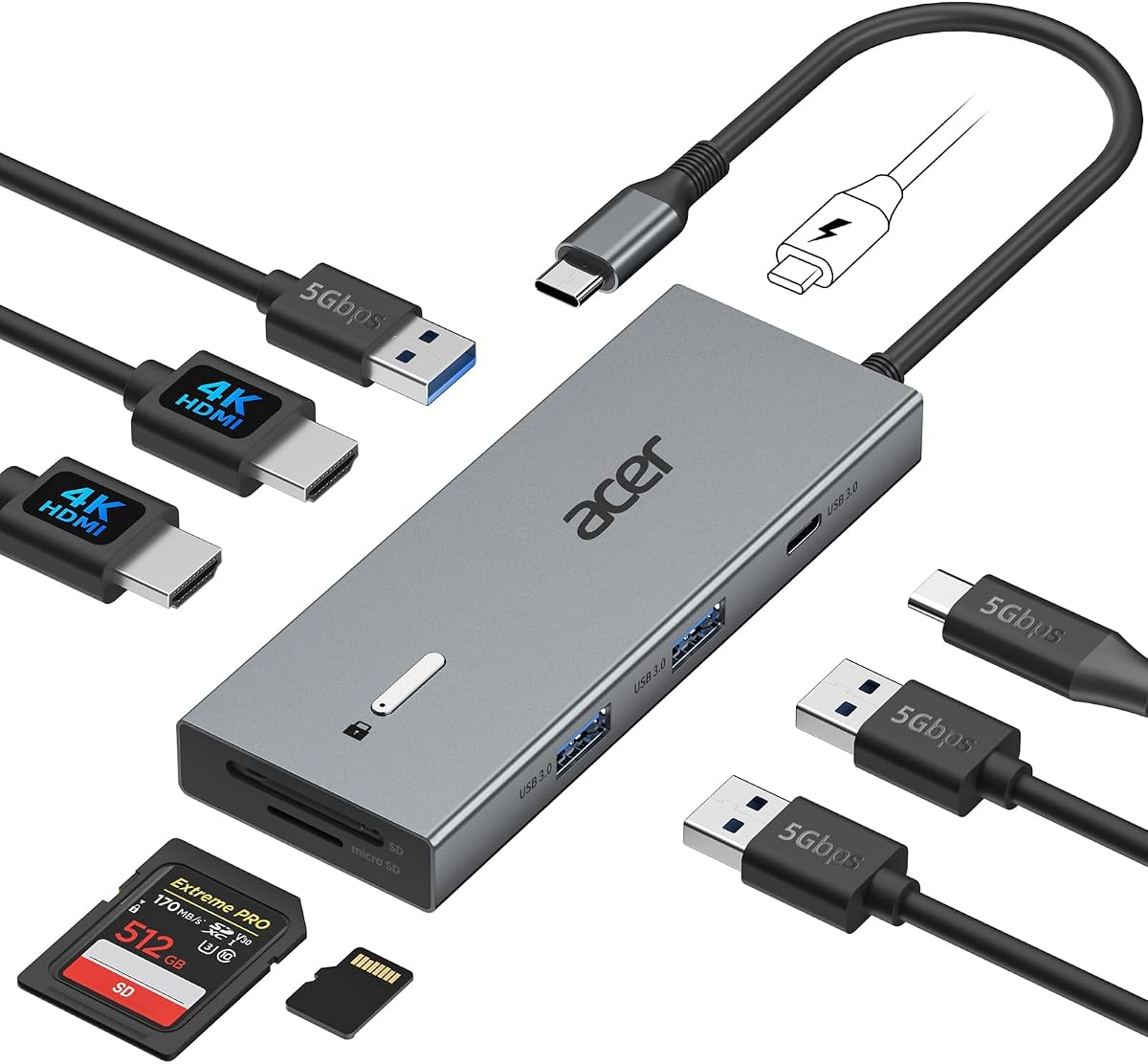
Acer's 13-in-1 docking station offers extensive connectivity including dual HDMI and one DisplayPort. It supports triple independent displays on Windows making it perfect for complex multitasking environments. The inclusion of a high-wattage power adapter ensures your laptop stays charged under heavy loads.
We may earn a commission when you buy through this link, at no additional cost to you.
The build quality is premium with a sleek aluminum body that manages heat efficiently. It features multiple USB ports for peripherals and a security slot to lock the dock to your desk. This makes it ideal for office settings where equipment security matters.
Mac users should note that macOS limits this dock to mirroring mode due to system constraints. While powerful the price is higher than basic models which might not suit budget-conscious buyers. However for power users the extra value justifies the cost.
Buy this if you need a single cable solution for triple monitors and high power delivery. It is particularly well-suited for financial analysts or designers needing massive screen real estate. The included adapter adds significant value right out of the box.
Windows users can connect three independent screens for a true multi-tasking command center.
The box includes a robust 110W adapter so you do not need to buy one separately.
We may earn a commission when you buy through this link, at no additional cost to you.
The Selore dual HDMI hub offers exceptional value for users needing dual 4K displays without breaking the bank. It supports high refresh rates up to 60Hz on HDMI which is rare at this price. The aluminum casing helps keep it cool during operation.
We may earn a commission when you buy through this link, at no additional cost to you.
It supports up to 100W power delivery ensuring your laptop charges even while driving two monitors. The extra USB ports and card reader provide necessary connectivity for flash drives or cameras. This makes it a practical everyday tool for students and remote workers.
One downside is the absence of an Ethernet port which limits wired network options. Also Mac users are restricted to mirroring mode which may not suit everyone. Despite these small limitations the performance per dollar is hard to beat in this category.
Choose this dock if you want reliable dual-screen setup on a tight budget. It works well with most Windows laptops with USB-C. The lightweight design makes it easy to carry for hybrid workers moving between home and office.
It supports 60Hz output on dual monitors for smoother video and scrolling.
Few models offer this level of video performance at such an accessible price point.
We may earn a commission when you buy through this link, at no additional cost to you.
This Acer 9-in-1 dock provides dual HDMI inputs that support 4K resolution at 60Hz. It delivers up to 90W to your laptop ensuring efficient charging while working. The security lock feature adds peace of mind for office environments where devices remain unattended.
We may earn a commission when you buy through this link, at no additional cost to you.
Data transfer speeds are solid with multiple USB ports available for peripherals. The built-in cable reduces clutter though it is relatively short which might restrict placement options. For users needing secure dual-monitor setups this is a reliable mid-range option.
The main limitation is the short cable which might require a USB-C extender for some desks. Mac users will find it limited to mirroring. However for Windows users the performance and stability make it a strong choice for daily use.
Recommended for office setups needing security features and dual 4K capability. The included lock button is a unique touch that enhances physical safety. Check your laptop placement before buying to ensure the cable length is sufficient.
The built-in lock button helps secure the device in shared office spaces.
Dual 4K@60Hz ensures sharp visuals and smooth motion on both screens.
We may earn a commission when you buy through this link, at no additional cost to you.
The Dell D3100 uses USB 3.0 rather than USB-C making it suitable for older laptops. It supports dual HDMI and one DisplayPort for flexible monitor configurations. The package includes a cable and DVI adapter for legacy display compatibility.
We may earn a commission when you buy through this link, at no additional cost to you.
It provides 65W of power which is enough for many Dell laptops but might be low for newer models. The build quality is durable and stable for desktop use. This dock is best for users with existing USB 3.0 hardware who need dual HDMI.
The main trade-off is the reliance on older USB 3.0 which offers lower speeds than Thunderbolt. It is also bulkier than modern USB-C hubs. If you have an older laptop without USB-C this remains a valid option for dual-screen work.
Consider this if you need a dock for non-USB-C laptops with HDMI outputs. It bridges the gap for legacy devices effectively. Verify your laptop ports match this USB 3.0 standard before purchasing to ensure compatibility.
Uses USB 3.0 to work with older laptops lacking USB-C ports.
Includes HDMI and DisplayPort plus an HDMI to DVI adapter.
We may earn a commission when you buy through this link, at no additional cost to you.
This Anker 7-in-1 hub focuses on portability and speed rather than maximum resolution. It supports dual 1080p displays which is perfect for standard office work. The 10Gbps data port offers fast file transfer speeds for modern workflows.
We may earn a commission when you buy through this link, at no additional cost to you.
Power delivery is robust with 85W output to keep your laptop charged. The compact design fits easily into travel bags making it great for hybrid workers. Anker's warranty provides extra confidence for long-term usage.
The lack of Ethernet is a notable omission for users who prefer wired connections. Also it limits max resolution to 1080p instead of 4K. However for general multitasking this is a strong and reliable choice.
Ideal for travelers needing reliable dual-screen support on the go. The fast data transfer speeds are a nice bonus for large files. If you do not need 4K or Ethernet this hub delivers solid performance.
Includes a 10Gbps port for quick large file transfers.
Compact size makes it easy to carry in a laptop bag.
We may earn a commission when you buy through this link, at no additional cost to you.
The MOKiN 13-in-1 dock provides extensive connectivity options including dual HDMI and Ethernet. It supports 4K at 60Hz on both ports which enhances visual clarity. A unique privacy lock button allows quick screen locking for security.
We may earn a commission when you buy through this link, at no additional cost to you.
Power delivery is rated at 100W ensuring your laptop charges efficiently. The wide variety of USB ports supports many peripherals simultaneously. This makes it a good choice for users with many USB devices.
You need a full-featured USB-C or Thunderbolt port to utilize the video features fully. Mac users are limited to mirroring mode. Despite this the feature set is comprehensive for the price point.
Buy this if you need many USB ports and Ethernet along with dual HDMI. The privacy feature is helpful for shared workspaces. Check your laptop specs to ensure full compatibility before ordering.
A physical button lets you lock screens instantly to protect sensitive data.
Offers many USB ports plus Ethernet for complete peripheral support.
We may earn a commission when you buy through this link, at no additional cost to you.
This Selore dock supports dual HDMI and additional ports for triple displays on Windows. It includes VGA and Ethernet making it versatile for older monitors and wired networks. The monitor control button allows quick switching between display modes.
We may earn a commission when you buy through this link, at no additional cost to you.
Power delivery supports up to 100W keeping your laptop charged during extended use. The aluminum body ensures durability and heat dissipation. This is a great option for users with mixed legacy and modern display needs.
Setup for triple displays requires specific hardware support on your laptop. Mac users face limitations similar to other models. For Windows users however the extra display options are a significant plus.
Select this if you need to connect older VGA monitors along with HDMI. The control button adds convenience to managing screen layouts. Ensure your system supports the required protocols before buying.
Includes VGA to connect older monitors that HDMI cannot support.
A dedicated button lets you switch display modes with one click.
We may earn a commission when you buy through this link, at no additional cost to you.
The Anker 13-in-1 station delivers robust power with a 135W adapter in the box. It supports three external monitors at 1080p making it ideal for multitaskers. The vertical design saves space on crowded desks.
We may earn a commission when you buy through this link, at no additional cost to you.
It includes multiple USB-C and USB-A ports for versatile connections. Power delivery is split to charge a laptop and phone simultaneously. This high wattage ensures performance even with multiple devices attached.
The main drawback is the lower 1080p limit compared to others offering 4K. For users needing 4K this might not be the best fit. However for general productivity the power and port count are strong.
Buy this if you need a desktop replacement with high wattage charging. It is well suited for Windows users needing three screens. Check your display resolution needs before finalizing your purchase.
Includes a powerful 135W adapter to charge laptop and peripherals.
Vertical orientation keeps your desk tidy and clutter free.
We may earn a commission when you buy through this link, at no additional cost to you.
This generic listing represents alternative options available on the market. Details are not fully provided so you must verify specific specs before buying. It serves as a placeholder for budget models that may lack brand backing.
We may earn a commission when you buy through this link, at no additional cost to you.
When considering this product ensure you check supported resolutions and power delivery carefully. Many generic docks lack robust warranties or quality control. Always read reviews to understand real-world performance.
The main trade-off is uncertainty about reliability and support. However if you need a basic adapter this might suffice. Ensure your laptop requirements match what is offered in the listing.
Proceed with caution and double check compatibility before purchase. It is only recommended if specific reviews confirm its reliability. For critical work branded options usually offer better security.
Ensure you verify specs and reviews since details are limited.
This might be a budget option but reliability varies significantly.
We may earn a commission when you buy through this link, at no additional cost to you.
Selecting the right docking station involves checking several technical details. Here are the key factors to consider before making your purchase.
Ensure the dock supports your monitor's native resolution such as 4K@60Hz or 4K@30Hz. Check if both HDMI ports support these rates simultaneously.
Prioritize docks with high refresh rate support if you need smooth visuals for work or media.
Look for Power Delivery (PD) that matches your laptop's charger rating ideally 65W or higher. This ensures your laptop charges while in use.
Higher wattage docks allow you to use a single cable for power and data efficiently.
Consider the total number of USB-A USB-C and Ethernet ports included. This determines how many peripherals you can connect at once.
More ports mean less need for additional adapters keeping your desk clean.
Verify compatibility with Windows or macOS. macOS often limits to mirroring for multiple monitors via HDMI.
Choose a dock that supports your system's display mode requirements like MST for extended desktops.
Aluminum bodies dissipate heat better than plastic. Look for models with good ventilation for stable performance.
Durable builds protect your investment and reduce overheating during long sessions.
Check for extras like SD card readers or security slots for added convenience or safety.
These features can replace separate accessories saving desk space and cost.
Some docks have short built-in cables which may limit placement flexibility. Consider if you need an extender.
Vertical designs save desk space while horizontal ones offer easier access to ports.
Choose brands with solid warranty terms like 18 months to ensure long-term support.
Good customer service can resolve issues quickly if connectivity problems arise.
Connect the docking station to your laptop using a high-quality USB-C cable that supports video and power. Ensure your laptop's port supports DisplayPort Alt Mode or Thunderbolt for video output.
Plug both HDMI monitors into the dock and power on the dock using the included adapter. Your system should detect the displays automatically if compatible drivers are installed.
Clean the ports occasionally with a dry soft cloth to remove dust. Avoid plugging in devices when the dock is hot and allow it to cool for stability.
Most docking stations with HDMI cannot provide extended desktops on macOS. Apple limits external displays to mirroring mode over HDMI. You would need DisplayPort with DSC or specific dongles to extend on Mac.
Many modern docks support dual 4K at 30Hz or 4K at 60Hz on one screen. To get 4K@60Hz on both you need a Thunderbolt dock or high-spec HDMI 2.1 model.
Some models explicitly exclude Linux support. Check compatibility notes before buying as many rely on display settings not fully supported by Linux systems.
Some docks include a power adapter while others do not. Always check the product details as you may need to buy a separate PD charger to charge your laptop.
Yes if the dock includes additional DisplayPort or VGA ports. Some models support triple displays by combining HDMI and DisplayPort outputs on Windows.
Most modern docks offer USB 3.0 at 5Gbps or USB 3.1 at 10Gbps. Verify specs to ensure your files transfer quickly when using external drives.
You will need to use the original laptop charger alongside the dock. The dock may not charge your laptop if the USB-C port does not support power input.
We highlighted top picks like the Anker 8-in-1 for reliability and the Acer 13-in-1 for premium triple-display needs. The Selore options offer great value for budget buyers needing dual screens.
Prioritize power delivery and resolution support based on your laptop and monitor setups. Check OS compatibility especially if you use macOS to avoid limited display modes.
Prices and availability change quickly so verify current specs before buying. With the right dock you can turn your laptop into a powerful multi-monitor workstation easily.