
Rioddas External CD/DVD Drive
4.3Editor score
Plug and play setup
USB 3.0 high speed
Embedded cable design
This guide compares the top external CD drives for ripping audio and video to digital formats, evaluating speed, compatibility, and build quality for reliable
Finding the right external CD drive for ripping is essential for preserving your physical media collection in digital formats. Whether you need to convert music albums to MP3 or archive video discs, the hardware must offer reliable read speeds and broad format support without errors.
We evaluated ten top-rated optical drives based on their data transfer capabilities, connection versatility, and overall stability during intensive read operations. Each model was assessed for its ability to handle various disc types consistently while maintaining compatibility across modern operating systems like Windows and macOS.
Each product section details specific strengths, limitations, and ideal use cases to help you match a drive to your specific ripping needs. Please note that product availability and pricing can change frequently, so verify current details before making your final purchase decision today.
4.3Editor score

4.4Editor score

4.5Editor score
The following table provides a side-by-side comparison of all ten selected external CD drives, highlighting their key specifications, interface types, and unique features to help you quickly identify the best fit for your digital archiving needs.



The ROOFULL External CD DVD Drive stands out as a highly reliable option for users looking to rip audio and video files from physical media. With a strong rating and millions of units sold, this drive offers consistent performance for converting discs into digital formats like MP3 and MP4.
We may earn a commission when you buy through this link, at no additional cost to you.
Its USB 3.0 interface ensures high-speed data transfer up to 5Gbps, which significantly reduces the time required to extract large video files or complete album rips. The built-in error correction technology helps prevent read errors when dealing with scratched or older discs, ensuring your digital archives remain intact.
One limitation to consider is that it does not support Blu-ray or 4K discs, so it is strictly for CD and DVD content. Additionally, Mac users might need to manually eject discs via Finder since the tray button is restricted by macOS protocols, which is a minor inconvenience compared to the overall functionality.
This drive is ideal for collectors and professionals who need a durable, portable solution for daily ripping tasks. Whether you are archiving family videos or converting music collections, the included case and long warranty provide added peace of mind for your investment.
Intelligent error correction helps the drive recover data from damaged sectors, which is crucial when ripping old or scratched discs without skipping audio or video frames.
The slim design and included protective sleeve make it easy to carry the drive in a laptop bag, allowing you to rip discs at home, work, or while traveling.
We may earn a commission when you buy through this link, at no additional cost to you.
The Rioddas External CD/DVD Drive is an excellent choice for budget-conscious users who still require high-speed performance for ripping tasks. It offers a robust USB 3.0 connection that ensures fast data transfer, making it efficient for converting large batches of CDs or DVDs into digital files quickly.
We may earn a commission when you buy through this link, at no additional cost to you.
Designed with copper mesh technology, this drive provides a stable connection that minimizes freezing or skipping during the ripping process. The embedded cable design keeps your workspace tidy by storing the USB cable directly on the drive, which is a thoughtful feature for frequent users who need reliable access.
While it is very affordable, users should note that it does not include an external power adapter, so it relies solely on USB power which might require a direct port on desktops. It also does not support Blu-ray discs, but for standard CD and DVD ripping, it delivers consistent results.
This drive is perfect for students or casual users who need a simple, plug-and-play solution for digital conversion. Its compatibility across Windows, Mac, and Linux systems makes it a versatile tool for anyone looking to preserve their media collection without spending much.
The copper mesh technology helps maintain a stable data stream during long rip operations, which is essential for preventing corrupted files from damaged source discs.
By integrating the cable into the chassis, the drive eliminates the risk of losing adapters, ensuring you always have everything you need to start ripping immediately.
We may earn a commission when you buy through this link, at no additional cost to you.
The ASUS SDRW-08V1M-U represents the premium end of external optical drives, offering advanced features like disc encryption alongside high-quality ripping performance. Its ultra-slim profile and robust build quality make it a standout choice for professionals who need to protect sensitive data while archiving media.
We may earn a commission when you buy through this link, at no additional cost to you.
One of its most unique features is the built-in cable storage, which keeps the USB Type-C cable neatly tucked away when not in use. This design prevents cable damage and loss, ensuring the drive remains a tidy and durable companion for travel or daily use in office environments.
While the price is higher than many competitors, the added security features like password control and hidden folders justify the cost for users handling confidential documents or proprietary media. However, some advanced burning features like Drag and Burn are limited to Windows users.
This drive is best suited for users who value design, durability, and security in their digital archiving tools. Whether you are an enterprise employee or a content creator, the combination of speed and protection makes it a worthwhile investment for high-quality ripping tasks.
Disc encryption allows you to set passwords on burned or saved files, adding a crucial layer of security when storing sensitive information on physical media.
The ultra-slim 14.6mm profile allows the drive to slide easily into a pocket or bag, making it perfect for business travelers who need to rip media on-site.
We may earn a commission when you buy through this link, at no additional cost to you.
The Amicool External DVD Drive is a versatile option that supports both USB 3.0 and USB-C interfaces, making it compatible with a wide range of laptops and desktops. Its slim design and robust connectivity options make it an attractive choice for users who switch between different devices frequently.
We may earn a commission when you buy through this link, at no additional cost to you.
With maximum CD read/write speeds of 24x, this drive can rip audio tracks efficiently, allowing you to build digital libraries quickly. The intelligent error correction and anti-shock technology ensure that even minor movements or vibrations do not disrupt the reading process, which is vital for accurate ripping.
Users with newer Macs might need a powered USB-C hub to ensure sufficient power, as the drive relies on bus power. Additionally, it does not support Blu-ray discs, so it is strictly for standard optical media. Despite these minor limitations, its performance and connectivity are strong.
This drive is an ideal pick for general users who need a simple, effective tool for ripping DVDs and CDs. Its plug-and-play nature means you can start converting your media collection immediately without spending time on configuration or driver installation.
Having both USB-A and Type-C connectors means you can use the drive with older PCs and modern ultrabooks without needing separate adapters or dongles for connectivity.
The anti-shock technology protects the drive during transport, ensuring that it remains functional even if it is moved while operating or packed in a crowded bag.
We may earn a commission when you buy through this link, at no additional cost to you.
The ORIGBELIE External CD DVD Drive is designed for users who prioritize portability above all else, with an ultra-thin profile of just 13mm. It offers solid performance for ripping tasks, supporting USB 3.0 speeds that make the process of converting discs efficient and quick.
We may earn a commission when you buy through this link, at no additional cost to you.
A unique feature of this drive is the inclusion of a 5V charging cable, which can be used to provide extra power if your computer's USB port lacks sufficient voltage. This is particularly useful when ripping large files or using older laptops that may not supply enough power on their own.
The anti-skid rubber pads on the bottom ensure that the drive stays stable during operation, preventing it from sliding across your desk while the disc spins. While the warranty period is shorter than some competitors, the drive provides good value for the price and performance it delivers.
This drive is best for travelers or students who need a compact solution to rip media on the go. Its lightweight design ensures it adds minimal bulk to your bag, making it easy to carry between classrooms, offices, or home setups.
The included charging cable ensures consistent power delivery, which is crucial for avoiding read errors during long or intensive ripping sessions on less powerful laptops.
Its slim 13mm thickness makes it easy to store in a drawer or laptop sleeve, ensuring it is always ready for use without taking up much room.
We may earn a commission when you buy through this link, at no additional cost to you.
The 8 in 1 External CD DVD Drive is a solid performer that focuses on providing stable operation through anti-shock technology. It supports both USB 3.0 and Type-C connections, making it a flexible choice for various computer setups where ripping performance and connectivity are key concerns.
We may earn a commission when you buy through this link, at no additional cost to you.
With an included USB power cable, users can ensure the drive receives enough power for smooth operation, which is especially helpful when ripping data-heavy discs or using desktop computers that may have unstable front ports. The integrated cable design keeps everything neat and organized.
While it is not the fastest drive available, it delivers reliable results for standard ripping tasks. The anti-shock protection helps maintain stability during operation, reducing the likelihood of read errors caused by physical movement or vibrations during the process.
This drive is a good option for general users who need a reliable tool for occasional media conversion. Its compatibility with multiple systems and stable performance make it a practical choice for home and office environments.
Anti-shock technology ensures that the drive can handle minor vibrations or bumps while reading data, which helps prevent read errors and ensures accurate file extraction.
Supporting both USB-A and Type-C allows you to use the drive with older machines and new ultrabooks without needing to buy extra adapters.
We may earn a commission when you buy through this link, at no additional cost to you.
This External CD/DVD Drive for Laptop is designed with extra clearance inside the disc bay, allowing it to accommodate discs with thick printed labels that other drives might reject. This feature is particularly useful for ripping older or custom discs that may have non-standard physical dimensions.
We may earn a commission when you buy through this link, at no additional cost to you.
It supports USB 3.0 for high-speed data transfer, ensuring that ripping and writing tasks are completed quickly. The drive is also designed to be durable with a brushed texture shell and anti-skid rubber bottom, providing stability and a premium feel during use.
While it is a straightforward device without extra software features, its ability to handle thick discs and provide consistent performance makes it a reliable choice. The dual port design ensures that you can connect it to almost any computer without trouble.
This drive is ideal for users who have a collection of older or custom discs that might be rejected by standard drives. Its robust build and practical design make it a great tool for anyone looking to digitize physical media efficiently.
The extra clearance allows you to rip discs with large labels or custom printing that might not fit into the tight trays of other optical drives.
The drive is designed to operate with minimal noise, making it pleasant to use even in quiet environments like offices or libraries while you rip your media.
We may earn a commission when you buy through this link, at no additional cost to you.
The 2 in 1 External CD DVD Drive features a widened inner space in its disc bay, making it easier to load discs with thick printed labels. This design choice helps reduce disc skipping and burning failures, which can be a common issue with standard optical drives.
We may earn a commission when you buy through this link, at no additional cost to you.
It supports USB 3.0 for fast data transfer, ensuring that your ripping process is not slowed down by connection speeds. The anti-slip rubber pads on the bottom keep the drive steady, while the embedded cable slot keeps the connection wire neatly stored when not in use.
While its rating is slightly lower than some competitors, it still offers reliable performance for basic ripping and playback tasks. The error correction modules help maintain data integrity, which is essential for converting your physical media into digital files without loss.
This drive is a solid option for users who need a reliable tool for occasional ripping. Its focus on physical design and compatibility with various disc types makes it a practical choice for home entertainment and backup needs.
A widened disc bay allows for better handling of discs with heavy labels, reducing the risk of jams and ensuring smooth operation during read and write tasks.
Advanced error correction helps recover data from scratched or dirty discs, ensuring that your digital copies remain clean and complete.
We may earn a commission when you buy through this link, at no additional cost to you.
The LG Electronics GP60NS50 is a reliable external drive known for its compatibility with Surface Pro devices and general Windows systems. It supports M-DISC technology, allowing you to archive data on long-lasting discs, which is a valuable feature for long-term storage of ripped content.
We may earn a commission when you buy through this link, at no additional cost to you.
With USB 3.0 connectivity, the drive ensures fast data transfer speeds, making it efficient for ripping large collections. Its ultra-slim profile makes it easy to carry, while the trusted LG brand adds a layer of reliability and support for users.
While it may be slightly more expensive than budget options, the build quality and feature set justify the cost for users who need consistent performance. The inclusion of M-Disc support makes it a great choice for archiving important files alongside media ripping.
This drive is best for users who prioritize brand reputation and compatibility with devices like Surface Pro. It offers a balanced mix of speed, storage features, and durability that fits well in professional and home environments.
M-DISC technology allows you to burn data onto discs that can last for centuries, making it ideal for preserving critical files and important media.
LG is a trusted name in optical drives, ensuring that the hardware is built to last and performs consistently over time without unexpected failures.
We may earn a commission when you buy through this link, at no additional cost to you.
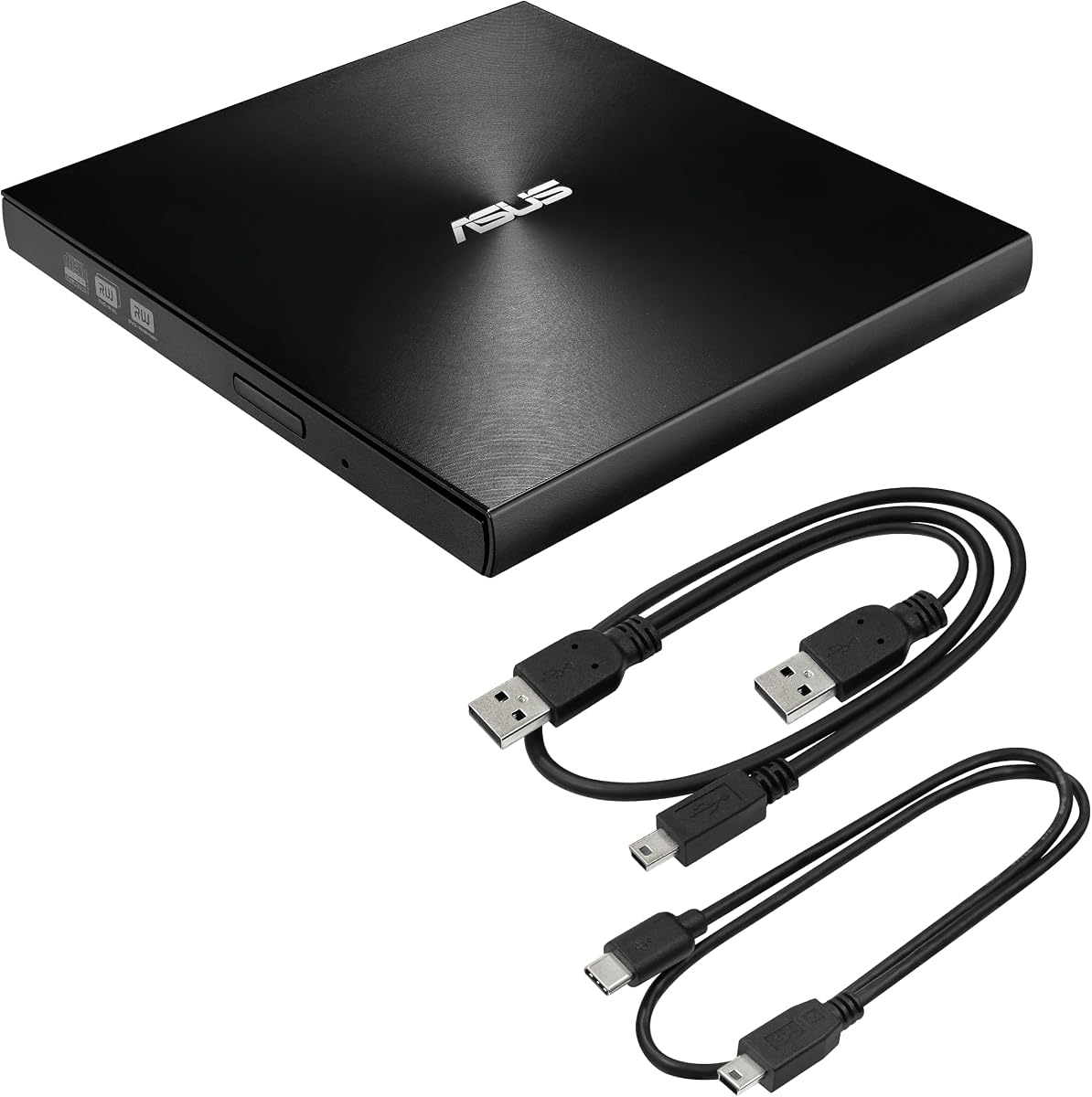
The ASUS ZenDrive Black is a slim external drive that offers a unique integration with Android devices through Nero BackItUp software. It supports M-DISC for long-term archiving and comes with both USB 2.0 and Type-C cables, making it a versatile tool for mobile and desktop users.
We may earn a commission when you buy through this link, at no additional cost to you.
Its ultra-slim 13mm design ensures it fits easily into bags, while the sleek black finish adds a modern touch. Although it uses USB 2.0, which is slower than USB 3.0, it is still efficient enough for standard ripping and playback tasks for most users.
This drive is particularly appealing to Android users who want to manage and back up media files directly to discs. The included cable set ensures you have the right connectors for various devices without needing to buy extras separately.
This drive is best for mobile users who need a portable solution for data management and ripping. Its design and cross-platform support make it a convenient choice for those looking to digitize content on the go.
Nero BackItUp software allows you to back up and manage media files directly from Android devices to discs, offering a seamless workflow for mobile users.
Inclusion of both USB-C and USB 2.0 cables ensures you can connect to modern and legacy devices without needing additional adapters.
We may earn a commission when you buy through this link, at no additional cost to you.
Choosing the right external CD drive for ripping involves evaluating connection types, build quality, and software compatibility to ensure smooth digital conversion of your media library.
For optimal ripping speeds, look for drives that support USB 3.0 or Type-C connections. These interfaces provide higher data transfer rates compared to USB 2.0, which significantly reduces the time needed to extract large video files or audio tracks. While USB 2.0 is still functional, it may introduce delays during batch ripping operations.
A USB 3.0 or Type-C connection ensures faster and more stable data transfer, making it the preferred choice for any user planning to rip a large media collection regularly.
Ensure the drive is compatible with your specific operating system. Most modern drives support Windows, macOS, and Linux, but some may have restrictions on certain versions or architectures like Apple Silicon. Checking compatibility early prevents issues with driver installations or connectivity.
Verify that the drive supports your OS version to ensure seamless plug-and-play functionality without needing complex driver setups.
Since ripping can take time, a sturdy build with anti-shock protection is vital. Drives with reinforced chassis and internal error correction mechanisms are less likely to fail or produce corrupted files during long sessions. This is especially important if you travel with your drive.
Choose a drive with strong anti-shock technology and durable materials to ensure it can handle repeated use and transport without performance degradation.
Most external drives are bus-powered, meaning they draw power from the USB port. However, some desktops or low-power laptops may not provide enough energy. Look for drives that include an external power adapter or a Y-cable for extra power to avoid reading errors.
Select a drive that either includes a power adapter or works reliably with standard USB power to prevent interruptions during the ripping process.
While most drives handle standard CDs and DVDs, check if the drive supports specific formats like CD-RW or DVD+R DL. If you need to burn or read specific disc types, verify that the drive lists these in its specifications to avoid compatibility issues.
Confirm that the drive supports all the disc formats you plan to use to ensure you can read and rip every disc in your collection without errors.
If you plan to use the drive outside your home, consider its size and weight. Ultra-slim designs with integrated cables are easier to pack and use on the go. Drives with protective cases or storage slots add extra convenience for travelers.
Look for a compact design with an integrated cable to make the drive easy to transport and use in different locations.
Some drives come bundled with software for burning, encryption, or backup. Features like M-DISC support can be useful for archiving data long-term. Check if the included software is compatible with your OS and fits your needs for media management.
Review any included software features to see if they add value to your ripping and archiving workflow without requiring extra purchases.
A longer warranty period indicates the manufacturer's confidence in the product. Look for drives with at least a one-year warranty to protect against hardware failure. Good customer support can also help resolve technical issues quickly.
Choose a drive with a solid warranty and responsive support to ensure you are protected if any hardware issues arise during use.
To get started, connect the external drive directly to a USB 3.0 or Type-C port on your computer. Avoid using unpowered hubs, as they may not provide enough energy for reliable operation. Wait for your computer to recognize the drive before inserting a disc.
Once recognized, use your preferred ripping software to extract audio or video files from the disc. Keep the drive stationary during operation to prevent read errors caused by movement. Clean the lens occasionally with a soft cloth if you notice reading issues.
After use, eject the disc safely through your operating system's interface before unplugging the drive. Store the drive in a protective case when not in use to prevent dust accumulation and physical damage. Regularly update your ripping software for the best compatibility.
Yes, most modern external CD drives are designed to be compatible with both macOS and Windows operating systems. Always check the product details to ensure your specific OS version is supported.
You cannot rip a DVD directly to MP3 since DVDs contain video, but you can extract the audio tracks and convert them to MP3 using third-party software after ripping the video data.
This often happens due to insufficient power or incompatible drivers. Try connecting to a rear USB port on a desktop or restart your computer to refresh the connection.
USB 3.0 is significantly faster and more stable for ripping large files, so it is the better choice if your computer supports it. USB 2.0 works but may be slower and less reliable.
Most standard external CD drives do not support Blu-ray discs unless specifically stated. Always check the product specifications for Blu-ray compatibility before purchasing.
You can use built-in tools like Windows Media Player or open-source software like Audacity or Exact Audio Copy for high-quality ripping without additional cost.
Choosing the right external CD drive for ripping depends on your specific needs, whether it is speed, portability, or advanced features like encryption. The ROOFULL, Rioddas, and ASUS models offer reliable performance for different budgets and use cases.
Prioritize drives with USB 3.0 or Type-C connections and anti-shock technology to ensure a smooth and efficient ripping process. These features help prevent errors and protect your hardware during daily use or travel.
Prices and availability change frequently, so always check the latest listings before purchasing. Select the model that best fits your technical requirements and budget for the best long-term value.