
DKE Desktop Computer Power Switch
4.7Editor score
2 Meter long cable included
Simple adhesive installation method
Compact portable design size
Finding a reliable external PC power button can transform your workspace by placing controls exactly where you need them most. Whether your tower hides under a desk or sits in a hard-to-reach corner, an external switch brings convenience and accessibility to your daily computing routine.
We compared ten top-rated models based on cable length, build quality, installation methods, and additional features like USB hubs or remote controls. Our analysis covers budget-friendly options alongside premium picks with aluminum casings and advanced connectivity to ensure you find the perfect match.
Each product in this list highlights key strengths and potential trade-offs to help you make an informed decision for your specific setup. Please note that prices and availability may change frequently, so verify current details before purchasing to ensure you get the best value available.
4.7Editor score

4.8Editor score

4.5Editor score
As an Amazon Associate we earn from qualifying purchases.
The following table provides a side-by-side comparison of all ten products reviewed in this guide to help you quickly identify the model that best fits your specific hardware requirements and budget constraints.





This PC power button ranks as the Editor's Choice due to its balance of functionality and ease of use. With a 4.6 rating from users, it stands out as a reliable solution for relocating your desktop controls to a more accessible spot.
We may earn a commission when you buy through this link, at no additional cost to you.
The product includes a 1 to 2 splitter board which allows you to keep your original chassis button working alongside the new external switch. This dual functionality is perfect for test benches or situations where you need backup control options.
Installation is straightforward using the provided adhesive stickers to secure the switch in place. The wiring can be routed through various openings like optical drive bays or expansion slots, making it versatile for different case types.
If you need a dependable external switch without spending much, this model is an excellent starting point. It effectively solves the problem of hard-to-reach power buttons on PC cases placed in awkward locations.
The included splitter board enables seamless integration with your existing chassis controls for enhanced flexibility.
Cables can be routed through multiple case openings to suit your specific build layout and preferences.
We may earn a commission when you buy through this link, at no additional cost to you.
This model expands on basic functionality by including both reset and HDD LED connections alongside the main power switch. It is ideal for users who want comprehensive control over their system indicators from a remote location.
We may earn a commission when you buy through this link, at no additional cost to you.
The package includes both a splitter board and a splitter cable giving you flexibility based on your available installation space. This thoughtful inclusion ensures you can adapt the switch to various motherboard layouts without extra purchases.
With a 2 meter cable you can position the button further away from your case compared to standard shorter options. This extended reach is beneficial for under-desk PC setups where the case is hidden from direct view.
Consider this option if you need detailed control features beyond just powering the system on and off. The added indicators help you monitor drive activity and system status from a convenient external position.
The HDD LED and reset switch connections provide full visibility and control over system states externally.
Multiple splitter types are included to accommodate different spatial constraints during installation.
We may earn a commission when you buy through this link, at no additional cost to you.
With an impressive 118-inch cable this switch is designed for situations where the PC is located far from your desk. It offers unparalleled reach allowing you to control your tower from across the room or from a floor-mounted position.
We may earn a commission when you buy through this link, at no additional cost to you.
The standard 4-pin connector ensures compatibility with most ATX motherboards without requiring adapters. This universal fit makes it a safe choice for users upgrading older systems or building custom rigs with non-standard layouts.
Installation remains simple with adhesive stickers securing the switch to your chosen surface. The included splitter allows you to maintain original controls while adding this extended external button for convenience.
If you have a setup where the case is under a desk or in a separate rack this is the ideal solution. The long cable eliminates the need to bend down or reach behind furniture to start your computer.
The 118-inch cable allows control from significant distances for flexible workspace arrangements.
Standard connectors ensure this works seamlessly with most desktop motherboards out of the box.
We may earn a commission when you buy through this link, at no additional cost to you.
This OwlTree switch stands out with its durable acrylic construction which provides a premium feel compared to standard plastic alternatives. Its 4.8 rating reflects high user satisfaction regarding build quality and reliability in daily use.
We may earn a commission when you buy through this link, at no additional cost to you.
The design features distinct physical buttons for boot and restart which helps prevent accidental presses during normal operation. This separation of functions adds a layer of control and safety for your system management.
LED indicators for power and hard disk activity give you visual feedback on system status at a glance. These lights help you confirm whether your computer is fully on or if drives are actively accessing data.
Choose this model if you prioritize build quality and a refined look for your desk setup. The acrylic finish resists scratches and maintains a clean appearance over time better than cheaper materials.
The acrylic casing offers durability and a high-end aesthetic that complements modern desk setups.
Separate boot and reset buttons ensure precise control over system operations without confusion.
We may earn a commission when you buy through this link, at no additional cost to you.
This option offers exceptional value by including an RGB LED effect without requiring any software configuration. It brings a touch of color to your desk setup while providing reliable external power control at a budget-friendly price.
We may earn a commission when you buy through this link, at no additional cost to you.
The low-voltage design ensures safe operation without risking damage to your motherboard components. This safety feature is crucial for users who might be less experienced with internal PC wiring and connections.
With a 2-meter cable you have ample length to route the switch to a convenient location like a desk side or keyboard tray. The cable is flexible enough for easy routing without bulk or tangling.
If you want an external switch that adds style to your setup without breaking the bank this is the top choice. The breathing LED effect enhances your gaming or office environment visually while serving a functional purpose.
The RGB LED adds a customizable glow that enhances your desk aesthetics without software setup.
Low-voltage engineering ensures reliable operation that protects your system components from electrical issues.
We may earn a commission when you buy through this link, at no additional cost to you.
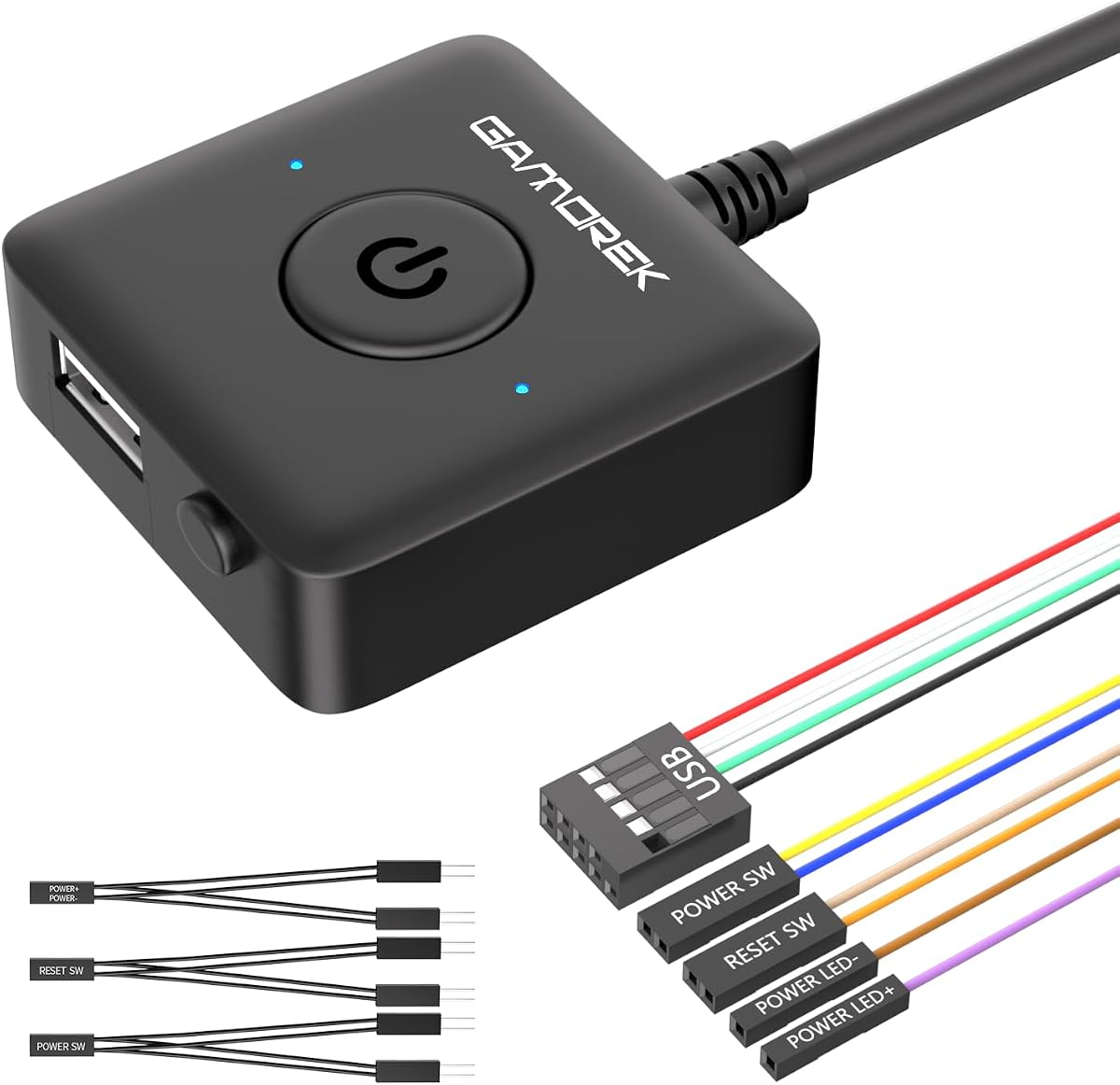
This unique model integrates a USB extension alongside standard power control features making it highly versatile for modern setups. It allows you to add accessible USB ports where you need them most without opening the case.
We may earn a commission when you buy through this link, at no additional cost to you.
The included PCI bracket helps secure the assembly professionally within your case opening for a neat installation. This ensures the button stays in place firmly without relying solely on adhesive tape for support.
USB support allows connection to keyboards, mice, or flash drives without reaching the back of your computer. This feature is particularly useful for users who frequently switch peripherals or need quick access to storage media.
Choose this if you need additional USB connectivity along with power control for a streamlined desk experience. The combination of features makes it a powerhouse option for users wanting to maximize desk space utility.
Built-in USB support adds convenient peripheral access points directly to your desk surface.
The included PCI bracket provides a stable and professional installation method for better durability.
We may earn a commission when you buy through this link, at no additional cost to you.
This device combines power control with a 4-port USB 3.0 hub offering significant expansion potential for your desktop. It allows you to add high-speed USB ports to a location that is easily accessible during daily work or gaming.
We may earn a commission when you buy through this link, at no additional cost to you.
The hub supports data transfer speeds up to 5.0Gbps ensuring your peripherals perform at their maximum potential. This is ideal for external drives or accessories that benefit from faster connection speeds than USB 2.0.
Installation involves connecting the power and USB cables to your motherboard headers for complete functionality. The adhesive option ensures the button stays fixed to your desk or panel securely without slipping.
If you need both power control and extra USB ports in one convenient unit this is a smart choice. The combination reduces cable clutter and brings high-speed connectivity closer to your hands for efficiency.
USB 3.0 support ensures fast file transfers and responsive peripheral performance across all four ports.
The compact form factor keeps your desk tidy while providing essential connectivity and control points.
We may earn a commission when you buy through this link, at no additional cost to you.
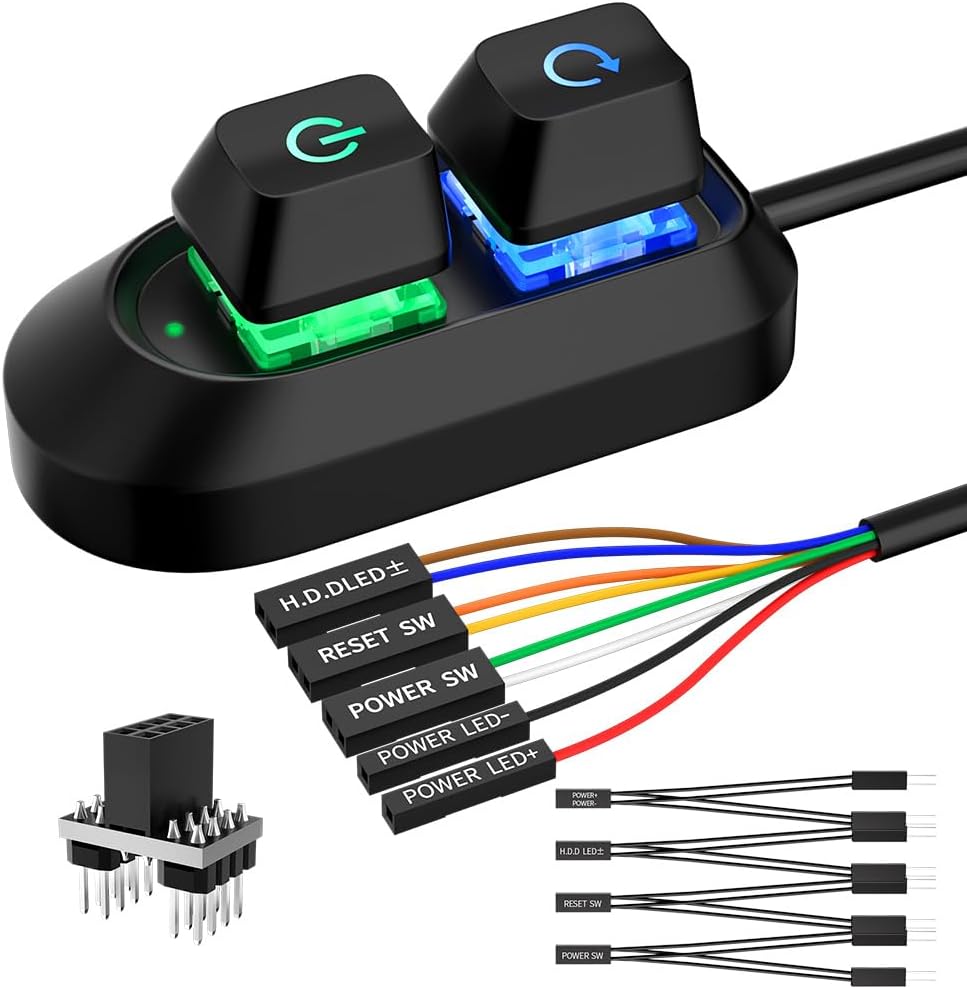
This DKE switch is notable for its extremely compact size making it ideal for spaces where desk real estate is limited. It offers reliable power control without adding bulk to your workspace or requiring large mounting areas.
We may earn a commission when you buy through this link, at no additional cost to you.
With a 2-meter cable you have sufficient range to place the switch comfortably near your keyboard or mouse. The cable is durable enough to withstand regular handling without fraying or breaking connections.
Installation is simple using the adhesive plate to secure the switch to any flat surface. This straightforward setup makes it accessible for users who want a no-fuss solution to power control issues.
Choose this model if you need a small reliable switch that does one job well. Its compact design ensures it fits easily into any setup without drawing attention away from your primary equipment.
The small footprint allows placement in tight spots where larger switches would not fit.
Adhesive mounting makes installation quick and easy without tools or complex wiring steps.
We may earn a commission when you buy through this link, at no additional cost to you.
This model features a robust aluminum casing that gives it a professional and premium look for your desk. The metal construction provides better durability and heat resistance compared to standard plastic options available in the market.
We may earn a commission when you buy through this link, at no additional cost to you.
It includes support for both reset and HDD LEDs giving you complete visibility of system status. This is particularly useful for users who need to monitor drive activity without looking at the case directly.
The package includes a splitter board allowing simultaneous use of original and external controls. This ensures you do not lose functionality on the case panel while gaining the benefits of an external button.
Invest in this unit if you want a high-end appearance that matches premium PC builds. The aluminum finish resists scratches and maintains a sleek look even after prolonged daily use.
Aluminum casing provides superior durability and heat resistance compared to standard plastic alternatives.
The premium finish complements high-end workstations and gaming setups with a sleek look.
We may earn a commission when you buy through this link, at no additional cost to you.
This wireless remote power switch offers the ultimate convenience by allowing you to control your PC from up to 50 feet away. It is ideal for users who want to turn their computer on or off without touching the case at all.
We may earn a commission when you buy through this link, at no additional cost to you.
The PCIe receiver board connects directly to your motherboard ensuring a stable and interference-free connection. This reliable hardware setup means you can trust the signal to reach your PC even in noisy environments.
Operation is simple with a single button press to start or a long press to safely shut down. The lack of required drivers means plug-and-play functionality right out of the box for most users.
Choose this option if you value remote access and are willing to sacrifice an internal PCIe slot. It transforms how you interact with your machine making it feel more like a smart device than a traditional tower.
Remote operation allows you to start or shut down your PC from anywhere in the room.
The PCIe receiver ensures stable communication with minimal risk of signal interference.
We may earn a commission when you buy through this link, at no additional cost to you.
Choosing the right external power button involves considering several key factors to ensure compatibility and ease of installation.
Cable length determines how far you can place the switch from your computer case. Standard options range from 1.5 to 118 inches so measure your desk setup before buying.
Always choose a cable that is at least twice the distance between your case and desired switch location for flexible routing.
Most external switches come with adhesive stickers for easy mounting on desks or panels. Look for strong 3M adhesive if you plan to stick it to a smooth surface.
For permanent setups consider models that include PCI brackets for secure integration into case openings.
Standard 4-pin connectors are compatible with most ATX motherboards. Verify your motherboard pin layout to ensure the switch will connect properly without extra adapters.
If you have specialized headers check product specifications for explicit compatibility before purchasing.
Some switches include reset buttons or USB functionality for expanded control. Decide if you need these extras or just basic power on and off functionality.
Features like HDD LEDs provide visual status feedback which can be helpful for troubleshooting.
Build material affects durability and aesthetics. Plastic models are affordable but aluminum ones resist scratches and look more premium on a desk.
Consider the look and feel as it impacts how well the switch blends with your existing gear.
A splitter board allows you to keep the original case button working alongside the new one. This dual control is useful for test benches or shared workstations.
Check if the package includes a splitter if you want to retain original functionality.
Look for kits that include clear instructions and all necessary connectors. Easier installation saves time and reduces the risk of wiring mistakes during setup.
User guides should clearly label POWER SW and LED connections to prevent confusion.
Prices vary significantly from basic switches to those with USB or wireless features. Determine your budget early to narrow down options that offer the best value.
Higher prices often reflect better build materials or additional connectivity features like remote control.
Install the switch by connecting the POWER SW and LED pins to the motherboard headers according to the provided manual. Secure the button using adhesive stickers on your desk or panel.
Test the connection by pressing the button to see if your PC powers on or off correctly. If it does not respond check all wiring connections to the motherboard for loose contacts.
Keep the button surface clean by wiping it with a soft cloth to maintain appearance and function. Avoid exposing the adhesive to moisture or direct sunlight to ensure it stays secure over time.
Yes most models include splitter boards that allow both external and internal buttons to function together. This ensures you maintain all control options without removing the original switch.
No these switches are hardware-based and do not require software drivers. You simply connect the cables to the motherboard headers for plug-and-play functionality.
Yes the switches operate at low voltage making them safe for direct handling. The design isolates electrical components to prevent any risk of shock during daily use.
Select a model with a longer cable length or use a USB extension cable to route the power wire further. Ensure the cable supports low-voltage signals to avoid issues.
Yes adhesive stickers allow mounting on vertical panels provided the surface is clean and smooth. Ensure the adhesive is pressed firmly to avoid the button falling off.
Most wireless models use stable frequencies designed to avoid interference with common peripherals. They perform reliably in office environments with minimal signal disruption.
We reviewed ten top options ranging from budget picks to premium models with unique features. Our Editor's Choice offers the best balance of price and ease of use for most users.
Prioritize cable length and build material when selecting your switch to ensure it fits your workspace perfectly. Consider whether you need extra features like USB or remote control before buying.
Prices and availability change regularly so check the current links for up-to-date details before finalizing your purchase. Choose the model that best aligns with your specific setup needs and budget.