
Coral M.2 Accelerator B+M Key
5.0Editor score
4 TOPS peak performance
Debian Linux integration
TensorFlow Lite support
This guide compares the top M2 accelerator cards for AI and edge computing, evaluating performance, compatibility, and efficiency to help you choose the right
M2 accelerator cards are essential for deploying machine learning models at the edge. These compact modules deliver high performance while maintaining low power consumption. Choosing the right card ensures your system handles vision tasks efficiently without overheating or lagging during critical operations.
We evaluated ten leading M2 accelerator cards based on processing power, thermal management, and software support. Our analysis focuses on real-world performance metrics and integration ease. This list covers diverse use cases from embedded systems to high-throughput server environments.
Each pick highlights specific strengths and ideal applications for different user needs. Prices and availability may vary over time so verify details before purchasing. We aim to provide clear guidance for developers and IT professionals seeking reliable AI hardware.
5.0Editor score

4.6Editor score

4.3Editor score
This table provides a side-by-side comparison of the ten selected M2 accelerator cards highlighting their key specifications and primary use cases for informed decision making.


The waveshare Hailo-8 M.2 AI Accelerator Module stands out with its impressive 26 TOPS processing power. It achieves a strong rating due to its ability to handle complex vision models efficiently. This module is designed for users needing real-time inferencing without excessive power draw.
We may earn a commission when you buy through this link, at no additional cost to you.
Its standout qualities include support for multiple frameworks like TensorFlow and PyTorch. This flexibility allows developers to deploy models easily without rewriting code. The module also enables simultaneous processing of multi-streams which is crucial for multi-camera setups.
While the module offers great power, users may face a learning curve with initial setup. Documentation is available but requires careful reading to optimize performance. However, the high efficiency and low power consumption make these trade-offs acceptable for most edge applications.
Ideal for robotics and surveillance systems needing high throughput. Developers looking for scalable solutions should consider this module. Its balance of performance and efficiency makes it a top recommendation for serious AI projects.
The module delivers 26 TOPS while maintaining low power consumption which is vital for battery powered devices.
Scalable processing enables simultaneous multi-model inference allowing robust applications on single hardware.
We may earn a commission when you buy through this link, at no additional cost to you.
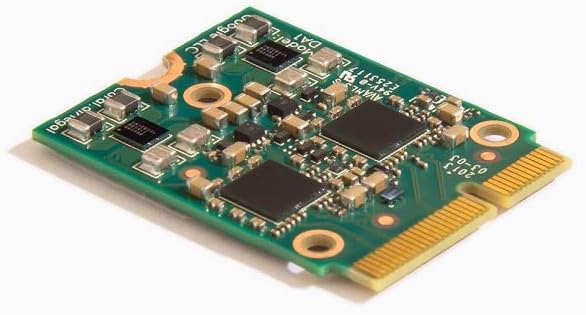
The Coral M.2 Accelerator delivers exceptional value with its 4 TOPS performance at low power. It maintains a perfect rating due to its reliability and ease of use. This card is ideal for developers starting with edge AI projects.
We may earn a commission when you buy through this link, at no additional cost to you.
It integrates seamlessly with Debian-based Linux systems offering a stable environment for development. Support for TensorFlow Lite simplifies model deployment significantly. The AutoML Vision Edge feature allows building custom classification models quickly.
The main limitation is compatibility with specific card slots which may restrict usage. Also, it is optimized for TensorFlow Lite models requiring conversion for other formats. Despite these minor constraints the performance efficiency makes it a top budget choice.
Best for hobbyists and small deployments needing reliable inference. Users who prefer Linux environments will find it straightforward. Its balance of cost and performance ensures it remains a top pick for many.
Uses only 0.5 watts per TOPS ensuring efficient operation without significant heat generation.
Models can be compiled to run directly on the Edge TPU without complex retraining.
We may earn a commission when you buy through this link, at no additional cost to you.
The MX3 M.2 AI Accelerator targets demanding computer vision workloads with high efficiency. It earns its premium status through robust performance and comprehensive software support. This card suits industrial applications needing consistent output.
We may earn a commission when you buy through this link, at no additional cost to you.
Its SDK simplifies development and deployment reducing time to market. Integration via M.2 M-key ensures compatibility with various systems including Raspberry Pi 5. The Linux OS support is extensive making it accessible for server deployments.
Cost may be higher than alternatives but the performance justifies it for critical tasks. Linux focus may limit Windows users though many industrial systems run Linux. The energy efficiency ensures low operating costs over the device lifecycle.
Perfect for enterprise deployments needing reliable vision processing. Developers requiring a complete SDK will appreciate the resources. Its balance of power and efficiency makes it a strong premium option.
The SDK simplifies deployment reducing time to market for custom vision applications.
Compatible with Raspberry Pi 5 via HAT offering flexible edge deployment options.
We may earn a commission when you buy through this link, at no additional cost to you.
This card offers dual Edge TPU accelerators in a compact M.2 2230 form factor. It provides 8 TOPS total peak performance for intensive machine learning tasks. It suits users needing more throughput than single TPU options.
We may earn a commission when you buy through this link, at no additional cost to you.
The 2x PCIe Gen2 x1 interface ensures dedicated bandwidth per TPU. This prevents bottlenecks during parallel processing. Its efficiency of 2 TOPS per watt is ideal for thermal constrained environments.
Compatibility requires specific E-key slots which may limit some older boards. The Gen2 interface is slower than Gen3 but sufficient for TPU workloads. Users should verify slot compatibility before purchase to avoid fit issues.
Recommended for multi-camera vision systems needing high throughput. Ideal for developers scaling from single to dual TPU needs. The modular design ensures future upgradeability without replacing the entire system.
Dual TPU modules enable higher throughput for multiple streams or complex models.
M.2 2230 size allows fitting into tight spaces where full sized cards fail.
We may earn a commission when you buy through this link, at no additional cost to you.
This card combines dual M.2 NVMe slots with a high speed 10GbE port. It enhances NAS performance significantly enabling faster data transfers and caching. It is excellent for systems needing both storage and network upgrades.
We may earn a commission when you buy through this link, at no additional cost to you.
The Marvell AQtion controller ensures stable high speed networking. Support for QNAP QTS and Windows/Linux OS provides broad compatibility. The pre-installed low profile bracket fits standard cases easily without custom brackets.
It is not designed for AI acceleration but rather storage and networking. Users looking for M.2 storage expansion will find it highly useful. The network port allows direct connection to high speed devices without additional switches.
Best for NAS users needing more bandwidth and cache speed. IT professionals managing servers will appreciate the dual utility. Its reliability and flexibility make it a top choice for storage networking.
10GbE ports allow direct connection to high speed network devices improving throughput.
Dual M.2 NVMe slots enable rapid caching improving overall system read write speeds.
We may earn a commission when you buy through this link, at no additional cost to you.
The Rocket 1604L offers PCIe 5.0 support for four NVMe drives with dedicated lanes. It ensures maximum throughput for each connected device without bottlenecks. It suits workstations needing extreme data transfer speeds.
We may earn a commission when you buy through this link, at no additional cost to you.
It supports mainstream operating systems and both Intel and AMD platforms. The 4x M.2 ports allow flexible configurations for RAID or independent storage. Its architecture is designed for future proof scalability.
The main requirement is a Gen5 motherboard which may not be available everywhere. Power draw is higher due to PCIe 5.0 speeds needing adequate cooling. Users should verify motherboard compatibility before purchase.
Perfect for high performance computing and video editing. IT admins needing flexible storage solutions will find it valuable. Its speed and scalability make it a top choice for advanced storage needs.
Gen5 support ensures future proof data transfer speeds for next generation drives.
Each port gets dedicated lanes ensuring consistent performance across all drives.
We may earn a commission when you buy through this link, at no additional cost to you.
This adapter transforms a single PCIe slot into a dual TPU workstation. It provides space efficient dual TPU performance without multiple slots. Ideal for users scaling up object detection or video analytics.
We may earn a commission when you buy through this link, at no additional cost to you.
The heatsink ensures thermal management for the two connected cards. Its PCIe Gen3 x4 to 4X Gen2 x1 splitter maximizes bandwidth usage. It is designed for TensorFlow Lite models and computer vision tasks.
Users must already own two Coral TPU cards to use this effectively. Setup requires technical knowledge to ensure proper lane splitting. However it is cost effective compared to buying a whole new workstation.
Best for developers expanding existing edge AI setups. Cost conscious users maximizing hardware investment will appreciate it. Its scalability makes it a top pick for growing vision projects.
PCIe Gen3 x4 splits into 4x Gen2 x1 to fit two accelerators efficiently.
Integrated cooling ensures stable performance during long inference sessions.
We may earn a commission when you buy through this link, at no additional cost to you.
This card supports four NVMe M.2 devices with up to 512 Gbps bandwidth. It includes active cooling to prevent throttling during heavy data transfers. Ideal for systems needing high speed RAID configurations.
We may earn a commission when you buy through this link, at no additional cost to you.
The large heatsink and thermal pads ensure stable temperatures. A 6-pin PCIe power connector provides sufficient power for all drives. It supports RAID across AMD and Intel platforms offering broad compatibility.
Power requirements may limit some smaller cases without extra connectors. Fan cable management can be tricky in tight chassis. Despite this the server grade PCB ensures reliability under sustained loads.
Perfect for workstations needing bootable RAID arrays. Users managing video archives will benefit from high throughput. Its cooling features make it a reliable choice for sustained workloads.
Active fan and thermal pads ensure unthrottled speeds under heavy loads.
Allows creation of bootable RAID arrays improving data safety and speed.
We may earn a commission when you buy through this link, at no additional cost to you.
This accelerator offers 4 TOPS performance in an A+E key interface. It is ideal for embedded systems needing reliable ML inference. It balances power efficiency with robust performance for edge devices.
We may earn a commission when you buy through this link, at no additional cost to you.
It supports Linux and Windows ensuring compatibility with diverse environments. The industrial grade reliability allows operation in harsh conditions. Its low power design makes it suitable for battery powered setups.
Users need an A+E key slot which may be less common. Peak performance is lower than newer 2280 options. However for embedded apps the compact size and efficiency are valuable.
Best for robotics and handheld devices needing inference. Developers needing Windows or Linux support will find it flexible. Its reliability makes it a solid pick for industrial automation.
Operating temperature range of -20C to 85C suits harsh environments.
Delivers 2 TOPS per watt ensuring long battery life on edge.
We may earn a commission when you buy through this link, at no additional cost to you.
This adapter board supports dual Coral TPU modules in a B+M Key slot. It is designed specifically to maximize inference performance of Coral hardware. It includes a mounting screw for secure fixation.
We may earn a commission when you buy through this link, at no additional cost to you.
It fits standard M.2 2280 slots making it easy to install. The bidirectional Gen2 bandwidth ensures stable data transfer between the card and host. It explicitly prevents buyer errors regarding Raspberry Pi CM4 enclosures.
Limited to Coral TPUs so incompatible with SATA M.2 drives. Gen2 bandwidth may limit high throughput applications. However its simplicity and mounting hardware make it a reliable choice.
Perfect for simple dual TPU setups in standard slots. Users needing secure mounting in vibration prone environments will find it useful. Its clear compatibility prevents costly buyer errors.
Stainless steel mounting screw ensures vibration resistant fixation in mobile cases.
Explicitly prevents use with Raspberry Pi CM4 enclosures to avoid buyer errors.
We may earn a commission when you buy through this link, at no additional cost to you.
Selecting the right M2 accelerator card requires considering several factors to ensure compatibility and performance.
Processing power determines how fast your card can execute machine learning models. Look for higher TOPS if you need real-time performance for complex tasks.
Higher TOPS means faster inference which is critical for video analytics or robotics.
Power consumption affects heat generation and battery life for mobile systems. Energy efficient cards help maintain thermal stability without heavy cooling.
Look for high TOPS per watt values to ensure efficiency and lower operating costs.
Ensure the card supports your primary operating system whether Linux or Windows. Compatibility avoids driver issues and simplifies development.
Most edge AI cards focus on Linux but check for Windows support if required.
Verify that your motherboard has the correct M.2 slot type and size. Common types include B-key, M-key, or E-key slots.
Matching the card to your slot prevents physical incompatibility issues upon arrival.
A comprehensive SDK helps developers deploy models quickly without building from scratch. Good documentation reduces setup time significantly.
Check if the vendor offers active support and tutorials to assist your team.
Active cooling or large heatsinks are vital for sustained workloads. Overheating leads to throttling and reduced performance.
Look for cards with built-in fans or efficient passive cooling for stability.
Ensure the card supports your model format like TensorFlow or ONNX. Some accelerators require models to be compiled specifically.
Choose a card compatible with your existing model stack to save conversion time.
Small systems may limit you to compact cards. Consider card dimensions to ensure it fits inside the chassis.
Measure available space before purchasing to avoid fit issues during installation.
First install the card by inserting it into the correct M.2 slot on your motherboard. Secure it firmly with a screw to prevent connection issues.
Ensure you install the latest drivers and software SDK from the manufacturer. This ensures optimal performance and compatibility with your applications.
Monitor temperatures during usage to prevent overheating. Use the provided tools to track performance and adjust loads as needed.
An M2 accelerator card is a compact module designed to perform AI and machine learning tasks efficiently. It connects to the motherboard via an M.2 slot and processes data faster than a CPU.
Yes most cards require specific drivers to function correctly. Install the software SDK provided by the manufacturer for proper operation.
No, slots vary by key type like B or M. You must check your motherboard specifications before purchasing a card.
Some cards support Windows but many focus on Linux. Check the product details for OS compatibility before buying.
Verify your motherboard's M.2 slot type and keying. Also ensure your OS matches the card's requirements.
TOPS stands for Tera Operations Per Second. It measures how many calculations the card can do per second for AI tasks.
No these are specialized for AI inference tasks like object detection. They are not designed for gaming graphics rendering.
Yes sustained workloads generate heat. Ensure your setup includes proper cooling to maintain performance levels.
We highlighted the waveshare Hailo-8 as a top performer with high processing power. The Coral M.2 Accelerator offers excellent value for budget-conscious users.
Prioritize processing power and compatibility when selecting a card. Ensure your system meets the required specifications before purchase.
Prices and availability may change so verify current details before buying. Check the official links provided for the most accurate information.