
Raycue Mac mini Dock & Stand
4.3Editor score
8TB M.2 NVMe expansion
10-in-1 connectivity hub
Flawless Wi-Fi interference shield
This guide compares the top Mac Mini M4 dock options featuring storage expansion, port connectivity, and sleek designs to help you choose the right hub for
Finding the right Mac Mini M4 dock transforms your workspace by adding essential ports and storage without cluttering your desk. A good dock blends seamlessly with your device while offering reliable connectivity for peripherals and external drives.
We evaluated ten real products based on port variety, storage expansion capabilities, build quality, and compatibility with the latest Mac Mini models. Our analysis focuses on practical performance and user experience across different workloads.
Each pick highlights specific strengths like Thunderbolt speed, NVMe enclosure support, or unique design features. Remember that availability and specs can change so verify details before purchasing to ensure the dock meets your needs.
4.3Editor score

4.5Editor score

4.3Editor score
The table below summarizes key specifications for all ten docks to help you compare port counts, storage options, and display support at a glance.


The UGREEN Mac mini Dock stands out as our top choice for balancing storage and connectivity. With a 4.5 rating it offers massive 8TB expandable storage via M.2 NVMe SSDs alongside an 11-in-1 hub. This combination makes it ideal for creatives needing quick access to large files.
We may earn a commission when you buy through this link, at no additional cost to you.
Its high-speed connectivity hub includes multiple USB-A and USB-C ports plus an SD/TF card reader. The precision-engineered design matches the Mac Mini curves perfectly while the power button lever lets you turn on your device without lifting it. This thoughtful touch saves daily effort.
While powerful the dock draws power from the Mac Mini but an external adapter is recommended for multi-device setups to avoid bottlenecks. The included short cable keeps your desk tidy but you may need a longer one for complex setups. Still these minor trade-offs are outweighed by performance.
If you want a single solution that expands storage and ports without clutter this dock delivers value. It suits pros and multitaskers who need speed and organization. Check availability to ensure it matches your specific Mac Mini model before purchasing for seamless integration.
Supports up to 8TB of ultra-fast internal storage with blazing 10Gbps transfer speeds ideal for 4K editing and backups.
Features anti-slip silicone pads for stability and a compact form factor that maximizes space while keeping cables organized.
We may earn a commission when you buy through this link, at no additional cost to you.
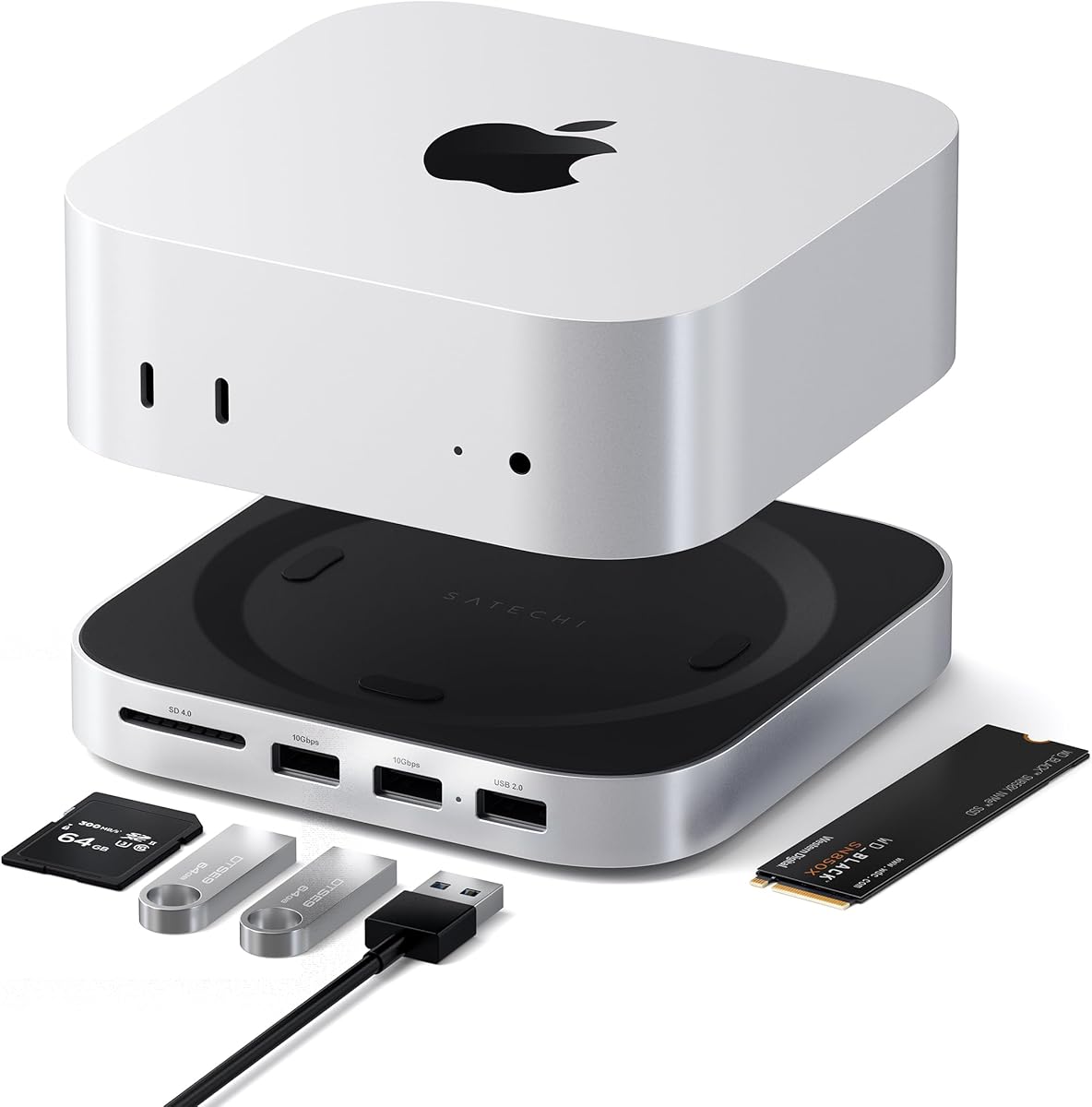
Satechi brings its reputation for quality with this sleek silver hub and stand. Rated 4.5 stars it features an aluminum build that dissipates heat efficiently through bottom vents. The recessed top ensures proper airflow for your Mac Mini M4 fan without obstruction.
We may earn a commission when you buy through this link, at no additional cost to you.
It offers five front-facing expansion ports including USB-A 3.2 and a fast UHS-II SD card reader. This setup suits users who need quick media access without diving into the back of your Mac Mini. The design stays minimal yet functional for daily tasks.
However the lack of USB-C data ports limits connectivity compared to broader hubs. You can only connect one bus-powered device at a time which may slow workflows with multiple peripherals. Still the build quality and cooling make it reliable for light to moderate use.
Choose this if you value aesthetics and thermal performance alongside basic expansion. It pairs well with the Mac Mini design language perfectly. Verify your exact Mac Mini model compatibility before buying to ensure seamless integration and stable long-term performance.
Crafted from industry-grade aluminum with heat-dissipating bottom vents to maintain safe temperatures during extended sessions.
Front-facing UHS-II SD card reader allows fast file transfers up to 312MB/s for photographers and content creators.
We may earn a commission when you buy through this link, at no additional cost to you.
This UGREEN dock excels for display needs with 4K@144Hz support for the M4 Pro via DisplayPort. It combines an 8TB NVMe enclosure with essential connectivity including USB-A and USB-C ports. Users rating 4.4 praise its precision engineering and clean desk aesthetics.
We may earn a commission when you buy through this link, at no additional cost to you.
The DP port delivers lag-free visuals perfect for creative work or gaming. Pair it with your Mac Mini Thunderbolt port for multi-screen setups enhancing productivity significantly. The power button lever ensures easy device access without moving your setup.
On the downside it offers fewer ports than the standard UGREEN dock making it less versatile for many peripherals. You must buy an SSD separately which adds to total cost. However the display performance justifies the choice for video editors needing smooth playback.
Ideal for users prioritizing high refresh rates over raw port counts. It keeps your desk clutter-free while expanding storage seamlessly. Check your Mac Mini model compatibility to ensure the DP output matches your system capabilities before finalizing your purchase.
Supports 4K@144Hz via DisplayPort enabling crystal-clear lag-free visuals for creative work and entertainment setups.
Integrates 8TB NVMe storage and essential ports into one dock blending functionality with a sleek minimal design.
We may earn a commission when you buy through this link, at no additional cost to you.
The 4URPC dock tops lists with thirteen ports including DisplayPort HDMI and USB expansions. Rated 4.8 it eliminates the need for separate hubs or stands on your desk. This all-in-one workstation solution keeps devices connected cleanly for work or study.
We may earn a commission when you buy through this link, at no additional cost to you.
You can boost productivity with triple-display setups combining the dock HDMI and DisplayPort outputs with Mac Mini built-in ports. Transfer speeds reach 10Gbps allowing quick file moves for photographers or video editors. The power button stays easily accessible without lifting the unit.
It is not compatible with older M1 or M2 models so verify your Mac Mini generation first. While it lacks Thunderbolt ports the standard USB speeds suit most needs. The large port count may increase cable clutter if not organized properly.
Best for users needing maximum connectivity without extra dongles. Its design simplifies complex workflows effectively. Ensure your Mac Mini model matches the compatibility list to avoid setup issues and enjoy a tidy workspace ready for creativity.
Supports up to three screens using DP HDMI and Mac Mini built-in ports for enhanced multitasking and editing workflows.
Includes USB-A USB-C SD slots and audio jack all in one dock to connect all essential peripherals easily.
We may earn a commission when you buy through this link, at no additional cost to you.
ACASIS offers dual-bay NVMe support allowing up to 16TB of storage in RAID modes. Rated 3.9 it addresses capacity concerns with included 65W PD adapter for stable power. Aluminum construction with side vents and silent fans maintain safe temperatures even after hours.
We may earn a commission when you buy through this link, at no additional cost to you.
You can connect up to three displays using the dock DP outputs plus your Mac Mini built-in ports. The package includes 40Gbps cable and thermal pads for easy installation. This setup suits professionals needing extensive local storage without cloud reliance.
Some users report display issues requiring troubleshooting like disconnecting other USB devices or replacing cables. The fans may produce slight noise in quiet environments. Always power off before plugging or unplugging SSDs to avoid data loss risks during operation.
Ideal for heavy data users prioritizing storage capacity over simplicity. Check the A page guide for troubleshooting tips to resolve connectivity problems. Verify your Mac Mini compatibility to ensure stable performance before investing in this robust expansion system.
Supports two NVMe SSDs delivering up to 16TB in RAID 0 mode for vast local storage and fast access speeds.
Included 65W PD adapter minimizes disconnection risks and supports dual drive operations without relying on Mac Mini power.
We may earn a commission when you buy through this link, at no additional cost to you.
Raycue provides great value with an 8TB NVMe expansion and ten ports at a lower cost. Rated 4.3 its conductive paint shielding blocks 5G Wi-Fi interference ensuring stable wireless performance. This makes it ideal for streaming video calls without dropped signals.
We may earn a commission when you buy through this link, at no additional cost to you.
You get two 10Gbps USB-A ports and one USB-C data port alongside a USB-C charge slot. The thermal design uses bottom vents and a recessed top for efficient cooling during multiple device use. It supports all major Mac Mini M4 models effectively.
The build feels less premium than aluminum options but remains sturdy enough for daily tasks. You need a separate SSD which is standard across this category. Some power adapters are required for heavy usage which adds minor extra cost to the setup.
Best for users seeking affordable expansion without sacrificing core speed. It keeps workspaces clean with its short cable. Verify your Mac Mini model compatibility before buying to ensure seamless integration and reliable performance for your specific workflow needs.
Conductive paint shielding blocks 5G Wi-Fi interference ensuring stable high-speed wireless performance during heavy usage.
Optimized bottom ventilation and recessed top design maintain peak performance without overheating during extended sessions.
We may earn a commission when you buy through this link, at no additional cost to you.
This ACASIS dock mirrors the 40Gbps model with dual NVMe bays and strong cooling. Rated 4.6 it supports up to 16TB with included 65W PD adapter. Aluminum alloy construction with side vents and silent dual fans keeps drives safe during continuous operation.
We may earn a commission when you buy through this link, at no additional cost to you.
It includes three USB-A 3.2 ports for peripherals and an HDMI port supporting 4K@60Hz. The package comes with 40Gbps cable and thermal pads for easy setup. This design suits editors needing large local storage without overheating issues.
Power dependency is a consideration as the dock requires its own adapter for stability. Always power off before inserting or removing SSDs to prevent data loss. While the fans are silent they do activate automatically under load which may be audible in quiet rooms.
Choose this for reliable dual-drive storage with built-in cooling. It simplifies complex storage needs effectively. Confirm your Mac Mini model compatibility to avoid setup issues and ensure optimal performance for your specific workflow requirements.
Silent dual cooling fans maintain safe temperatures around 60°C during hours of operation for stable drive performance.
Includes dock unit cables adapter and thermal pads for a hassle-free installation experience out of the box.
We may earn a commission when you buy through this link, at no additional cost to you.
UGREEN brings Thunderbolt 4 power to your Mac Mini with 40Gbps transfer speeds. Rated 4.3 it supports dual 4K@60Hz displays or single 8K@30Hz for ultimate productivity. Three downstream Thunderbolt ports let you connect multiple high-performance devices seamlessly.
We may earn a commission when you buy through this link, at no additional cost to you.
The included 140W GaN charger supports 85W laptop charging while working. This dock eliminates need for extra adapters by powering your Mac Mini directly. It suits power users who need maximum bandwidth for video editing or data transfers without bottlenecks.
Lack of built-in NVMe enclosure means external drives remain necessary for storage expansion. Not compatible with Intel Mac Mini 2018 models so verify your system first. Premium features come at higher cost but justify investment for professional workflows.
Ideal for professionals needing top-tier connectivity and display support. It simplifies complex setups significantly. Check your device compatibility thoroughly to ensure full feature availability and stable performance before finalizing your purchase decision.
Transfers data at 40Gbps with three downstream Thunderbolt 4 ports for ultimate speed and device connectivity options.
Extends dual 4K60Hz displays or single 8K display for enhanced multitasking and immersive visual workspaces.
We may earn a commission when you buy through this link, at no additional cost to you.
RayCue stands out for supporting both NVMe and SATA M.2 SSDs up to 8TB. Rated 4.3 it features a 4K@60Hz HDMI output perfect for mirroring screens. The brushed aluminum finish complements your Mac Mini design seamlessly for a premium look.
We may earn a commission when you buy through this link, at no additional cost to you.
Ten ports provide solid connectivity with USB-A and USB-C data alongside a USB-C charge port. You must connect an extra USB-C charging port to the back when using hard drives to ensure adequate power. This prevents disconnects during file transfers or playback.
Only one external monitor is supported which limits multi-screen setups. The dock is compatible with Mac Mini M4 M5 Pro M6 models and some USB-C laptops. Ensure you use the extra power port to avoid instability during heavy workloads.
Best for users needing SATA SSD support alongside modern connectivity. It expands memory efficiently without clutter. Verify your Mac Mini model compatibility to avoid setup issues and ensure reliable performance for your specific workflow requirements.
Supports both NVMe and SATA M.2 SSDs offering flexibility for existing hardware and faster expansion options.
Delivers 10Gbps speeds on USB-A and USB-C ports for quick file movement and reliable peripheral connectivity.
We may earn a commission when you buy through this link, at no additional cost to you.
M5 Retro Dock brings vintage charm with modern performance via its built-in five-inch HD display. Rated 4.4 it acts as a notification monitor while offering a 14-in-1 hub. This unique setup adds character to your desk without sacrificing connectivity.
We may earn a commission when you buy through this link, at no additional cost to you.
It supports M.2 NVMe SSDs up to 8TB and includes USB-A USB-C and SD card readers. An 80Gbps Thunderbolt 5 version launches later offering future-proof speeds. Current 10Gbps USB-C version serves everyday users well for standard file transfers and peripheral use.
The Thunderbolt 5 upgrade arrives late October so consider your timing needs carefully. While the display adds visual interest it increases the cost significantly. Compatibility extends beyond Mac Mini to MacBook Windows and Android devices supporting DP protocol for versatility.
Best for users valuing style alongside function. It transforms your desktop into a retro-modern workstation. Check upcoming Thunderbolt 5 release dates to decide if current features meet your needs for stable performance and integration.
Built-in 5-inch HD screen provides quick access to notifications lyrics or secondary information for enhanced workflow efficiency.
Offers current 10Gbps speeds with an upcoming 80Gbps Thunderbolt 5 version launching late October for ultimate bandwidth.
We may earn a commission when you buy through this link, at no additional cost to you.
Selecting the right dock depends on your specific workflow needs and device compatibility requirements.
Consider whether you need NVMe or SATA SSD support. Many docks support up to 8TB but dual-bay options allow up to 16TB in RAID modes for massive storage needs.
Choose single-bay for general use or dual-bay for professional workflows requiring extensive local files without cloud dependency.
Count the number of USB-A USB-C HDMI DisplayPort and audio ports you need daily. Some docks offer 11 ports while others focus on 5 to 10 essential connections.
Prioritize Thunderbolt 4 for maximum speed or standard USB 3.2 for cost-effective connectivity based on your peripheral requirements.
Check if the dock supports your desired resolution and refresh rate. Options range from 4K@60Hz HDMI to 4K@144Hz DisplayPort for high-refresh needs.
Verify multi-screen support by combining dock outputs with your Mac Mini built-in ports for triple-display setups if required.
Some docks draw power from the Mac Mini but external 65W or higher adapters ensure stability with multiple peripherals and drives.
Always check if a power adapter is included or sold separately to budget correctly for your complete setup costs.
Aluminum alloy offers better heat dissipation than plastic but costs more. Look for side vents or bottom vents to maintain safe operating temperatures.
Consider weight and anti-slip features to ensure the dock stays stable and protects your Mac Mini from scratches during daily use.
Passive cooling relies on vents and materials while active systems use fans for high-load scenarios. Silent fans are crucial for office environments.
Choose cooling that matches your workload intensity to prevent throttling during extended video editing or file transfer sessions.
Ensure the dock explicitly supports your exact Mac Mini model whether M4 M5 Pro or M6. Older models may have different port layouts or power needs.
Review compatibility notes to avoid buying docks designed only for newer generations that may not fit your current setup.
Some docks offer retro-inspired designs or built-in displays adding unique value beyond function. Choose finishes that match your Mac Mini color scheme.
Consider footprint and cable length to maintain a tidy workspace that suits your desk layout and personal style preferences.
Always power off the Mac Mini and unplug the dock before inserting or removing NVMe SSDs to prevent data loss or drive failure during operation.
Use the included thermal pads when installing SSDs to improve heat transfer and ensure optimal performance during extended file transfer sessions.
Regularly clean dust from vents and aluminum surfaces using a soft brush or compressed air to maintain efficient cooling over time.
Most docks are designed specifically for M4 M5 Pro and M6 models with different port layouts. Verify compatibility lists before purchasing to ensure the dock fits your current Mac Mini hardware correctly.
Yes all docks support external SSDs but some include built-in enclosures for M.2 NVMe drives. Use the included USB-A or USB-C ports for external drive connections to your Mac Mini.
Some docks draw power from the Mac Mini but external 65W adapters are recommended for stability with multiple peripherals. Check each product details to see if the adapter is included.
Most enclosures support M.2 NVMe SSDs in 2230 2242 2260 and 2280 sizes. Some also support SATA M.2 SSDs providing flexibility based on your existing hardware.
Yes many docks support dual or triple monitors by combining dock outputs with Mac Mini built-in ports. Check specific ports like HDMI and DisplayPort for resolution capabilities.
Most docks designed for Mac Mini are optimized for macOS but may work with USB-C laptops. Verify USB-C and Thunderbolt compatibility if you plan to use them with Windows or Android devices.
Disconnect other USB devices try a higher wattage adapter or replace the DisplayPort cable as recommended by support. Reconnect the dock carefully to ensure proper contact.
The UGREEN Mac mini Dock & Stand offers the best balance of storage and connectivity for most users while the Raycue option provides strong budget-friendly performance.
Prioritize your needs whether it is port count storage capacity or display support to select the dock that fits your specific workflow without unnecessary features.
Remember that product details may change so verify current availability and specifications before purchasing to ensure compatibility with your Mac Mini model.