
ZealSound Podcast Microphone for PC
4.4Editor score
Intelligent noise reduction mode
Zero-latency monitoring jack
Plug and play USB connection
Choosing the right microphone is crucial for podcasters who want to deliver clear and professional audio to their audience. A good microphone captures your voice with precision while minimizing background noise and ensuring consistent levels throughout your recording sessions.
We have evaluated ten leading microphones available today by analyzing their technical specifications, user feedback, and real-world performance across different recording environments. This list covers a range of options from affordable USB models to professional XLR solutions for every budget and setup.
Each pick highlights specific strengths and ideal use cases so you can find a match for your needs. Keep in mind that product availability and pricing can change over time, so verify details before making your final purchase decision.
4.4Editor score

4.8Editor score

4.6Editor score
As an Amazon Associate we earn from qualifying purchases.
The following table provides a side-by-side comparison of all ten microphones featured in this guide. Each entry includes key specifications and direct links so you can quickly assess which model fits your podcasting requirements and budget constraints.




The Shure MV7+ stands out as a top tier solution for podcasters who demand professional quality audio without compromising on ease of use. With a high rating of 4.8 stars, it delivers crystal clear vocal capture that rivals much more expensive studio setups.
We may earn a commission when you buy through this link, at no additional cost to you.
Its dual connectivity allows you to plug directly into your computer via USB-C or route through an XLR interface for greater control over your signal chain. The built-in DSP includes auto level mode and a real-time denoiser that keeps your recordings consistent and free of background noise.
While the price is higher than entry level mics, the investment pays off in durability and sound fidelity. The LED touch panel adds a modern flair and gives you instant mute control while customizing your setup with millions of color options.
If you are serious about podcasting and want a microphone that will grow with your needs, the MV7+ is a fantastic choice. It balances professional features with user friendly controls making it ideal for both solo hosts and multi-person recording setups.
You can use this mic with your laptop straight away or connect it to an audio interface for more advanced recording capabilities as your channel grows.
The auto level mode adjusts gain automatically based on how far you sit from the mic so you do not have to manually tweak levels during long sessions.
We may earn a commission when you buy through this link, at no additional cost to you.
The ZealSound K66 offers an impressive array of features at a budget friendly price that makes it accessible for new podcasters. It captures your voice clearly while using intelligent noise reduction to filter out distractions like keyboard clicks and fan hum.
We may earn a commission when you buy through this link, at no additional cost to you.
One of its strongest points is the real-time zero latency monitoring which lets you hear your recording as it happens without delay. This helps you catch issues early and ensures you are speaking at the right distance from the capsule.
Physical knobs for volume and echo give you quick control without needing to dive into software settings. While the build is mostly plastic it is sturdy enough for regular desk use and includes adapters for iPhone and Android devices.
For creators starting out or working with limited space this mic provides excellent value. It simplifies the recording process and delivers clean audio that works well for podcasts streaming and online classes.
Hold the mute button to activate noise reduction which helps clean up your audio in noisy environments without complex post processing.
Included adapters mean you can plug this mic into your phone or tablet for on the go interviews and content creation sessions.
We may earn a commission when you buy through this link, at no additional cost to you.
The Shure MV7X is designed for podcasters who already have or plan to invest in an audio interface. It offers the classic Shure dynamic sound that is beloved by broadcasters for its warmth and ability to reject room noise.
We may earn a commission when you buy through this link, at no additional cost to you.
Because it only uses XLR you have full control over your gain stages and signal path through your mixer or interface. This is perfect for setups where you record multiple people or need to integrate with complex live streaming rigs.
The all-metal construction feels incredibly robust and built to last for years of daily use. An integrated shock mount reduces handling noise and desk thumps so your audio remains clean without extra accessories.
If you want a microphone that feels like a pro studio tool the MV7X is a strong contender. It delivers reliable performance and requires less processing in post production to sound great.
The capsule is tuned specifically for speech to give your voice a rich natural tone that listeners find engaging and easy to understand.
Metal build quality ensures it can handle travel and frequent adjustments on a boom arm without wear or damage.
We may earn a commission when you buy through this link, at no additional cost to you.
The Blue Yeti has been a favorite for streamers and podcasters for years thanks to its versatility and sound quality. You can switch between cardioid omni bidirectional and stereo patterns to record solo or with guests without extra gear.
We may earn a commission when you buy through this link, at no additional cost to you.
Blue VO!CE software adds a layer of professional processing with effects and modulation to make your voice sound polished. It is compatible with Windows and Mac and lets you tweak settings to match your voice perfectly.
Its size is one trade off as it takes up more desk space than smaller mics. The stand is adjustable but it can pick up desk vibrations so mounting it on a boom arm often improves performance significantly.
For those who want one mic that can adapt to many recording styles the Blue Yeti is a proven choice. It is easy to use and delivers broadcast quality sound for YouTube videos and podcasts.
Switch patterns to isolate your voice or capture room sound depending on whether you are solo hosting or interviewing someone across the table.
The included software gives you access to filters and presets that refine your vocal tone before you even record.
We may earn a commission when you buy through this link, at no additional cost to you.
The FIFINE T669 comes as a full kit that includes a sturdy boom arm and double pop filter so you can start recording immediately. It captures clear vocal audio with a wide frequency response that suits spoken word content well.
We may earn a commission when you buy through this link, at no additional cost to you.
The cardioid pattern focuses on your voice and rejects noise from the sides and back. This helps you get clean recordings even in rooms that are not acoustically treated.
While it lacks the software features of more expensive mics it is simple and effective for straightforward podcasting tasks. The included stand offers good reach and adjustability though it may benefit from a solid mounting surface.
If you want everything in one box without extra purchases this is a smart buy. It delivers reliable performance and helps you build a professional looking setup quickly.
The inclusion of the boom arm and pop filter saves you time and money compared to buying those separately later.
Just plug the USB cable into your PC or laptop and start recording without installing drivers or configuring complex settings.
We may earn a commission when you buy through this link, at no additional cost to you.
This variant of the Shure MV7+ brings smart automation and creative effects to your podcasting workflow. The auto level mode keeps your volume steady even when you move around during recording which is great for active hosts.
We may earn a commission when you buy through this link, at no additional cost to you.
You can add built-in reverb effects like hall or studio to give your voice a polished finish without editing software. The LED panel allows you to tap to mute and change colors to match your branding or vibe.
Connectivity is flexible with both USB-C and XLR outputs so you can use it with a laptop or a pro mixer depending on the day. It feels premium in hand and looks excellent on camera.
For podcasters who want a bit of flair and automation this mic is a joy to use. It handles technical adjustments for you so you can focus on the conversation.
The mic adjusts gain on the fly based on your distance and voice volume so you do not clip or get too quiet.
Choose from reverb modes to add space and depth to your voice instantly without extra plugins.
We may earn a commission when you buy through this link, at no additional cost to you.
The midnight blue version of the Blue Yeti delivers the same trusted audio quality as the standard model. It is a workhorse for creators who need dependable performance for daily recording sessions.
We may earn a commission when you buy through this link, at no additional cost to you.
You can adjust gain and monitor your voice through the headphone jack with no latency. This ensures you hear exactly what is being recorded which helps prevent distortion and level issues.
Its size requires a dedicated spot on your desk but the stand is sturdy and adjustable. The four pickup patterns let you change how the mic hears you based on your seating and recording needs.
If you prefer a proven mic that works well out of the box this is a safe bet. It is widely used and supported which means tutorials and tips are easy to find online.
Use the physical knobs to adjust gain and volume so you do not have to rely solely on software mixers.
The included stand holds the mic securely and lets you pivot it to face your voice directly.
We may earn a commission when you buy through this link, at no additional cost to you.
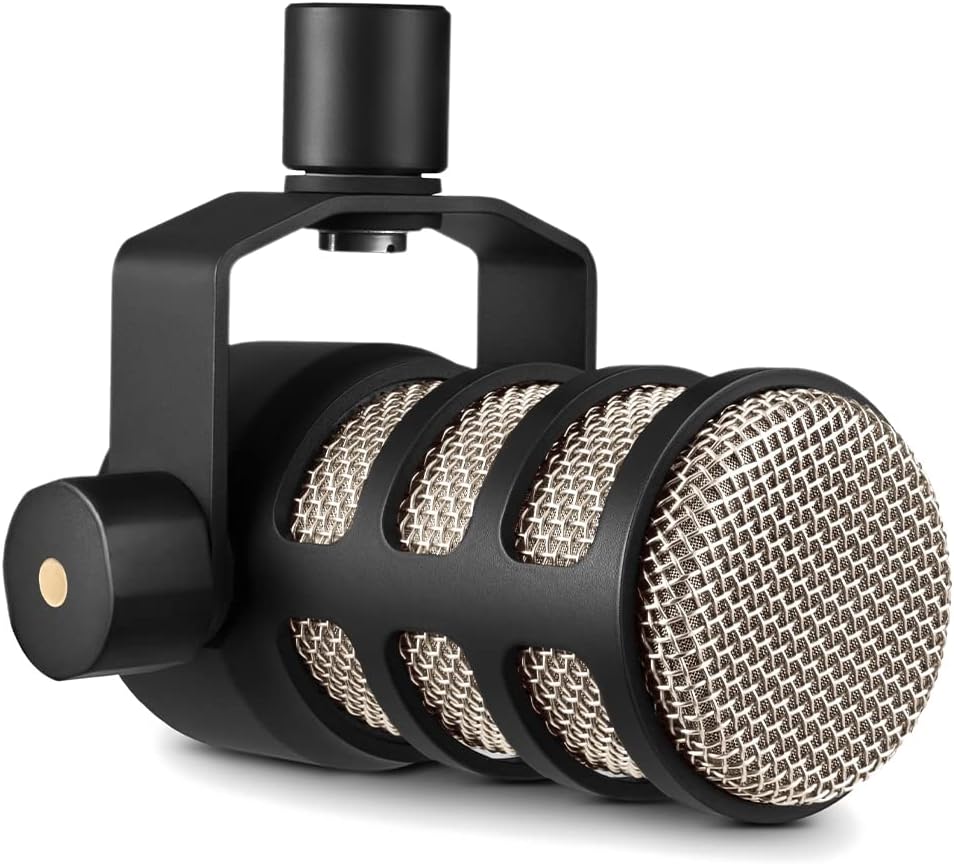
The RØDE PodMic is a broadcast grade dynamic mic designed specifically for spoken word content. It rejects room noise well and includes an internal pop filter to tame plosives without extra accessories.
We may earn a commission when you buy through this link, at no additional cost to you.
It connects via XLR so you will need an audio interface or mixer. This makes it ideal for multi person podcasts where you want to control each mic through a central device.
The all-metal build is heavy and durable which adds to its stability on a boom arm. It integrates seamlessly with other RODE equipment like the RODECASTER series.
If you are building a serious podcast setup and already have an interface this is a cost effective way to get great sound. It is built to handle daily use and last for years.
The internal suspension helps reduce handling noise and desk vibrations for a cleaner vocal track.
The capsule is tuned to emphasize speech frequencies so your voice sounds clear and intelligible in any room.
We may earn a commission when you buy through this link, at no additional cost to you.
The Amazon Basics microphone is one of the most affordable options available for podcasters on a tight budget. It uses a large diaphragm condenser to capture clear sound while isolating background noise with its cardioid pattern.
We may earn a commission when you buy through this link, at no additional cost to you.
The stand allows 360 degree rotation so you can angle the mic easily without moving your head. A built-in mute button syncs with your computer for quick privacy control during live recordings.
Shock absorption features help reduce minor bumps and vibrations but the build is lighter than premium models. It is perfect for home recording where extreme durability is not critical.
For beginners testing the waters of podcasting this mic offers a low risk entry point. It works well with common software and delivers decent quality for simple projects.
Tap the mute button on the mic to silence your audio instantly when you need to speak privately.
Adjust the mic angle freely to find the best position for your voice and desk setup.
We may earn a commission when you buy through this link, at no additional cost to you.
The DJI Mic Mini offers a wireless solution that lets you move around freely while recording. Each transmitter weighs just 10 grams and clips onto your clothing discreetly for interviews or on location content.
We may earn a commission when you buy through this link, at no additional cost to you.
With two transmitters you can record two speakers independently or carry a backup for long sessions. The charging case extends battery life to 48 hours so you rarely need to worry about power.
Two noise cancellation levels adapt to your environment whether you are indoors or outdoors. It works directly with DJI cameras but also connects to phones and computers via the receiver for versatility.
If you need mobility and high audio quality on the go this kit is a powerful tool. It is expensive but provides flexibility that fixed mics cannot offer.
The charging case provides enough power for several days of recording so you do not miss important interviews.
Use both transmitters to record two people separately or keep one handy as a backup during live streams.
We may earn a commission when you buy through this link, at no additional cost to you.
Selecting the right microphone involves balancing budget, technical needs, and recording environment. Here are key factors to consider before making your final decision.
USB microphones plug directly into your computer and are ideal for beginners who want simplicity. XLR microphones require an audio interface but offer more control and better quality for multi-mic setups.
Choose USB for easy setup or XLR if you plan to expand your studio gear later.
Cardioid patterns capture sound from the front and reject noise from other directions making them perfect for solo podcasting. Omni or bidirectional patterns are better when recording multiple people at the table.
Select cardioid for isolation or other patterns for group conversation.
Dynamic mics are more durable and less sensitive to room noise which suits untreated spaces. Condenser mics are more sensitive and capture finer details but may pick up ambient sounds.
Pick dynamic for noisy rooms and condenser for treated recording spaces.
Look for mics with physical gain, volume, and mute controls so you can adjust audio quickly without software. Monitoring jacks with zero latency let you hear your voice in real time.
Prioritize physical knobs and monitoring if you value live feedback.
Some mics come with companion apps that add effects and processing to refine your voice before recording. Others work purely as audio input devices without software dependency.
Choose software enabled mics if you want built-in enhancements.
Metal construction usually indicates better durability and resistance to wear over time. Plastic builds are lighter and cheaper but may feel less sturdy during regular use.
Invest in metal mics for long term reliability and professional use.
Bundles that include boom arms pop filters and shock mounts save you from buying extra items later. Single mic purchases may require additional spending to build a complete setup.
Check what comes in the box to avoid hidden costs.
Ensure the mic supports your operating system and devices like phones or cameras if you record on multiple platforms. Adapter availability for mobile devices can expand where you can record.
Verify OS and device support before purchasing.
Position the microphone about six to eight inches from your mouth and use a pop filter to reduce harsh plosive sounds like P and B.
Keep the mic off the desk surface by mounting it on a boom arm to prevent handling noise and vibrations from affecting your recordings.
Store your microphone in a dry place and clean the grille occasionally with a soft brush to maintain audio quality over time.
It depends on the mic. USB models work directly with your computer while XLR models require an interface. Check the connectivity section before buying to make sure you have the right gear.
Budget friendly USB microphones like the ZealSound or Amazon Basics offer easy setup and good sound without extra hardware. They are perfect for learning recording basics.
Most USB mics require adapters to work with phones. Look for models that include USB-C and Lightning adapters if mobile recording is a priority for you.
Choose a dynamic mic or one with noise cancellation features. Record in a quiet room with soft furniture to absorb echoes and avoid placing the mic near noisy devices.
A boom arm is not strictly necessary but it helps position the mic optimally and reduces desk vibration. It also saves desk space and improves your visual setup.
USB mics have built-in audio interfaces for simple use. XLR mics connect to external mixers or interfaces giving you more control over your audio signal path.
With proper care a quality microphone can last for many years. Replace it if sound quality degrades or if you need more advanced features for a new setup.
Wireless lavalier mics like the DJI Mini are great for remote recording since they allow mobility and do not require long cables near your recording device.
We highlighted top picks like the Shure MV7+ for quality, ZealSound for budget, and Shure MV7X for premium setups. Each offers unique benefits tailored to different creator needs.
Consider your recording environment and whether you want simplicity or advanced control. Prioritize features that match your workflow such as connectivity, monitoring, and built-in processing.
Verify current availability and check user reviews before buying since products evolve and prices vary. The right microphone will help you produce clear and engaging audio for your audience.