
Portable Printers Wireless for Travel A285M Small Inkless Thermal Printer
3.9Editor score
Inkless thermal technology
Compact lightweight build
Multi size paper support
Finding the right mobile printer for vehicles can transform how you handle paperwork on the road. Whether you are a truck driver, delivery service, or road tripper, having a reliable printer ensures you never miss a critical document or receipt.
We evaluated ten leading models based on portability, connectivity options, and print technology. Our analysis focuses on how well each device integrates into a vehicle environment, considering power needs, size, and ease of use during transit.
Each selection highlights unique strengths tailored to different mobile work styles. While ratings and availability shift over time, these picks represent the most consistent performers in reliability and functionality for drivers and professionals on the move.
3.9Editor score
4.2Editor score

4.1Editor score
As an Amazon Associate we earn from qualifying purchases.
The following table provides a side-by-side comparison of all ten reviewed models. This overview highlights key specifications to help you quickly identify which device aligns best with your specific vehicle printing requirements and operational constraints.



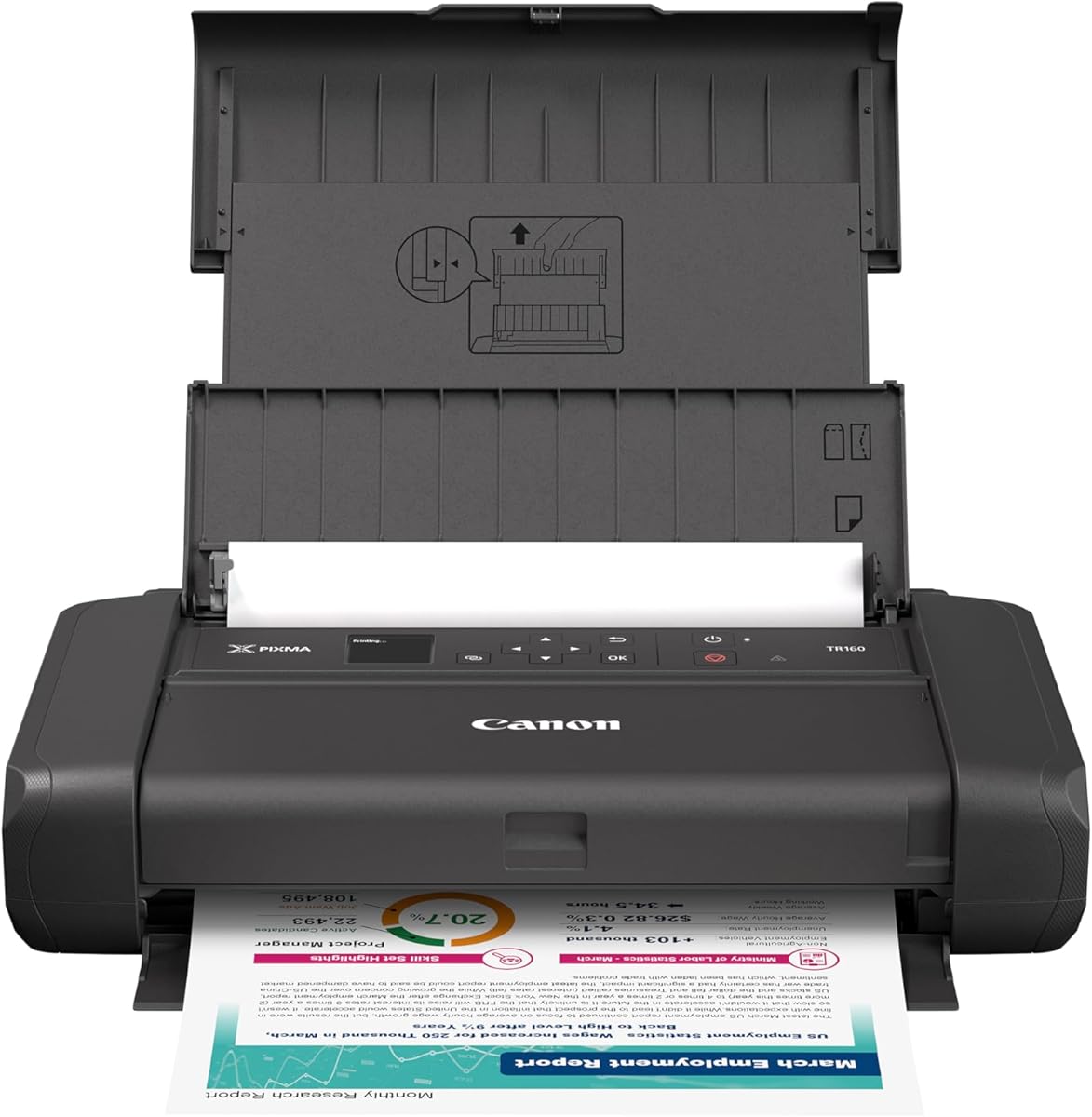
The Canon PIXMA TR160 stands out as a top-tier choice for vehicle-based printing. Its ability to deliver high-quality color documents and photos makes it ideal for professionals who need polished results on the road. With a 4.2 rating from users, it balances portability with performance effectively.
We may earn a commission when you buy through this link, at no additional cost to you.
Its 5-Color Hybrid Ink System ensures vibrant details and sharp text, which is crucial for client-facing documents. The Wireless Direct Mode allows you to connect devices without a router, a vital feature when working in remote areas or inside a vehicle where network signals may vary. The OLED display provides quick status checks, keeping you informed without fumbling through menus.
While it uses ink cartridges which require replacement, the convenience of full-color output outweighs this for many users. The printer is designed to fit into a backpack with room to spare, ensuring it does not clutter your limited vehicle workspace. It is a reliable companion for those needing more than just monochrome receipts.
For drivers who need professional-grade prints without sacrificing mobility, this model is highly recommended. It bridges the gap between desktop quality and travel-ready convenience. We suggest keeping extra ink cartridges in your storage to ensure uninterrupted operations during long trips.
The hybrid ink system supports both documents and photos, allowing you to print marketing materials or personal keepsakes with equal quality.
Connect via the Canon PRINT app or AirPrint without needing a Wi-Fi router, ensuring you can print anywhere a device has power.
We may earn a commission when you buy through this link, at no additional cost to you.
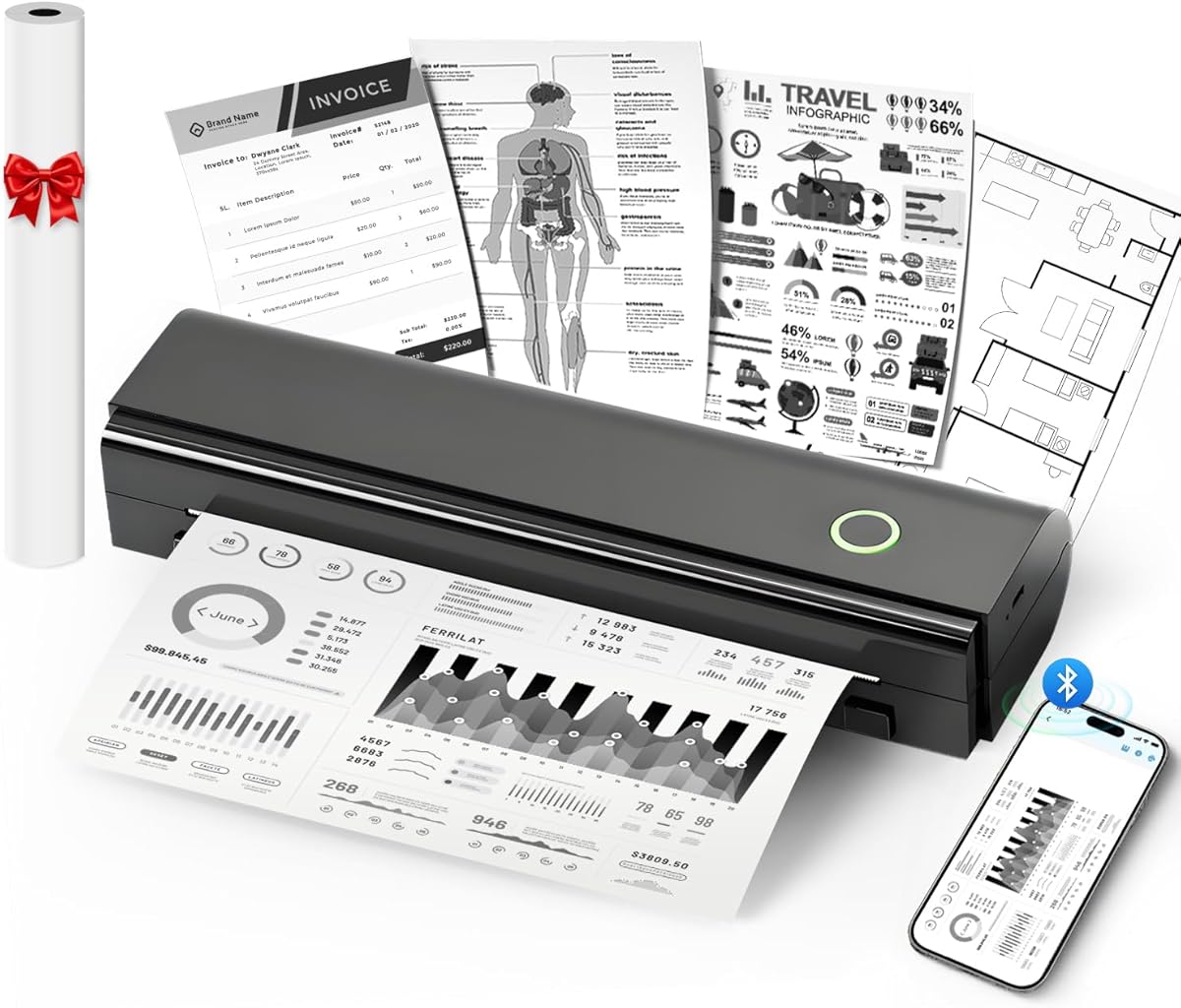
The A285M Small Inkless Thermal Printer offers an accessible entry point for mobile printing needs. Weighing only 1.5 pounds, it is incredibly easy to carry and store in a vehicle glove box or console. Its thermal technology eliminates the need for ink or toner, reducing long-term operational costs significantly.
We may earn a commission when you buy through this link, at no additional cost to you.
This printer supports five different sizes of thermal paper, ranging from small receipts to full US Letter pages. This flexibility makes it suitable for various tasks like printing contracts, invoices, or boarding passes on the go. Bluetooth connectivity allows seamless printing from phones or tablets, while a USB-C option connects it to laptops when drivers are installed.
Users should note that it only supports black and white printing and requires specific thermal paper. Regular copy paper will not work, which is a trade-off for its inkless convenience. However, for routine business documentation or quick records, this limitation is often negligible compared to the savings and portability.
Ideal for students, teachers, or budget-conscious travelers, the A285M delivers solid performance without breaking the bank. It is a practical tool for anyone who needs occasional document output while traveling. Ensure you have the correct thermal rolls stocked to maintain smooth operations.
By using thermal technology, you avoid buying ink cartridges, making every page cheaper to print over time.
Switch between different paper widths easily, allowing you to print everything from narrow receipts to full page documents.
We may earn a commission when you buy through this link, at no additional cost to you.
The Gloryang Inkless Portable Printer is a thoughtfully designed device for mobile professionals. It includes a carrying case and paper rolls, making it ready to use out of the box. Its thermal print capability ensures crisp text without the mess of ink, and the built-in paper bin keeps your vehicle interior tidy.
We may earn a commission when you buy through this link, at no additional cost to you.
Weighing just 1.75 pounds, it fits comfortably in a backpack or briefcase. The seamless Bluetooth connectivity works well with iOS and Android devices via the dedicated app. It supports a range of document sizes from 2 to 8.5 inches, covering most standard printing needs for contracts or reports.
The packaging includes a carrying case, which protects the unit during transport. This durability is essential for vehicle environments where items can shift during travel. Users note that paper jam issues are rare if the correct flat thermal paper is used, adding to its reliability in field work.
For students, professionals, or anyone needing a quick printing solution, the Gloryang offers excellent value. It combines convenience with portability effectively. We recommend using the recommended paper types to ensure the best print quality and prevent jams.
The package includes paper and a case, so you can start printing immediately without extra purchases.
A built-in paper bin reduces clutter, keeping your workspace organized even in tight vehicle environments.
We may earn a commission when you buy through this link, at no additional cost to you.
The N80 Bluetooth Thermal Printer provides clear results with its 203 DPI resolution. It is designed for versatility, supporting roll paper and tattoo transfer paper, which adds unique utility for creative professionals. With a built-in 1500mAh battery, it can print up to 160 sheets on a single charge, making it ideal for long shifts.
We may earn a commission when you buy through this link, at no additional cost to you.
Its compact size and 1.5-pound weight make it easy to stow in a vehicle. The Bluetooth connection pairs seamlessly with smartphones for instant printing of documents, web pages, or images. This capability ensures that you can handle paperwork efficiently without stopping to find a stationary printer.
While it is restricted to thermal paper, this limitation simplifies maintenance by removing ink-related tasks. The printer is suitable for schools, offices, and construction sites. Users appreciate that it is eco-friendly and cost-effective, reducing waste and ongoing expenses compared to traditional printers.
We suggest this model for travelers who need reliable printing over extended periods. The battery capacity ensures you won't run out of power during a trip. Keep a spare roll of thermal paper handy to maximize its utility.
A large internal battery supports hundreds of prints, ensuring reliability during long days on the road.
Support for tattoo transfer paper opens unique possibilities for artists and designers working remotely.
We may earn a commission when you buy through this link, at no additional cost to you.
The D90E Inkless Portable Thermal Printer is built for durability and ease of use. It includes a travel case and USB cable, ensuring you have everything needed for mobile printing. Its thermal technology guarantees quick outputs without ink, and the included case protects it during transit.
We may earn a commission when you buy through this link, at no additional cost to you.
Weighing 2.08 pounds, it remains light enough for regular transport. The Bluetooth connectivity allows easy pairing with mobile devices via the Labelnize app, while USB support connects it to PCs. It handles 8.5 x 11-inch thermal paper well, making it a strong choice for standard documents.
The manufacturer provides clear instructions for resolving paper jams, which enhances user confidence. Simply pressing the power button often ejects stuck paper, avoiding manual intervention. This feature is critical for professionals who cannot afford downtime during a job.
Ideal for truckers, teachers, and students, this printer balances function and portability. It is a robust tool for emergency scenarios or daily tasks. We recommend using flat thermal paper to avoid curling, ensuring consistent results over time.
Simple solutions for jams mean you can get back to work quickly without technical frustration.
Both Bluetooth and USB options allow you to connect to a wide range of devices easily.
We may earn a commission when you buy through this link, at no additional cost to you.
The Epson Workforce WF-110 is a premium solution for those requiring high-quality color prints on the road. Its built-in lithium-ion battery offers dependable performance, allowing you to work away from power outlets. The Wi-Fi Direct feature ensures smooth connections with tablets and smartphones without a router.
We may earn a commission when you buy through this link, at no additional cost to you.
As an inkjet printer, it delivers superior image and document quality compared to thermal options. This makes it perfect for marketing materials or professional reports that need to look polished. The design is compact relative to its capabilities, fitting well into mobile workspaces.
While it requires genuine cartridges which can add to the cost, the print quality justifies the investment for businesses. The option for an external accessory battery adds further flexibility for extended use. This model is ideal for consultants or creatives who cannot compromise on output quality.
We recommend this for professionals who need top-tier printing capabilities in a portable form. It is a significant step up in performance for users needing color and resolution. Ensure you stock genuine cartridges to maintain warranty and performance standards.
Inkjet technology provides superior resolution and color depth for documents that need to impress clients.
An external battery option extends runtime significantly for long work sessions without access to outlets.
We may earn a commission when you buy through this link, at no additional cost to you.
The Brother PJ-883 is a robust direct thermal printer designed for efficiency. It offers a print speed of 7.6 lines per minute, which is ideal for high-volume labeling tasks. The 300 x 300 dpi resolution ensures that text and graphics are crisp and readable, even on small labels.
We may earn a commission when you buy through this link, at no additional cost to you.
Its connectivity options are extensive, including Wireless LAN and Near Field Communication (NFC). These features allow for easy pairing in environments with established network infrastructures. The USB Host capability also provides flexibility for connecting to various devices directly.
While it focuses on monochrome output, this model is highly reliable for logistics, inventory, or technical documentation. The build quality suggests it can withstand frequent use in vehicle-based settings. It is a strong contender for businesses that prioritize speed and durability over color printing.
We suggest this for fleet managers or logistics professionals needing consistent label output. The wireless features reduce cable clutter, keeping your workspace organized. Verify network compatibility before purchase to ensure seamless integration with your existing systems.
High lines per minute rate allows you to finish printing jobs quickly, saving valuable time during shifts.
NFC and Wireless LAN ensure you can connect to devices and networks without manual cable plugging.
We may earn a commission when you buy through this link, at no additional cost to you.
The Canon Ivy 2 Mini is a specialized photo printer for travelers who want instant memories. It uses ZINK technology, which embeds dye-based crystals in the paper, eliminating the need for ink cartridges. The prints have a peel and stick backing, allowing you to place them on surfaces immediately.
We may earn a commission when you buy through this link, at no additional cost to you.
Its photo quality improvements include optimized skin tones and sharpness, ensuring images look vibrant. The Bluetooth 5.0 connectivity provides a stable and fast connection to compatible smartphones. It is a great accessory for road trips where capturing and sharing moments is a priority.
While it is limited to photo sizes and not documents, its convenience factor is unmatched. It fits easily into a pocket or bag, making it highly portable. For creative projects or personal keepsakes, this printer offers a unique solution that standard printers cannot match.
We recommend this for vacationers or creatives wanting physical copies of photos on the go. It is a fun and practical gift for anyone who loves photography. Keep a supply of ZINK paper sheets to ensure uninterrupted printing sessions.
Peel and stick backing allows you to instantly attach photos to journals, laptops, or walls anywhere.
Zero Ink technology ensures reliable color prints without mess or complex maintenance steps.
We may earn a commission when you buy through this link, at no additional cost to you.
The Brother Pj-883 Wired & Wireless Thermal Mobile Printer is designed for rigorous use. Its thermal technology delivers fast output for receipts or labels. The wired and wireless capabilities provide flexibility depending on the environment, ensuring connectivity in both mobile and fixed setups.
We may earn a commission when you buy through this link, at no additional cost to you.
Built for durability, it withstands the wear and tear of vehicle-based operations. The thermal engine ensures that outputs are crisp and consistent without needing ink. This reliability is critical for industries where downtime is not an option during delivery or service tasks.
While the price point may be higher than consumer models, the industrial build quality justifies the cost for professionals. It serves well in scenarios requiring consistent performance over time. Users should review the setup guides to optimize connectivity for their specific vehicle systems.
We recommend this for logistics firms or field service technicians who need robust printing. It is a long-term investment in operational efficiency. Ensure you have the appropriate cables and drivers to support all its connectivity features.
Built to withstand heavy use, this printer offers longevity for professionals relying on daily print operations.
Wired and wireless options ensure you can connect regardless of the available infrastructure in your vehicle.
We may earn a commission when you buy through this link, at no additional cost to you.
The Canon Pixma iP110 offers cloud and mobile printing capabilities ideal for travelers. With AirPrint and cloud compatibility, you can print directly from online services without transferring files. The high resolution ensures that both documents and photos look sharp on the go.
We may earn a commission when you buy through this link, at no additional cost to you.
Voice control via Alexa adds convenience, allowing you to request prints using simple commands. This feature is particularly useful when your hands are busy driving or handling other tasks. The Wi-Fi and USB connectivity options provide flexibility for various device types.
While it requires external power or a battery setup, the print quality and cloud features make it a strong choice. It is suitable for those who need to print complex documents or high-quality images while traveling. The cloud integration reduces the need for file management on your device.
We recommend this for users who rely heavily on cloud storage and want seamless printing integration. It bridges the gap between modern digital workflows and physical output needs. Check battery options or power setups to ensure mobility.
Direct cloud printing allows access to files stored online without downloading them to your device first.
Alexa support lets you print with voice commands, reducing manual interaction when multitasking.
We may earn a commission when you buy through this link, at no additional cost to you.
Selecting the right mobile printer involves evaluating several key factors to ensure it meets your daily operational needs. Below are the most critical aspects to consider before making your purchase.
Portability is the most important factor for vehicle use. Look for models that weigh under three pounds and fit into a backpack or glove box. A compact footprint ensures you can store the printer securely while driving without obstructing your workspace.
Prioritize lightweight designs that do not add unnecessary bulk to your vehicle setup. A portable printer should feel like a natural extension of your travel gear.
Mobile printers require reliable power sources. Check if the model includes a built-in battery or supports external power via USB or AC adapters. For long trips, a large internal battery or external battery option is essential to maintain productivity.
Ensure your vehicle has the necessary outlets to charge the device. Consider carrying spare power banks if you frequently work away from parking spots.
Wireless connectivity like Bluetooth or Wi-Fi Direct allows seamless printing from mobile devices. Verify compatibility with your smartphone OS and apps. USB support is also valuable for connecting to laptops or tablets when wireless signals are weak.
Choose a printer that pairs easily with your existing ecosystem. Look for support for AirPrint or native Android apps to simplify the workflow.
Thermal printers are often preferred for their lack of ink and speed. However, inkjet printers offer color and higher resolution for documents. Consider your primary needs: if you only need receipts or text, thermal is efficient. If color graphics are required, inkjet is better.
Evaluate maintenance needs associated with each technology. Inkless options reduce clogging risks, while inkjets may need periodic cleaning cycles.
Thermal printers require specific rolls that may not be universally available. Inkjets use standard sheets but need refills. Ensure you can source the required paper easily in your travel area. Some models offer adjustable paper sizes to accommodate different tasks.
Check if the printer supports standard letter sizes or if it is limited to receipts. Flexibility in paper handling can save you time when working on the road.
Vehicle environments can be rough with vibrations and temperature changes. Look for models with sturdy housings that resist wear. A travel case is a valuable addition for protection during transit.
Consider the warranty and manufacturer support for repairs. A durable device ensures longevity and reduces the risk of malfunction during critical moments.
Beyond the purchase price, consider the cost of consumables like paper and ink. Thermal rolls are cheaper over time compared to ink cartridges. Check reviews for user satisfaction regarding ongoing costs.
Calculate the total cost per page to understand long-term expenses. A lower upfront price might lead to higher maintenance costs later.
Intuitive apps and simple pairing processes enhance usability. Some printers require driver installation on laptops, which may add complexity. Look for models with well-reviewed companion apps for mobile printing.
Ease of use reduces frustration during urgent printing needs. A straightforward interface ensures you can operate the device even under pressure.
To maintain optimal performance, keep your printer in a stable, temperature-controlled environment when not in use. Extreme heat or cold inside a vehicle can damage internal components or paper supplies.
Clean the print head regularly according to the manufacturer's instructions to prevent clogging. For thermal models, avoid exposing the rollers to dust or debris that could cause jams.
Store paper in a sealed container to prevent moisture damage. Regularly check your power cables and adapters for wear to ensure safe and reliable connections while on the move.
Yes, many mobile printers come with built-in batteries that allow you to print without an outlet. Ensure the battery is fully charged before starting your trip. Some models also support external battery packs for extended use away from power sources.
Not all mobile printers support regular paper. Thermal models require special thermal rolls, while inkjets can use standard sheets. Check the specifications to ensure the printer matches your paper needs before purchasing.
Bluetooth is generally reliable for short-range connections like those in a vehicle. However, signal interference can occur. Using Wi-Fi Direct or USB connections can provide a more stable alternative in some cases.
Use a protective carrying case and secure the printer with non-slip mats or straps. Avoid placing it in areas where it might shift during sudden stops. Dust covers can also keep the internal mechanisms clean.
Keep a portable power bank or a USB power adapter ready. Some printers support charging via USB, allowing you to power them using a car charger. Monitoring battery levels beforehand is the best preventative measure.
Thermal printers are often better due to their inkless operation and compact size. They are less prone to leaks or clogging caused by vehicle movement. However, inkjets offer color capabilities that thermal models lack.
Selecting the ideal mobile printer for vehicles depends on balancing portability with print quality. The Canon PIXMA TR160 and Epson WF-110 excel in quality, while thermal models like the A285M offer budget-friendly efficiency.
Prioritize models with reliable power options and strong connectivity features. A device that works seamlessly with your mobile tools ensures you stay productive without interruptions during travel.
Always check current pricing and availability before purchasing. Prices and features can change over time, so verifying details ensures you get the best value for your specific needs.