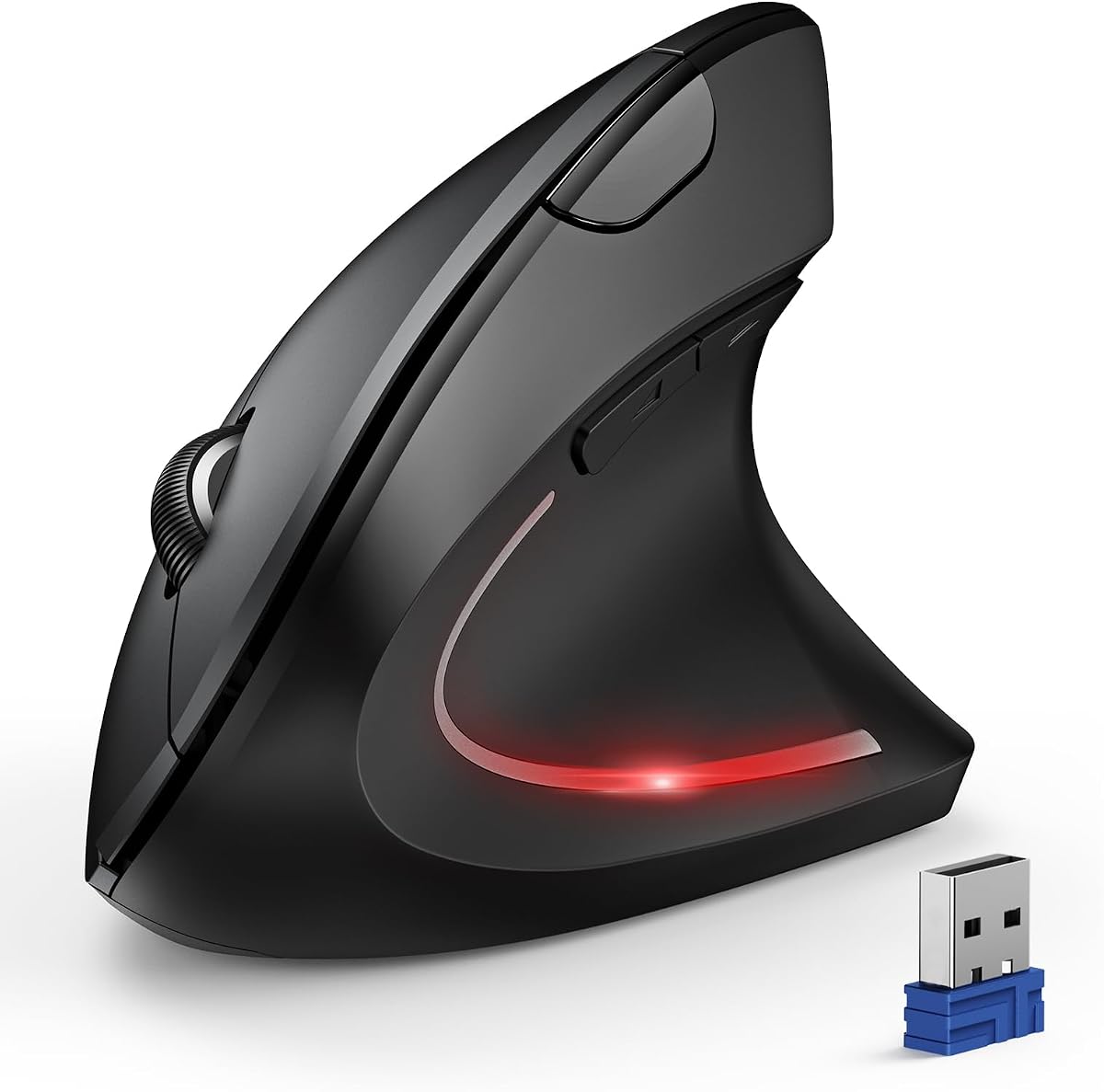
TECKNET Ergonomic Mouse 3-Device
4.4Editor score
Three device switching
4800 DPI precision
Built-in USB receiver
This guide compares the top ten ergonomic mice designed to relieve finger and wrist pain using vertical angles, trackballs, and adjustable DPI for comfort.
Choosing the right mouse for finger pain can transform your daily workflow and protect your long-term health. Traditional mice often force your hand into awkward positions that strain muscles and joints over time. Ergonomic designs address this by aligning your wrist and fingers in a more natural posture during use.
We compared ten highly rated ergonomic mice based on their design features, connectivity options, battery life, and user feedback regarding comfort. Each product was evaluated for its ability to reduce strain while maintaining productivity and precision for various tasks ranging from office work to creative design.
Each pick below highlights specific strengths such as vertical orientation, trackball control, or silent operation to help you find the ideal fit. Please note that product prices and availability may change frequently so verify current details before making your final purchasing decision online.
4.4Editor score

4.6Editor score

4.4Editor score
The following table provides a side-by-side comparison of all ten ergonomic mice included in this guide to help you quickly identify key specifications and features that matter most for your specific needs and budget constraints.




This TECKNET ergonomic mouse stands out as a top choice for users seeking relief from finger and wrist pain without breaking the bank. With a strong rating of 4.6 stars, it combines a natural 52 degree vertical angle with practical features like silent clicks and a rechargeable battery. The design promotes a relaxed handshake grip that significantly lowers strain on the forearm and carpal tunnel during extended use sessions.
We may earn a commission when you buy through this link, at no additional cost to you.
Key strengths include its versatile connectivity options supporting Bluetooth 5.0 and 3.0 plus a 2.4G USB receiver for smooth switching between three devices. The 4800 DPI precision allows you to adapt from pixel perfect editing to fast browsing with a single button press. Additionally the built-in 600mAh battery lasts up to two months on a single charge reducing waste from disposable batteries.
One trade-off is that the forward and back buttons are not available on Mac systems which may limit workflow efficiency for Apple users. There is also an adjustment period as users transition from traditional flat mice to the vertical orientation but most report significant comfort improvements within a few days of use.
This mouse is ideal for professionals working long hours in quiet environments like libraries or open offices who need reliable performance and ergonomic support. If you value silence durability and a natural hand position this model offers excellent value and comfort for daily tasks.
The 52 degree vertical angle aligns your wrist naturally reducing pressure and promoting healthier posture throughout the workday.
Silent click technology reduces noise by 99 percent ensuring distractions are minimized during focused work or shared spaces.
We may earn a commission when you buy through this link, at no additional cost to you.
This TECKNET ergonomic mouse delivers excellent value for budget conscious buyers looking for high performance vertical ergonomics. Rated 4.4 stars it features a near vertical angle that reduces wrist pain and pressure during prolonged use. The mouse supports seamless switching between three devices using Bluetooth or 2.4G connectivity making it versatile for multitasking environments.
We may earn a commission when you buy through this link, at no additional cost to you.
Its high performance chip enables six adjustable DPI levels up to 4800 allowing smooth operation on various surfaces including paper and wood. Silent left and right clicks ensure quiet usage in libraries or shared offices without disturbing others. The built-in USB receiver simplifies connection while the deep sleep mode conserves battery life effectively.
The main drawback is that it requires two AAA batteries which are not included adding to the initial cost compared to rechargeable options. Additionally side buttons may not function correctly on Mac systems limiting some workflow efficiencies for Apple users who need full button customization.
Ideal for students or office workers needing a reliable affordable ergonomic mouse this model balances cost with essential comfort features. If you prioritize silent operation and flexible connectivity without spending much this mouse provides a solid entry point into vertical ergonomic design.
Bluetooth and 2.4G modes allow connection to multiple devices reducing USB port usage and improving workflow flexibility.
Six DPI levels from 800 to 4800 ensure accurate tracking whether you are browsing or performing detailed tasks.
We may earn a commission when you buy through this link, at no additional cost to you.
The Logitech MX Vertical is a premium ergonomic mouse designed with criteria set by leading ergonomists to improve posture and reduce wrist pressure. Its unique 57 degree vertical angle promotes a natural handshake position that decreases muscular activity by 10 percent compared to standard mice. The textured rubber surface and comfort form fit a variety of hand shapes ensuring a secure and comfortable grip.
We may earn a commission when you buy through this link, at no additional cost to you.
Key features include an advanced optical sensor with 4000 DPI providing four times less hand movement for reduced fatigue. The cursor speed switch allows instant DPI adjustments for accuracy or speed with a single touch. This model is user tested and approved making it a reliable choice for professionals demanding high performance and long term comfort.
The higher price point may be a barrier for some users but the durability and ergonomic benefits justify the investment for heavy computer users. New users may also experience an adjustment period while adapting to the vertical orientation but most report significant pain relief over time.
This mouse is best suited for professionals who prioritize health and performance and are willing to invest in a top tier ergonomic tool. If you spend many hours at a computer and want proven relief from finger and wrist pain this model delivers exceptional results.
Designed with ergonomist criteria to lower muscle strain and reduce wrist pressure for healthier long term usage.
High precision sensor and cursor speed switch ensure smooth accurate tracking across various tasks and surfaces.
We may earn a commission when you buy through this link, at no additional cost to you.
The Nulea M505A trackball mouse offers a unique solution for finger pain by allowing cursor control with the index finger instead of moving the entire arm. Its 44mm trackball enhances precision while reducing muscle stress and arm stiffness. Rated 4.4 stars this ergonomic design is ideal for small workspaces or users who struggle with traditional mouse movements.
We may earn a commission when you buy through this link, at no additional cost to you.
It features five DPI modes for adjustable cursor speed and precision suited to different tasks. The built-in rechargeable battery lasts up to 60 days on a full charge ensuring minimal downtime. Wireless connectivity supports up to three devices via Bluetooth or USB receiver providing flexibility across PCs laptops and tablets.
The learning curve may be steep for those unfamiliar with trackball operation and some may feel uncomfortable until they gain command of the interface. However once adapted users often report reduced wrist discomfort and increased efficiency especially in confined desk environments.
This trackball is perfect for users with limited desk space or those seeking an alternative to vertical mice for wrist pain relief. If you prefer finger control over arm movement this model provides comfort and efficiency with long battery life and versatile connectivity.
Smooth trackball allows cursor navigation on any surface reducing the need for large desk movements.
Rechargeable battery lasts up to 60 days minimizing charging interruptions and maintaining consistent performance.
We may earn a commission when you buy through this link, at no additional cost to you.
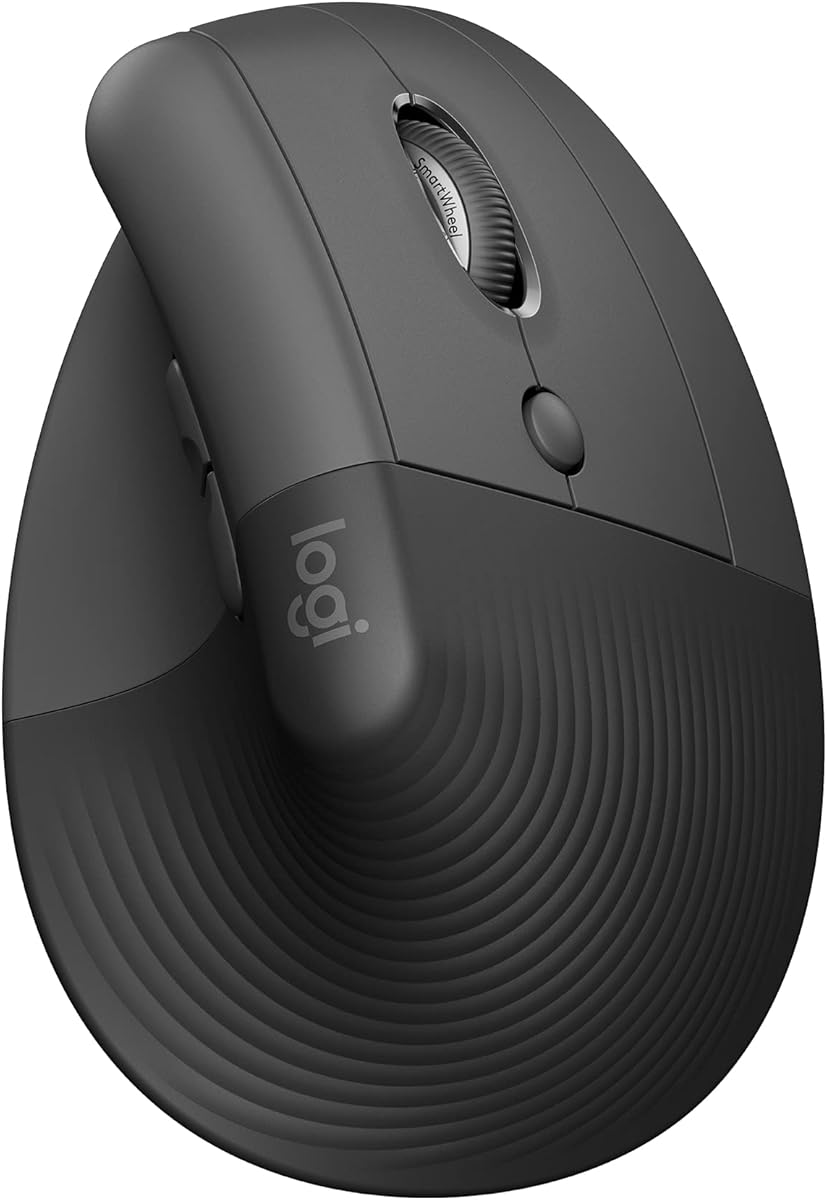
The Logitech Lift Vertical Ergonomic mouse is designed specifically for small to medium right hands providing a comfortable natural posture for daily work. Its 57 degree vertical shape promotes a relaxed handshake grip that reduces wrist strain and improves productivity. Rated 4.4 stars it features whisper-quiet clicks and a SmartWheel for smooth seamless scrolling.
We may earn a commission when you buy through this link, at no additional cost to you.
Key features include easy-to-reach customizable buttons and connectivity via Bluetooth Low Energy or Logi Bolt USB to multiple devices. The battery lasts up to two years reducing maintenance needs. Made with certified post consumer recycled plastic this model combines sustainability with ergonomic performance.
The higher price point may be a consideration for budget conscious buyers and the design is specific to right handed users. However the ergonomic benefits and build quality make it a reliable choice for those seeking certified comfort and quiet operation.
This mouse is best suited for users with small to medium hands who want a certified ergonomic design with long battery life. If you prioritize quiet operation and a natural hand position for all-day comfort this model delivers consistent performance and reliability.
Designed specifically for small to medium right hands ensuring a snug fit and maximum comfort.
Plastic parts include certified post consumer recycled plastic supporting environmental sustainability.
We may earn a commission when you buy through this link, at no additional cost to you.
The Logitech Lift Vertical Ergonomic mouse in Rose offers the same ergonomic benefits as the graphite model with a stylish color option. Its 57 degree vertical shape promotes a natural handshake grip reducing wrist strain and improving productivity. Rated 4.4 stars it features whisper-quiet clicks and a SmartWheel for smooth seamless scrolling.
We may earn a commission when you buy through this link, at no additional cost to you.
Key features include customizable buttons and connectivity via Bluetooth Low Energy or Logi Bolt USB to multiple devices. The battery lasts up to two years reducing maintenance needs. Made with certified post consumer recycled plastic this model combines sustainability with ergonomic performance in a visually appealing design.
The higher price point may be a consideration for budget conscious buyers and the design is specific to right handed users. However the ergonomic benefits and aesthetic appeal make it a reliable choice for those seeking certified comfort and style.
This mouse is best suited for users with small to medium hands who want a certified ergonomic design with long battery life and style. If you prioritize quiet operation and a natural hand position for all-day comfort this model delivers consistent performance and reliability.
Rose color option adds a touch of style to your workspace while maintaining ergonomic functionality.
Up to two years battery life reduces maintenance needs and ensures consistent performance over time.
We may earn a commission when you buy through this link, at no additional cost to you.
The Lekvey Ergonomic Mouse features a scientific ergonomic design that encourages healthy neutral handshake wrist and arm positions. Rated 4.3 stars it significantly reduces wrist pain and becomes comfortable after a 3-5 day adjustment. The built-in 600mAh rechargeable battery lasts up to 3-4 weeks with daily use offering convenience without disposable batteries.
We may earn a commission when you buy through this link, at no additional cost to you.
Key features include Page Back and Page Forward buttons for web browsing convenience and three DPI levels for adjustable sensitivity. The mouse works with Windows Linux and Mac OS and includes a Type-C charging cable for easy recharging. It is backed by a 36-month manufacturer warranty for added peace of mind.
Lower DPI levels may limit performance for users needing high precision tasks but sufficient for general office work and browsing. The adjustment period to vertical orientation requires patience but most users report significant comfort improvements after a few days of consistent use.
This mouse is ideal for users seeking a reliable rechargeable ergonomic solution with dedicated navigation buttons. If you value convenience and a natural hand position without the need for disposable batteries this model offers excellent value and comfort.
Built-in 600mAh battery with Type-C charging eliminates the need for disposable batteries reducing waste.
Page Back and Page Forward buttons streamline web browsing and improve overall workflow efficiency.
We may earn a commission when you buy through this link, at no additional cost to you.
The Uineer Ergonomic Wireless Vertical Mouse offers tri-mode connectivity supporting Bluetooth 5.0 4.0 and 2.4G USB for versatile device switching. Rated 4.3 stars its natural grip design keeps your wrist straight and forearm relaxed reducing discomfort during prolonged use. The mouse features RGB ambient lighting and a side scroll wheel for smooth horizontal navigation.
We may earn a commission when you buy through this link, at no additional cost to you.
Key features include four-level adjustable DPI up to 3200 and silent buttons for quiet operation in shared environments. The built-in 500mAh rechargeable battery lasts weeks on a full charge with typical daily use. Smart sleep mode conserves energy after inactivity ensuring extended battery life.
The adjustment period may take up to two weeks for full adaptation to the vertical design which requires patience. RGB lighting adds visual appeal but may add slight weight compared to minimalist designs. However the connectivity options and ergonomic benefits make it a strong contender.
This mouse is ideal for users who need versatile connectivity across multiple devices and value horizontal scrolling capabilities. If you prioritize silent operation and customizable lighting while reducing wrist fatigue this model offers a comfortable and efficient solution.
Bluetooth 5.0 4.0 and 2.4G USB support seamless switching between work and personal devices.
Side scroll wheel enables smooth horizontal scrolling for spreadsheets and wide content viewing.
We may earn a commission when you buy through this link, at no additional cost to you.
This Nulea wireless trackball mouse combines ergonomic comfort with RGB lighting for a stylish and functional design. Rated 4.4 stars the 44mm index finger trackball enhances cursor control and reduces arm stiffness making it effective for wrist pain relief. The RGB effect adds a pop of color to your setup and can be toggled on or off.
We may earn a commission when you buy through this link, at no additional cost to you.
Key features include five DPI modes for adjustable precision and a built-in rechargeable battery lasting up to 45 days on a single charge. The trackball allows cursor navigation on any surface making it ideal for small workspaces or mobile setups. Connectivity supports multiple devices for flexible use.
The RGB lighting may drain battery faster if left on constantly but can be disabled to extend usage. The learning curve for trackball use requires patience but users often find reduced wrist discomfort after adapting to the finger control mechanism.
This mouse is ideal for users seeking a combination of ergonomic relief and visual customization for their workspace. If you want to reduce arm movement and add style to your setup this trackball offers comfort and versatility.
RGB effect allows you to personalize your setup with color while maintaining ergonomic benefits.
Rechargeable battery lasts up to 45 days on a single charge minimizing interruptions.
We may earn a commission when you buy through this link, at no additional cost to you.
The UGREEN Ergonomic Wireless Mouse features a natural vertical handshake position that reduces wrist rotation and muscle strain. Rated 4.3 stars it includes quiet-click buttons to maintain a peaceful workspace and a practical 5-button layout for efficient navigation. The PTFE glide feet ensure smooth tracking with reduced surface friction.
We may earn a commission when you buy through this link, at no additional cost to you.
Key features include four adjustable DPI levels from 1000 to 4000 for accurate cursor control across various tasks. The mouse connects via 2.4G wireless or Bluetooth with up to 10m range and supports multiple operating systems. Powered by one AA battery with smart sleep mode it extends battery life effectively.
Powered by AA batteries instead of rechargeable adds convenience but requires replacement over time compared to USB-C models. The design is functional and effective but lacks some premium features found in higher priced alternatives. However the silent operation and ergonomic benefits make it a solid choice.
This mouse is ideal for users seeking a reliable silent vertical mouse for quiet environments. If you prioritize peaceful operation and smooth tracking without spending much this model offers comfort and practical functionality.
Quiet-click buttons help keep your workspace peaceful and minimize distractions during work.
Durable Teflon glide pads ensure effortless movement and reduced friction on various surfaces.
We may earn a commission when you buy through this link, at no additional cost to you.
Selecting the right ergonomic mouse involves understanding key features that impact comfort usability and long-term health benefits.
Vertical mice are designed to position your hand in a natural handshake orientation reducing rotation and strain on the wrist and forearm. Look for models with angles between 50 and 60 degrees as these generally provide the best balance between comfort and usability without requiring excessive adjustment.
Choose a vertical mouse with an angle that feels natural to your hand to minimize wrist pressure and promote healthier posture during work.
DPI (dots per inch) determines how far the cursor moves relative to hand movement. Higher DPI allows for faster cursor speed which is useful for large screens or multitasking while lower DPI provides precision for detailed tasks.
Select a mouse with adjustable DPI levels so you can switch between precision and speed depending on your task requirements.
Wireless connectivity via Bluetooth or 2.4G USB receivers offers freedom of movement and reduces desk clutter. Some models support multi-device switching allowing you to connect to multiple computers or tablets seamlessly which improves productivity.
Choose a mouse with connectivity options that match your devices to ensure compatibility and convenience for your workflow.
Rechargeable batteries reduce waste and the need to buy replacements but may have shorter runtimes compared to disposable batteries. Look for models with long battery life or efficient sleep modes to minimize downtime during usage.
Consider whether you prefer rechargeable or disposable batteries based on your usage patterns and maintenance preferences.
Silent click technology is essential for shared workspaces or quiet environments as it minimizes distractions. Mechanical clicks provide tactile feedback which some users prefer for confirmation of actions but may produce more noise.
Opt for silent click models if you work in libraries offices or shared spaces to maintain a peaceful environment.
Ergonomic mice should withstand daily use over time so look for models with high click ratings and robust construction. A textured grip surface ensures secure handling and prevents slipping during extended sessions.
Choose a mouse with durable materials and high click durability ratings to ensure long-term reliability and comfort.
Ensure the mouse is compatible with your operating system such as Windows macOS Linux or Chrome OS. Some features like side buttons may not function on all systems so verify compatibility before purchase.
Verify that all buttons and features work with your operating system to avoid limitations in functionality.
Ergonomic mice are often designed for specific hand sizes so check recommendations for small medium or large hands. A proper fit ensures that your hand rests comfortably without requiring excessive reach or strain.
Select a mouse size that matches your hand dimensions for optimal comfort and ergonomic benefits.
Begin by placing the mouse at elbow height on your desk with your forearm resting comfortably to avoid bending your wrist excessively during use.
Allow time to adjust to ergonomic designs such as vertical or trackball mice as proper posture and muscle memory develop over several weeks of consistent use.
Keep the mouse clean by wiping the surface regularly with a soft dry cloth and use compressed air to remove dust from crevices to maintain smooth tracking.
A vertical mouse positions your hand in a natural handshake orientation which reduces forearm rotation and strain on the wrist and carpal tunnel. This alignment distributes pressure more evenly across the hand and forearm promoting healthier posture and reducing discomfort over time.
Most users adapt to vertical or trackball mice within one to two weeks of regular use. Initial discomfort may occur as muscles adjust to new positions but consistent use typically leads to significant pain relief and improved efficiency.
Yes many ergonomic mice support macOS but some features like side buttons may not function correctly. Check product specifications carefully to confirm compatibility with your Mac system before purchasing to avoid limitations.
Rechargeable mice reduce waste and the need for replacements but may have shorter runtimes. Choose based on your usage patterns and convenience preferences since both options provide ergonomic benefits effectively.
Silent click technology reduces noise without significantly compromising tactile feedback or performance. High-quality models maintain responsive clicks while minimizing sound making them ideal for quiet environments.
Higher DPI reduces the physical distance needed to move the cursor which can decrease finger strain. Start with moderate settings around 1600 DPI and adjust based on comfort and task requirements.
This guide has highlighted ten top-rated ergonomic mice offering various designs from vertical orientations to trackballs to relieve finger and wrist pain effectively.
Prioritize factors like hand size compatibility DPI and battery life when selecting a mouse that suits your workflow and comfort needs for long-term health.
Prices and availability change so verify current details on official retailer sites before purchasing to ensure you get the best value today.