
GL.iNet GL-SFT1200 Opal
4.2Editor score
Compact travel-friendly design
AC1200 dual-band wireless
Full gigabit ports included
Discover the best open source routers for 2026. We compare top models from GL.iNet, Linksys, and Banana Pi based on performance, customization, and security
Open source routers offer unparalleled control over your home network. They run on transparent firmware that allows deep customization for security and performance tailored to your specific needs.
We evaluated ten top models based on hardware specs, open source compatibility, and real-world throughput. Our comparison covers gaming capabilities, travel utility, and advanced plugin support for power users.
Each pick highlights unique strengths like Wi-Fi 7 speeds or dedicated OpenWrt support. Prices fluctuate often, so verify current listings before purchasing to ensure you get the best deal available today.
4.2Editor score

4.5Editor score

4.3Editor score
The following table compares all ten routers side-by-side to help you choose the right model for your network needs and budget constraints.



The Linksys WRT54GL is a historic entry in open source networking. It runs a Linux based system that supports community firmware and provides basic internet sharing for small networks.
We may earn a commission when you buy through this link, at no additional cost to you.
Its strength lies in simplicity and compatibility with older devices. The built-in switch and WPA2 standards ensure secure connectivity without needing complex configuration steps.
However, the 54 Mbps max link rate limits modern usage. It is best suited for legacy setups rather than high-speed broadband connections today.
This router is ideal for those learning Linux networking basics. It offers a reliable foundation for experimentation and basic home internet needs on a budget.
The router uses a Linux operating system enabling deep customization by developers and enthusiasts.
Built-in SPI firewall helps prevent potential attacks from the internet to protect devices.
We may earn a commission when you buy through this link, at no additional cost to you.
The Flint 2 stands out for its exceptional gaming and streaming capabilities. With Wi-Fi 6 speeds up to 6 Gbps it handles intensive tasks smoothly without lag.
We may earn a commission when you buy through this link, at no additional cost to you.
VPN performance is a major highlight with Wireguard reaching up to 900Mbps. This ensures secure data flow even during peak usage times on multiple devices.
The main trade-off is the initial setup step where firmware must be updated. This small task ensures optimal performance but adds a moment of configuration.
Buy this if you need high-speed open source routing at home. It balances modern tech with robust security features ideal for families.
Designed to handle intense multiplayer battles with stable high-speed connections throughout play.
Supports DIY users seeking to install additional plugins for customized network management.
We may earn a commission when you buy through this link, at no additional cost to you.
The Flint 3e represents the future of wireless routing with Wi-Fi 7 speeds up to 6.5 Gbps. It delivers ultra-low latency perfect for high-density environments.
We may earn a commission when you buy through this link, at no additional cost to you.
Parental controls integrate Bark tools to manage screen time and safety easily. This feature helps parents balance digital exposure across family devices effectively.
While powerful the price reflects its advanced capabilities and new standard. It is best suited for homes ready to invest in top-tier tech now.
Choose this router for future-proofing your network infrastructure. It ensures smooth 8K streaming and stable connections for many years ahead.
Uses MLO and 4K-QAM breakthroughs to reduce latency significantly in busy homes.
Integrated support for filtering websites and setting usage limits for safer online experiences.
We may earn a commission when you buy through this link, at no additional cost to you.
The Banana Pi OpenWrt One ships with OpenWrt already installed making it a unique tool for developers. It supports official mainline firmware and includes hardware for expansion.
We may earn a commission when you buy through this link, at no additional cost to you.
Its MediaTek SoC and DDR4 RAM ensure reliable performance for custom projects. The MikroBUS socket allows users to add modules like sensors or extra ports.
This model demands technical know-how to utilize effectively. Beginners might find the setup and customization process challenging without prior experience.
Buy it if you want to build custom network tools. It is an ideal choice for those diving deep into open source development.
Includes M.2 SSD and USB 2.0 for extended storage and peripheral support.
PoE support allows flexible installation options in locations without power outlets.
We may earn a commission when you buy through this link, at no additional cost to you.
The Beryl AX is a powerful portable router that fits easily in a travel bag. It offers Wi-Fi 6 speeds and a dedicated 2.5G WAN port for high bandwidth.
We may earn a commission when you buy through this link, at no additional cost to you.
VPN capabilities allow users to encrypt all network traffic from hotel or public networks. The WPA3 protocol ensures strong password protection against brute-force attacks.
Its size limits range in large homes but suits travel perfectly. It turns unsecure connections into private networks instantly upon setup.
This is the top choice for travelers needing reliable internet security. It combines portability with the open source flexibility enthusiasts appreciate.
Encrypts network traffic automatically to protect data on public WiFi hotspots.
Runs OpenWrt firmware allowing installation of over 5000 plugins for tailored use.
We may earn a commission when you buy through this link, at no additional cost to you.
The WRT1900ACS offers robust performance with its dual-core CPU and AC1900 speeds. It supports external storage sharing which simplifies accessing media across connected devices.
We may earn a commission when you buy through this link, at no additional cost to you.
Its four high-performance antennas provide strong signal strength in multilevel homes. The visual network map helps users prioritize devices and monitor activity easily.
Physical size is larger than travel models but fits well in homes. It remains a solid choice for users needing both speed and storage flexibility.
Choose this for a reliable family hub with extra storage options. It handles simultaneous streaming and file transfers without significant lag.
USB 3.0 and eSATA ports allow fast data transfer from external drives.
Network tools let users prioritize gaming or streaming to prevent bandwidth congestion.
We may earn a commission when you buy through this link, at no additional cost to you.
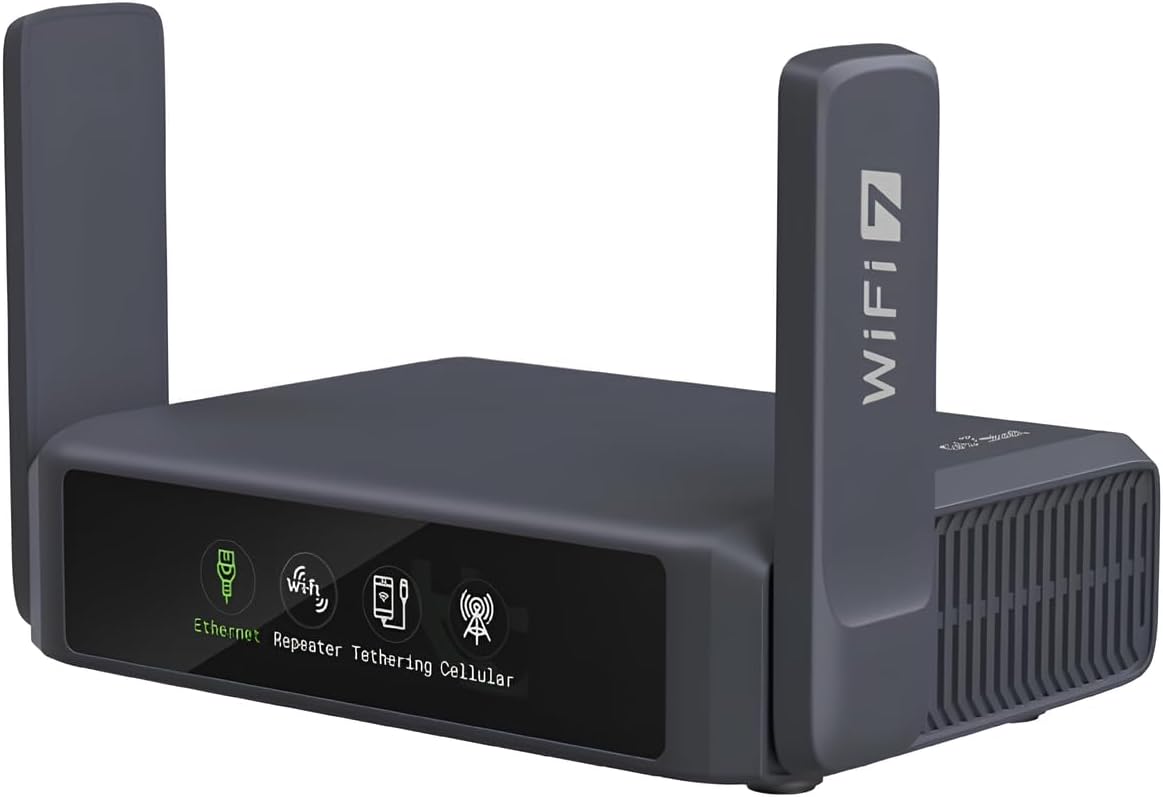
The Slate 7 brings a touchscreen interface to portable open source routing. Users can toggle VPN settings and monitor speeds directly on the display without extra apps.
We may earn a commission when you buy through this link, at no additional cost to you.
Wi-Fi 7 speeds and dual 2.5G ports ensure rapid connectivity. It remains small enough for travel while offering advanced features like DNS over HTTPS.
Screen interaction simplifies complex setups for users on the go. It reduces reliance on mobile apps for basic network management tasks.
Buy this for tech-savvy travelers who value control. It combines modern speeds with an accessible interface ideal for quick adjustments.
Scan QR codes and switch providers directly on the display for instant setup.
DNS over TLS prevents data eavesdropping from malicious parties on public networks.
We may earn a commission when you buy through this link, at no additional cost to you.
The Opal is an affordable entry into open source travel routing. We weighs only 145g making it easy to pack for any trip without adding bulk.
We may earn a commission when you buy through this link, at no additional cost to you.
It supports AC1200 dual-band speeds and full gigabit ports for wired connections. Retractable antennas help improve signal reception in challenging hotel environments.
While not the fastest it meets basic needs for secure browsing. The physical toggle switch allows quick VPN enabling without navigating menus.
This is the perfect budget pick for occasional travelers. It offers essential security and open source features at a very low cost.
Compact size allows easy packing in bags or pockets for on-the-go internet.
Turns public wired or wireless networks into private Wi-Fi to secure your devices.
We may earn a commission when you buy through this link, at no additional cost to you.
The Beryl 7 delivers Wi-Fi 7 speeds in a portable package ideal for travel. It handles up to 120 devices ensuring stability even with many connections.
We may earn a commission when you buy through this link, at no additional cost to you.
VPN performance reaches up to 1100Mbps with WireGuard. This high throughput ensures secure connections without slowing down your browsing or streaming.
The compact design fits easily in luggage while providing robust power. It remains a top choice for tech enthusiasts who need modern speeds on the road.
Choose this for secure travel with cutting-edge wireless standards. It balances high performance with the flexibility of open source firmware.
Ideal companion for hotels or cruise ships needing secure internet on the go.
Supports multiple VPN protocols for flexible and fast secure connections.
We may earn a commission when you buy through this link, at no additional cost to you.
The WRT3200ACM delivers high-end performance with AC3200 tri-stream wireless. It uses beamforming to double bandwidth and supports MU-MIMO for multiple devices at once.
We may earn a commission when you buy through this link, at no additional cost to you.
Open source firmware offers advanced customization for power users. The extended warranty and robust build quality make it a reliable long-term solution for homes.
Its price reflects the premium features and raw power included. It is designed for those needing top speeds and extensive configuration options daily.
Select this for a premium home hub with open access. It ensures smooth 4K streaming and gaming without lag for years.
Tri-stream 160 technology doubles bandwidth to handle more data efficiently.
Users gain access to customize the router with various open-source firmware systems.
We may earn a commission when you buy through this link, at no additional cost to you.
Choosing the right open source router depends on your specific needs and technical expertise.
Ensure the router supports open-source firmware like OpenWrt. Check for official support to guarantee security updates and plugin availability.
Look for models that ship pre-installed or have documented compatibility lists.
Select a Wi-Fi standard that matches your internet speed. Wi-Fi 6 is widely available while Wi-Fi 7 offers future-proof performance for high-density homes.
Consider your device compatibility when choosing between AC, AX, or BE standards.
Open source routers often excel in secure routing. Check VPN throughput speeds to ensure encryption does not bottleneck your connection.
WireGuard typically offers faster speeds than OpenVPN on these devices.
Verify port types and numbers match your setup. Gigabit or 2.5G Ethernet ports are essential for high-speed wired connections.
USB ports help for external storage sharing or network printing.
Decide if you need a portable device or a stationary hub. Travel routers prioritize compact size while home routers focus on coverage range.
Small devices may lack high-gain antennas for large areas.
Some models offer AdGuard Home or DNS filtering out of the box. These features enhance privacy without complex manual setup steps.
Check if plugins and custom scripts are easily installable.
Advanced users may want to add modules or storage. Look for M.2 slots or USB ports that support hardware expansion.
Development boards often include GPIO or specific sockets for modules.
Ensure support for modern security standards like WPA3 and DNS over HTTPS. These protocols protect against password attacks and data snooping.
Always update firmware to benefit from the latest security patches.
Start by connecting the router to your modem using an Ethernet cable. Access the admin panel via a web browser and update the firmware to the latest version.
Configure your network name and password through the setup wizard. Enable any desired plugins like VPN clients or ad blockers in the admin panel.
Place the router in a central location to maximize signal range. Keep it away from direct sunlight or heat sources to ensure stable operation.
Open source routers allow full control over firmware and security features. They support extensive customization through plugins and prevent vendor lock-in effectively.
Most modern models come with user-friendly admin panels. Basic setup is easy while advanced customization requires some technical knowledge.
Yes, many models offer low latency and high throughput. Look for Wi-Fi 6 or 7 support for smoother gaming experiences.
Almost all open source routers support VPN clients and servers. WireGuard and OpenVPN are commonly pre-installed for secure connections.
Check the admin panel for an update option or visit the manufacturer website. Always backup settings before applying any new firmware version.
OpenWrt is a Linux-based operating system for embedded devices. It provides flexibility for customizing routers beyond stock software.
Our top picks include the Flint 2 for home use and the Slate 7 for travel. Each offers distinct advantages depending on your network requirements.
Prioritize compatibility and VPN speeds if security matters most. Beginners should start with pre-configured options like Beryl AX.
Prices change often so check current listings for the best value. Ensure your choice meets both immediate and long-term needs effectively.