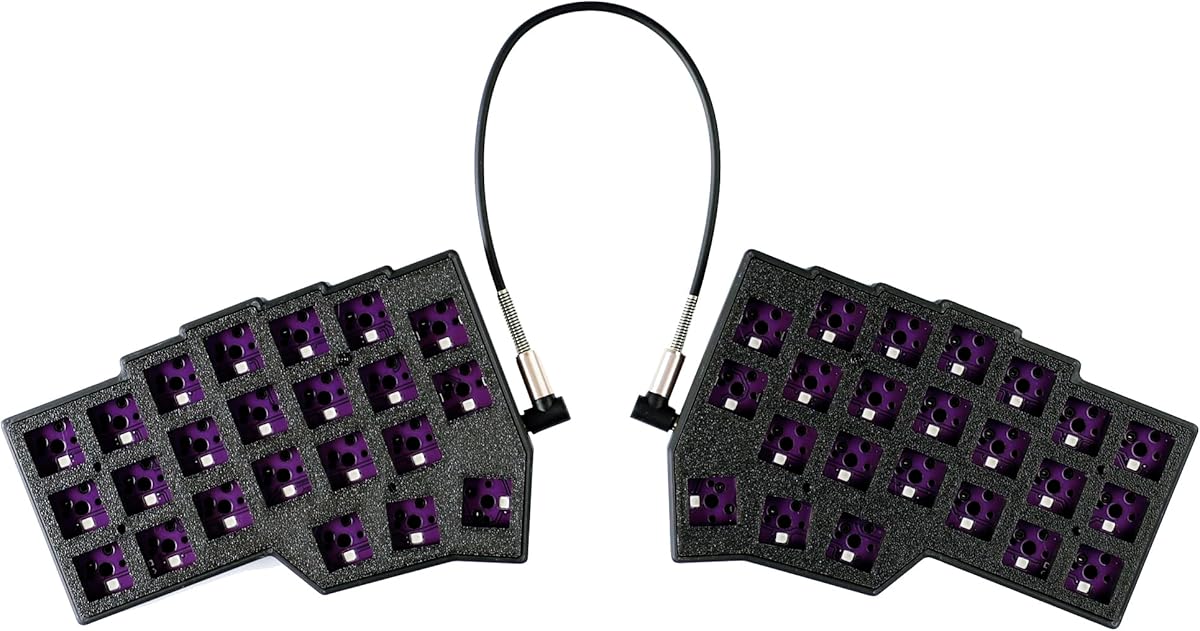
YMDK Corne V4.1 Kit
4.2Editor score
40% 3×6 Ortholinear
PLA Build Material
Full QMK Vial Customization
This guide compares the top ortholinear keyboards for ergonomics, typing comfort, and customization to help you find the best split mechanical layout for your
Ortholinear keyboards rearrange keys into straight columns to match natural finger movement. This design reduces strain and improves accuracy for programmers, writers, and heavy typists seeking ergonomic benefits.
We evaluated ten top models based on layout, build quality, programmability, and user feedback. Our comparison covers split designs, low-profile options, and various switch types to find the best fits.
Each pick highlights key strengths, pros, and cons to guide your decision. Prices and availability change frequently, so check current listings before purchasing to ensure you get the best value today.
4.2Editor score

4.3Editor score

4.4Editor score
This side-by-side comparison highlights the core specifications of every model reviewed. We focus on layout percentage, switch types, connectivity options, and programmability to help you identify the right tool for your workflow.


The KBDraft 07Israfel stands out as a top choice for ortholinear enthusiasts. It features a 56-key layout with a true ortho arrangement that aligns keys vertically for natural finger travel.
We may earn a commission when you buy through this link, at no additional cost to you.
Its low-profile switches and gasket mount deliver a satisfying typing feel with reduced noise and vibration. The split design allows users to adjust the tilt and angle to suit their posture.
While it offers robust customization through Vial software, users new to ergonomic layouts may need time to adjust. The case design is also unique, compatible with standard Lego bricks for creative builds.
This keyboard is ideal for typists seeking comfort and customization. We recommend it for programmers and writers who prioritize ergonomics and enjoy tweaking their setup.
The hinge-split design offers up to seven tilt options, allowing users to minimize wrist strain during long sessions.
With hot-swap sockets and Vial support, you can easily change switches and remap keys to fit your workflow.
We may earn a commission when you buy through this link, at no additional cost to you.
This 4×6 Corne layout offers a unique ergonomic experience with added knobs for extra control. It includes 4 thumb keys per hand to maximize efficiency and reduce finger travel.
We may earn a commission when you buy through this link, at no additional cost to you.
The keyboard features pre-lubed linear switches that provide smooth operation with minimal noise. RGB lighting is extensive, with 16.8 million colors and 45 preset modes for atmosphere.
While powerful, this keyboard demands technical knowledge to set up effectively. It is better suited for enthusiasts who enjoy customizing their keyboard than casual users.
We recommend this for e-sports enthusiasts and heavy typists wanting a compact, fully programmable ergonomic solution.
Repositioning common keys to the thumb group helps reduce strain on the wrist during repetitive typing tasks.
The RGB system allows deep customization through Vial, letting you create unique lighting effects for any environment.
We may earn a commission when you buy through this link, at no additional cost to you.
The YIVU Corne V4.1 is a highly compact ortholinear keyboard featuring a 3×6 layout. It offers full programmability and vibrant per-key RGB lighting for a personalized setup.
We may earn a commission when you buy through this link, at no additional cost to you.
It comes with pre-lubed linear switches for smooth typing and hot-swap sockets for future upgrades. The split design helps improve posture by separating the left and right sides.
Due to its small size, users must use layers for full functionality, which requires learning. The TRS cable connection also needs care to avoid unplugging while powered.
This board is best for portable users and enthusiasts who prioritize desk space and customization over traditional layouts.
The ultra-compact 46-key design makes it easy to transport and use on smaller desks.
Hot-swap sockets allow you to change switches without soldering to adjust typing feel later.
We may earn a commission when you buy through this link, at no additional cost to you.
This version of the KBDraft 07Israfel offers the same robust features as the white model but in black. It maintains the 56-key ortholinear layout and ergonomic benefits.
We may earn a commission when you buy through this link, at no additional cost to you.
The gasket mount system enhances typing comfort by reducing noise and vibration. Users can still benefit from the hinge-split tilt options and programmable Vial features.
The black case provides a sleek look for dark desk setups. It remains a strong choice for those prioritizing ergonomics and customization.
We suggest this for users seeking a stylish ortholinear board that balances performance with visual aesthetics.
The black variant retains all functional specifications of the white version, ensuring no feature sacrifice.
The black finish adds a professional touch to modern desk environments and minimalist setups.
We may earn a commission when you buy through this link, at no additional cost to you.
The YMDK Corne V4.1 kit is an affordable option for those willing to build their own keyboard. It includes PLA cases, PCBs, and cables but requires you to add switches and keycaps.
We may earn a commission when you buy through this link, at no additional cost to you.
This kit supports full QMK and Vial programming for unlimited customization. The PLA material is environmentally friendly and lightweight compared to traditional plastics.
Since switches are not included, users have flexibility to choose their preferred feel. It is a cost-effective way to enter the ortholinear mechanical market.
We recommend this for DIY enthusiasts on a budget who want a functional ortho board without paying for prebuilt kits.
By skipping pre-installed switches, you save money while keeping control over your typing experience.
PLA is biodegradable and non-toxic, making it an eco-conscious choice for case materials.
We may earn a commission when you buy through this link, at no additional cost to you.
This keyboard uses an X-Bows butterfly layout rather than a strict ortholinear grid. It aims to improve ergonomics while keeping a traditional typing feel.
We may earn a commission when you buy through this link, at no additional cost to you.
It includes Gateron Brown tactile switches and white backlighting for easy use in low light. The build quality features a solid chassis and retro styling.
While it offers ergonomic benefits, users may find the layout adjustment challenging. It works well as a plug-and-play ergonomic solution without complex programming.
We suggest this for users wanting ergonomic benefits without the complexity of full ortholinear programming.
The butterfly layout shifts key positions to reduce finger stretch while maintaining a familiar look.
Plug-and-play functionality means you can start typing immediately without complex software setup.
We may earn a commission when you buy through this link, at no additional cost to you.
The Keychron K2 HE offers wireless flexibility with magnetic Hall Effect switches. While not strictly ortholinear, its programmability and ergonomic features make it a high-end contender.
We may earn a commission when you buy through this link, at no additional cost to you.
Rapid trigger technology provides instant responses for gaming. The board supports up to three device connections via Bluetooth or 2.4GHz for seamless workflow switching.
It uses durable PBT keycaps and offers a web-based configurator for easy customizations. This model suits users prioritizing wireless performance and build quality.
We recommend this for users needing a versatile wireless board with advanced switch customization.
Dual mode connectivity allows you to work across multiple devices without reconnection hassles.
Rapid trigger ensures minimal latency during fast-paced gameplay by detecting key resets instantly.
We may earn a commission when you buy through this link, at no additional cost to you.
The Logitech K835 is a solid TKL keyboard designed for productivity. It offers a standard layout rather than ortho, but provides ergonomic comfort through its curved profile.
We may earn a commission when you buy through this link, at no additional cost to you.
Linear red switches offer smooth feedback with minimal resistance. The aluminum frame ensures durability and a premium look for your desk setup.
While it lacks ortho features, its reliability and comfort make it a great alternative for those avoiding complex layouts.
We suggest this for users seeking a dependable wired mechanical keyboard for general office tasks.
The curved design matches natural hand position, reducing strain during daily typing sessions.
Aluminum frame construction ensures long-term stability and resistance to everyday wear.
We may earn a commission when you buy through this link, at no additional cost to you.
The nuphy Air60 V2 is a portable low-profile keyboard perfect for travel. While not ortho, its 60% layout supports VIA/Vial programming for customization.
We may earn a commission when you buy through this link, at no additional cost to you.
It features multiple wireless modes and a long-lasting battery for extended use. The 1000Hz polling rate ensures responsiveness even in wireless mode.
Its compact form factor saves desk space, but users must use layers for full function access. It is ideal for travelers needing reliable performance.
We recommend this for users seeking a portable, customizable low-profile keyboard for work and play.
With up to 150 hours of use, the battery supports a full week of work without charging.
Switch between Bluetooth and wired modes seamlessly to adapt to different connection needs.
We may earn a commission when you buy through this link, at no additional cost to you.
The Logitech Ergo K860 provides a split layout that promotes natural posture. It includes a memory foam wrist rest and curved frame to minimize bending and strain.
We may earn a commission when you buy through this link, at no additional cost to you.
It features adjustable tilt legs and familiar full-size keys for easy transition. Wireless connectivity via Bluetooth or USB receiver offers flexible setup options.
While not ortholinear, its ergonomic design effectively reduces muscle strain. It is best for users wanting comfort without learning new layouts.
We recommend this for users seeking maximum comfort and ergonomic support in a traditional design.
The memory foam wrist rest provides extra cushioning to reduce pressure on your wrists.
Three tilt options allow you to adjust the keyboard angle to suit your posture.
We may earn a commission when you buy through this link, at no additional cost to you.
Selecting the right ortholinear keyboard involves balancing layout, build, and features. Use these factors to match your needs.
Layouts range from 40% to 75%. Smaller layouts save space but require layer usage. Larger layouts offer more keys but take up more desk space.
Choose a size based on your workspace and need for extra keys.
Linear switches offer smooth keystrokes, while tactile switches provide bumps. Consider noise levels and personal preference when selecting switch types.
Pre-lubed switches often reduce noise and improve smoothness.
Wired options ensure stable connection, but wireless offers flexibility. Check Bluetooth support for multi-device compatibility if needed.
Wireless boards often require charging but save cable clutter.
QMK and Vial support allow deep customization of key functions. This is essential for adapting ortho layouts to your workflow.
Ensure software compatibility with your operating system.
Aluminum frames are durable, while plastic is lightweight. PLA cases are eco-friendly but may be less robust than ABS.
Consider durability and weight for portability needs.
Per-key RGB adds visual appeal and can help identify keys in low light. Ensure software allows customization of these effects.
RGB usage may impact battery life on wireless models.
Hot-swap sockets let you change switches without soldering. This is valuable for experimenting with different typing feels.
Check socket compatibility with 3-pin or 5-pin switches.
Start by adjusting the keyboard tilt and split angle for comfort. Ensure your wrists are neutral and your hands are relaxed during typing.
Use QMK or Vial software to remap keys. Take time to learn layers gradually, using the keycaps or online resources as references.
Clean the keyboard regularly with a soft brush and compressed air. Avoid liquids near electronics and store it in a protective case if transporting.
Yes, they require an adaptation period due to the different layout. Most users find typing accuracy and comfort improve after a few weeks of consistent use.
Ortholinear designs align keys with finger movement, reducing lateral finger travel. This ergonomic layout often helps decrease strain and fatigue over time.
Most ortholinear keyboards support Mac, especially those with QMK or Vial. Check product compatibility details to confirm key mappings work correctly.
Linear switches like Cherry MX Red are common for reduced noise. Tactile options are also used if you prefer feedback during key presses.
Hot-swap support is helpful for changing switches without tools. It allows customization of the typing feel as your preferences evolve.
Typical learning periods range from one to four weeks. Regular practice and using software aids can speed up adaptation and efficiency.
The KBDraft 07Israfel and YMDK Corne kits stand out for versatility and budget value. They offer strong customization and ergonomic benefits for various users.
Prioritize layout size, switch feel, and software support when choosing. Consider your workspace needs and typing habits to select the best fit.
Prices and availability change frequently. Always verify current product listings and warranty details before purchasing to ensure satisfaction.