
Ordilend Keyboard Cleaner & Laptop Cleaning Kit
4.6Editor score
Includes 10+ accessories
Retractable brush included
Soft polishing cloths
This guide compares the top 10 PC cleaning kits featuring air dusters, brushes, and cloths to help you choose the right tools for your electronics maintenance
Keeping your computer and electronics clean is essential for performance and longevity. Dust buildup can cause overheating and hardware failure. A good PC cleaning kit provides the tools needed to safely remove debris from keyboards, screens, and internal components.
We evaluated the best options based on power, versatility, and ease of use. Our list includes electric air dusters, manual brush sets, and all-in-one kits. Each product offers unique features to suit different cleaning scenarios and budgets.
Each pick highlights key specs, pros, cons, and ideal use cases. We focused on reusable solutions to reduce waste and cost. Prices and availability may change, so check current listings before purchasing your next cleaning tool.
4.6Editor score

4.6Editor score

4.1Editor score
This side-by-side comparison highlights the key specifications and features of each top-rated PC cleaning kit to help you find the perfect match for your maintenance routine.





The WOLFBOX MegaFlow 50 stands out with its 110000 RPM motor delivering powerful airflow. It earns top marks for efficiency and versatility in cleaning electronics. With 4 adjustable nozzles it adapts well to various cleaning tasks.
We may earn a commission when you buy through this link, at no additional cost to you.
Its 3-gear adjustable settings allow precise control from delicate dusting to heavy debris removal. The battery lasts up to 240 minutes on the lowest setting ensuring long use between charges. The included lanyard adds convenience for storage and transport.
While it costs more than basic kits the reusable design saves money over time. Charging takes about 3.5 hours which is standard. It requires full charging before first use for optimal performance.
Ideal for PC owners and tech enthusiasts who need reliable tools. Its power and battery life make it a top choice for regular maintenance without buying cans.
The high RPM motor effectively removes stubborn dust from tight spaces like keyboard crevices and radiator fans.
Reusable electric dusters reduce environmental waste compared to single-use compressed air cans.
We may earn a commission when you buy through this link, at no additional cost to you.
The Ordilend Kit offers an extensive range of tools for a low cost. It includes retractable brushes and keycap pullers for deep cleaning. Users appreciate the variety of cloths for different surfaces.
We may earn a commission when you buy through this link, at no additional cost to you.
Its accessories cover keyboards screens and cameras effectively. The metal pen tip removes stains without scratching. The flocking sponge is useful for earbud cases and small crevices.
Manual cleaning takes more effort than electric dusters but suits lighter maintenance. The spray is recyclable though you should test on small areas first. Storage is compact enough for drawers or bags.
Perfect for students or casual users needing a full set cheaply. It meets professional cleaning needs without expensive equipment.
From keycap pullers to lens pens this kit handles diverse cleaning scenarios from desks to cameras.
At a low cost you get tools equivalent to buying ten separate electronic cleaning products.
We may earn a commission when you buy through this link, at no additional cost to you.
This dual-function device combines blowing and vacuuming for thorough cleaning. Its 320000 RPM motor ensures powerful performance. The large battery supports long sessions without interruption.
We may earn a commission when you buy through this link, at no additional cost to you.
The vacuum feature collects debris instead of just moving it. It includes various nozzles and brush heads for different surfaces. The aluminum body ensures durability and heat resistance.
Weight is slightly higher due to the larger battery but remains portable. Safety features like overheat protection add reliability. Charging is quick at 3.5 hours.
Recommended for users needing maximum performance and versatility. It handles PC towers and car interiors with ease.
Switch between blowing dust out and vacuuming it up to avoid spreading debris around your workspace.
Aluminum construction and built-in protections ensure safe long-term use even during heavy cleaning tasks.
We may earn a commission when you buy through this link, at no additional cost to you.
The MF60 delivers strong airflow with its brushless motor and two batteries. Its compact design fits easily into backpacks. Users report effective dust removal on keyboards and fans.
We may earn a commission when you buy through this link, at no additional cost to you.
Gear settings allow customization for delicate or tough cleaning. The included batteries ensure you always have a charged one ready. Nozzles range from flat to round for different tasks.
Charging takes 3.5 hours which is standard for this type. The lack of a display screen makes monitoring battery less intuitive. However runtime remains excellent at 240 minutes on low.
Great for travelers and gamers who need portable power. It balances performance and size effectively.
Two included batteries mean you can clean multiple devices without worrying about running out of power.
At just 0.5 lbs this duster is easy to carry anywhere without adding bulk to your gear.
We may earn a commission when you buy through this link, at no additional cost to you.
This model features an impressive 280000 RPM motor for fast cleaning. The LCD screen shows battery status clearly. It includes a light to help see dark corners.
We may earn a commission when you buy through this link, at no additional cost to you.
It excels at cleaning camera lenses and delicate screens. The brushless motor ensures consistent airflow. Four speed settings provide flexibility for different tasks.
Runtime is shorter at 90-150 minutes but acceptable for precise work. The charging time is efficient at 2.5 hours. It replaces cans effectively for optics maintenance.
Ideal for photographers and videographers needing reliable lens cleaning. The display and light add practical value.
High speed and nozzles allow safe removal of dust from lenses without scratching the glass.
The LCD screen prevents surprise shutdowns by showing remaining battery life and speed level clearly.
We may earn a commission when you buy through this link, at no additional cost to you.
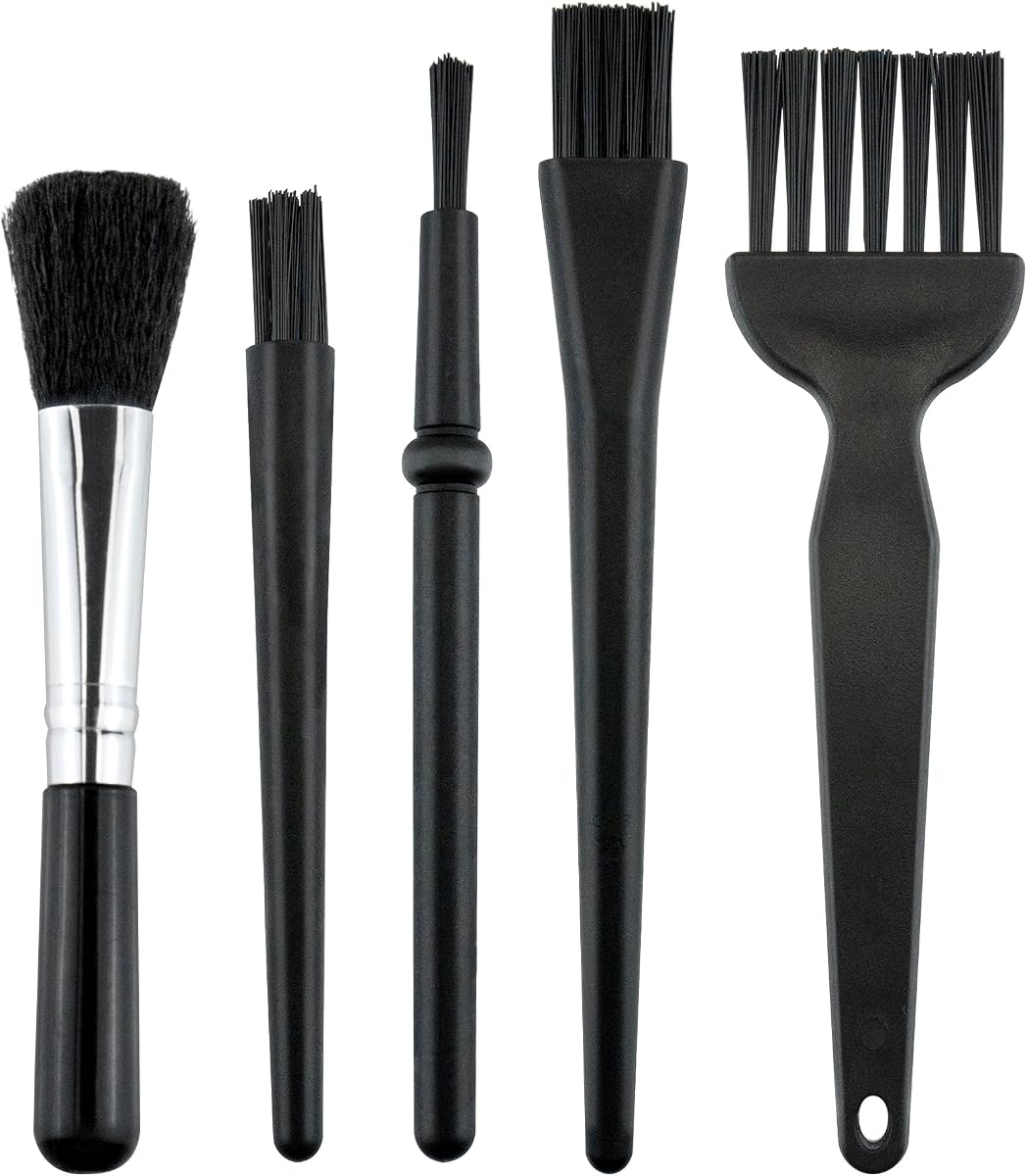
A simple set of five brushes designed for small spaces. The anti-static bristles protect sensitive electronics from damage. Each brush fits different crevices and gaps.
We may earn a commission when you buy through this link, at no additional cost to you.
Nylon bristles and PP handles ensure durability over time. They are perfect for keyboards and car interiors. No charging is needed since they are manual tools.
While slower than electric blowers they offer precision for tight spots. The variety of sizes makes them versatile for many devices. They are great as backups to air dusters.
Best for those who prefer manual control or need a quick cleanup tool. They are inexpensive and highly portable.
Bristles prevent static buildup that could potentially harm sensitive internal computer components.
High-quality nylon bristles do not fall off or break easily ensuring long tool life.
We may earn a commission when you buy through this link, at no additional cost to you.
This duster combines power with a slim ergonomic design. Its 170000 RPM motor provides strong airflow without bulk. The 4-speed settings allow adjustment for different tasks.
We may earn a commission when you buy through this link, at no additional cost to you.
Multiple nozzles help reach narrow gaps in PCs and cars. It is easy to store and carry anywhere. Users report effective debris removal with steady performance.
Battery life is standard for this class and recharges via Type-C. While no extra battery is included the runtime suffices for regular use. It is a reliable alternative to cans.
Perfect for daily cleaning tasks and general maintenance. Its balance of size and power makes it a top pick.
The handheld shape fits comfortably in your hand for precise control during extended cleaning sessions.
Brushless motor technology ensures consistent pressure without fluctuation for efficient cleaning.
We may earn a commission when you buy through this link, at no additional cost to you.
This duster features a 6000mAh battery providing decent capacity. It includes an LED display for monitoring power levels. The device can even inflate items like swimming rings at low speed.
We may earn a commission when you buy through this link, at no additional cost to you.
Its motor reaches 130000 RPM which is effective for general dust. The included nozzles offer versatility. It is light and comfortable to hold during use.
Continuous runtime is 20-40 minutes but total battery life is higher. The LED screen helps manage usage efficiently. It protects against overheating and short circuits.
Suitable for users needing multiple functions beyond dusting. The inflation feature adds extra utility for home or outdoor use.
Beyond dusting the blower can help inflate air cushions or even assist with barbecuing.
An easy-to-read screen keeps you informed of battery levels and speed settings at all times.
We may earn a commission when you buy through this link, at no additional cost to you.
This set provides specialized brushes for sensitive electronics. The anti-static bristles prevent damage during cleaning. It includes 10 different brushes for various stiffness and shapes.
We may earn a commission when you buy through this link, at no additional cost to you.
It keeps keyboards motherboards and cameras safe while cleaning. The zipper pouch helps organize tools effectively. Pros recommend it for hobbyists who handle sensitive components.
Manual use means slower cleaning but higher control. The variety ensures you have a brush for every nook. It is ideal for repair work where static is a concern.
Best for technicians or DIYers working on internal PC parts. The safety features justify it as a top choice for repair.
ESD-safe bristles prevent static discharge that could fry sensitive circuits on motherboards or GPUs.
A dedicated zipper bag keeps all ten brushes tidy and ready for use whenever needed.
We may earn a commission when you buy through this link, at no additional cost to you.
A comprehensive kit with 20 tools for various electronics. It includes a retractable brush and spray for easy cleaning. The keycap puller helps maintain mechanical keyboards.
We may earn a commission when you buy through this link, at no additional cost to you.
Lens pens and cleaning cloths protect screens and glasses. It handles phones tablets and computers effectively. The compact design makes it easy to carry anywhere.
The spray bottle is small which limits usage. Manual cleaning requires effort but covers most common needs. It is a solid choice for general maintenance.
Best for students or families sharing devices. The variety ensures you have a tool for every surface.
From earbud cleaners to camera brushes this kit covers nearly all common electronic cleaning needs.
Card pickup pins and metal tips allow safe removal of cards and dirt without causing damage.
We may earn a commission when you buy through this link, at no additional cost to you.
Choosing the right cleaning kit depends on your equipment and maintenance habits. Consider power source tool variety, and safety features to find the best match.
Decide between electric air dusters and manual brush sets. Electric units are faster and better for internal components while manual tools are precise and affordable. Electric options require charging but save money long term compared to buying cans.
If you clean often a rechargeable electric duster is the smarter choice for convenience and speed.
Electric dusters vary by RPM which determines airflow strength. Higher RPMs like 280000 remove stubborn debris faster. Lower speeds are safer for delicate electronics like camera lenses. Check the adjustable settings to ensure versatility.
Look for models with multiple gear settings to handle both gentle and tough cleaning tasks effectively.
Battery capacity affects how long you can use the device continuously. Units with 7800mAh or dual batteries offer longer runtimes. Fast charging via Type-C is a convenient modern feature. Ensure the battery has safety protections like overheat control.
Prioritize models with at least 90 minutes of runtime and safe charging features for reliable use.
Static electricity can damage sensitive electronics so look for anti-static brushes or ESD-safe tools. Electric models should have overheat and short-circuit protection to prevent accidents. Always choose materials that protect your hardware during cleaning.
Always opt for safety features like overheat control and anti-static properties to protect your devices.
Lightweight devices are easier to carry between rooms or for travel. Weighing under 1 lb is ideal for portability. Consider if it comes with a storage bag or lanyard for organization. Size matters if you have limited desk space.
Choose a device under one pound with a carrying case for easy storage and transport.
A good kit includes various nozzles, brushes, and cloths. Nozzles help reach narrow gaps while brushes clean crevices. Some kits include lens pens or sprays for screens. More accessories increase the kit's value and utility.
Look for kits with multiple nozzle shapes and cleaning cloths to handle different surfaces.
Materials like aluminum alloy or durable plastic extend the life of the tool. Check if bristles stay firm and do not break easily. Higher build quality often means better performance and fewer replacements needed over time. Warranty support is also a plus.
Opt for aluminum or durable plastic builds to ensure long-lasting performance and resistance to wear.
While electric dusters cost more upfront, they eliminate recurring costs of air cans. Manual kits are cheaper but take more effort. Calculate long-term savings if you clean frequently. Avoid the cheapest options that compromise on safety.
Invest in reusable tools to save money and reduce waste over time.
Before using electric dusters fully charge the battery to ensure optimal power. Use the lowest speed setting for sensitive electronics like camera lenses or screens. Hold the device slightly away from the component to avoid direct contact damage.
For manual brush sets, gently sweep debris away rather than pressing hard. Use static-safe brushes for internal PC parts to prevent electrical discharge. Clean your brushes occasionally to remove trapped dust from the bristles.
Store tools in a dry place to protect electronics from moisture. Keep nozzles and cloths organized in their pouch to avoid loss. Regular maintenance of your kit ensures it remains effective for future cleaning tasks.
Yes, compressed air dusters are ideal for cleaning keyboard keycaps and switches. They remove crumbs and dust without disassembly. Always hold the nozzle at an angle to blow dust out rather than pushing it deeper.
Electric dusters are more powerful and reusable, making them cost-effective and environmentally friendly. They also do not freeze the surface like canned air can. Canned air is convenient for occasional use but runs out quickly.
For heavy users, cleaning every three months is recommended to prevent overheating. Casual users might only need cleaning twice a year. Monitor your device temperatures as a sign that dust is building up.
Use sprays designed specifically for electronics to avoid damaging coatings. Spray the cloth rather than the screen directly to prevent liquid entering edges. Avoid ammonia or alcohol based cleaners on anti-glare screens.
Use a dedicated lens blower or soft brush first to remove loose dust. Follow up with a microfiber cloth for smudges. Avoid using compressed air near sensitive lens coatings unless the pressure is very low.
A keycap puller helps clean under the keys by allowing removal. It is optional but useful for deep cleaning mechanical keyboards. Be gentle when snapping caps back to avoid breaking stabilizers.
The WOLFBOX MegaFlow 50 remains our top choice for its powerful performance and battery life. For budget-conscious users, the Ordilend Kit offers great value with extensive accessories. The 2-in-1 Duster is perfect for those needing maximum versatility.
Prioritize safety features and battery capacity when making your decision. Electric dusters save time and effort compared to manual tools. Choose a model that fits your budget and cleaning frequency.
Always check current prices and availability before purchasing. Prices change frequently on Amazon so compare listings for the best deal. Keep your electronics clean to ensure optimal performance and longevity.